
Geekee CG6
Geekee CG6 Wireless Outdoor Security Camera User Manual
Model: CG6
Wstęp
This manual provides detailed instructions for the installation, operation, and maintenance of your Geekee CG6 Wireless Outdoor Security Camera. Please read this manual thoroughly before using the product to ensure proper function and safety. Keep this manual for future reference.

The Geekee CG6 camera, designed for outdoor use, featuring a robust, weatherproof casing.
Co jest w pudełku
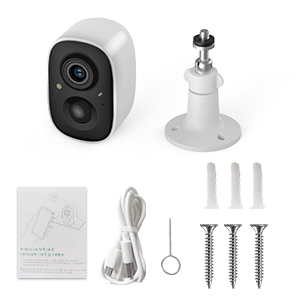
- Geekee CG6 Wireless Security Camera
- Uchwyt montażowy
- Kabel ładujący USB
- Śruby montażowe i kotwy ścienne
- Resetuj pin
- Instrukcja obsługi (ten dokument)
A visual guide detailing the simple setup process: downloading the VicoHome app, fully charging the device, and connecting the camera to your phone.
Produkt ponadview
The Geekee CG6 is a 100% wireless, battery-powered security camera designed for both indoor and outdoor surveillance. It features 2K HD video, full-color night vision, AI motion detection, two-way audio, and an IP65 weatherproof rating.
Główne cechy:
- Wideo 2K HD: Captures clear, high-resolution footage.
- Pełnokolorowa wizja nocna: Zapewnia szczegółowe kolorowe obrazy nawet przy słabym oświetleniu.
- Wykrywanie ruchu AI: Intelligently identifies humans, pets, packages, and vehicles.
- Rozmowa dwukierunkowa: Komunikuj się z gośćmi i odstraszaj intruzów zdalnie.
- Spotlight & Siren Alarm: Active deterrence features.
- Odporność na warunki atmosferyczne IP65: Trwała konstrukcja do stosowania na zewnątrz w różnych warunkach pogodowych.
- Akumulator 5200mAh: Long-lasting power for wireless operation.

Szczegółowy view of the camera's internal battery, emphasizing its wireless operation and long-lasting power.

This image showcases the camera's versatility, suitable for monitoring both outdoor areas like driveways and indoor spaces such as living rooms.
Instrukcje konfiguracji
1. Naładuj kamerę
Before initial use, fully charge the camera using the provided USB cable. Connect the cable to the camera's charging port and a standard 5V/1A USB power adapter (not included). The indicator light will show charging status.
2. Download the VicoHome App
Szukaj 'VicoHome' in the Apple App Store (for iOS devices) or Google Play Store (for Android devices) and download the application. Register for a new account or log in if you already have one.
3. Połącz się z siecią Wi-Fi
- Open the VicoHome app and tap 'Add Device' or the '+' icon.
- Postępuj zgodnie z instrukcjami wyświetlanymi na ekranie, aby wybrać model aparatu.
- Upewnij się, że Twój smartfon jest podłączony do Sieć Wi-Fi 2.4 GHz. This camera does not support 5GHz Wi-Fi.
- The app will generate a QR code. Position your camera approximately 6-8 inches (15-20 cm) in front of your phone screen so the camera can scan the QR code.
- Po nawiązaniu połączenia kamera poinformuje o pomyślnym sparowaniu, a Ty będziesz mógł nadać nazwę swojemu urządzeniu w aplikacji.
4. Montaż kamery
Wybierz odpowiednie miejsce dla swojego aparatu, upewniając się, że ma on czyste pole widzenia. view and good Wi-Fi signal strength. Use the provided mounting bracket, screws, and wall anchors to securely attach the camera to a wall or ceiling. Adjust the camera angle as needed.

The camera is shown functioning reliably in various weather conditions, including rain and snow, confirming its IP65 weatherproof construction.
Instrukcja obsługi
1. Wideo na żywo Viewwchodzenie
Open the VicoHome app and select your camera from the device list to view live 2K HD video. You can switch between day and night vision modes, and zoom in for more detail.

This image illustrates the superior clarity and full-color detail provided by the camera's 2K HD night vision, compared to traditional black and white infrared.
2. Rozmowa dwustronna
Chwila viewna żywotage, tap the microphone icon in the app to activate two-way audio. You can speak through the camera's built-in speaker and hear audio from the camera's microphone.
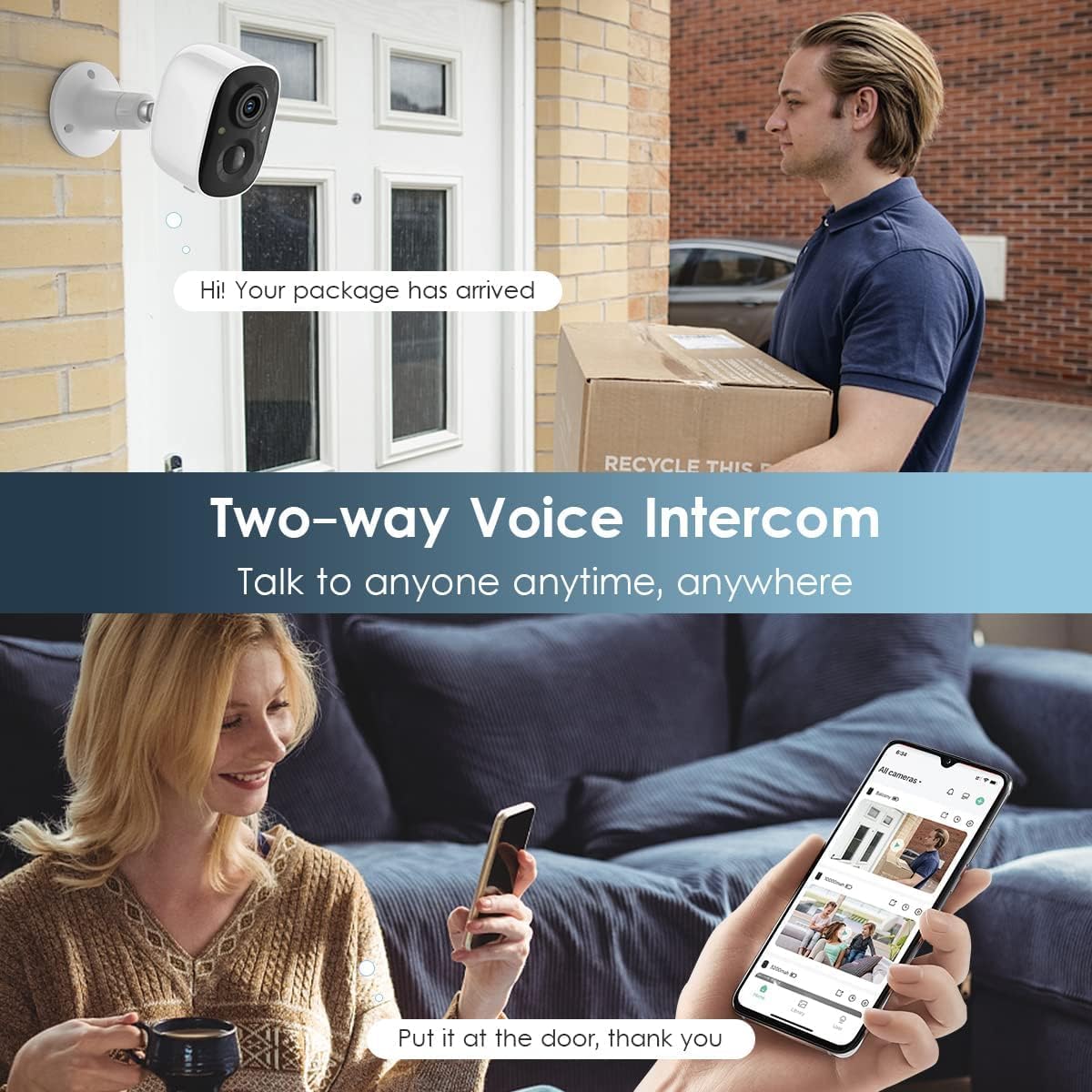
The image depicts the two-way audio function, allowing users to speak with visitors or delivery personnel remotely through the camera.
3. Detekcja ruchu i alerty
The camera features a PIR motion sensor for accurate detection. When motion is detected, you will receive instant notifications on your smartphone via the VicoHome app. You can customize the monitoring range and sensitivity settings within the app.

This graphic demonstrates how the camera detects motion, activates a flashlight, and sounds a siren to deter intruders, providing comprehensive coverage.
4. Spotlight and Siren Alarm
In response to detected motion, the camera can automatically activate its built-in spotlight and siren alarm to deter unwanted visitors. These features can also be manually triggered through the VicoHome app.
5. Opcje przechowywania
The camera supports dual storage modes:
- Pamięć karty SD: Insert a Micro SD card (up to 128GB, not included) into the camera's SD card slot to store recorded video locally.
- Przechowywanie w chmurze: Enjoy free rolling 3-day cloud storage for video history. Advanced cloud memory and AI recognition features are available with a subscription after a 30-day free trial.
6. AI Intelligent Recognition and Activity Zones
Utilize the VicoHome app to define custom activity zones, focusing motion detection on specific areas. The camera's AI can differentiate between humans, pets, packages, and vehicles, reducing false alerts.

This image highlights the advanced AI capabilities of the camera, which can differentiate between various objects and events for more precise alerts and playback.
Konserwacja
1. Ładowanie baterii
Monitor the battery level through the VicoHome app. When the battery is low, remove the camera and recharge it using the USB cable. Battery life varies based on usage and environmental factors.
2. Czyszczenie soczewki
Periodically clean the camera lens with a soft, dry cloth to ensure optimal image clarity. Avoid using abrasive cleaners or solvents.
3. Izolacja przed warunkami atmosferycznymi
While the camera is IP65 weatherproof, ensure all ports and covers are securely closed to maintain its water and dust resistance, especially after charging or accessing the SD card slot.
Rozwiązywanie problemów
- Kamera nie łączy się z siecią Wi-Fi: Ensure your router is broadcasting a 2.4GHz Wi-Fi signal. Check Wi-Fi signal strength at the camera's location. Restart your router and the camera.
- Słaba jakość wideo: Ensure the lens is clean. Check your Wi-Fi connection speed. Adjust video resolution settings in the app if necessary.
- Detekcja ruchu nie działa lub jest zbyt czuła: Adjust PIR sensitivity settings in the VicoHome app. Define custom activity zones to reduce unwanted alerts. Ensure there are no obstructions blocking the sensor.
- Krótka żywotność baterii: Częste zdarzenia wykrywania ruchu na żywo viewing, or use of spotlight/siren will consume more battery. Reduce sensitivity, limit live viewing, or consider a solar panel accessory (if available for your model).
- Problemy z dwukierunkową transmisją dźwięku: Ensure your phone's microphone and speaker are enabled for the VicoHome app. Check camera's microphone and speaker for obstructions.
Specyfikacje
| Funkcja | Specyfikacja |
|---|---|
| Numer modelu | CG6 |
| Rozdzielczość przechwytywania wideo | 2K |
| Efektywna rozdzielczość wideo | 1080 pikseli |
| Viewing kąt | 110 stopni |
| Technologia łączności | Bezprzewodowa (tylko Wi-Fi 2.4 GHz) |
| Źródło zasilania | Zasilany bateryjnie |
| Pojemność baterii | 5200 mAh litowo-polimerowy |
| Zastosowanie wewnątrz/na zewnątrz | Wewnątrz, Na zewnątrz |
| Międzynarodowa Ocena Ochrony | IP65 |
| Cechy specjalne | Motion Sensor, Night Vision (Full Color/Infrared), Two-Way Talk, Spotlight, Siren Alarm |
| Kompatybilne urządzenia | Smartfon (Android, iOS) |
| Wymiary (dł. x szer. x wys.) | 5.9 x 3.9 x 4.72 cala |
| Waga przedmiotu | 11.2 uncji |
Informacje o gwarancji
Geekee products are designed for reliability and performance. For specific warranty terms and conditions, please refer to the warranty card included with your product or visit the official Geekee webZachowaj dowód zakupu na wypadek roszczeń gwarancyjnych.
Wsparcie
For technical assistance, troubleshooting, or any product-related inquiries, please contact Geekee customer support:
- E-mail: wsparcie@getgeekee.com
- Our support team aims to reply within 24 hours.

Details about the available technical support, emphasizing professional assistance and a direct email contact for inquiries.
Ask a question about this manual
Ask about setup, troubleshooting, compatibility, parts, safety, or missing instructions. Manuals+ will review the question and use this page’s manual context to help answer it.