
Wstęp
This manual provides detailed instructions for the proper setup, operation, and maintenance of your TOMLOV DM04 Digital Microscope. Please read this manual thoroughly before using the device to ensure optimal performance and longevity.
The TOMLOV DM04 is a versatile digital microscope featuring a 9-inch LCD screen, 16MP camera, and up to 1300X digital magnification. It is designed for various applications including coin inspection, circuit board repair, and general observation of small objects. It is compatible with Windows and Mac OS for advanced functions.
Zawartość opakowania
Sprawdź, czy w przesyłce znajdują się wszystkie elementy wymienione poniżej:
- 9-calowy mikroskop
- Płyta bazowa
- 10-inch Stand Pole
- Zdalne sterowanie
- USB Cable for Microscope (Micro USB)
- USB Cable for Base (USB-C)
- Bariera świetlna
- Instrukcja obsługi
- Karta SD 32 GB (wstępnie zainstalowana lub dołączona osobno)

Image: All components included in the TOMLOV DM04 Digital Microscope package, including the microscope unit, stand, base, cables, remote, and manual.
Instrukcje konfiguracji
- Złóż stojak: Attach the 10-inch stand pole to the base plate. Ensure it is securely fastened.
- Zamontuj mikroskop: Slide the microscope unit onto the stand pole and tighten the securing screw at the desired height.
- Podłącz zasilanie:
- Connect the Micro USB cable to the microscope unit and a power source (e.g., USB adapter, computer USB port).
- Connect the USB-C cable to the base plate (for auxiliary lights) and a separate power source.
- Włóż kartę SD: If not pre-installed, insert the provided 32GB SD card into the slot on the back of the microscope unit.
- Position Auxiliary Lights: Adjust the flexible auxiliary lights on the base to illuminate your observation area as needed.
- Włączanie: Press and hold the power button on the microscope unit to turn it on.
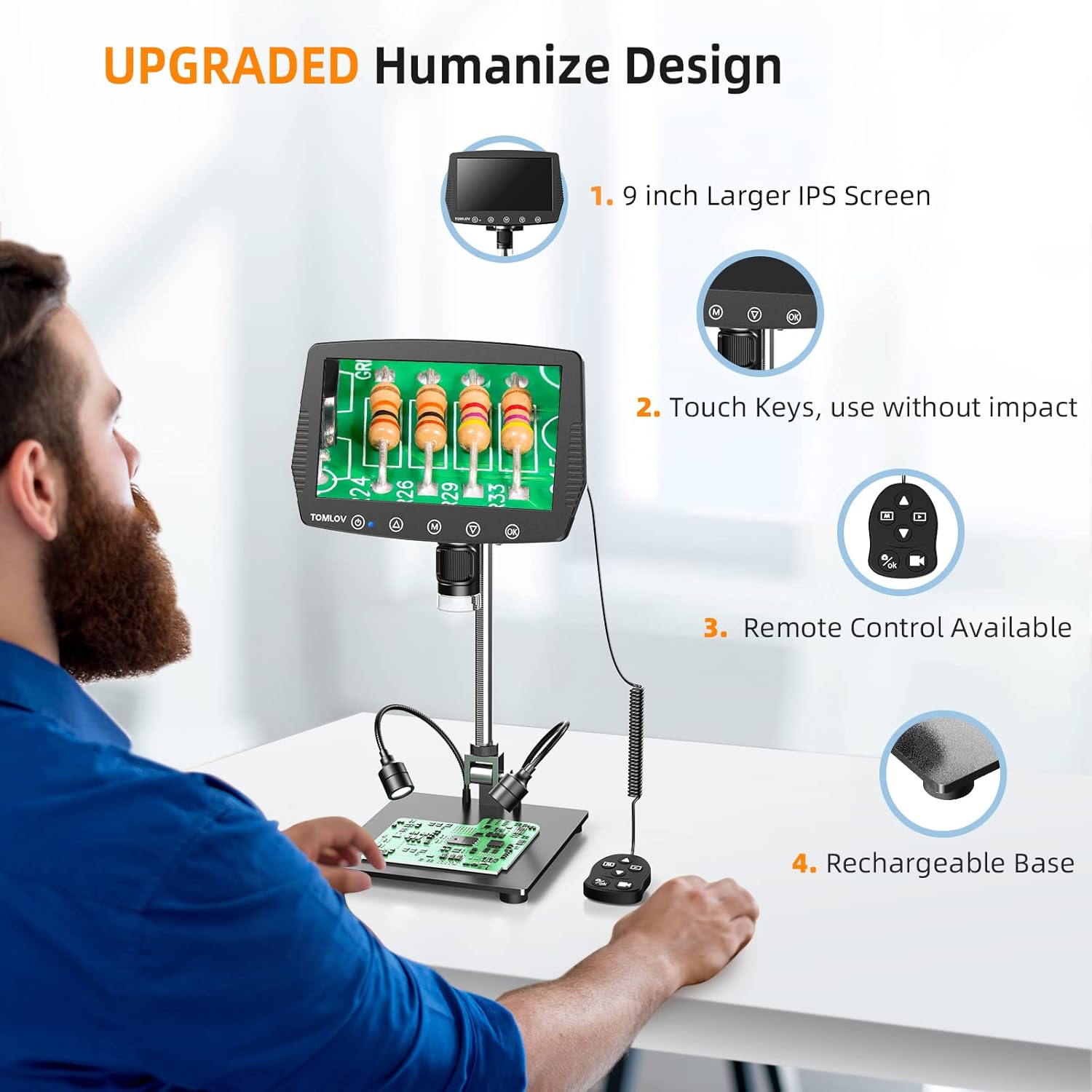
Image: A user setting up the TOMLOV DM04 microscope, demonstrating the assembly of the stand and placement of the microscope unit.
Instrukcja obsługi
Podstawowa obsługa
- Włączanie/wyłączanie: Naciśnij i przytrzymaj przycisk zasilania (⑂) aby włączyć lub wyłączyć urządzenie.
- Regulacja ostrości: Rotate the focus wheel on the microscope unit to achieve a clear image on the 9-inch LCD screen.
- Powiększenie: The microscope offers digital magnification up to 1300X. Adjust the height of the microscope on the stand and use the digital zoom functions (if available via menu) to change magnification.
- Oświetlenie:
- Wbudowane światła LED: The microscope head has built-in LED lights. These can be adjusted via the menu or dedicated buttons.
- Auxiliary Base Lights: The two flexible lights on the base can be adjusted independently using their respective controllers to provide additional illumination.
- Przechwytuj obrazy/filmy:
- Naciśnij OK button on the microscope or remote control to take a picture.
- Naciśnij i przytrzymaj OK przycisk do rozpoczęcia/zatrzymania nagrywania wideo.
- Captured images and videos are saved to the inserted SD card.
Zaawansowane funkcje
- Nawigacja po menu: Użyj M (Menu) button and arrow buttons (▲, ▼) to navigate through settings and options on the LCD screen.
- Zdalne sterowanie: The included remote control allows for stable operation, reducing image shake during capture.
- Rotatable Screen & Bracket Pole: The screen can be rotated up to 80 degrees and the bracket pole up to 180 degrees for flexible viewkąty.
- PC Connection (Windows/Mac OS):
- Connect the microscope to your computer using the appropriate USB cable.
- Select "PC Camera" mode on the microscope's screen.
- Install the dedicated software (refer to the included software CD or manufacturer's website for download) to enable measurement and marking functions, and to view the live feed on your computer.
- Files can be transferred directly from the SD card when connected to a PC.

Image: The TOMLOV DM04 microscope connected to a laptop, showing the "PC Camera" function and measurement capabilities on the computer screen.

Obraz: Zbliżenie view of the TOMLOV DM04 microscope's dual auxiliary lighting system, highlighting the built-in LED ring light and the two flexible base lights.
Video: A demonstration of the TOMLOV DM04 digital microscope's capabilities, showing a detailed view of a fly. This video illustrates the clarity and magnification achievable with the device.
Konserwacja
- Czyszczenie:
- Use a soft, dry cloth to clean the exterior of the microscope and screen.
- Do czyszczenia soczewek należy używać ściereczki i specjalnego płynu do czyszczenia soczewek. Unikać materiałów ściernych.
- Do not use liquid cleaners directly on the screen or lens.
- Składowanie: Przechowuj mikroskop w czystym, suchym miejscu, z dala od bezpośredniego światła słonecznego i ekstremalnych temperatur.
- Pielęgnacja baterii: For optimal battery life, charge the microscope regularly and avoid fully discharging it for extended periods.
- Aktualizacje oprogramowania: Okresowo sprawdzaj oficjalnego TOMLOV website for any available software or firmware updates for your DM04 model.
Rozwiązywanie problemów
| Problem | Możliwa przyczyna | Rozwiązanie |
|---|---|---|
| Brak obrazu na ekranie | Device not powered on; lens cap on; focus not adjusted. | Ensure device is powered on. Remove lens cap. Adjust focus wheel. |
| Obraz jest rozmazany | Improper focus; insufficient lighting; dirty lens. | Adjust focus wheel. Increase illumination using built-in or auxiliary lights. Clean the lens. |
| Nie można zapisać obrazów/filmów | No SD card inserted; SD card full or corrupted; incorrect file ustawienia formatu. | Włóż kompatybilną kartę SD. Usuń niepotrzebne. files or replace SD card. Check menu settings for file format. |
| Połączenie z komputerem nie działa | Incorrect USB cable; "PC Camera" mode not selected; driver issues. | Ensure correct USB cable is used. Select "PC Camera" mode on microscope. Install necessary drivers/software. |
Specyfikacje
- Model: DM04
- Rozmiar ekranu: 9-calowy wyświetlacz LCD
- Rozdzielczość kamery: 16 megapiksela
- Rozdzielczość wideo: 1080P
- Digital Magnification: Do 1300X
- Stand Length: 10 cali
- Zakres ostrości: Up to 8 inches (with enhanced stand)
- Oświetlenie: Built-in 8-LED fill lights, Rechargeable base lights (2)
- Kontrola: Touch buttons, Remote control
- Składowanie: Obsługuje karty Micro SD (32 GB w zestawie)
- Kompatybilność z komputerem: Windows, Mac OS
- Źródło zasilania: Zasilanie bateryjne (5 V)
- Tworzywo: 10'' Metal Stand + 9'' LCD Screen + Large Metal Base
Informacje o gwarancji
TOMLOV products typically come with a standard manufacturer's warranty. Please refer to the warranty card included in your product packaging or visit the official TOMLOV webSzczegółowe warunki gwarancji, w tym okres gwarancji i procedury składania reklamacji, można znaleźć na stronie internetowej.
Obsługa klienta
For technical assistance, troubleshooting not covered in this manual, or warranty inquiries, please contact TOMLOV customer support:
- Webstrona: www.tomlov.com (Uwaga: To jest symbol zastępczy URL, please refer to your product documentation for the official support webstrona.)
- E-mail: Refer to your product documentation.
- Telefon: Refer to your product documentation.
When contacting support, please have your product model (DM04) and purchase information ready.