
CRONY AZ-4009
Crony AZ-4009 Auto Islamic Azan Clock User Manual
Model: AZ-4009 | Brand: CRONY
Wstęp
The Crony AZ-4009 Auto Islamic Azan Clock is designed to display current time, prayer times, and Hijri date. It features automatic calculation of prayer times for various cities, a remote control for easy adjustments, and a clear digital display. This manual provides detailed instructions for setting up and operating your Azan clock.
Główne cechy
- Automatic calculation of Hijri date with adjustment capability.
- Display of Hijri month names and days of the week.
- Two different time modes: 12/24 hours (optional).
- Automatic and manual switching of Daylight Saving Time.
- Display of the five prayer times and the sunrise time (Ishraq).
- Audible and visible alerts at each prayer and Iqama time.
- Iqama setting in two modes: Relative & Fixed.
- Display of Iqama time (remaining time to Iqama) with adjustable settings for each prayer.
- Temperature display (range between 0 ~ 40°C).
- Easy control via remote control and local keypad.
- Power save mode (from Isha'a to Fajr).
- Enable/Disable key tones.
- Connects with PC via USB port to upload prayer times for any country or city (optional feature).

Image: A close-up of the product packaging highlighting the main features of the Crony AZ-4009 Azan Clock, including automatic Hijri date, prayer times, and remote control.
Zawartość opakowania
Proszę zaznaczyć pole dotyczące następujących elementów:
- Crony AZ-4009 Auto Islamic Azan Clock Unit
- Zdalne sterowanie
- Zasilacz
- Instrukcja obsługi (ten dokument)

Image: The Crony AZ-4009 Azan Clock displayed with its included accessories: a remote control and a power adapter.
Organizować coś
1. Podłączenie zasilania
- Connect the power adapter to the DC input port located at the back of the clock.
- Podłącz zasilacz do odpowiedniego gniazdka elektrycznego (220-240 V, 50/60 Hz).
- The clock will power on and display default settings.

Zdjęcie: Tył view of the Crony AZ-4009 Azan Clock, showing the power input port and product label with electrical specifications.
2. Ustawienia początkowe (czas, data, miasto)
Upon first power-on or after a power interruption, you may need to set the current time, date, and your location (city) for accurate prayer time calculations. Use the provided remote control for easier navigation.
- Naciśnij USTAWIĆ button on the remote control to enter the settings menu.
- Użyj GÓRA/DÓŁ arrows to navigate through options like Time, Date, City, Prayer Calculation Method.
- Użyj LEWO/PRAWO arrows or numerical keys to adjust values.
- Naciskać OK to confirm selections and move to the next setting.
- Refer to the remote control diagram for button functions.
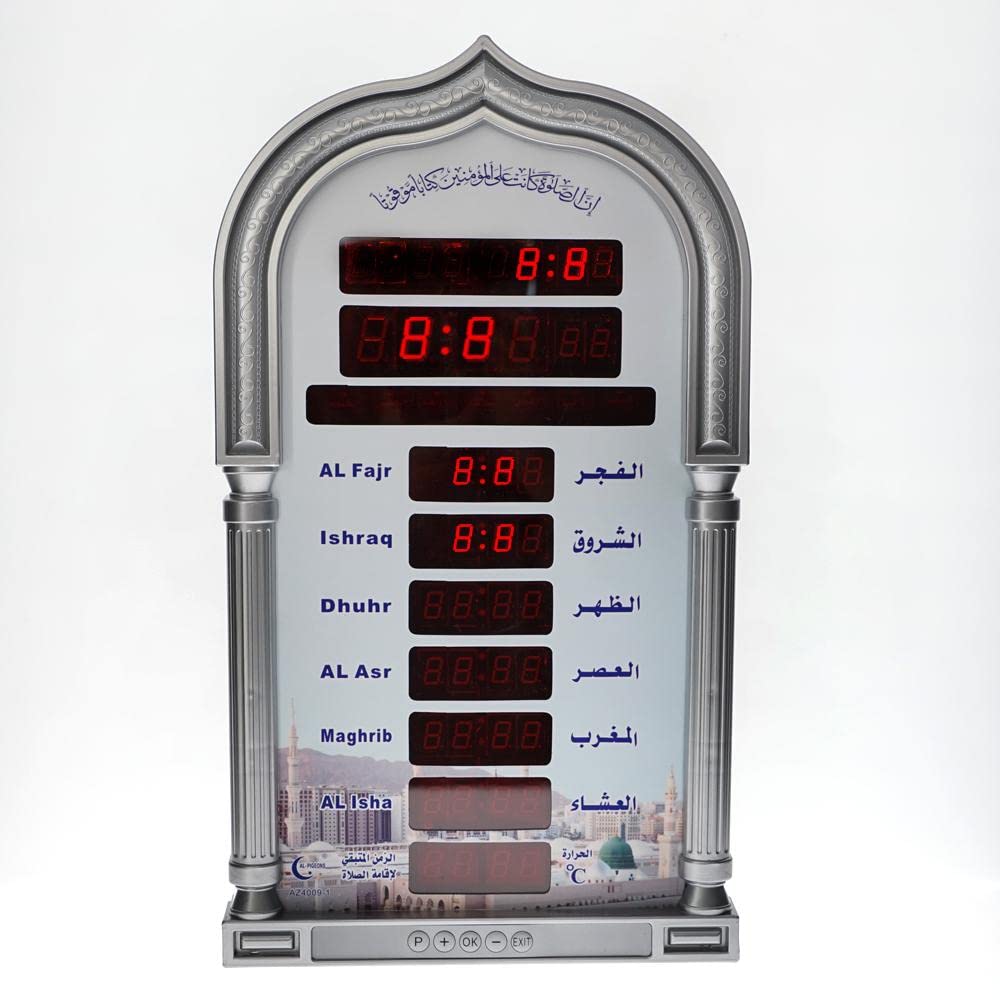
Image: The Crony AZ-4009 Azan Clock with its remote control and power adapter, illustrating the components used for setup and operation.
Instrukcja obsługi
Wyświetlacz czasu modlitwy
The clock automatically displays the current time, date, and the five daily prayer times (Fajr, Dhuhr, Asr, Maghrib, Isha) along with Ishraq (sunrise). The current prayer time will typically be highlighted or indicated.
Adjusting Hijri Date
The clock automatically calculates the Hijri date. If an adjustment is needed due to local moon sighting, use the remote control:
- Naciskać USTAWIĆ na pilocie.
- Navigate to the Hijri Date setting.
- Używać GÓRA/DÓŁ or numerical keys to adjust the date.
- Naciskać OK zapisać.
Czas letni (DST)
The clock supports automatic and manual switching for Daylight Saving Time. Check your local DST schedule and adjust the setting in the menu if necessary.
- Naciskać USTAWIĆ na pilocie.
- Navigate to the DST setting.
- Wybierać Automatyczny or Podręcznik and adjust accordingly.
- Naciskać OK zapisać.
Iqama Settings
You can set the Iqama time (remaining time to Iqama) for each prayer individually. The clock offers Relative and Fixed modes.
- Tryb względny: Iqama time is set relative to the Azan time (e.g., 15 minutes after Azan).
- Tryb stały: Iqama time is set to a specific time.
Aby dostosować:
- Naciskać USTAWIĆ na pilocie.
- Navigate to the Iqama settings.
- Select the prayer you wish to adjust.
- Choose between Relative/Fixed mode and set the desired time/duration.
- Naciskać OK zapisać.
Tryb oszczędzania energii
The clock features a power save mode that can be activated from Isha'a to Fajr to conserve energy. This mode can be enabled or disabled in the settings menu.
- Naciskać USTAWIĆ na pilocie.
- Navigate to the Power Save Mode setting.
- Toggle the setting On or Off.
- Naciskać OK zapisać.
Konserwacja
- Clean the clock's display and casinCzyścić miękką, suchą ściereczką. Nie używać środków czyszczących ani rozpuszczalników o działaniu ściernym.
- Trzymaj zegar z dala od bezpośredniego światła słonecznego, ekstremalnych temperatur i wysokiej wilgotności.
- Ensure the power adapter cable is not damaged or kinked.
- If using batteries for the remote control, replace them when the remote's range decreases or it becomes unresponsive.
Rozwiązywanie problemów
| Problem | Możliwa przyczyna | Rozwiązanie |
|---|---|---|
| Zegar się nie włącza. | Brak zasilania, uszkodzony adapter. | Check power connection. Ensure adapter is plugged in correctly. Try a different outlet. |
| Incorrect prayer times. | Incorrect city/location settings; incorrect calculation method; incorrect date/time. | Verify city, date, and time settings. Adjust the prayer calculation method in the settings menu to match local requirements. |
| Pilot nie działa. | Wyczerpane baterie; przeszkoda; poza zasięgiem. | Wymień baterie w pilocie. Upewnij się, że między pilotem a zegarem nie ma żadnych przeszkód. Używaj zegara w zasięgu. |
| Wyświetlacz jest przyciemniony lub migocze. | Problem z zasilaniem; usterka wewnętrzna. | Check power adapter. If problem persists, contact customer support. |
Specyfikacje
- Marka: CRONY
- Model: AZ-4009
- Kolor: Szary
- Tworzywo: PC
- Typ wyświetlacza: Cyfrowy
- Cechy szczególne: Alarm, Daylight Saving, Auto Azan
- Źródło zasilania: Corded Electric (220-240V, 50/60Hz)
- Waga przedmiotu: 1.13 kilograma
- Wymiary opakowania: Wymiary 43.9 x 25.5 x 6 cm
- Zastosowanie wewnątrz / na zewnątrz: Wnętrz
Gwarancja i wsparcie
The Crony AZ-4009 Auto Islamic Azan Clock comes with a 1-letnia gwarancja od daty zakupu. Niniejsza gwarancja obejmuje wady produkcyjne powstałe w wyniku normalnego użytkowania.
For technical support, warranty claims, or further assistance, please contact your retailer or visit the official CRONY webZachowaj paragon jako dowód zakupu na potrzeby serwisu gwarancyjnego.

Image: The retail packaging of the Crony AZ-4009 Azan Clock, indicating a 1-year warranty and other product details.
Ask a question about this manual
Ask about setup, troubleshooting, compatibility, parts, safety, or missing instructions. Manuals+ will review the question and use this page’s manual context to help answer it.