
1. Koniecview
The Hoco ES61 Manner Sports Wireless Bluetooth Headset is designed for active lifestyles, offering a blend of comfort, long battery life, and versatile connectivity. This manual provides detailed instructions to help you get the most out of your headset.
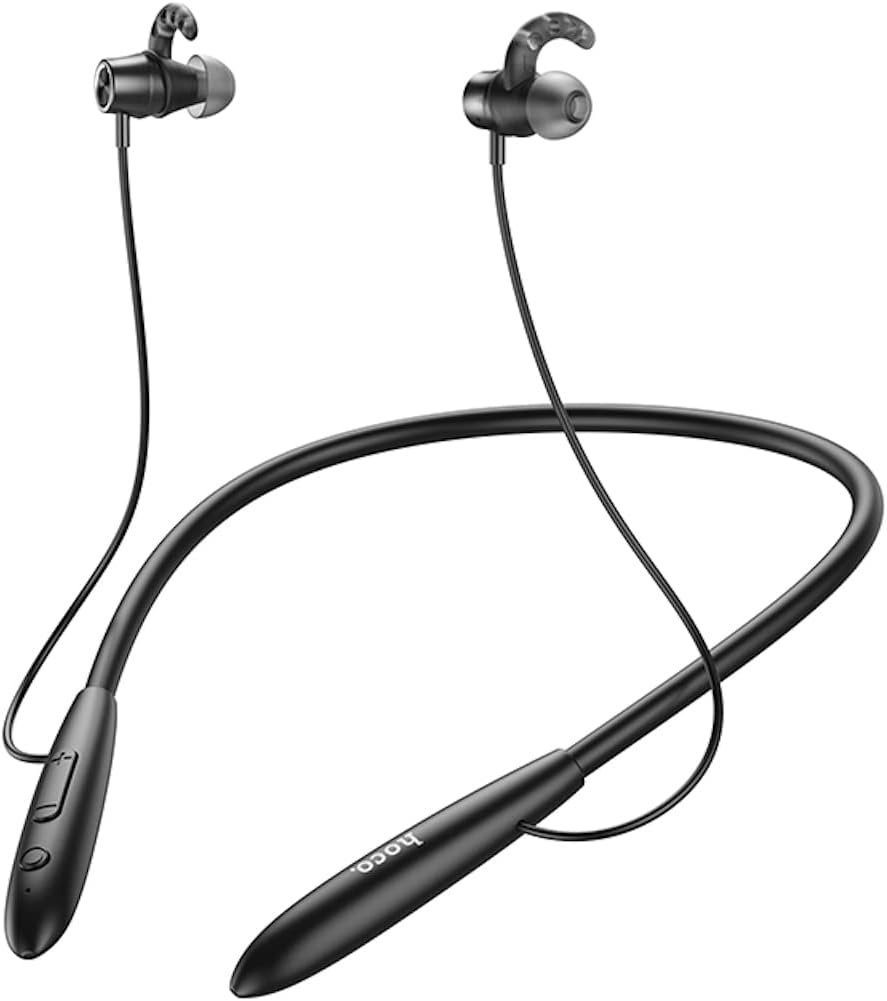
Obraz: Przód view of the Hoco ES61 headset, showcasing its neckband design and in-ear earbuds.
2. Funkcje produktu
- Łączność Bluetooth 5.1: Equipped with JL AC7006 chip for stable and efficient wireless connection.
- Dłuższa żywotność baterii: Features a 200mAh battery, providing up to 20 hours of music/talk time and an impressive 330 hours of standby time.
- Szybkie ładowanie: Pełne naładowanie w ciągu około 2 godzin.
- Lekka i wygodna konstrukcja: The earphone cord measures 85cm in length, and the headset weighs only 22g, ensuring comfort during extended wear.
- Wszechstronne opcje odtwarzania: Supports Bluetooth audio streaming and TF card playback (up to 32GB) for direct music listening.
- Multi-language Voice Prompts: Offers voice prompts in both Chinese and English for user convenience.
- Szeroka kompatybilność: Compatible with a broad range of devices including iPhone, Samsung, OnePlus, Huawei, Xiaomi, and Oppo smartphones.

Obraz: Zbliżenie view of the Hoco ES61 headset, highlighting the integrated TF card slot for direct music playback.
Wideo: Oficjalny film prezentujący produktasing the Hoco ES61 Bluetooth Headset's features, including its 20-hour battery life, voice prompts, and compatibility with iOS and Android devices.
3. Przewodnik konfiguracji
3.1 Ładowanie zestawu słuchawkowego
Before first use, fully charge the headset. Use a standard USB charger (not included) to connect the charging port on the headset to a power source.
- Podczas ładowania dioda LED zwykle świeci się na czerwono.
- Once fully charged (approximately 2 hours), the LED indicator will turn blue or off.
3.2 parowanie Bluetooth
To connect your Hoco ES61 headset to a Bluetooth-enabled device:
- Upewnij się, że zestaw słuchawkowy jest wyłączony.
- Press and hold the multi-function button (usually the power button) for approximately 3-5 seconds until the LED indicator flashes red and blue alternately. This indicates pairing mode.
- Włącz Bluetooth na swoim urządzeniu (smartfonie, tablecie itp.) i wyszukaj dostępne urządzenia.
- Select "Hoco ES61" from the list of found devices.
- Once connected, the LED indicator on the headset will typically flash blue slowly or turn off, and you will hear a voice prompt confirming the connection.
3.3 Odtwarzanie z karty TF
The Hoco ES61 supports direct music playback from a TF (MicroSD) card.
- Carefully insert a TF card (up to 32GB) with your music files into the designated TF card slot on the headset.
- The headset will automatically switch to TF card playback mode if a card is detected and contains playable audio files.
- Use the headset controls to manage playback (play, pause, skip tracks).
4. Instrukcja obsługi
4.1 Podstawowe sterowanie
| Przycisk/Akcja | Funkcjonować |
|---|---|
| Przycisk wielofunkcyjny (MFB) | Power On/Off, Play/Pause, Answer/End Call |
| Zwiększanie głośności (+) | Increase Volume, Next Track (long press) |
| Ściszanie (-) | Decrease Volume, Previous Track (long press) |
4.2 Odtwarzanie muzyki
- Odtwórz/Pauza: Krótko naciśnij MFB.
- Następny utwór: Naciśnij i przytrzymaj przycisk zwiększania głośności (+).
- Poprzedni utwór: Naciśnij i przytrzymaj przycisk zmniejszania głośności (-).
- Regulacja głośności: Naciśnij krótko przycisk zwiększania głośności (+) lub zmniejszania głośności (-).
4.3 Zarządzanie połączeniami
- Odbieranie/kończenie połączeń: Short press the MFB during an incoming call.
- Odrzuć połączenie: Naciśnij i przytrzymaj przycisk MFB podczas połączenia przychodzącego.
- Ponowne wybieranie ostatniego numeru: Double-click the MFB when not on a call.

Image: The Hoco ES61 headset resting on a smartphone, illustrating its use with mobile devices for music and calls.
5. Konserwacja i pielęgnacja
- Przechowuj zestaw słuchawkowy w suchym miejscu. Nie wystawiaj go na działanie ekstremalnych temperatur ani wilgoci.
- Clean the earbuds and charging port regularly with a soft, dry cloth to prevent dust and debris buildup.
- Unikaj stosowania silnych środków chemicznych i ściernych środków czyszczących.
- Gdy nie używasz zestawu słuchawkowego, przechowuj go w chłodnym i suchym miejscu.
- Nie należy podejmować prób demontażu ani modyfikacji zestawu słuchawkowego, gdyż spowoduje to utratę gwarancji i może spowodować uszkodzenia.

Image: The Hoco ES61 headset shown with different sizes of silicone ear tips, emphasizing the importance of proper fit for comfort and sound quality.
6. Rozwiązywanie Problemów
6.1 Headset Not Turning On
- Ensure the headset is fully charged. Connect it to a charger and check the LED indicator.
- Press and hold the multi-function button for a few seconds to power on.
6.2 Nie można sparować z urządzeniem
- Make sure the headset is in pairing mode (LED flashing red and blue alternately).
- Upewnij się, że Bluetooth jest włączony w Twoim urządzeniu i że znajduje się ono w zasięgu (zazwyczaj 10 metrów).
- Forget/delete "Hoco ES61" from your device's Bluetooth list and try pairing again.
- Uruchom ponownie zestaw słuchawkowy i urządzenie.
6.3 Brak dźwięku lub niski poziom głośności
- Zwiększ głośność zestawu słuchawkowego i podłączonego urządzenia.
- Sprawdź, czy zestaw słuchawkowy jest prawidłowo podłączony do urządzenia.
- Jeśli używasz karty TF, upewnij się, że karta jest prawidłowo włożona i zawiera odtwarzalny dźwięk files.
- Check for any obstructions in the earbud nozzles and clean if necessary.
6.4 Krótki czas pracy baterii
- Przed użyciem upewnij się, że zestaw słuchawkowy jest w pełni naładowany.
- Czas działania baterii może się różnić w zależności od poziomu głośności i sposobu użytkowania.
- Unikaj wystawiania baterii na działanie ekstremalnych temperatur.
7. Specyfikacje
| Funkcja | Szczegół |
|---|---|
| Wersja Bluetooth | 5.1 |
| Układ Bluetooth | JL AC7006 |
| Pojemność baterii | 200mAh |
| Czas ładowania | Około 2 godzin |
| Czas muzyki/rozmowy | Do 20 godzin |
| Czas czuwania | Do 330 godzin |
| Earphone Cord Length | 85cm |
| Waga | 22g |
| Obsługa kart TF | Tak, do 32 GB |
| Podpowiedzi głosowe | chiński i angielski |
| Zgodność | iPhone, Samsung, OnePlus, Huawei, Xiaomi, Oppo |
8. Gwarancja i wsparcie
For warranty information and customer support, please refer to the product packaging or contact your retailer. Keep your purchase receipt as proof of purchase for any warranty claims.