
1. Wprowadzenie
Welcome to the Radiant Miami Smartwatch user manual. This guide provides essential information for setting up, operating, maintaining, and troubleshooting your new smartwatch. The Radiant Miami Smartwatch (Model RAS21005) is designed for both men and women, offering a blend of modern design and advanced health monitoring features.
Key features include heart rate monitoring, blood pressure measurement, sleep tracking, and various activity tracking functions. It also supports notifications for calls and messages from compatible smartphones.

Image 1.1: The Radiant Miami Smartwatch worn on a wrist, showcasinze względu na jego elegancki wygląd.
2. Konfiguracja
2.1 Ładowanie smartwatcha
Before initial use, fully charge your Radiant Miami Smartwatch. Connect the charging cable to the charging port on the back of the watch and plug the USB end into a standard USB power adapter (not included) or a computer's USB port. A full charge typically takes approximately 2 hours and provides up to 10 days of battery life, depending on usage.
2.2 Instalacja i parowanie aplikacji
- Pobierz aplikację towarzyszącą: Szukaj the official Radiant companion app on your smartphone's app store (compatible with iOS 8.4+ and Android 4.4+).
- Włącz Bluetooth: Upewnij się, że Bluetooth jest włączony w Twoim smartfonie.
- Otwórz aplikację: Launch the Radiant app and follow the on-screen instructions to create an account or log in.
- Paruj urządzenie: Within the app, navigate to the 'Device' or 'Add Device' section. Select your Radiant Miami Smartwatch from the list of available devices. Confirm the pairing request on both your phone and the smartwatch if prompted.
Once paired, the smartwatch will synchronize time and data with your smartphone.
3. Obsługa smartwatcha
3.1 Podstawowa nawigacja
- Przesuń w górę/w dół: Przewijaj menu i powiadomienia.
- Przesuń w lewo/w prawo: Uzyskaj szybki dostęp do funkcji lub różnych ekranów danych.
- Uzyskiwać: Wybierz element lub potwierdź czynność.
- Przycisk boczny: Naciśnij, aby powrócić do ekranu głównego lub wybudzić urządzenie.
3.2 Monitorowanie stanu zdrowia
The Radiant Miami Smartwatch continuously monitors various health metrics:
- Tętno: Access the heart rate monitor from the main menu or a quick-access screen. The watch will display your current heart rate in beats per minute (BPM).
- Ciśnienie krwi: Initiate a blood pressure measurement from the dedicated function. Ensure the watch is snug on your wrist for accurate readings.
- Tlen we krwi (SpO2): Measure your blood oxygen saturation level.
- Monitor snu: The watch automatically tracks your sleep patterns, including awake, light, and deep sleep stagt.j. View szczegółowe dane dotyczące snu w aplikacji towarzyszącej.
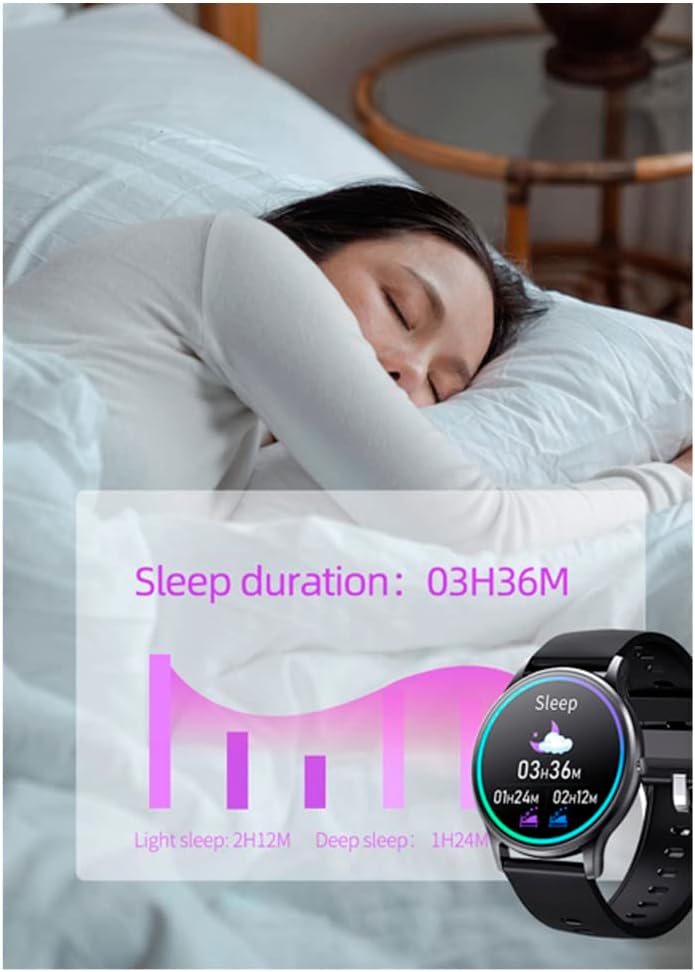
Image 3.1: The smartwatch screen showing sleep duration and different sleep stages (light, deep).
3.3 Śledzenie aktywności
Śledź swoje codzienne aktywności i treningi:
- Kroki, dystans, kalorie: The watch automatically records your steps, estimated distance, and calories burned throughout the day.
- Tryby multisportowe: Select specific sport modes (e.g., running, walking, cycling) to get more accurate data for your workouts.

Obraz 3.2: Examples of activity tracking screens on the smartwatch, showing metrics for different exercises.
3.4 Powiadomienia i połączenia
Receive notifications directly on your smartwatch:
- Alerty wiadomości: Get alerts for messages from apps like WhatsApp and Facebook. You can view the message text on your watch.
- Połączenia przychodzące: See who is calling and reject calls directly from your smartwatch.
- Vibration Reminders: The watch provides vibration alerts for sedentary reminders, alarm clocks, low battery, and water intake reminders.

Image 3.3: The smartwatch screen showing an incoming message notification from Facebook.
NIGDY nie można dostosowywać
Spersonalizuj swoje doświadczenie ze smartwatchem:
- Tarcze zegarka: Change the watch face through the companion app's 'Dial Center' to match your style.

Image 3.4: The companion app's 'Dial Center' displaying multiple watch face options for customization.
4. Konserwacja
4.1 Czyszczenie
Regularnie czyść smartwatch i pasek, aby zapobiec podrażnieniom skóry i zachować funkcjonalność. Używaj miękkiej, miękkiej szczoteczki.amp Ściereczka do wycierania ekranu i paska. Unikaj stosowania silnych środków chemicznych i materiałów ściernych.
4.2 Pielęgnacja baterii
Aby przedłużyć żywotność baterii:
- Unikaj ekstremalnych temperatur.
- Naładuj zegarek zanim bateria całkowicie się rozładuje.
- Do not leave the watch charging for extended periods after it is full.
5. Rozwiązywanie Problemów
5.1 Smartwatch Not Turning On
Upewnij się, że zegarek jest w pełni naładowany. Jeśli nadal się nie włącza, spróbuj podłączyć go do ładowarki na co najmniej 30 minut.
5.2 Nie można sparować ze smartfonem
- Sprawdź, czy Bluetooth jest włączony w Twoim smartfonie.
- Upewnij się, że smartwatch znajduje się w zasięgu Bluetooth Twojego telefonu.
- Uruchom ponownie smartfon i smartwatch.
- Spróbuj rozparować i ponownie sparować urządzenie za pomocą aplikacji.
5.3 Nieprawidłowe odczyty stanu zdrowia
For accurate readings, ensure the smartwatch is worn snugly on your wrist, about one finger's width above the wrist bone. Avoid excessive movement during measurements. Note that the smartwatch is not a medical device and readings are for reference only.
5.4 Brak powiadomień
- Verify that notifications are enabled in the companion app settings.
- Check your smartphone's notification settings to ensure the app has permission to send notifications.
- Upewnij się, że smartwatch jest połączony przez Bluetooth.
6. Specyfikacje
| Funkcja | Specyfikacja |
|---|---|
| Numer modelu | RAS21005 |
| Typ baterii | 1 Lithium metal battery (required) |
| Żywotność baterii | Do 10 dni (czuwanie) |
| Czas ładowania | Około 2 godzin |
| Zgodność | iOS 8.4 + / Android 4.4 + |
| Producent | PROMIENNY |
| Wymiary produktu | Wymiary 16.3 x 14.5 x 3.5 cm |
| Waga przedmiotu | 100 gramów |
7. Gwarancja i wsparcie
Radiant is a recognized and respected Spanish brand in the watch industry, known for producing high-quality watches for decades. For warranty information or technical support, please refer to the documentation included with your purchase or visit the official Radiant webZachowaj dowód zakupu na wypadek roszczeń gwarancyjnych.
For further assistance, please contact Radiant customer service through their official channels.