
Clear Power DCOT-0004-DC
Clear Power Outdoor Digital Programmable Timer
Model: DCOT-0004-DC
Brand: Clear Power
Wstęp
Thank you for choosing the Clear Power Outdoor Digital Programmable Timer. This manual provides detailed instructions for the safe and efficient operation of your new timer. Designed for outdoor use, this digital timer offers convenient control over your outdoor lighting and electrical devices, featuring two grounded outlets and a user-friendly interface.
Ważne informacje dotyczące bezpieczeństwa
OSTRZEŻENIE: Aby zminimalizować ryzyko porażenia prądem, pożaru lub obrażeń ciała, należy zawsze przestrzegać podstawowych zasad bezpieczeństwa podczas korzystania z produktów elektrycznych.
- Tylko do stosowania na zewnątrz.
- Nie zanurzać w wodzie.
- Always ensure the timer is securely mounted vertically and not laid on the ground.
- Works with Incandescent, Compact Fluorescent, and LED light sources.
- Ensure the connected devices do not exceed the timer's maximum electrical rating.
- Trzymaj dzieci z dala od timera i podłączonych urządzeń.
For more detailed safety guidelines, please refer to the official Informacje dotyczące bezpieczeństwa w formacie PDF.
Główne cechy
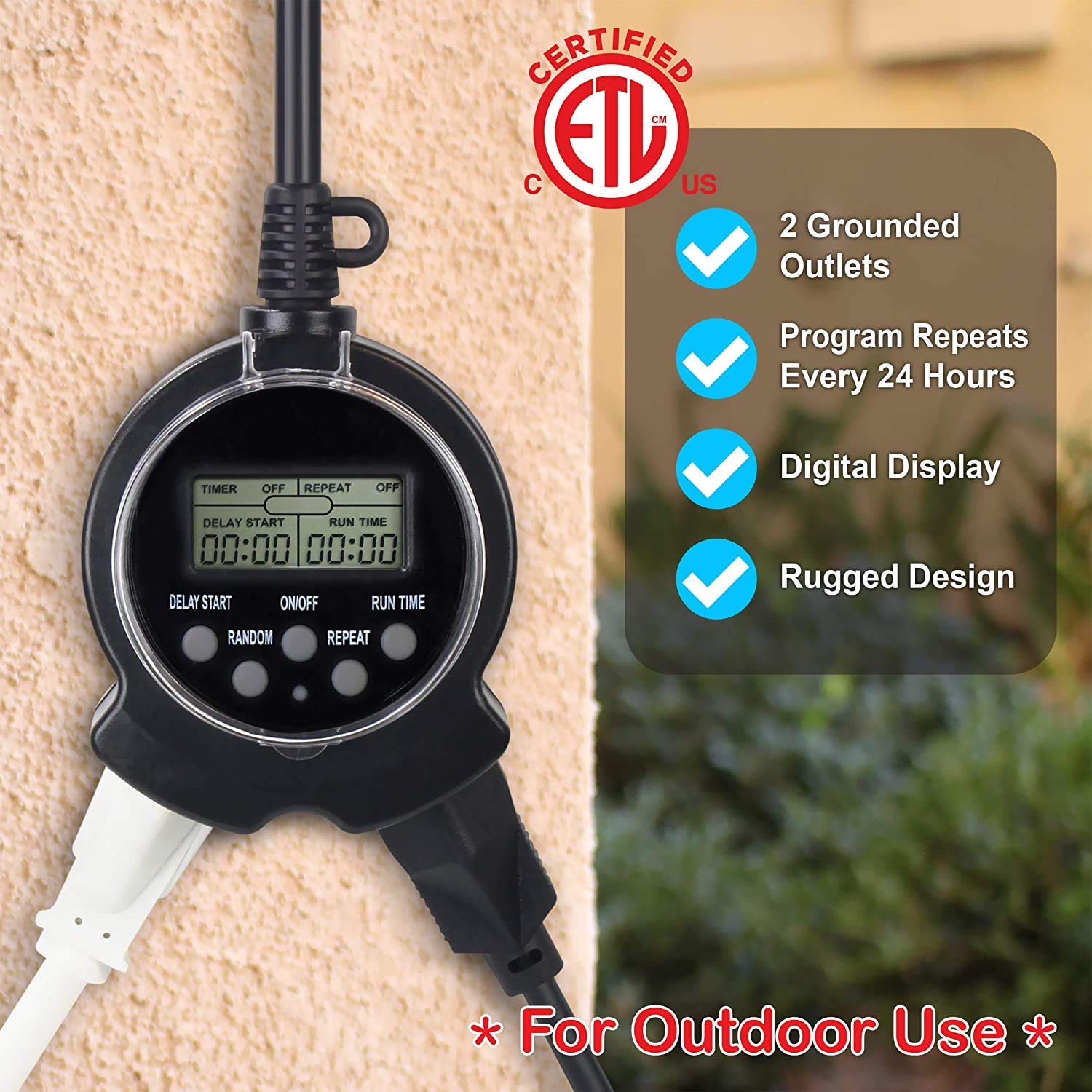
- 2 gniazdka uziemiające: Allows control of two devices simultaneously.
- 24-Hour Repeating Cycle: Programs turn on/off at the same time daily.
- Simple Digital Programming: Easy to set with only three buttons.
- Random Vacation Mode: Turns devices on/off +/- 30 minutes from programmed times for a "lived-in" appearance.
- Przełącznik ręcznego sterowania: Enables bypassing the timer to manually control connected items.
- Konstrukcja odporna na warunki atmosferyczne: Safe for year-round outdoor use in various weather conditions.
- Flat Grounded Plug: Patented reversed ground pin enables use with right angle & lo-profile buble.
Zawartość opakowania
- 1 x Clear Power Outdoor Digital Programmable Timer (Model: DCOT-0004-DC)
- 1 x Instrukcja obsługi (ten dokument)
Instrukcje konfiguracji
- Opłata początkowa: To fully charge the internal battery and ensure proper operation, plug the timer into a standard 120V AC outlet for at least 30 minutes before first use or after prolonged storage.
- Resetowanie timera: Before programming, it is recommended to reset the timer. Use a small pointed object (like a pen tip) to press the recessed "RESET" button located on the timer's face. The display will clear.
- Montowanie: Install the timer vertically close to an outdoor-rated grounded receptacle. Use the integrated eye-hole on the cord to secure the timer to a wall or suitable surface with a screw. Do not lay the timer on the ground.


Instrukcja obsługi
Programming the Timer (Easy 3-Step Process)
The Clear Power Digital Timer is designed for simple programming with only three main buttons: DELAY START, ON/OFF, and RUN TIME.
- Step 1: Turn Timer ON. Naciśnij WŁ./WYŁ. button to activate the timer. The display will show "TIMER ON".
- Step 2: Set Delay Start Time. Naciśnij i przytrzymaj OPÓŹNIONY START button to quickly advance the time in hours. Lightly touch and release the button to move the time in 1-minute intervals. This sets how many hours and minutes from the current moment the timer will turn ON. For example, if the current time is 1:00 PM and you want the timer to turn ON at 6:00 PM, set DELAY START for 5:00 (5 hours).
- Step 3: Set Run Time. Naciśnij i przytrzymaj CZAS PRACY button to quickly advance the time in hours. Lightly touch and release the button to move the time in 1-minute intervals. This sets how long the timer will remain ON after it activates. For example, if the timer turns ON at 6:00 PM and you want it to turn OFF at 10:30 PM, set RUN TIME for 4:30 (4 hours and 30 minutes).

Funkcja powtarzania
To have the timer turn ON/OFF at the same programmed times every day, press the POWTARZAĆ button. The display will show "REPEAT ON". This is ideal for daily routines like garden lights or holiday decorations.
Random Mode (Vacation Mode)
For a more "lived-in" appearance when you are away, use the LOSOWY tryb. wciśnij LOSOWY button. The display will show "RANDOM ON". In this mode, the timer will randomly turn ON/OFF up to +/- 30 minutes from your programmed DELAY START and RUN TIME settings. For example, if DELAY START is 6:00 PM, it might turn on as early as 5:30 PM or as late as 6:30 PM. Similarly, the RUN TIME will randomly vary by up to 30 minutes.
Ręczne nadpisanie
To bypass the timer's program and manually control the attached device, press the WŁ./WYŁ. button again. The timer will hold its program until you change it. To return control of the device to the timer, press the WŁ./WYŁ. jeszcze raz.
Video Guide: Programming and Features
Konserwacja
- Czyszczenie: Przed czyszczeniem odłącz timer od gniazdka elektrycznego. Przetrzyj zewnętrzną część miękką, miękką szmatką.amp płótno. Nie używaj ostrych środków chemicznych ani ściernych środków czyszczących.
- Składowanie: Jeśli timer nie będzie używany przez dłuższy czas, należy przechowywać go w chłodnym, suchym miejscu, z dala od bezpośredniego światła słonecznego i ekstremalnych temperatur.
- Kontrola: Okresowo sprawdzaj timer i jego przewód pod kątem uszkodzeń, takich jak przecięcia, przetarcia lub odsłonięte przewody. W przypadku stwierdzenia uszkodzenia należy natychmiast przerwać użytkowanie i wymienić urządzenie.
Rozwiązywanie problemów
| Problem | Możliwa przyczyna | Rozwiązanie |
|---|---|---|
| Wyświetlacz timera jest pusty lub przyciemniony. | Wewnętrzna bateria jest słaba lub wyczerpana. | Podłącz timer do gniazdka elektrycznego na co najmniej 30 minut, aby naładować baterię. |
| Timer nie włącza się/wyłącza o zaprogramowanych porach. | Incorrect programming; Timer is in manual override mode; Power outage. | Review programming steps carefully. Ensure the timer is not in manual override (press ON/OFF button). If there was a power outage, the internal battery should maintain the program, but verify settings. |
| Podłączone urządzenie nie włącza się. | Device is not properly plugged in; Device is faulty; Timer is not receiving power. | Ensure the device is securely plugged into the timer. Test the device in another outlet. Check the power outlet the timer is plugged into. |
| Random mode not working as expected. | Misunderstanding of random mode function. | Random mode varies ON/OFF times by +/- 30 minutes from programmed settings, it does not completely randomize. This is normal operation. |
Specyfikacje
- Model: DCOT-0004-DC
- Marka: Wyczyść moc
- Wymiary produktu: 1" gł. x 2" szer. x 3" wys.
- Liczba wyjść: 2 Uziemiony
- Rozmiar ekranu: 6 Inches (display area)
- Kolor: Czarny
- Producent: Wyczyść moc
- Pierwsza dostępna: 17 czerwca 2020 r.
Gwarancja i wsparcie
Clear Power products are designed for reliability and performance. For specific warranty information and customer support, please refer to the documentation included with your purchase or visit the official Clear Power website. You can also contact the seller, DATACONCT SOLUTIONS INC, for assistance.
For additional resources, you may find the Instrukcja obsługi (PDF) pomocny.