
Fenge B0B2JGPRNH
Fenge 48x24 Inch Electric Height Adjustable Standing Desk with LED Strips Instruction Manual
Model: B0B2JGPRNH
1. Wprowadzenie
Thank you for choosing the Fenge 48x24 Inch Electric Height Adjustable Standing Desk. This manual provides detailed instructions for assembly, operation, maintenance, and troubleshooting to ensure optimal performance and longevity of your desk. Please read this manual thoroughly before use and retain it for future reference.
2. Informacje dotyczące bezpieczeństwa
- Przed montażem upewnij się, że wszystkie elementy są kompletne i nieuszkodzone. Nie używaj, jeśli brakuje którejkolwiek części lub jest ona uszkodzona.
- Aby zapobiec obrażeniom, podczas pracy biurka należy trzymać dzieci i zwierzęta z dala od niego.
- Nie przeciążaj biurka. Zapoznaj się ze specyfikacją, aby poznać maksymalny udźwig.
- Upewnij się, że przewód zasilający nie jest przyciśnięty ani uszkodzony. Używaj wyłącznie dołączonego zasilacza.
- Unikaj stawiania płynów bezpośrednio na panelu sterowania lub w pobliżu podzespołów elektrycznych.
- Do not attempt to disassemble or repair the motor or control system yourself. Contact customer service for assistance.
- Aby zapewnić stabilność biurka, należy je ustawić na równej powierzchni.
3. Zawartość opakowania
Sprawdź, czy w pakiecie znajdują się wszystkie poniższe elementy:
- Desktop sections (pre-drilled)
- Nogi biurka i elementy ramy
- Silnik elektryczny i skrzynka sterownicza
- Control panel with USB charging port
- Zasilacz i kabel
- Sprzęt montażowy (śruby, podkładki, klucz imbusowy)
- Desk hook
- Instrukcja obsługi
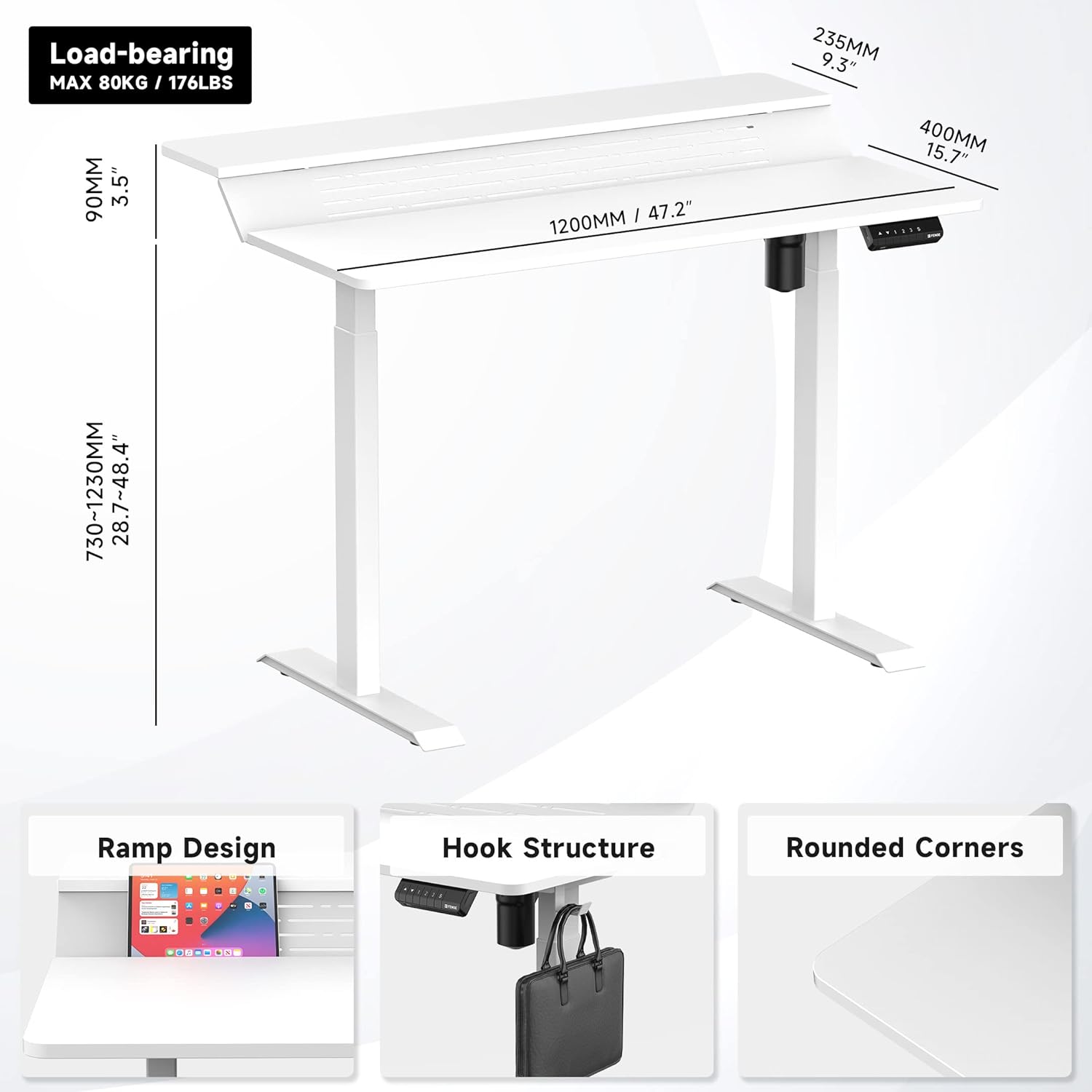
Rysunek 1: Koniecview of desk components and key dimensions.
4. Instalacja i montaż
The Fenge Standing Desk is designed for simplified assembly. All parts are letter-coded, and the tabletop is pre-drilled. An Allen wrench is included; no additional power tools are required.
4.1 Etapy montażu
- Przymocuj stopy do nóg: Secure the feet to the bottom of each desk leg using the provided screws.
- Połącz poprzeczkę: Attach the crossbar between the two legs. Ensure the hexagonal rod is fully inserted into the motor and the limit ring is no longer visible.
- Montaż wsporników bocznych: Fasten the side brackets to the top of the legs.
- Mount Desktop Sections: Carefully place the pre-drilled desktop sections onto the assembled frame and secure them with screws.
- Install Control Panel and Power: Attach the control panel to the underside of the desk. Connect the power adapter to the control box and then to a power outlet.
- Attach Desk Hook: Install the desk hook on either side of the desk as desired.
Video 1: Detailed installation guide for the Fenge Standing Desk. This video demonstrates each step of the assembly process, from attaching the legs to connecting the electrical components and securing the desktop.
Film 2: Szybkie przejścieview of the Fenge Standing Desk assembly process. This video highlights the ease of putting the desk together, showcasing the main steps involved in a concise format.
5. Instrukcja obsługi
Your Fenge Standing Desk features an electric height adjustment system with memory presets and a convenient USB charging port.
5.1 Regulacja wysokości
- Użyj W górę (▲) I W dół (▼) przyciski strzałek na panelu sterowania umożliwiają ręczną regulację wysokości biurka.
- The desk height can be adjusted from 28.7 inches to 48.4 inches.
5.2 Ustawienia pamięci
Panel sterowania umożliwia zapisanie do trzech preferowanych ustawień wysokości:
- Dostosuj wysokość biurka do swoich potrzeb, korzystając ze strzałek w górę/w dół.
- Naciśnij "S" button (Save).
- Natychmiast naciśnij jeden z przycisków numerycznych ("1", "2", Lub "3") aby zapisać aktualną wysokość w tym ustawieniu wstępnym.
- Aby przywołać zapisaną wysokość, wystarczy nacisnąć odpowiedni przycisk numeryczny. Biurko automatycznie ustawi się w zapisanej pozycji.
5.3 porty USB do ładowania
The control panel includes a USB charging port to conveniently power your devices.

Figure 2: Close-up of the multifunction control panel, showing height adjustment buttons, memory presets (1, 2, 3, S), and the integrated USB charging port.

Figure 3: A closer look at the USB charging port located on the control panel, providing convenient power for your devices.
6. Funkcje
The Fenge Standing Desk is designed with several features to enhance your workspace:
- 2-Tier Design with 135° Ramp: The unique two-tier desktop with a 135° ramp design provides an ergonomic setup, allowing for optimal monitor placement and increased workspace.
- Paski LED: Integrated LED strips offer customizable lighting to suit your mood or task.
- Zarządzanie kablami: Strategically placed holes and a metal cable management tray (optional, may require separate purchase) help keep your cables organized and out of sight.
- Haczyk na biurko: A convenient hook is included for hanging headphones, bags, or other accessories.
- Cicha praca: The electric motor operates at less than 49 dB, ensuring a quiet adjustment experience.
- Funkcja zapobiegająca kolizjom: The desk is equipped with a rebound-on-resistance safety feature, stopping movement if an obstruction is detected.

Figure 4: The 135-degree ramp design of the desk, providing an elevated surface for monitors or other items, promoting ergonomic posture.

Figure 5: The Fenge Standing Desk in an ergonomic workspace setup, showcasing the integrated LED strips and ample space for dual monitors and a laptop.
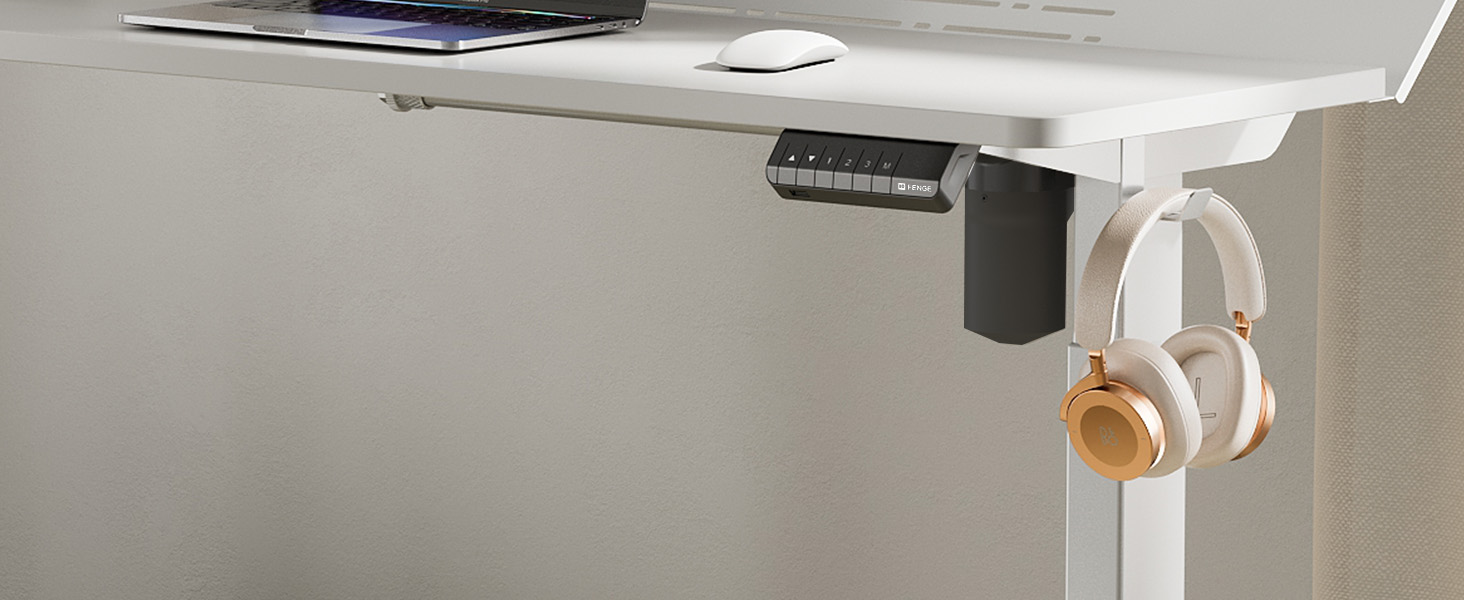
Figure 6: A close-up of the convenient desk hook, ideal for hanging headphones or other personal items, keeping your workspace tidy.
7. Konserwacja
- Czyszczenie: Przetrzyj powierzchnię biurka miękką,amp szmatką. Unikaj silnych środków chemicznych i ściernych środków czyszczących.
- Kontrola: Okresowo sprawdzaj wszystkie śruby i połączenia, aby upewnić się, że są dobrze dokręcone. W razie potrzeby dokręć.
- Zarządzanie kablami: Regularly organize cables to prevent tangles and damage.
8. Rozwiązywanie Problemów
If you encounter any issues with your Fenge Standing Desk, please refer to the following common problems and solutions:
| Problem | Możliwa przyczyna | Rozwiązanie |
|---|---|---|
| Biurko się nie rusza | Odłączony kabel zasilający; błąd silnika; przeciążenie. | Check power connections. Unplug and replug the power for 10 seconds. Reduce weight on the desk. |
| Nierówna regulacja wysokości | Legs not properly aligned; obstruction. | Ensure all screws are tightened. Check for any obstructions under the desk. Perform a reset (refer to control panel instructions if available). |
| Hałas podczas pracy | Luźne śruby; problem z silnikiem. | Tighten all assembly screws. If noise persists and is unusual, contact customer service. |
| Ustawienia pamięci nie działają | Nieprawidłowa procedura zapisywania. | Follow the memory preset saving instructions carefully (Section 5.2). |
If the problem persists after trying these solutions, please contact Fenge customer service.
9. Specyfikacje
| Funkcja | Szczegół |
|---|---|
| Marka | Fenge |
| Model | B0B2JGPRNH |
| Wymiary produktu | 24" gł. x 48" szer. x 51.9" wys. |
| Minimalna wysokość | 28.7 cali |
| Maksymalna wysokość | 48.4 cali |
| Maksymalna zalecana waga | 264 funtów (120 kg) |
| Typ materiału | Aluminum alloy (Base), Metal (Top) |
| Mechanizm podnoszący | Elektryczny |
| Poziom hałasu | Poniżej 49 dB |
| Wymagany montaż | Tak (narzędzia w zestawie) |
| Cechy specjalne | LED Strips, 2-Tier Design, Memory Presets, USB Charging Port |
10. Gwarancja i wsparcie
Fenge provides the following warranty for your standing desk:
- Desk Frame: 3-letnia gwarancja
- Silnik: 5-letnia gwarancja
This electric desk has obtained TUV, UL, CE, SGS, and other global certifications, ensuring high quality and safety standards.
For any product issues, questions, or warranty claims, please contact Fenge customer service. We are committed to providing prompt responses and practical solutions.
Visit the official Fenge Store for more information and products: Fenge Store on Amazon
Ask a question about this manual
Ask about setup, troubleshooting, compatibility, parts, safety, or missing instructions. Manuals+ will review the question and use this page’s manual context to help answer it.