
Wstęp
Welcome to the NN BEN NEVIS Kids Digital Sport Watch instruction manual. This guide provides detailed information on how to set up, operate, and maintain your new digital watch. Designed for children aged 5-12, this watch integrates essential features like step counting, calorie tracking, distance measurement, an alarm clock, and a stopwatch, all without the need for a smartphone app.

Figure 1: NN BEN NEVIS Kids Digital Sport Watch (Black)
Cechy produktu
- Kids Sport Watch: Integrated step counting, stopwatch, calories, and mileage. No smartphone or app connection required, making it easy to set and use.
- Wydajna bateria: Features a convenient USB interface for charging. A full charge provides approximately 15 days of battery life.
- Silent Vibrating Alarm: Set up to two alarms to remind children for study or rest. The vibration ensures discretion without disturbing others.
- Niezawodna jakość: Lightweight and soft silicone band, designed for comfort on children's wrists. The band offers multiple adjustable settings.
- Waterproof Resistant: 5 ATM water-resistant, suitable for hand washing, face washing, and rain. Not recommended for swimming, hot baths, or saunas.

Rysunek 2: Koniecview of Watch Features
Organizować coś
Ładowanie zegarka
The watch features a built-in USB charging interface. To charge, gently pull the watch face out of the silicone band to reveal the USB connector. Plug this connector directly into any standard USB adapter (e.g., smartphone adapter, computer USB port, or portable charger). A blue indicator light will illuminate on the watch face to confirm it is charging. Allow approximately 1 hour for a full charge, which provides up to 15 days of use.
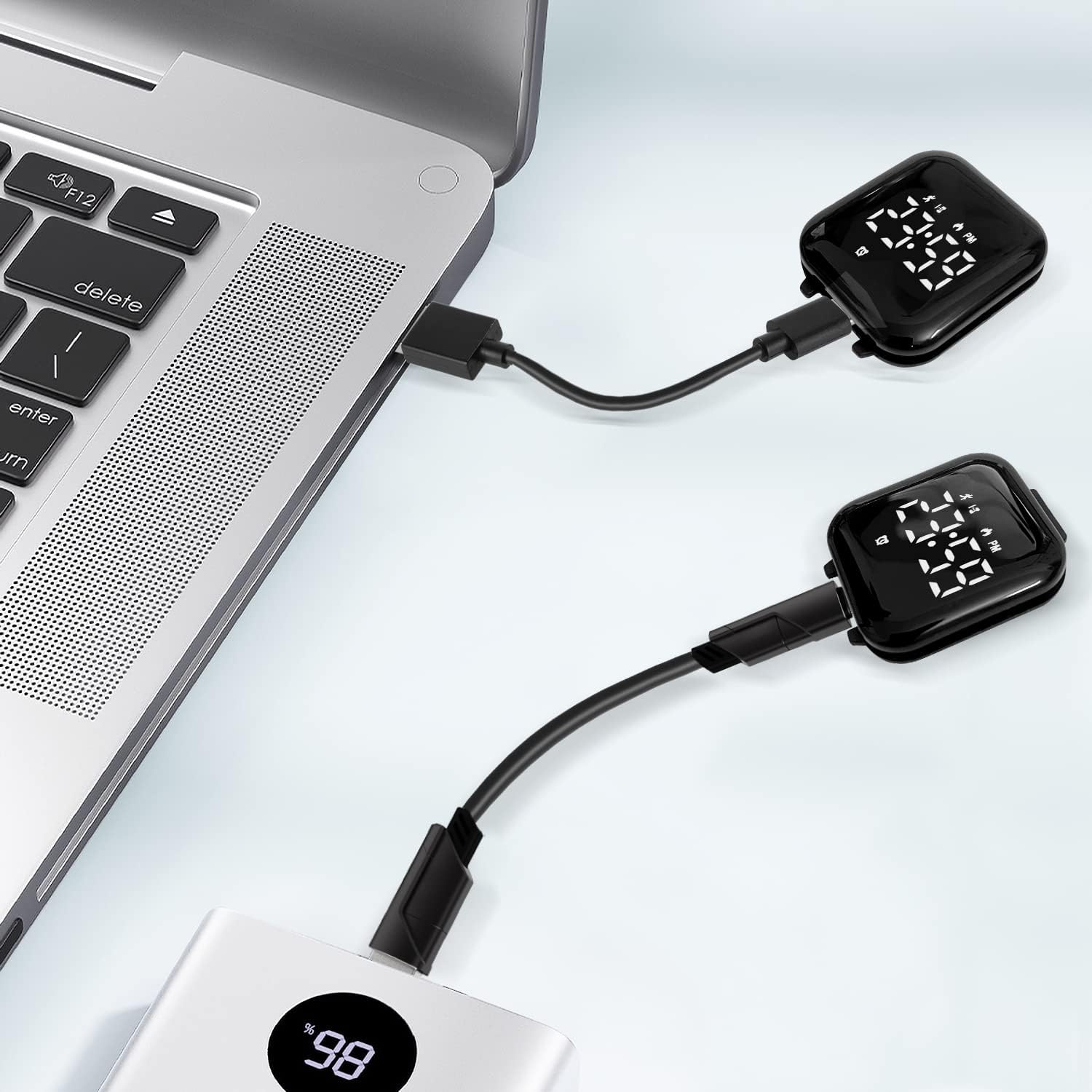
Rysunek 3: Metoda ładowania przez USB
Initial Setup and Basic Settings
For detailed visual instructions on setting the time, date, and other functions, please refer to the official product video below. The watch operates using two buttons, typically labeled A and B, on the side of the watch face.
Video 1: Kids Watch Settings Reference Guide. This video demonstrates how to set the time, date, and other features of the watch.
Instrukcja obsługi
The watch functions are accessed and adjusted using the two side buttons. Pressing button A typically cycles through display modes (Time, Steps, Calories, Distance, Alarm, Stopwatch). Pressing and holding button B (or a combination of A and B) allows for setting adjustments within each mode.
Ustawienie czasu i daty
Press button A to show the time. To set the time and date:
- Press button A until the time is displayed.
- Press and hold button B until the hour flashes.
- Use button A to adjust the hour. Press button B to switch to minutes, then use button A to adjust minutes.
- Continue this process for Month, Day, and Year.
- To switch between 12-hour and 24-hour clock formats, press and hold button B until the clock format flashes, then use button A to select.
- Press and hold button B to confirm settings.
Fitness Tracking (Steps, Distance, Calories)
The watch automatically tracks steps, distance, and calories burned. To view these metrics:
- Press button A to show the current time.
- Press button A again to view "Steps Counting".
- Press button A two more times to display "Calories Burned".
- Press button A three more times to display "Distance Traveled".
- To clear current counting steps, press and hold button A while viewing "Steps Counting".

Figure 4: Fitness Tracking in Action
Budzik
The watch supports a silent vibrating alarm. To set and manage the alarm:
- Press button A until the alarm clock display appears.
- Press and hold button B to enable or disable the alarm. When disabled, it will show "OFF". When enabled, it starts at "07:00" by default.
- To adjust the alarm time, continue to hold button B until the hour flashes. Use button A to adjust the hour, then button B to switch to minutes, and button A to adjust minutes.
- Press and hold button B to confirm the alarm setting.

Figure 5: Silent Vibrating Alarm Feature
Stoper
Aby użyć funkcji stopera:
- Press button A until the stopwatch display appears.
- Press and hold button A until "Stopwatch Mode" flashes.
- Press button A to start or pause the stopwatch.
- Press and hold button A to exit Stopwatch Mode.
Konserwacja i pielęgnacja
- Wodoodporność: The watch is 5 ATM water-resistant. This means it can withstand splashes from hand washing, face washing, and rain. However, it is NOT designed for swimming, showering, hot baths, saunas, or pressing buttons underwater. Frequent contact with water may reduce its service life.
- Czyszczenie: Przetrzyj zegarek i pasek miękką ściereczką.amp płótno. Unikaj stosowania ostrych chemikaliów lub materiałów ściernych.
- Składowanie: Przechowuj zegarek w chłodnym i suchym miejscu, gdy nie jest używany.
Rozwiązywanie problemów
- Zegarek nie włącza się/nie wyświetla: Upewnij się, że zegarek jest w pełni naładowany. Podłącz go do źródła zasilania USB i sprawdź wskaźnik ładowania.
- Nieprawidłowa godzina/data: Follow the "Time and Date Setting" instructions to re-adjust.
- Fitness data not accurate: Ensure the watch is worn snugly on the wrist. Note that the watch is not a professional measuring tool, and data is for reference only.
- Alarm nie wibruje: Check if the alarm is enabled in the settings. Ensure the watch has sufficient battery.
Specyfikacje
| Specyfikacja | Szczegół |
|---|---|
| Numer modelu | T15E-Black |
| Wymiary opakowania | 5.91 x 2.72 x 1.34 cala |
| Waga przedmiotu | 1.13 uncji |
| Rodzaj zapięcia | Klamra z języczkiem |
| Odporność na wodę | 5 bankomatów |
| Żywotność baterii | Approx. 15 days (after 1 hour charge) |

Figure 6: Watch Dimensions and Basic Specifications
Gwarancja i wsparcie
For information regarding warranty coverage, returns, or additional support, please refer to the product packaging or visit the official NN BEN NEVIS website. Contact information for customer service may also be available on the product's retail page.