
Gofunly C3
Instrukcja obsługi aparatu cyfrowego Gofunly Kids C3
Model: C3 | Brand: Gofunly
Wstęp
Thank you for choosing the Gofunly C3 Kids Digital Camera. This camera is designed to provide children aged 3-12 with a fun and engaging way to explore photography and videography. Featuring a 20MP dual lens, 1080P HD video recording, a 2.0-inch IPS screen, and a durable silicone case, it's perfect for capturing precious moments. Please read this manual carefully to ensure proper use and maintenance of your camera.
Produkt ponadview
Główne cechy
- 20MP Dual Lens: High-resolution front and rear cameras for photos and selfies.
- Wideo HD 1080P: Record clear and vibrant videos.
- Ekran IPS 2.0 cala: Bright and clear display for viewprzeglądanie zdjęć i filmów.
- W zestawie karta Micro SD o pojemności 32 GB: Ampmiejsce do przechowywania tysięcy zdjęć i filmów.
- Wielofunkcyjny: Supports original photo capture, video recording, playback, time-lapse, 8x zoom, 28 cartoon photo frames, 6 photo filters, and 5 mirror effects.
- Wbudowane gry: Includes 3 classic puzzle games (Snake, Tetris, Sokoban) for entertainment.
- Trwała konstrukcja: Cute, eco-friendly, soft silicone shockproof case for protection.
- Przenośny: Compact and lightweight, with two lanyards for easy carrying.
- Akumulator: Wbudowana bateria litowa o pojemności 1000mAh zapewniająca dłuższe użytkowanie.
Co jest w pudełku
- 1 x Gofunly Kids Digital Camera (Green Dinosaur)
- Karta Micro SD Micro 1 x 32GB
- 1 x kabel USB
- 1 x czytnik kart
- 2 x Smycze
- 1 x Resetuj pin
- 1 x Instrukcja obsługi

Image: The Gofunly C3 Kids Digital Camera, green dinosaur model, displayed with its accessories: a 32GB memory card and a USB card reader.

Image: A visual representation of all items included in the camera package: the green dinosaur camera, a 32GB SD card, a USB cable, a card reader, and two lanyards.
Organizować coś
1. Ładowanie aparatu
Before first use, fully charge the camera battery. Use the included USB cable to connect the camera to a computer's USB port or a standard USB wall adapter (not included).
- Podczas ładowania zaświeci się kontrolka ładowania.
- The light will turn off or change color once charging is complete.
- Pełne ładowanie trwa zwykle 2-3 godziny.

Image: The side of the camera illustrating the USB port for charging and the slot for the 32GB SD card.
2. Wkładanie karty Micro SD
The camera requires a Micro SD card to save photos and videos. A 32GB card is included in the package.
- Znajdź gniazdo karty Micro SD z boku aparatu.
- Insert the Micro SD card with the gold contacts facing down, gently pushing until it clicks into place.
- To remove the card, push it in again until it clicks, and it will spring out.
Instrukcja obsługi
Podstawowe funkcje
- Włączanie/wyłączanie: Press and hold the power button (usually marked with a circle and line) for a few seconds.
- Robić zdjęcie: In photo mode, press the shutter button (usually a large button on top or side) to capture an image.
- Nagraj wideo: Switch to video mode (if applicable, via a mode button), then press the shutter button to start/stop recording.
- Odtwarzanie nagranego dźwięku: Press the playback button (often an arrow icon) to view saved photos and videos. Use the navigation buttons to browse.
- Nawigacja po menu: Use the up/down/left/right buttons to navigate through menus and select options with the OK/shutter button.
Cechy specjalne
- Tryb selfie: The camera features a dual lens. Switch to selfie mode (check camera interface for icon) to use the front-facing camera.

Image: A child and an adult smiling while taking a selfie with the green dinosaur camera, highlighting its selfie capability.
- Upływ czasu: Set the camera to time-lapse mode (2s/5s/10s options) to capture a series of photos at set intervals, creating a time-lapse video.

Image: The camera screen showing a time-lapse sequence, alongside examples of photos captured with 2x, 4x, 6x, and 8x digital zoom.
- 8-krotny zoom cyfrowy: Use the zoom buttons (often up/down navigation) to digitally zoom in on your subject.

Image: A visual sequence demonstrating the camera's 8x digital zoom, showing how the image becomes progressively closer to the subject.
- Photo Frames & Filters: Enhance your photos with 28 cartoon photo frames, 6 photo filters, and 5 mirror effects. Access these options through the camera's menu.

Obraz: Pokaz kolażuasing different photo frames and effects that can be applied to pictures taken with the camera, including various cartoon borders and mirror effects.

Image: A comprehensive display of the camera's creative options, including six distinct photo filters and a wide selection of 28 cartoon frames and fun stickers.
- Zawody sportowe: The camera includes 3 classic puzzle games: Snake, Tetris, and Sokoban. Access them through the main menu for entertainment.

Image: The camera screen displaying one of the built-in puzzle games, with icons representing the three classic games: Snake, Tetris, and Sokoban.
Konserwacja
Czyszczenie
- Przetrzyj korpus aparatu miękką, suchą ściereczką.
- W przypadku uporczywych zabrudzeń, delikatnieampWytrzyj szmatkę wodą. Nie używaj silnych środków chemicznych ani ściernych środków czyszczących.
- Clean the lens gently with a microfiber cloth specifically designed for camera lenses.
Pielęgnacja baterii
- Unikaj częstego całkowitego rozładowywania akumulatora.
- Aby zachować sprawność baterii, ładuj ją regularnie, nawet jeśli jej nie używasz.
- Do not expose the camera to extreme temperatures, as this can affect battery life.
Składowanie
- Przechowuj aparat w chłodnym i suchym miejscu, z dala od bezpośredniego światła słonecznego.
- When storing for extended periods, ensure the battery is partially charged (around 50%).
Rozwiązywanie problemów
| Problem | Możliwa przyczyna | Rozwiązanie |
|---|---|---|
| Kamera nie włącza się. | Bateria jest rozładowana lub słaba. | Ładuj kamerę przez co najmniej 30 minut. |
| Nie można robić zdjęć/kręcić filmów. | No SD card inserted or card is full/corrupted. | Insert a Micro SD card. If already inserted, check if it's full and delete some files, or try formatting the card (this will erase all data). |
| Ekran jest zamrożony. | Błąd oprogramowania. | Use the included reset pin to press the reset button (usually a small hole near the charging port). This will restart the camera without losing data. |
| Niska jakość obrazu. | Zabrudzony obiektyw lub słabe oświetlenie. | Clean the camera lens with a soft, clean cloth. Ensure adequate lighting when taking photos. |
| Nie można połączyć się z komputerem. | Wadliwy kabel USB lub problem ze sterownikiem. | Try a different USB cable or USB port on your computer. Ensure the camera is powered on when connecting. |
Specyfikacje
| Funkcja | Szczegół |
|---|---|
| Model | C3 |
| Ekran wyświetlacza | Ekran IPS 2.0 cala |
| Rozdzielczość zdjęcia | Do 20 MP |
| Rozdzielczość wideo | Rozdzielczość 1080P HD |
| Pojemność baterii | Polimer litowy 1000 mAh |
| Składowanie | Obsługuje karty Micro SD (32 GB w zestawie) |
| Zoom optyczny | 8x (cyfrowy) |
| Wymiary produktu | 4.9 x 8.86 x 7.04 cm (1.93 x 3.49 x 2.77 cala) |
| Waga | 105 gramów (0.23 funta) |
| Tworzywo | Eco-friendly Soft Silicone Case |
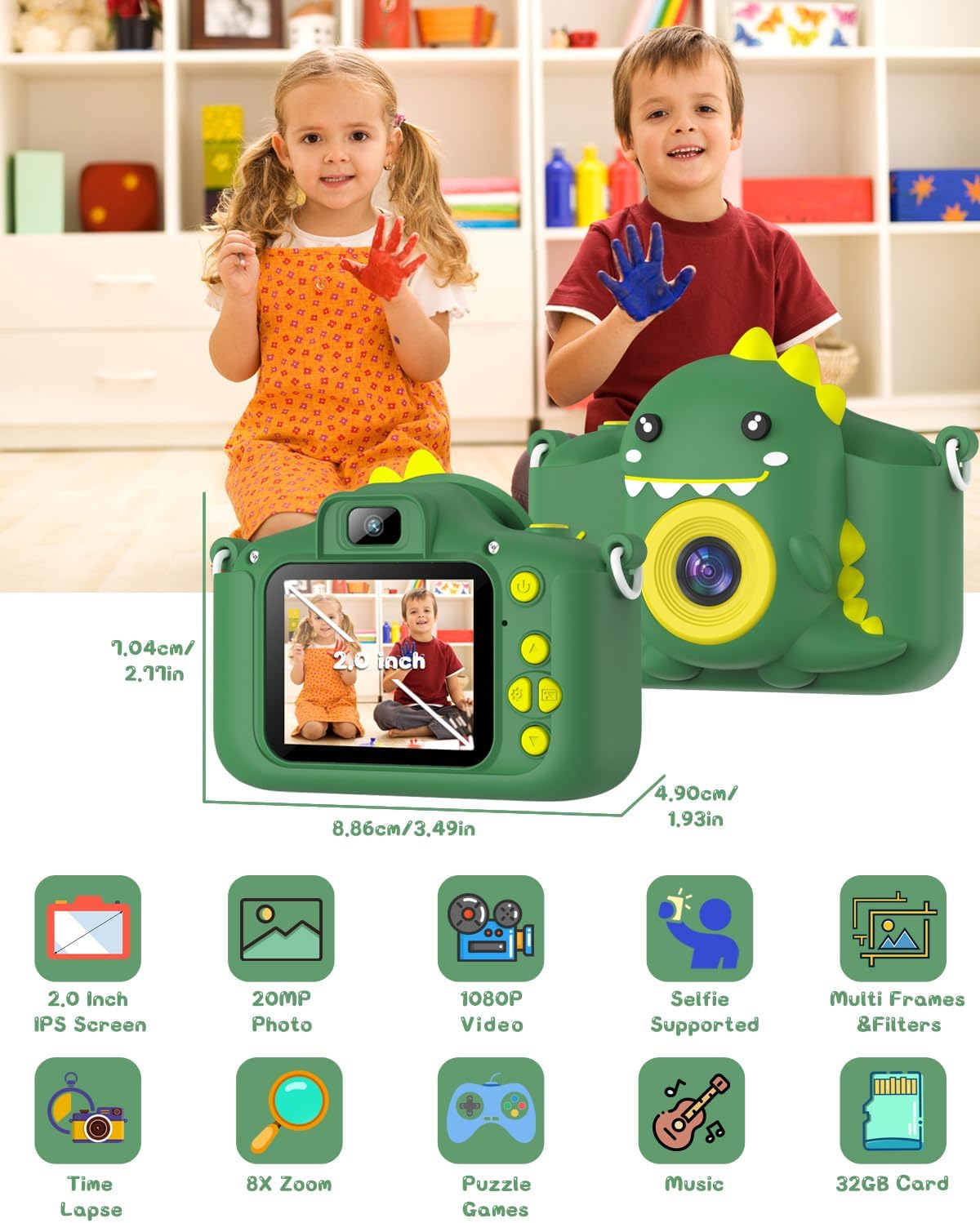
Image: The camera shown with its physical dimensions and a grid of icons highlighting its main features: 2.0-inch IPS screen, 20MP photo, 1080P video, selfie support, multiple frames and filters, time-lapse, 8x zoom, puzzle games, music playback, and included 32GB card.
Gwarancja i wsparcie
Gofunly provides customer support for its products. If you encounter any issues or have questions regarding your Gofunly C3 Kids Digital Camera, please refer to the contact information provided with your purchase or visit the official Gofunly store on Amazon:
A satisfactory solution will be offered in accordance with the warranty policy.