
1. Wprowadzenie
The SteelSeries Arctis Nova 1X Gaming Headset delivers an immersive audio experience across multiple platforms. Designed for comfort and clarity, it features the Signature Arctis Sound and a ClearCast Gen 2 Microphone, making it ideal for Xbox Series X|S, PC, PlayStation, Switch, and mobile gaming.
This manual provides detailed instructions for setting up, operating, and maintaining your Arctis Nova 1X headset to ensure optimal performance and longevity.
2. Co znajduje się w pudełku
Upon unboxing your SteelSeries Arctis Nova 1X Gaming Headset, you should find the following components:
- Zestaw słuchawkowy Arctis Nova 1X
- Main Headset Cable (3.5mm)
- Headband (pre-installed or separate, as per packaging)
- Przewodnik po produktach

Obraz: Przód view of the SteelSeries Arctis Nova 1X Gaming Headset, showcasing its sleek design and microphone.
3. Konfiguracja
3.1 Podłączanie zestawu słuchawkowego
The Arctis Nova 1X is a wired headset designed for universal compatibility. To connect your headset:
- Locate the 3.5mm main headset cable.
- Plug one end of the 3.5mm cable into the audio jack on the left earcup of your Arctis Nova 1X headset.
- Plug the other end of the 3.5mm cable into the corresponding audio port on your gaming device (Xbox Series X|S controller, PC, PlayStation controller, Nintendo Switch, or mobile device).
Note: Ensure the cable is securely connected to both the headset and your device for optimal audio and microphone performance.

Image: Diagram illustrating the multi-platform compatibility of the Arctis Nova 1X headset, showing connections to various gaming devices.
4. Obsługa zestawu słuchawkowego
4.1 Regulacja głośności
Adjust the audio volume directly from the headset:
- Locate the volume wheel on the left earcup.
- Roll the wheel up to increase the volume or down to decrease it.
4.2 Wyciszenie mikrofonu
To mute or unmute your microphone:
- Find the microphone mute button on the left earcup, adjacent to the volume wheel.
- Press the button to toggle the microphone on or off. A red indicator will typically show when the microphone is muted.
4.3 Retractable ClearCast Gen 2 Microphone
The ClearCast Gen 2 microphone is retractable for convenience:
- To use the microphone, gently pull it out from the left earcup until it reaches your desired position.
- To store the microphone, push it back into the earcup until it is fully retracted.
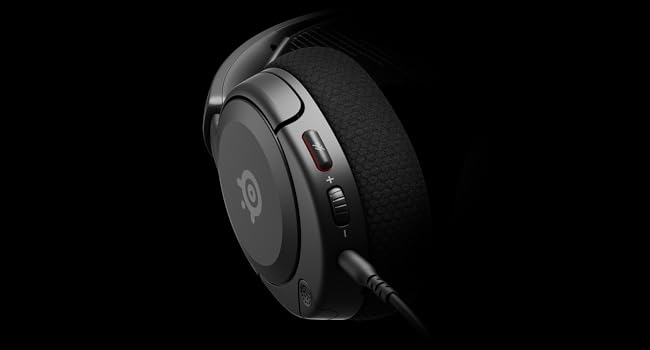
Obraz: Zbliżenie view of the left earcup of the Arctis Nova 1X, highlighting the volume wheel and microphone mute button for easy access during gameplay.
Video: Official SteelSeries video demonstrating the features of the Arctis Nova 1 headset, including its audio capabilities and microphone design.
5. Komfort i dopasowanie
The Arctis Nova 1X is designed for extended gaming sessions with its ComfortMAX System:
- Ultralekka konstrukcja: Weighing only 236g, the headset minimizes pressure during long use.
- Height-Adjustable Earcups: The earcups can be adjusted vertically to fit various head sizes comfortably.
- Flexible Suspension Headband: The elastic headband conforms to your head for a secure yet gentle fit.

Image: The Arctis Nova 1X headset highlighting its ultra-lightweight and slim profile, designed for comfort.

Image: The Arctis Nova 1X headset demonstrating its height-adjustable earcups for a personalized and comfortable fit.
6. Funkcje audio
Experience superior sound with the Arctis Nova 1X:
- Almighty Audio: The Nova Acoustic System with High Fidelity Drivers delivers crystal-clear highs, precise mids, and deep bass.
- Dźwięk przestrzenny 360°: Immerse yourself in the game with surround sound that allows you to pinpoint enemy positions and environmental cues.
- Pro-grade Parametric EQ: Dostosuj swojego profesjonalistę dźwiękufile with the SteelSeries Sonar Audio Software Suite for a competitive edge.

Image: The Arctis Nova 1X headset highlighting its "Almighty Audio" capabilities for a rich sound experience.
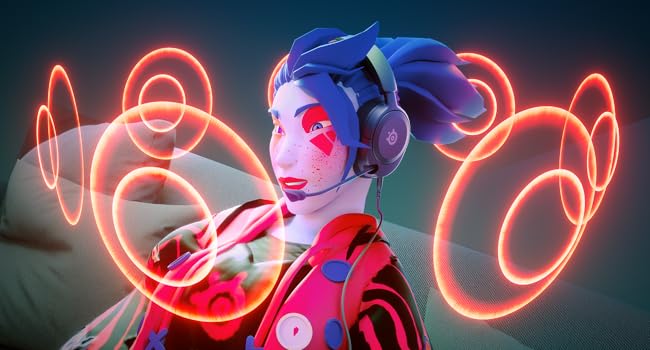
Image: Visual representation of 360° Spatial Audio, showing sound waves surrounding a gamer wearing the Arctis Nova 1X headset.
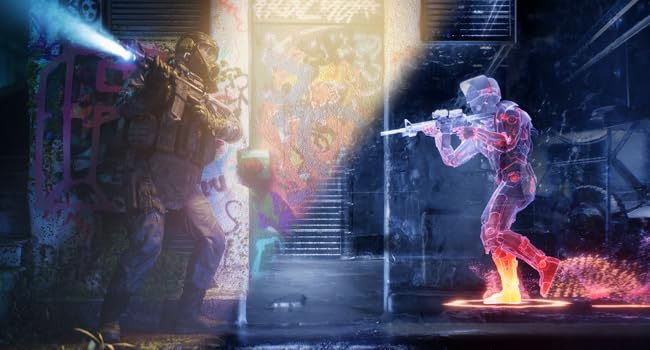
Image: Graphic illustrating the Pro-grade Parametric EQ, suggesting advanced audio customization options available with the headset.
7. Microphone Features
The ClearCast Gen 2 Mic ensures clear communication:
- Redukcja szumów AI: Advanced AI algorithms filter out background noise, ensuring your voice is heard clearly by teammates.
- Konstrukcja chowana: The microphone can be fully retracted into the earcup when not in use, maintaining a sleek profile.

Image: The Nova 1 AI Microphone, emphasizing its noise-cancelling capabilities for clear voice communication.
8. Konserwacja
To ensure the longevity and optimal performance of your Arctis Nova 1X headset, follow these maintenance guidelines:
- Czyszczenie: Do przecierania nauszników i pałąka użyj miękkiej, suchej ściereczki. Do dokładniejszego czyszczenia użyj delikatnego szorowania.amp cloth with mild soap can be used, ensuring no moisture enters the speaker grilles or ports.
- Pielęgnacja kabli: Avoid sharp bends or excessive pulling on the headset cable to prevent internal damage. Store the cable neatly when not in use.
- Składowanie: Przechowuj zestaw słuchawkowy w chłodnym, suchym miejscu, z dala od bezpośredniego światła słonecznego i ekstremalnych temperatur.
- Wskazówki dotyczące słuchawek dousznych: If applicable, ensure earbud tips (if using with mobile) fit snugly. Replace worn-out earbud tips to maintain sound quality and comfort.
9. Rozwiązywanie Problemów
If you encounter issues with your Arctis Nova 1X headset, try the following solutions:
- Brak dźwięku/niska głośność:
- Ensure the 3.5mm cable is fully inserted into both the headset and your device.
- Sprawdź pokrętło głośności na zestawie słuchawkowym i głośność systemową urządzenia.
- Przetestuj zestaw słuchawkowy z innym urządzeniem, aby wykluczyć problemy związane z konkretnym urządzeniem.
- Mikrofon nie działa:
- Ensure the microphone mute button is not activated (red indicator off).
- Sprawdź, czy mikrofon jest całkowicie rozciągnięty i prawidłowo ustawiony.
- Sprawdź ustawienia audio swojego urządzenia, aby upewnić się, że wybrano właściwe wejście mikrofonu i że jego głośność nie jest wyciszona.
- Słaba jakość dźwięku:
- Ensure the 3.5mm cable is not damaged and is securely connected.
- Adjust your device's audio settings or equalizer settings.
10. Specyfikacje
| Funkcja | Szczegół |
|---|---|
| Marka | Stalowa seria |
| Nazwa modelu | Arctis Nova 1X |
| Numer modelu | 61616 |
| Technologia łączności | Przewodowy (gniazdo 3.5 mm) |
| Umieszczenie ucha | Na ucho |
| Kontrola hałasu | Aktywna redukcja szumów (mikrofon) |
| Typ sterownika audio | Dynamiczny sterownik |
| Zakres częstotliwości | 20 Hz - 20 000 Hz |
| Mikrofon | ClearCast Gen 2 (Retractable, AI Noise Cancelling) |
| Kompatybilne urządzenia | Xbox Series X|S, PC, PlayStation, Switch, Mobile |
| Waga przedmiotu | 1.1 funta (ok. 500 g) |
| Kolor | Czarny |
| UPC | 850014119737 |
Wideo: 360 stopni view of the SteelSeries Arctis Nova 1X headset in black, showcasinoglądając jego projekt ze wszystkich stron.
11. Gwarancja i pomoc techniczna
11.1 Informacje o gwarancji
The SteelSeries Arctis Nova 1X Gaming Headset comes with a 1 rok ograniczonej gwarancji od daty zakupu. Niniejsza gwarancja obejmuje wady produkcyjne i zapewnia, że produkt działa zgodnie z przeznaczeniem przy normalnym użytkowaniu. Prosimy zachować dowód zakupu na wypadek roszczeń gwarancyjnych.
For detailed warranty terms and conditions, please refer to the official SteelSeries webwitryny lub karty gwarancyjnej dołączonej do opakowania produktu.
11.2 Obsługa klienta
For further assistance, technical support, or warranty claims, please contact SteelSeries customer support through their official webstrona:
You may also find additional resources, FAQs, and software downloads on their support page.