
Alpine ILX-507
Alpine iLX-507 Multimedia Receiver User Manual
Model: ILX-507
Wstęp
This manual provides comprehensive instructions for the installation, operation, and maintenance of your Alpine iLX-507 7" Multimedia Receiver. Please read this manual thoroughly before using the product to ensure proper and safe operation. Keep this manual for future reference.
The Alpine iLX-507 is a state-of-the-art digital multimedia receiver designed to enhance your in-car entertainment and connectivity. It features a 7-inch capacitive touchscreen display and offers seamless integration with modern smartphones through wireless Apple CarPlay and wireless Android Auto.
Konfiguracja i instalacja
Prawidłowy montaż ma kluczowe znaczenie dla optymalnej wydajności i bezpieczeństwa. Zaleca się, aby montaż wykonał wykwalifikowany specjalista.
Rozpakowywanie i sprawdzanie komponentów
Przed rozpoczęciem instalacji należy sprawdzić, czy w opakowaniu znajdują się wszystkie elementy:
- Alpine iLX-507 Multimedia Receiver Unit
- Wiązka przewodów
- Antena GPS
- Mikrofon
- Sprzęt montażowy
- Instrukcja obsługi (ten dokument)
Połączenia okablowania
Connect the wiring harness to the vehicle's power, ground, speaker, and accessory wires according to the wiring diagram provided with the unit. Ensure all connections are secure and properly insulated to prevent short circuits.
The iLX-507 supports various inputs and outputs, including USB for media playback and smartphone connectivity, and HDMI for external video sources.

Rycina 1: Przód view of the Alpine iLX-507 multimedia receiver displaying the radio interface with frequency selection and current song information.
Pierwsze włączenie i ustawienia podstawowe
After installation, turn on your vehicle's ignition to power the unit. The initial setup wizard will guide you through basic configurations such as language, time, and region settings. Ensure the GPS antenna is positioned correctly for accurate time synchronization and navigation assistance.
Instrukcja obsługi
Nawigacja za pomocą interfejsu dotykowego
The iLX-507 features a responsive 7-inch capacitive touchscreen. Navigate through menus and select functions by tapping icons. Swipe gestures may be used for scrolling lists or changing screens.
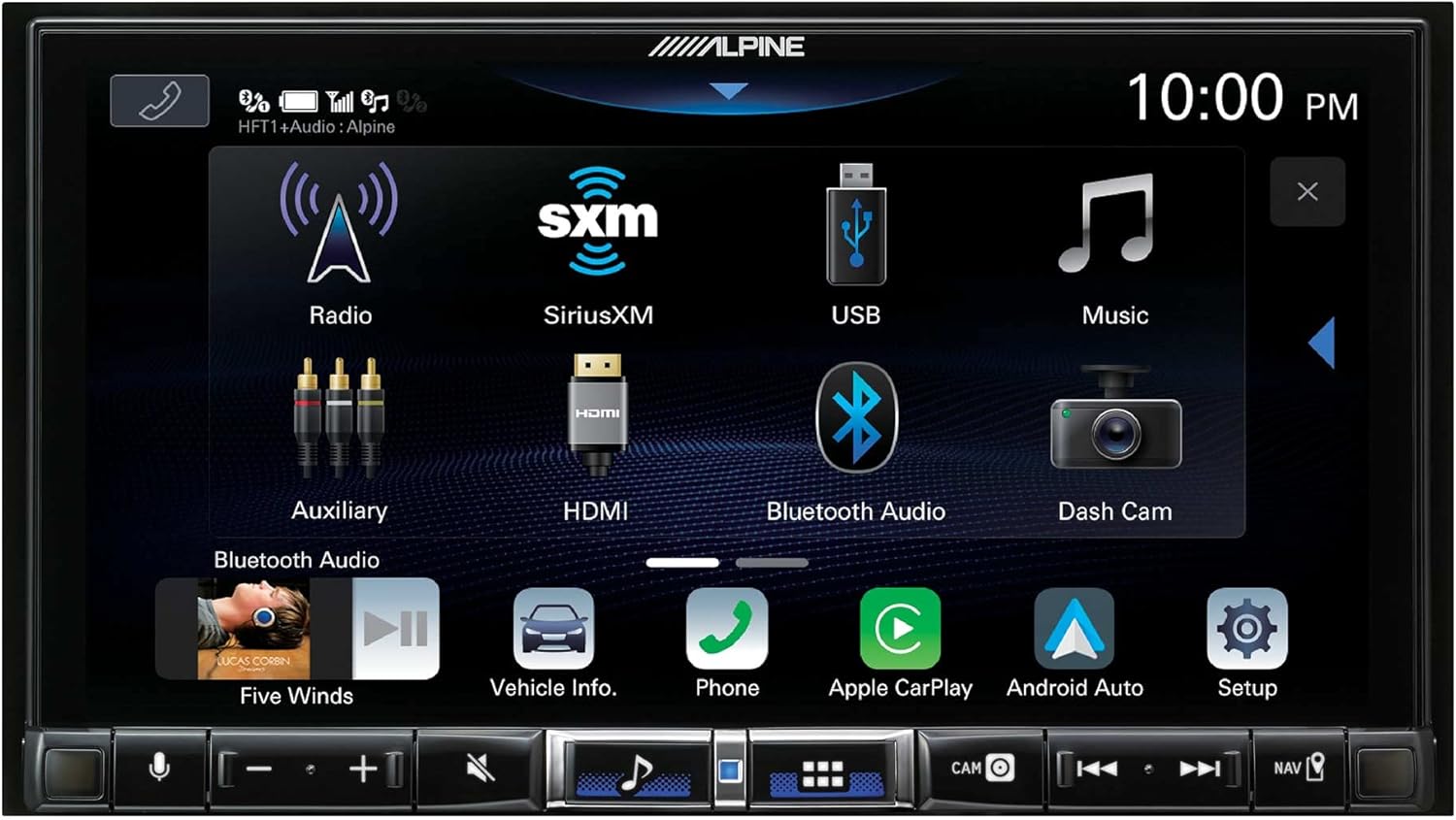
Figure 2: The main menu screen of the iLX-507, showing icons for Radio, SiriusXM, USB, Music, Auxiliary, HDMI, Bluetooth Audio, Dash Cam, Vehicle Info, Phone, Apple CarPlay, and Android Auto.
Bezprzewodowy Apple CarPlay i Android Auto
The iLX-507 supports both wired and wireless Apple CarPlay and Android Auto. To connect wirelessly, ensure Bluetooth is enabled on your smartphone and pair it with the receiver. Once paired, select the respective CarPlay or Android Auto icon on the receiver's screen to initiate the connection.
- Apple CarPlay: Access navigation, make calls, send and receive messages, and listen to music directly from your iPhone.
- Android Auto: Utilize Google Maps, make calls, send messages, and control music from your Android device.

Figure 3: A visual comparison demonstrating the user interfaces for both Apple CarPlay and Android Auto as displayed on the Alpine iLX-507 screen.
Rozmowy przez zestaw głośnomówiący Bluetooth i strumieniowe przesyłanie dźwięku
Pair your smartphone via Bluetooth for hands-free calling and wireless audio streaming. Access your phone's contact list, dial numbers, and manage calls directly from the receiver's screen. Stream music from your device's library or supported apps like Pandora, Spotify, and Tidal.
Audio Settings and Equalizer
The iLX-507 offers extensive audio customization options. Access the audio settings menu to adjust bass, treble, balance, fader, and subwoofer levels. Utilize the built-in equalizer for precise sound tuning to match your preferences and vehicle acoustics.

Figure 4: The audio settings screen of the Alpine iLX-507, showing options for MediaXpander, battery voltage display, sound presets, bass/treble adjustments, and time correction settings.
Konserwacja
Czyszczenie wyświetlacza
To clean the capacitive touchscreen, gently wipe it with a soft, lint-free cloth. For stubborn smudges, dampen the cloth slightly with water or a screen-safe cleaner. Avoid using abrasive materials or harsh chemicals, as these can damage the screen coating.
Aktualizacje oprogramowania
Alpine periodically releases software updates to improve performance, add features, or address issues. Check the official Alpine website for the latest firmware updates for your iLX-507 model. Follow the provided instructions carefully when performing updates, typically involving a USB drive.
Rozwiązywanie problemów
This section addresses common issues you might encounter with your Alpine iLX-507. For problems not listed here, please contact Alpine customer support.
| Problem | Możliwa przyczyna | Rozwiązanie |
|---|---|---|
| Urządzenie nie włącza się. | Nieprawidłowe okablowanie, przepalony bezpiecznik, wyłączony zapłon pojazdu. | Check power and ground connections. Inspect vehicle fuses. Ensure ignition is on. |
| Brak wyjścia audio. | Speaker wires disconnected, volume too low, mute activated, incorrect source selected. | Verify speaker connections. Increase volume. Check mute status. Select correct audio source. |
| Brak połączenia bezprzewodowego CarPlay/Android Auto. | Bluetooth off on phone/unit, phone not paired, interference. | Ensure Bluetooth is on and paired. Forget device on both ends and re-pair. Move phone closer to unit. |
| Ekran dotykowy nie reaguje. | Tymczasowy błąd oprogramowania, ekstremalna temperatura. | Restart the unit (turn vehicle off and on). Allow unit to reach normal operating temperature. |
Specyfikacje
| Funkcja | Szczegół |
|---|---|
| Numer modelu | ILX-507 |
| Wyświetlacz | 7-calowy pojemnościowy ekran dotykowy |
| Łączność | Wireless Apple CarPlay, Wireless Android Auto, Bluetooth, USB, HDMI |
| Tryb wyjścia audio | Stereofoniczny, monofoniczny |
| Konfiguracja kanału dźwięku przestrzennego | 5.1 lub 7.1 |
| Wymiary (produkt) | 12 x 12 x 12 cala |
| Waga (przedmiot) | 5 funta |
| Data pierwszej dostępności | 18 marca 2022 r. |
Gwarancja i wsparcie
For warranty information, please refer to the warranty card included with your product or visit the official Alpine website. Alpine provides customer support for technical assistance, troubleshooting, and service inquiries.
For the most up-to-date support resources, including FAQs and contact information, please visit the Alpine Support Page.
Powiązane dokumenty - ILX-507
 |
Procedura i przewodnik aktualizacji oprogramowania Alpine iLX-F511/iLX-F509/iLX-507 Instrukcja krok po kroku aktualizacji oprogramowania układowego (wersja 2.0.000) dla odbiorników multimedialnych Alpine iLX-F511, iLX-F509, iLX-507, i509-WRA-JK i i509-WRA-JL. Obejmuje formatowanie, kopiowanie, instalację i rozwiązywanie problemów. |
 |
Alpine Multimedia Receiver Software Update Procedure for iLX-F511, iLX-F509, iLX-507, i509-WRA-JK, i509-WRA-JL Detailed instructions for updating the firmware on Alpine multimedia receivers, including models iLX-F511, iLX-F509, iLX-507, i509-WRA-JK, and i509-WRA-JL to version 1.1.280. Covers formatting USB drives, copying update files, performing the update, and troubleshooting common issues. |
 |
Instrukcja obsługi 7-calowego odbiornika audio/wideo Alpine iLX-W670 To oficjalna instrukcja obsługi 7-calowego odbiornika audio/wideo Alpine iLX-W670. Zawiera szczegółowe instrukcje dotyczące instalacji, obsługi, konfiguracji, funkcji takich jak Apple CarPlay i Android Auto, łączności Bluetooth, SiriusXM oraz rozwiązywania problemów. Zarejestruj swój produkt na stronie www.alpine-usa.com/registration, aby otrzymywać aktualizacje i informacje. |
 |
Instrukcja obsługi Alpine iLX-507, iLX-F509, iLX-F511, i509 Niniejsza instrukcja obsługi zawiera szczegółowe wskazówki dotyczące amplitunerów audio/wideo Alpine iLX-507, iLX-F509, iLX-F511 i i509, obejmujące konfigurację, obsługę, funkcje i rozwiązywanie problemów w celu zapewnienia lepszej rozrywki w samochodzie. |
 |
Manual de Instrucciones Alpine iLX-W670: Receptor de Audio/Video de 7 Pulgadas Guía completa de usuario para el receptor Alpine iLX-W670. Aprenda a instalar, configurar y utilizar las funciones de audio, video, Apple CarPlay, Android Auto y más para su vehículo. |
 |
Alpine Multimedia Receiver Software Update Procedure Step-by-step guide for updating the firmware of Alpine Multimedia Receivers including models iLX-F511, iLX-F509, iLX-507, i509-WRA-JK, and i509-WRA-JL to version 2.0.300. Covers formatting a USB drive, copying update files, performing the update, and troubleshooting common issues. |
Ask a question about this manual
Ask about setup, troubleshooting, compatibility, parts, safety, or missing instructions. Manuals+ will review the question and use this page’s manual context to help answer it.