
1. Wprowadzenie
Thank you for choosing the Ctronics RBX-F20 2.5K 4MP Solar WiFi PTZ Outdoor Security Camera. This advanced security camera offers high-resolution surveillance, flexible pan and tilt capabilities, and sustainable solar power. This manual will guide you through the installation, setup, and operation of your camera to ensure optimal performance and security for your property.

Image: The Ctronics RBX-F20 camera with its integrated solar panel, designed for outdoor use.
2. Główne cechy
- 2.5K 4MP Resolution & Color Night Vision: Experience clear 2560x1440 resolution. Equipped with 10 built-in spotlights, the camera provides full-color night vision up to 30 meters, illuminating a wider area.
- 100% bezprzewodowy i zasilany energią słoneczną: Features a 7800mAh rechargeable battery for extended operation. The integrated solar panel continuously recharges the battery, ensuring uninterrupted power and true wireless functionality.
- PIR Sensor & Human Detection: Utilizes a PIR sensor for accurate human shape detection with a rapid 0.2-second wake-up time. Adjustable alarm sensitivity (low, medium, high) sends precise real-time notifications to your smartphone upon human motion detection.
- Obrót 355° i pochylenie 95°: Control the camera's rotation remotely via your smartphone, covering a wide area with 355° horizontal pan and 95° vertical tilt.
- Dwukierunkowy dźwięk: Built-in microphone and speaker allow for real-time communication with family, visitors, or to deter intruders from anywhere.
- Odporność na warunki atmosferyczne IP66: Designed with a robust IP66-certified weatherproof casing, ensuring reliable operation in various extreme weather conditions.

Image: Comparison of day and color night vision footage from the 2.5K 4MP camera, showing clarity and detail.
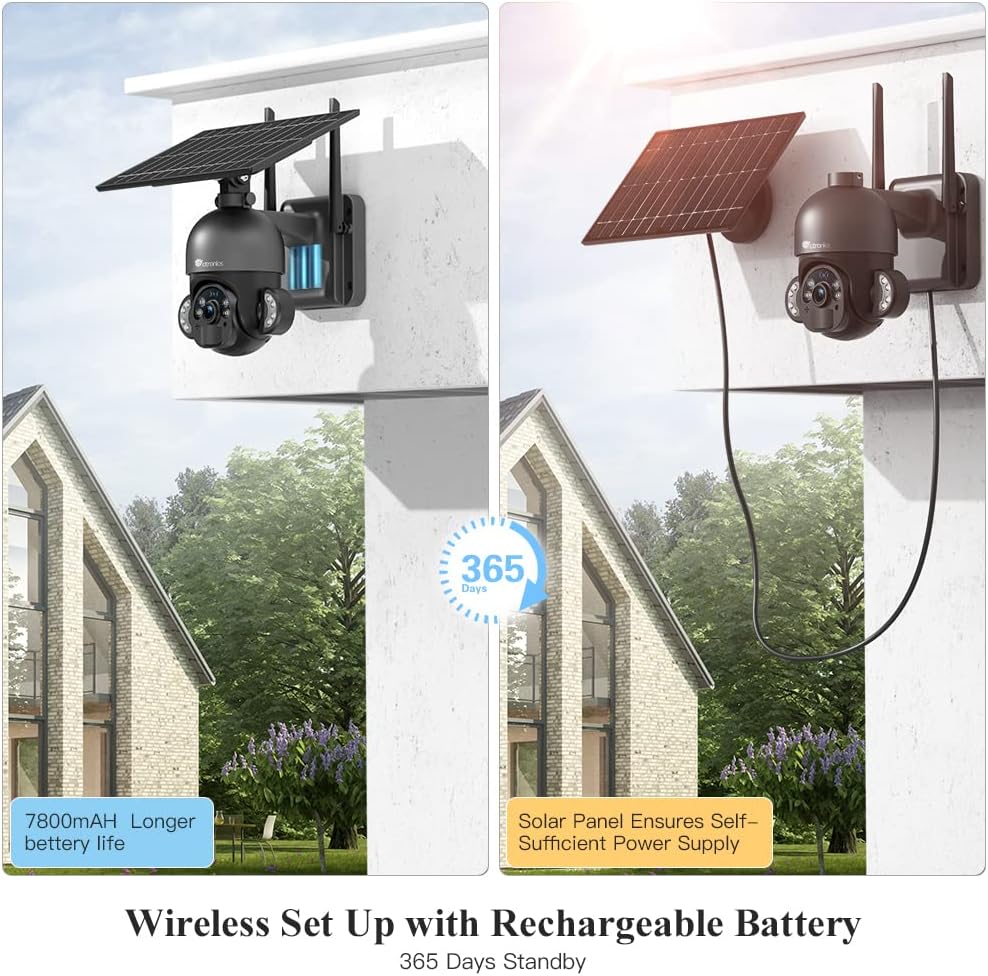
Image: The camera highlighting its 7800mAh battery and the solar panel providing continuous power, indicating 365 days of standby.

Image: A person and a dog in the camera's view, demonstrating the human detection feature distinguishing between human and non-human movement.

Image: The camera mounted on a wall, illustrating its 355-degree pan and 95-degree tilt capabilities for comprehensive coverage.

Image: A person interacting with a delivery driver via the camera's two-way audio feature, shown on a smartphone screen.

Image: The camera mounted outdoors, with rain and clouds indicating its IP66 weatherproof design.
3. Zawartość opakowania
Prosimy o sprawdzenie zawartości przesyłki po jej otrzymaniu. Jeśli brakuje któregokolwiek z elementów lub jest on uszkodzony, prosimy o kontakt z obsługą klienta.
- Ctronics RBX-F20 PTZ Camera with Solar Panel
- Uchwyt montażowy
- Śruby montażowe i kołki ścienne
- Kabel ładujący USB
- Instrukcja obsługi
- Szybki przewodnik
4. Konfiguracja i instalacja
4.1 Pierwsze ładowanie
Before installation, fully charge the camera's built-in 7800mAh battery using the provided USB cable. Connect the cable to a 5V/2A power adapter (not included) and the camera's charging port. The charging indicator will show the status.
4.2 Instalacja aplikacji i tworzenie konta
- Download the "Ctronics" app from the App Store (iOS) or Google Play Store (Android).
- Open the app and register a new account, or log in if you already have one.
4.3 Parowanie aparatu z aplikacją
- Upewnij się, że Twój smartfon jest podłączony do sieci Wi-Fi 2.4 GHz. (Wi-Fi 5 GHz nie jest obsługiwane).
- Włącz kamerę.
- In the Ctronics app, tap the "+" icon to add a new device.
- Follow the on-screen instructions to scan the QR code on the camera or manually enter the device ID.
- Wybierz swoją sieć Wi-Fi i wprowadź hasło.
- The camera will attempt to connect. Once connected, you can name your camera and complete the setup.
4.4 Montaż kamery
The camera offers two installation methods: all-in-one (camera and solar panel together) or separated (solar panel mounted separately for optimal sunlight exposure).
- Wybierz lokalizację: Select a location with good Wi-Fi signal and sufficient sunlight exposure for the solar panel. Ensure the camera has a clear view obszaru, który chcesz monitorować.
- Zaznacz otwory wiertnicze: Użyj uchwytu montażowego jako szablonu do zaznaczenia miejsc wywiercenia otworów na ścianie.
- Wiercenie otworów: Wywierć otwory w zaznaczonych miejscach i włóż w nie kołki rozporowe.
- Zabezpiecz wspornik: Przymocuj uchwyt montażowy do ściany za pomocą dołączonych śrub.
- Zamontuj kamerę/panel słoneczny:
- All-in-one: Attach the camera unit (with the solar panel already connected) to the mounting bracket.
- Rozdzielony: Mount the solar panel in a location with maximum sunlight, then connect it to the camera using the extension cable (if needed, not included). Attach the camera to its mounting bracket.
- Dostosuj kąt: Adjust the camera and solar panel angles for optimal coverage and charging efficiency.

Image: Illustrates two installation methods for the camera: integrated solar panel and separate solar panel for flexible placement.
5. Działanie
5.1 Na żywo View i sterowanie PTZ
Open the Ctronics app and select your camera to access the live view. Use the on-screen controls to pan (355° horizontally) and tilt (95° vertically) the camera lens to monitor different areas.
5.2 Dźwięk dwukierunkowy
Na żywo view interface, tap the microphone icon to speak through the camera's speaker. Tap the speaker icon to listen to audio from the camera's surroundings.
5.3 Detekcja ruchu i alerty
The camera uses a PIR sensor for human detection. You can adjust the sensitivity (low, medium, high) in the app settings. When motion is detected, the camera will record and send a push notification to your smartphone.
5.4 Tryby widzenia nocnego
The camera supports color night vision up to 30 meters using its built-in spotlights. You can configure night vision settings (e.g., automatic, black & white, color) within the app.
5.5 Nagrywanie i odtwarzanie
The camera supports local storage via a Micro TF card (not included). Recorded footage can be accessed and played back through the Ctronics app. The camera also supports saving to an FTP server.
6. Konserwacja
- Czyszczenie: Regularnie czyść obiektyw aparatu i panel słoneczny miękką, miękką szmatką.amp cloth to ensure clear images and efficient solar charging. Do not use harsh chemicals.
- Pielęgnacja baterii: While the solar panel provides continuous charging, ensure the camera receives adequate sunlight. If the camera is installed in a shaded area or during prolonged cloudy periods, occasional manual charging via USB may be necessary.
- Aktualizacje oprogramowania układowego: Check the Ctronics app periodically for firmware updates. Keeping your camera's firmware up-to-date ensures optimal performance and security.
- Ochrona środowiska: The IP66 rating protects against dust and water jets. Avoid submerging the camera in water or exposing it to extreme physical impact.
7. Rozwiązywanie Problemów
| Problem | Możliwa przyczyna | Rozwiązanie |
|---|---|---|
| Kamera nie łączy się z siecią Wi-Fi. | Incorrect Wi-Fi password, 5GHz network, weak signal, or MAC address filtering on router. |
|
| False alarms or too many notifications. | High PIR sensitivity, environmental factors (e.g., moving branches, pets). |
|
| Battery not charging or low battery. | Niewystarczająca ilość światła słonecznego, brudny panel słoneczny, wadliwe połączenie. |
|
| Niska jakość obrazu. | Brudny obiektyw, słabe warunki oświetleniowe, problemy z przepustowością sieci. |
|
8. Specyfikacje
| Nazwa modelu | RBX-F20 |
| Marka | Elektronika |
| Rezolucja | 2.5K 4MP (2560x1440) |
| Technologia łączności | Wireless (Wi-Fi 2.4GHz), Wired (Ethernet, ONVIF, RTSP) |
| Źródło zasilania | Solar Powered / Rechargeable Battery (7800mAh) |
| Pan / Tilt Angle | Pan 355 °, pochylenie 95 ° |
| Wizja nocna | Color Night Vision up to 30 meters (with 10 spotlights) |
| Wykrywanie ludzi | PIR Sensor with adjustable sensitivity |
| Audio | Dwukierunkowa transmisja dźwięku (wbudowany mikrofon i głośnik) |
| Odporność na warunki atmosferyczne | Certyfikat IP66 |
| Składowanie | Micro TF Card Slot (up to 128GB, not included), FTP Storage |
| Kompatybilne urządzenia | Smartfon (Android/iOS) |
| Zalecane zastosowanie | Bezpieczeństwo na zewnątrz |
9. Gwarancja i wsparcie
Ctronics products come with a standard warranty. For detailed warranty information, please refer to the warranty card included in your package or visit the official Ctronics website. If you encounter any issues or have questions regarding your camera, please contact Ctronics customer support. Our team is dedicated to providing prompt and helpful assistance.
Informacje kontaktowe: Please refer to the contact details provided on the Ctronics official website or in your product packaging for the most up-to-date support channels.