
1. Wprowadzenie
Dziękujemy za zakupasing the GOWENIC Mini MP3 Player. This compact and portable digital music player is designed to provide high-fidelity lossless sound, making it ideal for various activities such as running, business, and travel. Please read this manual carefully to ensure proper use and to maximize your enjoyment of the device.
Zawartość opakowania
- GOWENIC Mini MP3 Player
- Kabel ładujący USB
- Instrukcja obsługi
- Note: Memory card and headphones are not included.
2. Informacje dotyczące bezpieczeństwa
- Nie wystawiaj urządzenia na działanie ekstremalnych temperatur, bezpośredniego światła słonecznego i wysokiej wilgotności.
- Unikaj upuszczania i narażania urządzenia na silne uderzenia.
- Trzymaj urządzenie z dala od wody i innych płynów.
- Nie próbuj samodzielnie demontować ani naprawiać urządzenia. W przypadku problemów skontaktuj się z obsługą klienta.
- Do ładowania używaj wyłącznie dostarczonego kabla USB.
- Aby zapobiec uszkodzeniu słuchu, słuchaj przy umiarkowanym poziomie głośności.
3. Koniec produktuview
Familiarize yourself with the components and controls of your MP3 player.

Obraz 3.1: Strona view of the GOWENIC Mini MP3 Player, showing the headphone jack at the top, the micro USB charging/data port, and the microSD card slot on the side.
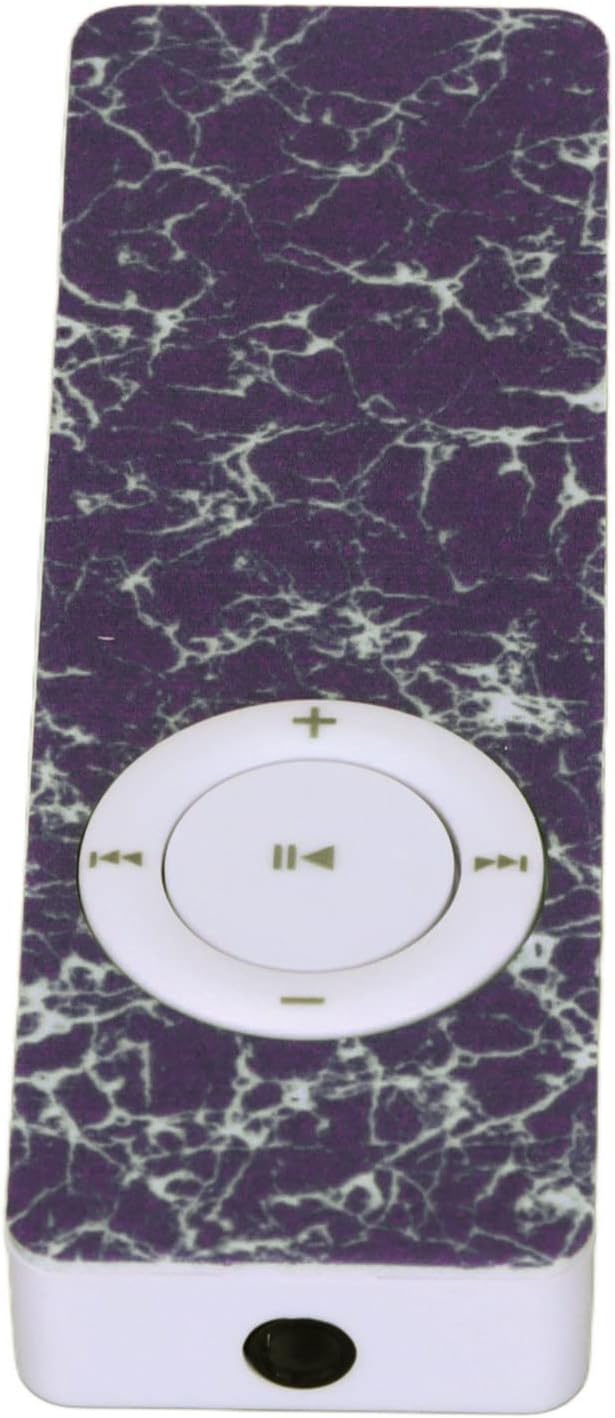
Obraz 3.2: Szczyt view of the GOWENIC Mini MP3 Player, highlighting the 3.5mm headphone jack.

Obraz 3.3: Spód view of the GOWENIC Mini MP3 Player, showing the microSD card slot and the micro USB port.
Sterownica:

Obraz 3.4: Przód view of the GOWENIC Mini MP3 Player, displaying the central circular control pad.
- Central Button (Play/Pause): Naciśnij, aby odtworzyć lub wstrzymać muzykę.
- Left/Right Buttons (Previous/Next Track): Press to skip to the previous or next song.
- Up/Down Buttons (Volume +/-): Naciśnij, aby zwiększyć lub zmniejszyć głośność.
- Przycisk zasilania: Located on the side (not visible in all images, but implied by typical MP3 player design). Slide to turn the device on or off.
4. Konfiguracja
4.1 Ładowanie urządzenia
- Connect the small end of the USB charging cable to the micro USB port on the MP3 player.
- Podłącz większy koniec kabla USB do zasilacza USB (nie ma go w zestawie) lub do portu USB komputera.
- The device will begin charging. A full charge typically takes a few hours.
- Po pełnym naładowaniu odłącz kabel.
4.2 Wkładanie karty pamięci
The GOWENIC Mini MP3 Player supports microSD cards up to 64GB (not included).
- Locate the microSD card slot on the side/bottom of the player (refer to Image 3.3).
- Ostrożnie wsuń kartę microSD do gniazda, złotymi stykami skierowanymi w dół, aż do kliknięcia.
- To remove the card, push it in slightly until it springs out.
4.3 Przesyłanie muzyki Files
- Ensure a microSD card is inserted into the MP3 player.
- Podłącz odtwarzacz MP3 do komputera za pomocą kabla USB.
- The computer should recognize the MP3 player as a removable disk.
- Open the removable disk folder.
- Przeciągnij i upuść wybraną muzykę files (e.g., MP3, WAV, FLAC) into the player's storage.
- Raz filePo przeniesieniu plików należy bezpiecznie wyjąć dysk wymienny z komputera przed odłączeniem kabla USB.
5. Instrukcja obsługi
5.1 Włączanie/wyłączanie
- Włączanie: Przesuń wyłącznik zasilania do pozycji „ON”.
- Aby wyłączyć: Przesuń wyłącznik zasilania do pozycji „WYŁ.”.
5.2 Podstawowe odtwarzanie muzyki
- Ensure headphones are connected to the 3.5mm audio jack.
- Włącz urządzenie.
- Naciśnij Przycisk centralny rozpocząć odtwarzanie muzyki.
- Naciśnij Przycisk centralny ponownie, aby wstrzymać odtwarzanie.
- Użyj Przyciski lewy/prawy aby poruszać się pomiędzy utworami.
- Dostosuj głośność za pomocą Przyciski góra/dół.

Obraz 5.1: The GOWENIC Mini MP3 Player in use, surrounded by musical notes, illustrating its primary function.
6. Konserwacja
- Czyszczenie: Use a soft, dry cloth to wipe the device. Do not use liquid cleaners or aerosols.
- Składowanie: Store the MP3 player in a cool, dry place when not in use. Avoid extreme temperatures.
- Pielęgnacja baterii: Aby przedłużyć żywotność baterii, unikaj częstego całkowitego rozładowywania baterii. Ładuj urządzenie regularnie, nawet jeśli nie jest używane regularnie.
7. Rozwiązywanie Problemów
| Problem | Możliwa przyczyna | Rozwiązanie |
|---|---|---|
| Urządzenie się nie włącza. | Bateria jest rozładowana. Wyłącznik zasilania jest wyłączony. | Charge the device. Ensure the power switch is in the "ON" position. |
| Brak dźwięku. | Headphones not connected properly. Volume is too low. Corrupt music file. | Ensure headphones are fully plugged in. Increase volume. Try playing a different music file. |
| Komputer nie rozpoznaje urządzenia. | Luźne połączenie USB. Problem ze sterownikiem. | Reconnect the USB cable. Try a different USB port or computer. Ensure the device is powered on. |
| Muzyka filenie gra. | Nieobsługiwane file format. No memory card inserted. | Zapewnić files are in a supported format (e.g., MP3, WAV, FLAC). Insert a formatted microSD card with music. |
8. Specyfikacje
- Model: GOWENICuzhgqv83iw3060-12
- Tworzywo: ABS
- Bateria: Wbudowana bateria litowo-polimerowa o pojemności 180 mAh
- Obsługa kart pamięci: Karta microSD do 64 GB (brak w zestawie)
- Łączność: Auxiliary (3.5mm headphone jack), USB (for data transfer and charging)
- Rozmiar ekranu: 1.44 cali
- Jakość dźwięku: Hi-Fi Lossless Decoding
9. Gwarancja i wsparcie
For warranty information or technical support, please refer to the retailer's policy or contact GOWENIC customer service through their official channels. Keep your purchase receipt for warranty claims.