
Wstęp
Dziękujemy za zakupasing the Max Power MPD15EQ Portable Rechargeable PA Speaker. This manual provides important information regarding the setup, operation, and maintenance of your speaker. Please read it thoroughly before using the product to ensure proper function and to maximize its lifespan.
Instrukcje bezpieczeństwa
- Nie wystawiaj urządzenia na działanie deszczu lub wilgoci, aby zapobiec ryzyku pożaru lub porażenia prądem.
- Nie otwieraj obudowy głośnika. Wewnątrz nie ma żadnych części, które mogłyby zostać naprawione przez użytkownika. Wszelkie prace serwisowe zlecaj wykwalifikowanemu personelowi.
- Zapewnij odpowiednią wentylację. Nie blokuj żadnych otworów wentylacyjnych.
- Używaj wyłącznie zasilacza dostarczonego wraz z urządzeniem.
- Keep the speaker away from heat sources, direct sunlight, and strong magnetic fields.
- Czyścić wyłącznie suchą szmatką.
Zawartość opakowania
- Max Power MPD15EQ PA Speaker
- Mikrofon przewodowy
- Zdalne sterowanie
- Zasilacz
- Instrukcja obsługi (ten dokument)
Produkt ponadview
Familiarize yourself with the various parts of your MPD15EQ speaker.
Panel przedni
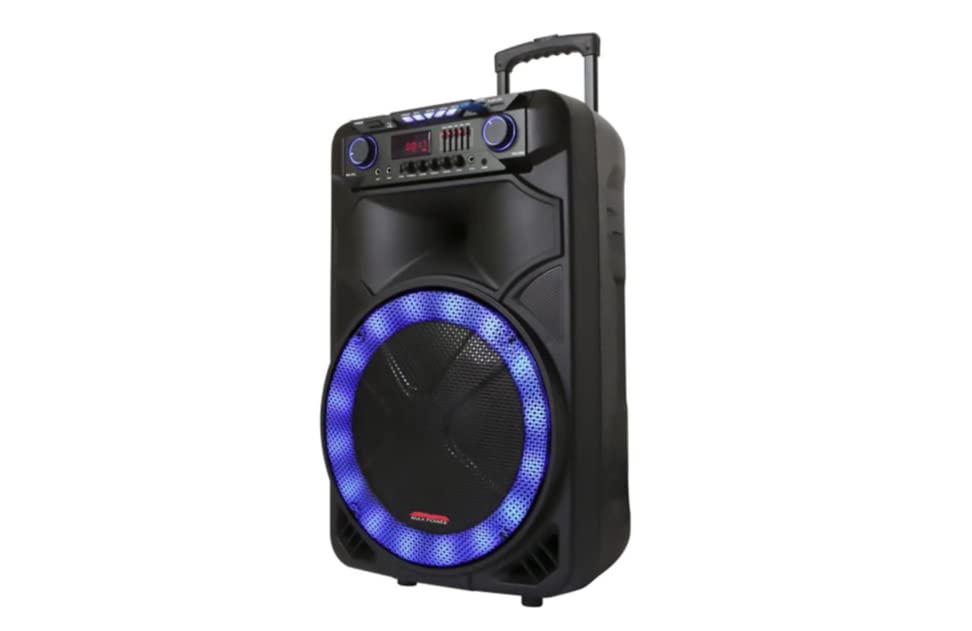
Opis obrazu: This image displays the front of the Max Power MPD15EQ speaker. It features a large 15-inch woofer at the bottom, a 5-inch horn tweeter above it, and a control panel with an LED display screen. The speaker grille covers the woofer and tweeter, and the overall design is robust and portable.
- 15" Woofer: Provides powerful bass frequencies.
- 5" Horn Tweeter: Zapewnia czyste wysokie częstotliwości.
- Ekran wyświetlacza LED: Pokazuje aktualny tryb, informacje o utworze i ustawienia.
- Panel sterowania: Buttons and knobs for various functions (volume, EQ, mode, etc.).
- LED Light On/Off Switch: Steruje zintegrowanym oświetleniem LED.
Panel tylny (npample - specific details not provided in source)
The rear panel typically includes input/output ports and the power connection.
- Pobór mocy: For connecting the power adapter to charge the battery or operate the unit.
- Port USB: Do odtwarzania dźwięku z dysków USB.
- Gniazdo karty SD: Do odtwarzania dźwięku z kart SD.
- Wejście mikrofonowe: Do podłączenia przewodowego mikrofonu.
- Wejście pomocnicze: Do podłączania zewnętrznych urządzeń audio za pomocą kabla 3.5 mm lub RCA.
Organizować coś
Ładowanie akumulatora
The MPD15EQ features a built-in rechargeable battery. Before first use, fully charge the speaker for approximately 6-8 hours.
- Connect the supplied power adapter to the speaker's power input port.
- Podłącz zasilacz do standardowego gniazdka ściennego.
- The LED display or an indicator light will show the charging status.
- Po pełnym naładowaniu odłącz zasilacz.
Pierwsze włączenie zasilania
- Ensure the speaker is fully charged or connected to power.
- Locate the power switch (usually on the rear or control panel) and turn it to the "ON" position.
- The LED display will illuminate, indicating the speaker is ready for use.
Instrukcja obsługi
Połączenie Bluetooth
- Turn on the MPD15EQ speaker.
- Press the "MODE" button on the control panel until "BLUETOOTH" or "BT" appears on the LED display.
- Włącz Bluetooth w swoim smartfonie, tablecie lub innym urządzeniu audio.
- Szukaj available devices and select "MPD15EQ" from the list.
- Once paired, you will hear a confirmation sound, and you can now play audio wirelessly.
Korzystanie z mikrofonu przewodowego
- Connect the supplied wired microphone to the "MIC IN" port on the speaker.
- Adjust the microphone volume knob (if available) on the control panel to your desired level.
- Mów do mikrofonu.
Odtwarzanie z USB/karty SD
- Włóż dysk flash USB lub kartę SD (wstępnie wgraną z dźwiękiem MP3) files) do odpowiedniego portu.
- The speaker should automatically switch to USB/SD mode and begin playing. If not, press the "MODE" button.
- Use the playback controls (Play/Pause, Next, Previous) on the control panel or remote control.
5-Band Graphic EQ Adjustment
The MPD15EQ features a 5-band graphic equalizer to fine-tune your audio output.
- Locate the EQ sliders on the control panel.
- Each slider corresponds to a specific frequency band. Adjust them up or down to boost or cut those frequencies.
- Experiment with the settings to achieve your preferred sound profile.
Światła LED
The speaker includes integrated LED lights. Use the "LED Light On/Off Switch" to activate or deactivate them.
Użycie pilota zdalnego sterowania
The included remote control allows for convenient operation from a distance. It typically includes buttons for power, mode selection, volume, track control, and EQ presets.
Konserwacja
Czyszczenie
- Zawsze wyłączaj głośnik i odłączaj go od zasilania przed czyszczeniem.
- Do przecierania powierzchni zewnętrznych należy używać miękkiej, suchej ściereczki.
- Do not use liquid cleaners, aerosols, or abrasive chemicals.
Składowanie
- Przechowuj głośnik w chłodnym, suchym miejscu, z dala od bezpośredniego światła słonecznego i ekstremalnych temperatur.
- If storing for extended periods, charge the battery periodically (e.g., every 3 months) to maintain battery health.
Rozwiązywanie problemów
| Problem | Możliwa przyczyna | Rozwiązanie |
|---|---|---|
| Brak zasilania | Akumulator rozładowany; Kabel zasilający nie jest podłączony; Wyłącznik zasilania wyłączony. | Charge the battery; Check power cable connection; Turn power switch ON. |
| Brak dźwięku | Zbyt niski poziom głośności; Nieprawidłowy tryb wprowadzania; Urządzenie nie jest sparowane (Bluetooth). | Increase master volume; Select correct input mode (Bluetooth, USB, AUX); Re-pair Bluetooth device. |
| Mikrofon nie działa | Microphone not connected; Microphone volume low; Microphone switch off. | Ensure microphone is securely plugged in; Increase microphone volume; Check microphone's ON/OFF switch. |
| Połączenie Bluetooth niestabilne | Urządzenie jest za daleko; Zakłócenia; Niski poziom baterii. | Move device closer to speaker; Avoid obstacles; Ensure speaker battery is charged. |
Specyfikacje
- Głośnik niskotonowy: Pojedynczy 15"
- Głośnik wysokotonowy: Single 5" Horn
- Pasmo przenoszenia: 40Hz-20KHz
- Impedancja: 4 omy
- Wrażliwość: 93dB
- Wymiary (szer. x gł. x wys.): 19" x 16.75" x 32"
- Waga: Około 38 funtów
- Bateria: Wbudowany akumulator
- Łączność: Bluetooth, USB, SD Card, Microphone Input, Auxiliary Input
- EQ: 5-pasmowy korektor graficzny
- Wyświetlacz: Ekran wyświetlacza LED
- Dołączone akcesoria: Wired Microphone, Remote Control
Gwarancja i wsparcie
Max Power products are designed for reliability and performance. For warranty information or technical support, please refer to the warranty card included with your purchase or visit the official Max Power webZachowaj dowód zakupu na wypadek roszczeń gwarancyjnych.
Informacje kontaktowe: Please refer to the packaging or official website for the most up-to-date contact details for customer service.
Oficjalne filmy produktowe
No official product videos from the seller were available for embedding at this time. If available, they would appear here with detailed descriptions.