
1. Koniec produktuview
The johgee Bluetooth Water Timer is designed to automate your garden watering system, providing convenience and efficiency. This smart device connects to your garden hose faucet and can be controlled via a Bluetooth-enabled application on your smartphone (Android or iOS).
Główne cechy obejmują:
- APP Smart Control: Program and manage watering schedules remotely via the "Tuya Smart" app within Bluetooth range.
- Łączność Bluetooth: Automatic reconnection to your device once paired, ensuring continuous operation.
- Rainy Mode: Automatically skips scheduled watering during rainy weather to conserve water.
- Dwa tryby podlewania: Supports Timed Irrigation and Cyclic Irrigation for flexible scheduling.
- Trwała konstrukcja: Constructed from PC+UV silicone material with an IPX5 waterproof rating for outdoor use.
This manual provides detailed instructions for installation, operation, maintenance, and troubleshooting to help you get the most out of your water timer.

Image 1.1: The johgee Bluetooth Water Timer installed and actively watering a lawn.
2. Konfiguracja i instalacja
2.1 Zawartość opakowania
Przed instalacją należy upewnić się, że wszystkie komponenty są obecne:
- johgee Bluetooth Water Timer
- Instrukcja obsługi
- 3/4 inch fitting (pre-installed or included)
- 1/2 inch adapter (for EU-type faucets, if applicable)
- 5mm O-ring (for sealing)
- Quick Connector (for hose attachment)
2.2 Instalacja baterii
- Znajdź komorę baterii z tyłu sterownika wodnego.
- Otwórz pokrywę komory baterii.
- Insert two (2) AA alkaline batteries (not included), ensuring correct polarity (+/-).
- Dokładnie zamknij pokrywę komory baterii, aby zachować wodoodporność.
2.3 Connecting to Faucet
The water timer is designed for standard 3/4 inch garden hose faucets. An adapter is provided for 1/2 inch EU-type faucets.
- Sprawdź, czy kran jest zakręcony.
- If your faucet is a 1/2 inch EU-type, first screw the 1/2 inch adapter onto the faucet, ensuring the 5mm O-ring is in place for a tight seal.
- Screw the water timer's 3/4 inch rotating connector onto your faucet (or the 1/2 inch adapter). Tighten it as much as possible by hand to prevent leaks. Do not overtighten with tools.
- Attach your garden hose to the quick connector at the bottom of the water timer.
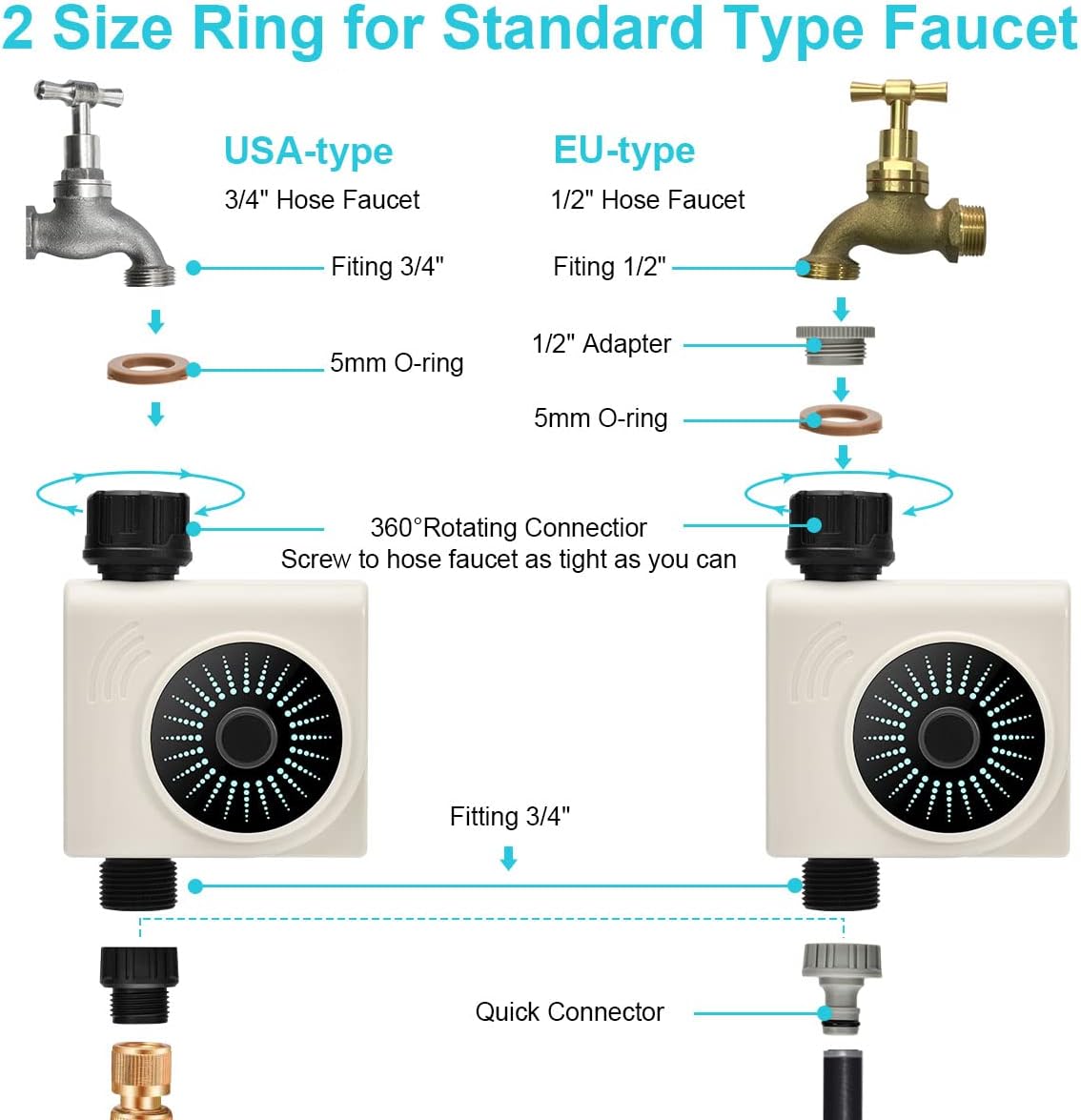
Image 2.1: Connection diagram for different faucet types.
2.4 Pobieranie i parowanie aplikacji
- Pobierz aplikację „Tuya Smart” ze sklepu App Store (iOS) lub Google Play Store (Android).
- Zarejestruj się lub zaloguj na swoje konto Tuya Smart.
- Ensure your smartphone's Bluetooth is enabled and you are within 49.2 feet (15 meters) of the water timer in an open area without interference.
- Open the Tuya Smart app. The app should automatically detect the new device. If not, tap the "+" icon to add a device and select the water timer from the list of discoverable Bluetooth devices.
- Aby dokończyć proces parowania, postępuj zgodnie z instrukcjami wyświetlanymi na ekranie.

Image 2.2: Controlling the water timer via the Tuya Smart app.
3. Instrukcja obsługi
Once paired, you can control and program your johgee Bluetooth Water Timer using the Tuya Smart app.
3.1 Timed Irrigation Mode
This mode allows you to set specific start times and durations for watering.
- In the Tuya Smart app, navigate to the water timer's control interface.
- Select "Timed Irrigation" or a similar option.
- Set the desired start time, watering duration (e.g., minutes), and frequency (e.g., daily, specific days of the week).
- Save your settings. The timer will execute the program automatically.

Image 3.1: App interface for setting timed irrigation schedules.
3.2 Cyclic Irrigation Mode
Cyclic irrigation allows you to set a watering interval within a specific period, useful for deep watering or new plantings.
- From the app's control interface, select "Cyclic Irrigation."
- Define the start and end times for the cycle.
- Set the watering duration (how long it waters each time).
- Set the soaking time (the interval between watering sessions within the cycle).
- Zapisz ustawienia.
3.3 Sterowanie ręczne
You can manually start or stop watering at any time without affecting your programmed schedules.
- In the app, locate the manual control option (often a large "Open" or "Close" button).
- Tap "Open" to start watering immediately.
- Tap "Close" to stop watering.

Image 3.2: Manual watering function in the app.
3.4 Rainy Mode
Activate Rainy Mode to temporarily suspend all watering schedules when rain is detected or expected.
- In the app, locate the "Rainy Mode" toggle switch.
- Toggle it ON to activate. The timer will not execute any programmed watering while Rainy Mode is active.
- Toggle it OFF to resume normal scheduled watering.
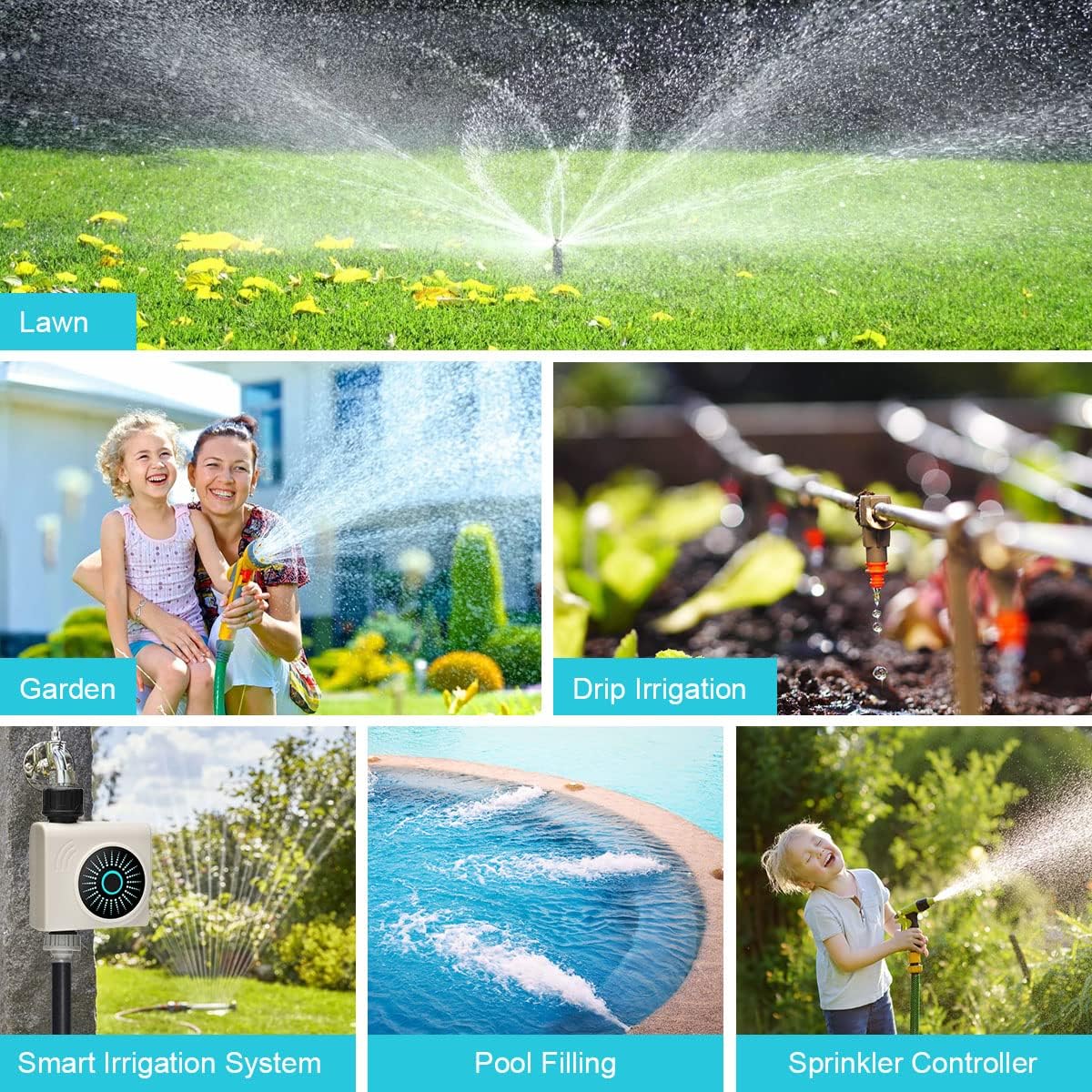
Image 3.3: Rainy Mode activated, preventing watering during rainfall.
4. Konserwacja
4.1 Czyszczenie
Periodically inspect and clean the water timer to ensure optimal performance.
- Ekran filtra: The inlet of the water timer contains a filter screen to prevent debris from entering. Regularly remove and rinse this screen under running water to clear any accumulated particles.
- Zewnętrzny: Wipe the exterior of the timer with a damp cloth to remove dirt or mineral deposits. Do not use abrasive cleaners.
4.2 Wymiana baterii
Replace batteries when the app indicates low battery or if the timer stops responding. Always use fresh alkaline batteries.
- Turn off the faucet and detach the water timer.
- Otwórz komorę baterii.
- Wyjmij stare baterie i zutylizuj je zgodnie z lokalnymi przepisami.
- Insert new AA alkaline batteries, observing correct polarity.
- Dokładnie zamknij komorę baterii.
4.3 Zimowanie
Before the first frost, remove the water timer from the faucet and store it indoors in a dry, protected area. Freezing temperatures can damage the internal components and seals.
5. Rozwiązywanie Problemów
- Brak przepływu wody:
- Sprawdź, czy kran jest całkowicie otwarty.
- Check if the filter screen is clogged (refer to Section 4.1).
- Verify that the watering schedule is active and not paused by Rainy Mode.
- Check battery level in the app; replace batteries if low.
- App Cannot Connect to Timer:
- Upewnij się, że Bluetooth jest włączony w Twoim smartfonie.
- Move closer to the water timer (within 49.2 feet / 15 meters).
- Check battery level of the timer.
- Uruchom ponownie aplikację Tuya Smart.
- If issues persist, try unpairing and re-pairing the device in the app.
- Timer Leaks at Faucet Connection:
- Ensure the connection is hand-tightened securely.
- Check if the O-ring is properly seated and not damaged. Replace if necessary.
- Verify that the correct adapter (if applicable) is used for your faucet type.
- Scheduled Watering Not Occurring:
- Confirm that the schedule is correctly set and saved in the app.
- Check if Rainy Mode is active.
- Ensure the timer has sufficient battery power.
6. Specyfikacje
| Specyfikacja | Szczegół |
|---|---|
| Marka | johgee |
| Numer modelu | 611B |
| Tworzywo | PC + UV Silicone |
| Waga przedmiotu | 422 gram |
| Stopień wodoodporności | IPX5 |
| Kompatybilność kranów | 3/4 inch (with 1/2 inch adapter for EU-type) |
| Łączność | Bluetooth |
| Zasięg Bluetooth | Do 49.2 stóp (15 m) w terenie otwartym |
| Źródło zasilania | 2 baterie alkaliczne AA (brak w zestawie) |
7. Gwarancja i wsparcie
7.1 Informacje o gwarancji
The johgee Bluetooth Water Timer is covered by a manufacturer's warranty against defects in materials and workmanship. Please refer to the product packaging or the official johgee webSzczegółowe warunki gwarancji i jej czas trwania można znaleźć na stronie.
7.2 Obsługa klienta
For technical assistance, troubleshooting, or warranty claims, please contact johgee customer support through the following channels:
- W sieci: Visit the official johgee webStrona z odpowiedziami na często zadawane pytania i formularzami kontaktowymi pomocy technicznej.
- E-mail: Aby uzyskać adres e-mail pomocy technicznej, zapoznaj się z opakowaniem produktu lub kartą gwarancyjną.
- Detalista: Aby uzyskać pomoc, skontaktuj się ze sprzedawcą, u którego kupiłeś produkt.
When contacting support, please have your product model number (611B) and purchase information readily available.