
1. Wprowadzenie
Thank you for choosing the DIHOOM Wireless Outdoor Security Camera expansion unit. This camera is designed to be added to an existing DIHOOM wireless security camera system (ASIN: B09YRCF943). It features 5-megapixel (2K) resolution, advanced AI face and human detection, full-color night vision, two-way audio communication, and an IP66 weatherproof rating for reliable outdoor surveillance. Please read this manual carefully before installation and operation to ensure proper use and optimal performance.
2. Informacje dotyczące bezpieczeństwa
- Ensure the power adapter (sold separately) is compatible with the camera's power requirements and local electrical standards.
- Nie wystawiaj aparatu na działanie ekstremalnych temperatur wykraczających poza zakres jego działania.
- Unikaj umieszczania kamery w pobliżu silnych pól elektromagnetycznych.
- Nie próbuj demontować ani modyfikować kamery. Spowoduje to unieważnienie gwarancji.
- Mount the camera securely to prevent accidental falls.
- Przechowuj aparat i jego akcesoria poza zasięgiem dzieci.
3. Zawartość opakowania
Proszę sprawdzić, czy w paczce znajdują się następujące elementy:
- DIHOOM Wireless Outdoor Security Camera Unit
- Śruby montażowe i kołki ścienne
- Waterproof Cap for Network Cable (if applicable)
- Szybki przewodnik
Notatka: A power adapter is not included and must be purchased separately. This camera is an expansion unit and requires an existing DIHOOM wireless security camera system (ASIN: B09YRCF943) to function.
4. Koniec produktuview
The DIHOOM Wireless Outdoor Security Camera features a robust design suitable for outdoor environments. Key components include the camera lens, infrared LEDs, white LED lights for full-color night vision, a microphone, a speaker for two-way audio, and an antenna for wireless connectivity.

Image: DIHOOM Wireless Outdoor Security Camera showing its main body and white LED lights. The camera is white with a black lens area and two prominent white LED lights on the front. An antenna extends from the top.
5. Konfiguracja
5.1. Montaż kamery
- Wybierz odpowiednie miejsce na zewnątrz, które zapewni pożądane viewing angle and is within range of your DIHOOM NVR/system's Wi-Fi signal.
- Use the included mounting screws and wall plugs to securely attach the camera bracket to a wall or ceiling. Ensure the camera is stable.
- Adjust the camera's angle for optimal coverage. The antenna is foldable for flexible positioning.

Image: A diagram illustrating the simple installation process, showing the camera mounted on a wall and its foldable antenna being adjusted. Another part of the image shows a multi-camera setup connected to a monitor.
5.2. Podłączenie zasilania
Connect a compatible 12V DC power adapter (not included) to the camera's power input. Ensure the connection is secure and protected from moisture, especially for outdoor installations.
5.3. Adding to Your DIHOOM System
This camera is designed to be an expansion unit for the DIHOOM wireless security camera set (ASIN: B09YRCF943). Refer to your main DIHOOM NVR system's manual for specific instructions on how to add new cameras. Generally, this involves:
- Power on the new camera.
- Access the NVR's camera management interface.
- Initiate the 'Add Camera' or 'Pair Camera' function. The NVR will automatically search for and connect to the new camera.
- Once connected, the camera's live feed should appear on your NVR monitor or linked mobile application.
6. Instrukcja obsługi
6.1. Na żywo View i nagrywanie
Access the live video feed through your DIHOOM NVR or the dedicated smartphone application. The system supports various recording modes:
- Ciągłe nagrywanie: Nagrywa 24/7.
- Nagrywanie z wykrywaniem ruchu: Nagrywa tylko po wykryciu ruchu.
- Zaplanowane nagrywanie: Nagrania z określonych okresów czasu.

Image: A smartphone screen displaying the DIHOOM app interface, showing options for recording modes (continuous, motion detection, alarm recording) and user management settings.
6.2. Tryby widzenia nocnego
Kamera oferuje dwa tryby widzenia nocnego:
- Nocna Nocna Wizja: Zapewnia wyraźne czarno-białe obrazy w całkowitej ciemności dzięki zastosowaniu diod LED podczerwonych.
- Pełnokolorowa wizja nocna: Utilizes built-in white LED lights to illuminate the area, providing vivid full-color video even in low-light conditions. This mode can be activated automatically upon detection of an intruder. The night vision range is up to 20 meters.
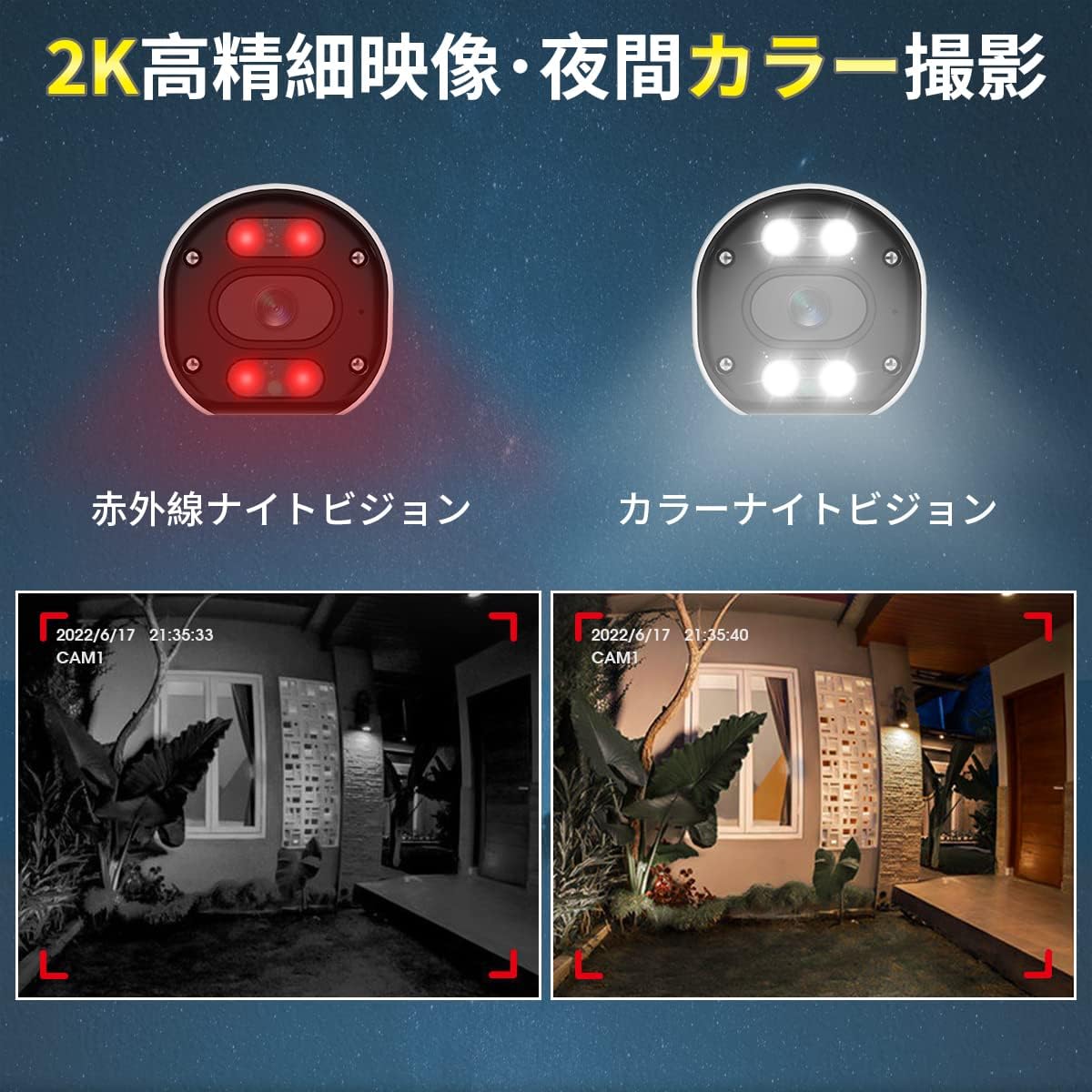
Image: A split image comparing infrared night vision (monochrome) and full-color night vision footage from the camera, demonstrating the clarity and color retention of the latter.
6.3. Dźwięk dwukierunkowy
The camera is equipped with a built-in microphone and speaker, enabling two-way audio communication. Through the mobile app, you can listen to the camera's surroundings and speak through the camera's speaker. This feature is useful for deterring intruders or communicating with visitors.

Image: An illustration showing a person at a door communicating with someone via the camera's two-way audio feature. Another section highlights the camera's IP66 waterproof design under rain.
6.4. AI Detection Features
The camera integrates advanced AI for enhanced security:
- Wykrywanie ludzi przez sztuczną inteligencję: Accurately identifies human movement, significantly reducing false alarms triggered by animals, insects, or swaying trees (up to 99% false alarm reduction). When a human is detected, you will receive instant app notifications.
- Rozpoznawanie twarzy przez sztuczną inteligencję: The system can detect and identify faces from recorded footage. You can register up to 10,000 faces and search for specific individuals' video clips. Up to 8 faces can be detected simultaneously.
- Alarm dźwiękowy i świetlny: Upon detecting an intruder, the camera can activate a 110dB siren and flash its 200LM white LED lights to deter unwanted visitors. This feature is configurable via the app.

Image: A diagram illustrating AI human detection, where a person entering a monitored area triggers an app notification, a sound siren, and flashing white lights from the camera.

Image: An illustration demonstrating AI face recognition, showing a face being detected and highlighted, with a note indicating simultaneous detection of up to 8 people and registration of up to 10,000 faces.
6.5. Detection Area and Sensitivity
You can customize the detection area and adjust the sensitivity of motion detection to suit your specific surveillance needs. This helps to focus monitoring on critical zones and further reduce unwanted alerts.

Image: A diagram showing a person walking into a defined 'alert area' with a 'warning line'. Below, a slider indicates 6 levels of detection sensitivity, allowing users to fine-tune the camera's responsiveness.
7. Konserwacja
- Czyszczenie: Regularnie czyść obiektyw aparatu miękką, suchą ściereczką, aby zapewnić wysoką jakość obrazu. Nie używaj silnych środków chemicznych.
- Aktualizacje oprogramowania układowego: Check the DIHOOM app or website periodically for firmware updates. Keeping your camera's firmware up-to-date ensures optimal performance and access to new features.
- Kontrola kabla: Periodically inspect power and network cables for any signs of wear or damage, especially in outdoor installations.
8. Rozwiązywanie Problemów
- Brak obrazu/Offline:
- Sprawdź, czy kamera jest prawidłowo włączona.
- Check the Wi-Fi connection between the camera and the NVR.
- Verify the camera is correctly added to your DIHOOM NVR system.
- Restart the camera and NVR.
- Słaba jakość obrazu:
- Wyczyść obiektyw aparatu.
- Upewnij się, że przed obiektywem nie ma żadnych przeszkód.
- Sprawdź, czy na wprost aparatu nie znajdują się silne źródła światła.
- Verify the camera's resolution settings in the app/NVR.
- Częste fałszywe alarmy:
- Adjust the motion detection sensitivity to a lower level.
- Define a specific detection area to exclude irrelevant zones (e.g., swaying trees, busy roads).
- Upewnij się, że wykrywanie człowieka przez sztuczną inteligencję jest włączone.
- Problemy z dwukierunkowym dźwiękiem:
- Sprawdź ustawienia głośności mikrofonu i głośnika w aplikacji.
- Upewnij się, że nie ma żadnych przeszkód fizycznych blokujących mikrofon lub głośnik.
- Verify network stability for real-time audio transmission.
9. Specyfikacje
| Funkcja | Specyfikacja |
|---|---|
| Numer modelu | B09YYB1261 |
| Marka | DIHOOM |
| Rozdzielczość wideo | Up to 5 Megapixel (2K / 1440p) |
| Czujnik obrazu | SONY CMOS Sensor |
| Łączność | Bezprzewodowy (Wi-Fi) |
| Wizja nocna | Infrared Night Vision, Full-Color Night Vision (20m range) |
| Audio | Dwukierunkowa rozmowa (wbudowany mikrofon i głośnik) |
| Funkcje wykrywania | AI Human Detection, AI Face Recognition, Motion Sensor |
| Alarm | 110dB Siren, 200LM White Light Alarm |
| Ocena odporności na warunki atmosferyczne | IP66 pyłoszczelna i wodoodporna |
| Ochrona przed piorunami | 4KV |
| Kompatybilne urządzenia | Smartphone (via app), DIHOOM NVR System (ASIN: B09YRCF943) |
| Wymiary | Wymiary 19.6 x 10.9 x 9.7 cm |
| Waga | 430 gramów |
10. Gwarancja i wsparcie
DIHOOM products come with a standard manufacturer's warranty. For specific warranty terms and conditions, please refer to the warranty card included with your original DIHOOM NVR system or visit the official DIHOOM website. For technical support, troubleshooting assistance, or any inquiries, please contact DIHOOM customer service through the contact information provided on the official webmiejscu lub w opakowaniu produktu.