
1. Wprowadzenie
The V8 Live Sound Card is a versatile audio mixer and external sound card designed for live broadcasting, KTV, and voice chat. It offers multiple sound effects, adjustable audio controls, and broad compatibility with various devices, enhancing your audio experience for entertainment and professional use.
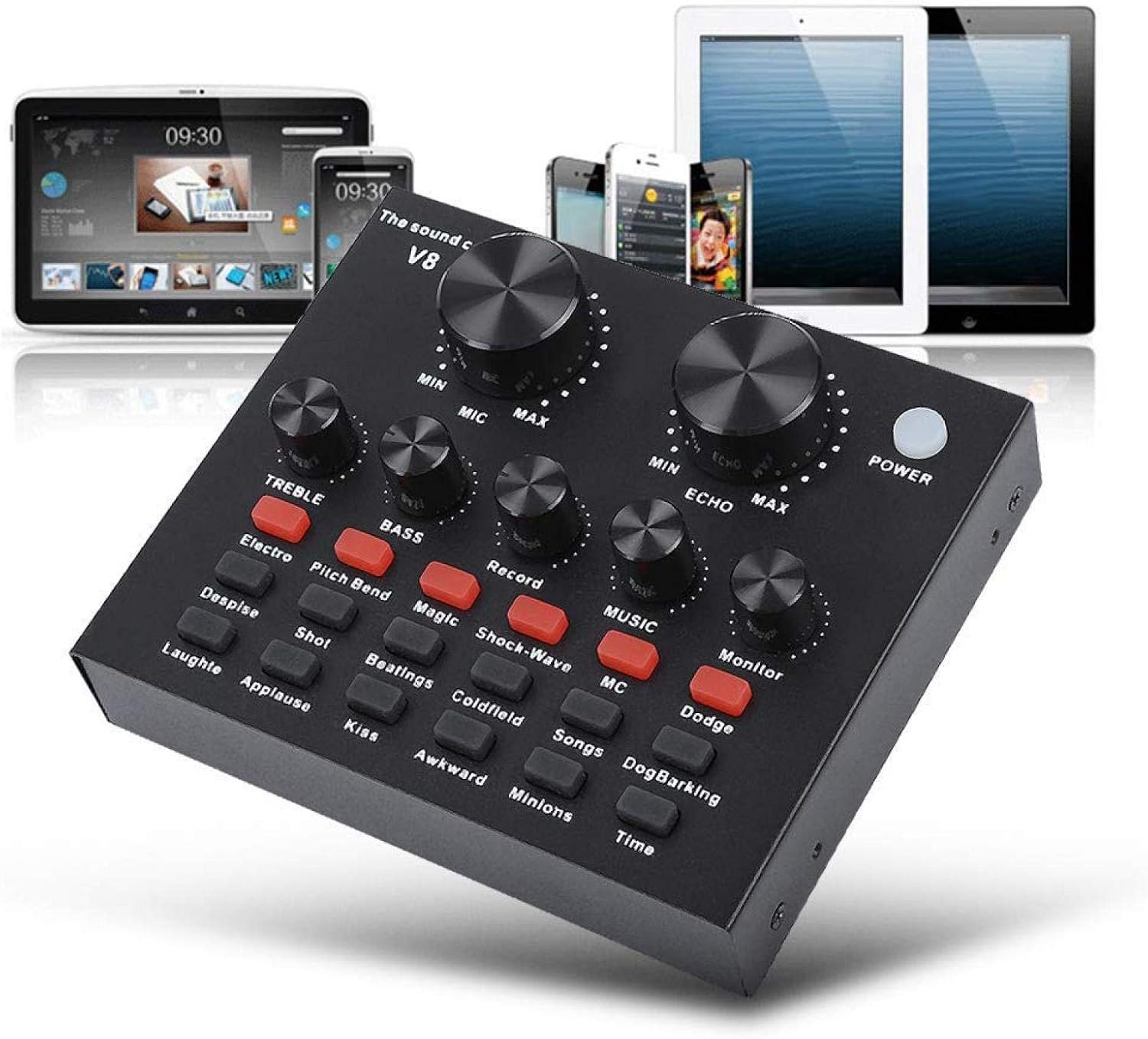
Figure 1: V8 Live Sound Card connected to various devices.
2. Funkcje
- Obsługa wielu urządzeń: Compatible with mobile phones, computers (laptops, desktops), and single headsets. Supports dual cell phone live, mobile phone computer synchronous live, one computer live, computer accompaniment cell phone live, and instrument input cell phone live.
- Professional Noise Reduction Technology: Features adjustable volume controls for various needs, including reverberation size, microphone volume, high/bass, recording volume, music volume, and monitoring volume (earphone function).
- Multiple Effects, Modes, and Gameplay: Includes 12 kinds of electric sound, 12 kinds of sound effects, and 10 kinds of effect modes. Silicone buttons allow for real-time volume adjustments without software.
- Przenośny i lekki: Designed for portability, allowing users to enjoy singing or speech anywhere.
- Szerokie zastosowanie: Suitable for Home KTV, Voice Chat, Live streaming (Facebook, Periscope, Livestream, Wechat, Smule), and more. Plug and Play functionality, no driver downloads required.
3. Zawartość opakowania
Po otwarciu opakowania należy sprawdzić, czy wszystkie elementy są obecne i w dobrym stanie:
- 1 x V8 Live Sound Card Unit
- 2 x kable audio
- 1 x kabel USB
- 1 x Instrukcja obsługi w języku angielskim

Figure 2: V8 Live Sound Card and its included accessories.
4. Koniec produktuview
Familiarize yourself with the V8 Live Sound Card's layout and ports:
Elementy sterujące na panelu przednim:

Figure 3: Front panel of the V8 Live Sound Card.

Rysunek 4: Szczegółowy view of control panel labels.
- MIC (Microphone Volume): Reguluje głośność wejściową mikrofonu.
- ECHO (Echo Effect): Controls the intensity of the echo effect.
- TREBLE (Regulacja tonów wysokich): Adjusts the high-frequency sound.
- BASS (Regulacja basów): Adjusts the low-frequency sound.
- RECORD (Recording Volume): Controls the volume of the recorded output.
- MUSIC (Music Volume): Dostosowuje głośność muzyki w tle.
- MONITOR (Monitoring Volume): Controls the volume heard through connected headphones/earphones.
- Przycisk zasilania: Włącza/wyłącza urządzenie.
- Przyciski efektów dźwiękowych: Various buttons for specific sound effects (e.g., Electro, Pitch Bend, Magic, Shock-Wave, MC, Dodge, Despise, Shot, Beatings, Coldfield, Songs, Dog Barking, Laughter, Applause, Kiss, Awkward, Minions, Time, Reverb Delay, Voice Change, Elimination, Crack, 9277, Yell, Slash, PUBG).
Porty na tylnym panelu:

Figure 5: Rear panel ports of the V8 Live Sound Card.
- Charging / Computer Interface: USB port for charging and connecting to a computer.
- Live 1 / Live 2: Ports for connecting mobile phones for live broadcasting.
- Interfejs akompaniamentu: For connecting an external audio source for background music.
- Głośnik słuchawkowy: Output for connecting external speakers or headphones.
- Interfejs zestawu słuchawkowego: For connecting a headset with a combined microphone and headphone jack.
- Mikrofon pojemnościowy: Wejście dla mikrofonów pojemnościowych.
- Dynamic Mic: Input for dynamic microphones.
5. Konfiguracja
Follow these steps to set up your V8 Live Sound Card:
Pierwsze włączenie:
- Ensure the sound card is charged or connected to a power source via the USB cable.
- Naciśnij MOC button on the front panel to turn on the device.
Metody połączenia:

Figure 6: Computer Live/Accompaniment connection method.
- For Computer Live/Accompaniment:
- Connect the USB cable from the sound card's Charging / Computer Interface to your computer. The sound card should be automatically recognized.
- Podłącz mikrofon do Mikrofon pojemnościowy or Mikrofon dynamiczny wejście.
- Connect your headphones or speakers to the Głośnik słuchawkowy or Interfejs słuchawkowy.
- If using an accompaniment device (e.g., another phone for music), connect it to the Accompaniment Interface using an audio cable.
- For Single Mobile Phone Live Broadcast:
- Connect one audio cable from the sound card's Na żywo 1 or Na żywo 2 port to your mobile phone's audio jack. If your phone does not have a 3.5mm audio jack, use an audio adapter cable (not included).
- Connect your microphone to the appropriate mic input.
- Podłącz słuchawki do Interfejs słuchawkowy or Głośnik słuchawkowy.
- For Dual Mobile Phone Live Broadcast:
- Connect one audio cable from the sound card's Na żywo 1 port to your first mobile phone.
- Connect a second audio cable from the sound card's Na żywo 2 port to your second mobile phone.
- Connect your microphone and headphones as described above.
6. Instrukcja obsługi
Once connected, you can begin using your V8 Live Sound Card:
- Adjusting Volumes: Use the large knobs for MIKROFON I ECHO. Use the smaller knobs for POTROIĆ, BASS, NAGRYWAĆ, MUZYKA, I MONITOR to fine-tune your audio levels.
- Applying Sound Effects: Press the various sound effect buttons on the front panel to activate different effects. Experiment with each button to find the desired sound.
- Zmiana głosu: Wykorzystaj
Powiązane dokumenty16508823665168
RELATED DOCUMENTInstrukcja obsługi karty dźwiękowej na żywoInstrukcja obsługi karty dźwiękowej V8 Live zawierająca szczegółowe informacje na temat konfiguracji, metod podłączania telefonów komórkowych i komputerów, środków ostrożności podczas użytkowania oraz parametrów produktu.View document →RELATED DOCUMENTInstrukcja obsługi karty dźwiękowej ALPOWL V8 LiveInstrukcja obsługi karty dźwiękowej ALPOWL V8 Live, szczegółowo opisująca jej funkcje, konfigurację, metody połączenia z komputerem i urządzeniem mobilnym, parowanie Bluetooth oraz specyfikacje produktu dotyczące transmisji na żywo i nagrywania dźwięku.View document →RELATED DOCUMENTInstrukcja obsługi karty dźwiękowej na żywoInstrukcja obsługi karty dźwiękowej Live Sound Card zawierająca szczegółowe informacje na temat jej funkcji, środków ostrożności podczas użytkowania, metod podłączania telefonów komórkowych i komputerów oraz wskazówki dotyczące rozwiązywania problemów.View document →RELATED DOCUMENTV8 Audio External USB Live Broadcast Sound Card - Features & SpecificationsDetailed specifications and features for the V8 Audio External USB Sound Card, designed for mobile and computer live broadcasting with Bluetooth support.View document →RELATED DOCUMENTAyeBeau Live Sound Card User ManualUser manual for the AyeBeau Live Sound Card, including setup instructions, connection diagrams, and technical specifications.View document →RELATED DOCUMENTV8 Audio External USB Sound Card SpecificationsTechnical specifications and features for the V8 Audio External USB Sound Card, including sound effects, connection methods, and physical dimensions.View document →RELATED DOCUMENTKarta dźwiękowa V8: instrukcje podłączania i przewodnik rozwiązywania problemówKompleksowy przewodnik po podłączaniu i rozwiązywaniu problemów z kartą dźwiękową V8 do transmisji na żywo, nagrywania i zmiany głosu. Zawiera schematy konfiguracji i rozwiązania typowych problemów.View document →RELATED DOCUMENTV8 Audio External USB Sound Card User GuideTechnical specifications and feature overview for the V8 Audio External USB Headset Microphone Live Broadcast Sound Card by APWIKOGER.View document →Ask a question about this manual
Ask about setup, troubleshooting, compatibility, parts, safety, or missing instructions. Manuals+ will review the question and use this page’s manual context to help answer it.


