
1. Wprowadzenie
This manual provides essential information for the safe and efficient use of your Princess 357250 Smart Air Cooler Fan. Please read these instructions carefully before operating the appliance and retain them for future reference.

Figure 1: Princess 357250 Smart Air Cooler Fan in operation, illustrating air circulation.
The Princess 357250 is a versatile 3-in-1 appliance functioning as a fan, air cooler, and air freshener. It features a 3.5-liter water reservoir, three operating modes, and can be controlled via the HomeWizard Climate app, voice commands, or the included remote control.
2. Ważne instrukcje bezpieczeństwa
Aby zmniejszyć ryzyko pożaru, porażenia prądem i obrażeń ciała, należy zawsze przestrzegać podstawowych zasad bezpieczeństwa podczas korzystania z urządzeń elektrycznych.
- Przed użyciem należy przeczytać wszystkie instrukcje.
- Upewnij się, że objętośćtage podana na urządzeniu odpowiada lokalnej objętości sieci zasilającejtage przed połączeniem.
- Nie zanurzaj urządzenia, przewodu ani wtyczki w wodzie lub innych płynach.
- Należy zachować ścisły nadzór, jeżeli z urządzenia korzystają dzieci lub w ich pobliżu.
- Odłączaj urządzenie od gniazdka, gdy nie jest używane, przed montażem lub demontażem części oraz przed czyszczeniem.
- Nie używaj żadnego urządzenia, jeśli przewód lub wtyczka są uszkodzone, ani po awarii urządzenia lub po jego uszkodzeniu w jakikolwiek sposób.
- Nie stosować na zewnątrz.
- Nie pozwól, aby przewód zwisał z krawędzi stołu lub blatu i dotykał gorących powierzchni.
- Nie umieszczać na gorącym palniku gazowym lub elektrycznym ani w jego pobliżu, a także w nagrzanym piekarniku.
- Always place the appliance on a dry, stable, and level surface.
- Stosuj wyłącznie akcesoria zalecane lub sprzedawane przez producenta.
- Nie blokuj żadnych otworów wentylacyjnych.
- Do not fill the water tank above the MAX level indicator.
- Przed użyciem należy zawsze upewnić się, że zbiornik na wodę jest bezpiecznie umieszczony na swoim miejscu.
3. Składniki produktu
The Princess 357250 Smart Air Cooler Fan comes with the following components:
- Princess 357250 Smart Air Cooler Fan unit
- Zdalne sterowanie
- 2 x CR2032 batteries (for remote control)
- Instrukcja obsługi
- Ice packs (typically 2, for enhanced cooling)

Rysunek 2: Dołączony pilot zdalnego sterowania zapewniający wygodną obsługę.

Rysunek 3: Example of an ice pack used to enhance cooling performance.
4. Konfiguracja i pierwsze użycie
4.1 Rozpakowanie
Carefully remove the air cooler from its packaging. Retain the packaging for future storage or transport. Check that all components listed in Section 3 are present and undamaged.
4.2 Umieszczenie
Place the air cooler on a firm, level surface. Ensure there is adequate space around the unit for proper air circulation. Do not place it directly against a wall or furniture that could obstruct the air intake or outlet.
4.3 Napełnianie zbiornika na wodę
- Wyciągnij zbiornik na wodę z tyłu dolnej części urządzenia.
- Fill the water tank with clean, cool water. Do not exceed the 'MAX' fill line.
- For enhanced cooling, place the included ice packs in a freezer until frozen. Once frozen, add them to the water tank.
- Ostrożnie wsuń zbiornik na wodę z powrotem do urządzenia, aż zatrzaśnie się na swoim miejscu.
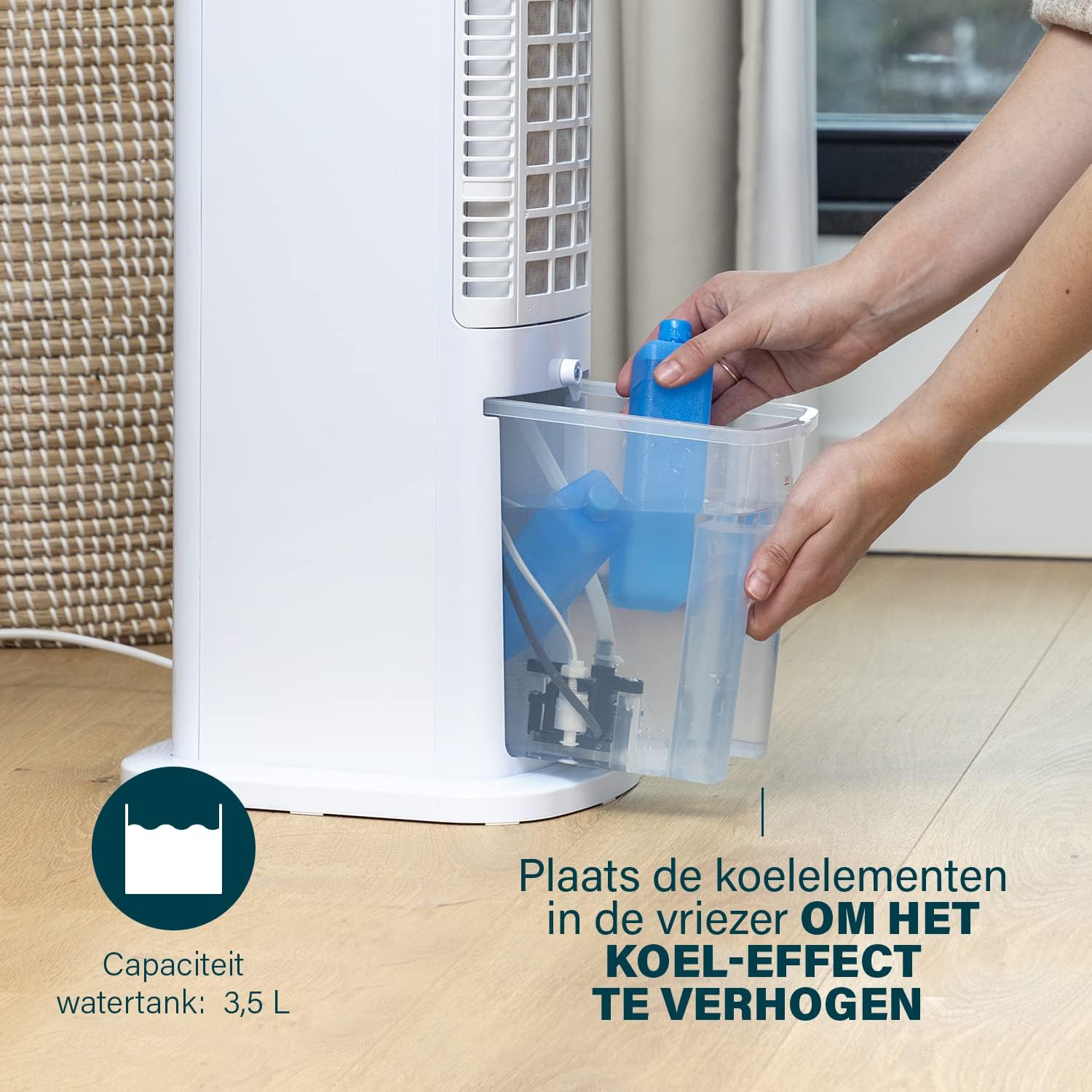
Figure 4: Adding ice packs to the water reservoir to increase cooling effect.
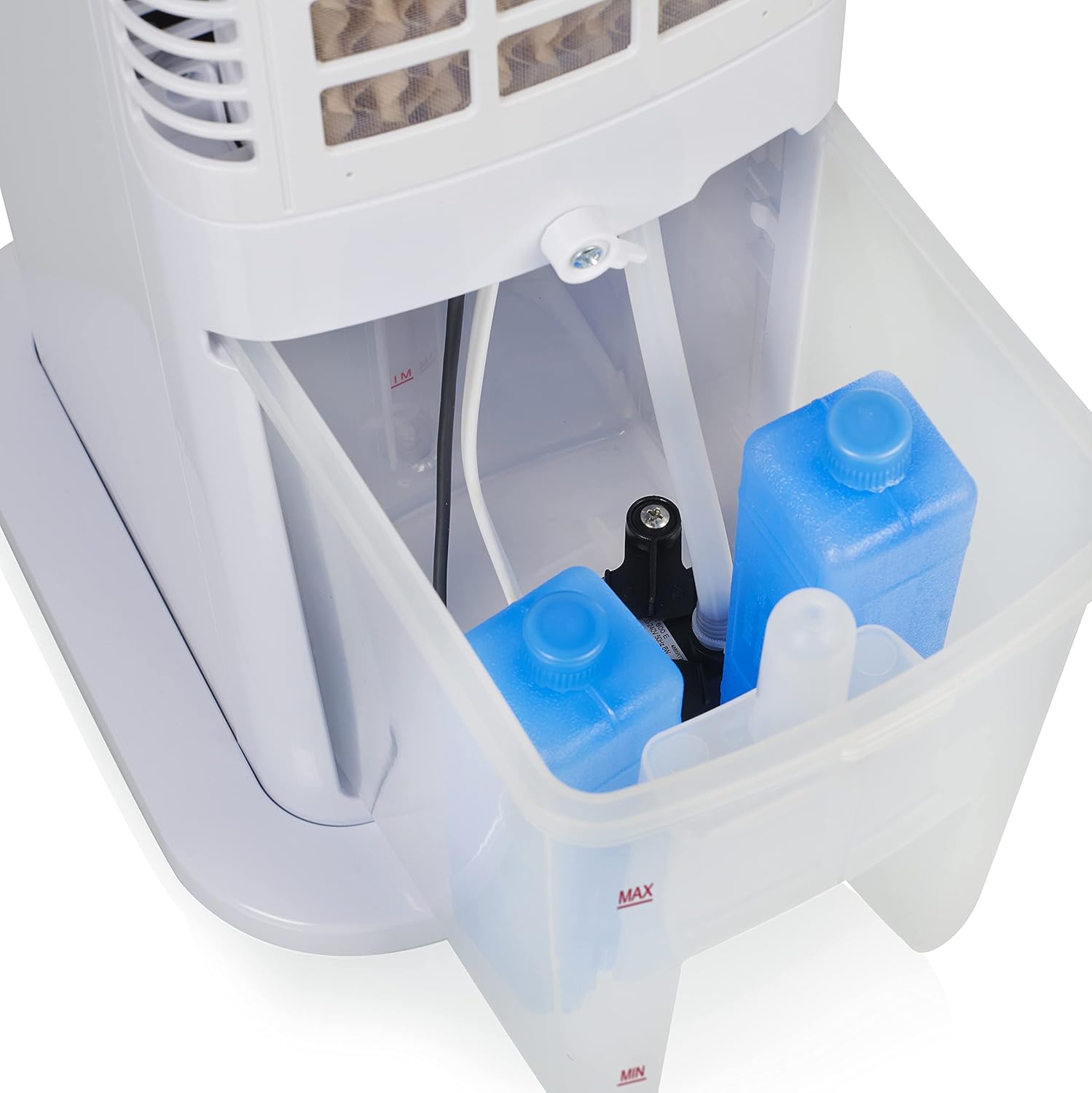
Figure 5: Water tank with ice packs, indicating fill levels.
4.4 Połączenie zasilania
Plug the power cord into a suitable electrical outlet (230V). The unit will enter standby mode.
5. Instrukcja obsługi
The Princess 357250 can be operated via its control panel, remote control, or the HomeWizard Climate app.
5.1 Panel sterowania ponadview
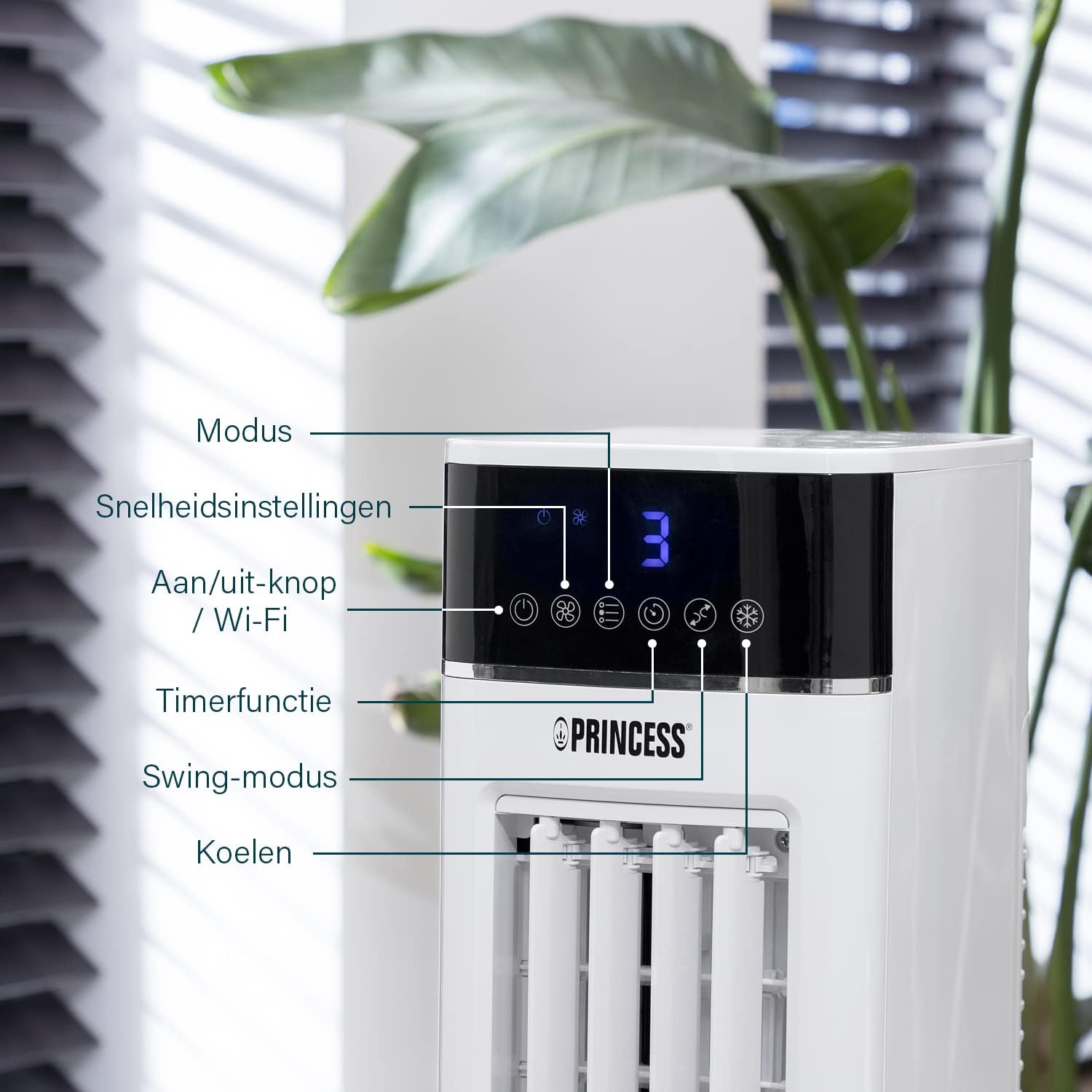
Figure 6: Control panel with various function buttons.
- Power Button (On/Off / Wi-Fi): Turns the unit on or off. Press and hold to activate Wi-Fi pairing mode.
- Przycisk trybu: Cycles through operating modes (Normal, Natural, Sleep).
- Przycisk prędkości: Dostosowuje prędkość wentylatora (niska, średnia, wysoka).
- Przycisk timera: Sets the operating timer.
- Przycisk Swing: Activates or deactivates the oscillation function.
- Fajny przycisk: Activates or deactivates the evaporative cooling function (requires water in the tank).

Figure 7: Manual control via the top panel buttons.
5.2 tryby pracy
- Tryb normalny: Provides a constant airflow at the selected speed.
- Tryb naturalny: Simulates natural breeze by varying fan speed intermittently.
- Tryb uśpienia: Operates at a lower, quieter speed, gradually decreasing fan speed over time for undisturbed sleep.
5.3 Funkcja oscylacji
Press the 'Swing' button to activate the oscillation function. The unit will rotate horizontally to distribute air across a wider area (Oscillation range: 50°). Press again to stop oscillation.
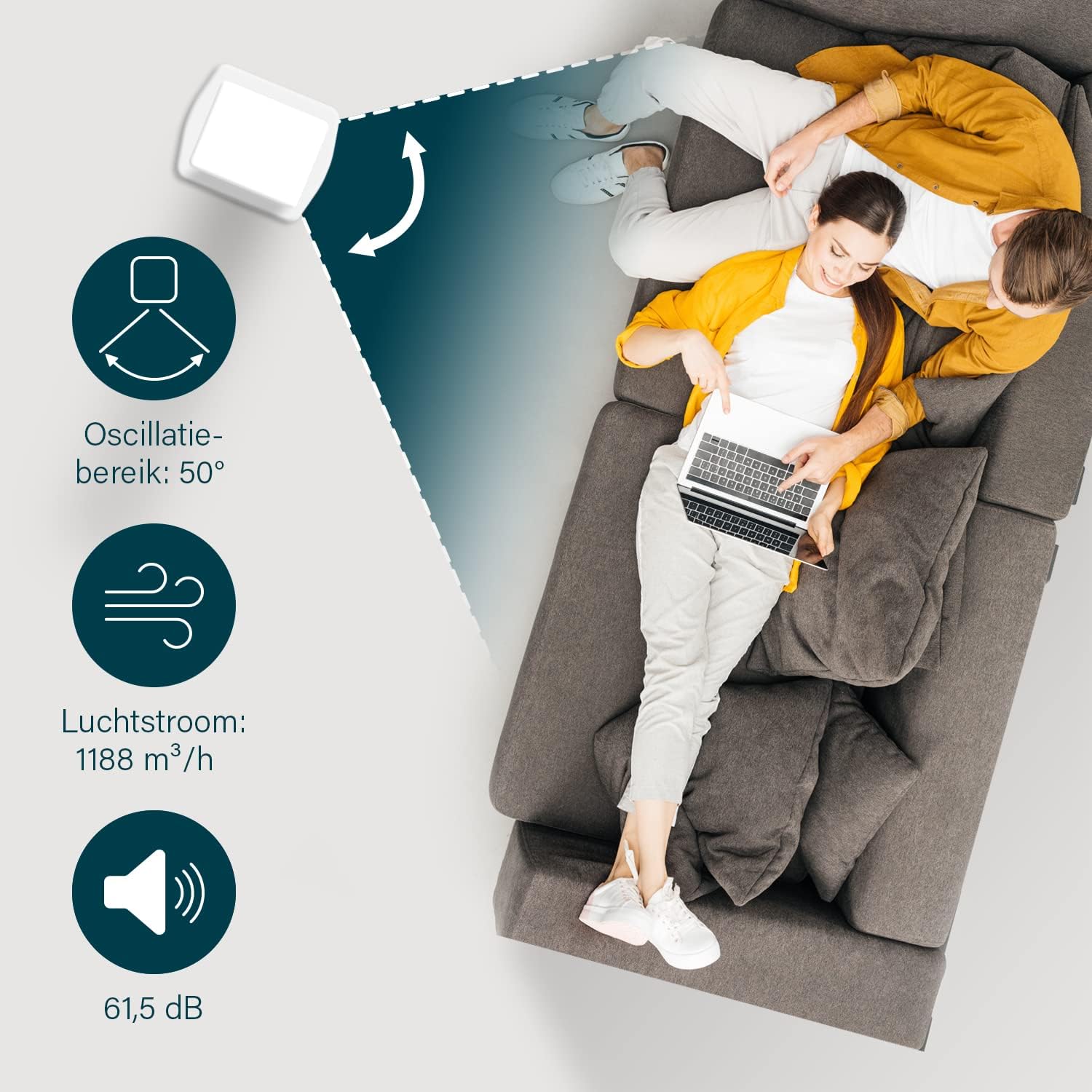
Figure 8: The oscillation function distributes cool air across a 50° range.
5.4 Evaporative Cooling Function
To activate the cooling function, ensure the water tank is filled. Press the 'Cool' button. The unit will use the water from the reservoir to cool the air through evaporation. This function works best in dry climates.

Figure 9: Innovative cooling technology utilizes a membrane system to cool air particles.
5.5 Smart Control (HomeWizard Climate App & Voice Control)
The Princess 357250 can be controlled remotely via the HomeWizard Climate app or voice commands (compatible with Siri and Google Assistant).
- Download the HomeWizard Climate app from your device's app store.
- Follow the in-app instructions to pair your air cooler with your Wi-Fi network. This typically involves pressing and holding the Power/Wi-Fi button on the unit until the Wi-Fi indicator blinks.
- Once paired, you can control all functions of the air cooler from your smartphone or tablet.
- For voice control, link your HomeWizard Climate account with your preferred voice assistant (Siri or Google Assistant) through their respective apps.

Figure 10: Control your air cooler using the HomeWizard Climate app and voice assistants.
6. Konserwacja i czyszczenie
Regular cleaning ensures optimal performance and extends the lifespan of your air cooler.
6.1 Ogólne czyszczenie
- Zawsze odłączaj urządzenie od zasilania przed czyszczeniem.
- Przetrzyj zewnętrzne powierzchnie miękką, damp ściereczka. Nie należy używać środków czyszczących o właściwościach ściernych ani rozpuszczalników.
- Upewnij się, że do panelu sterowania i innych części elektrycznych nie dostanie się woda.
6.2 Czyszczenie zbiornika na wodę
The water tank should be cleaned regularly, especially if using the cooling function frequently, to prevent mold and bacteria growth.
- Odłącz chłodnicę powietrza.
- Wyjmij zbiornik na wodę z urządzenia.
- Wylej pozostałą wodę.
- Clean the inside of the tank with a mild detergent and warm water. Use a soft brush if necessary to remove any residue.
- Dokładnie spłukać czystą wodą.
- Przed ponownym włożeniem zbiornika do urządzenia należy odczekać, aż całkowicie wyschnie.
6.3 Cooling Pad Cleaning/Replacement
The cooling pad (evaporative filter) may accumulate dust and mineral deposits over time. Refer to the diagram for its location.

Figure 11: The cooling pad, which should be cleaned periodically.
- Odłącz chłodnicę powietrza.
- Carefully remove the back panel to access the cooling pad.
- Gently remove the cooling pad.
- Rinse the cooling pad under running water to remove dust and deposits. For stubborn deposits, soak in a mild descaling solution (e.g., vinegar and water) for 30 minutes, then rinse thoroughly.
- Przed ponownym włożeniem należy odczekać, aż wkładka chłodząca całkowicie wyschnie.
- Replace the cooling pad if it is damaged or heavily soiled and cannot be cleaned effectively.
7. Rozwiązywanie Problemów
Jeśli masz problemy z chłodnicą powietrza, zapoznaj się z poniższą tabelą, w której znajdziesz listę typowych problemów i ich rozwiązań.
| Problem | Możliwa przyczyna | Rozwiązanie |
|---|---|---|
| Jednostka się nie włącza. | Brak zasilania. | Sprawdź, czy przewód zasilający jest prawidłowo podłączony do sprawnego gniazdka. |
| No cool air/weak cooling effect. | Zbiornik na wodę jest pusty lub poziom wody jest niski. Funkcja chłodzenia nie jest aktywowana. Podkładka chłodząca jest brudna. | Napełnij zbiornik na wodę. Press the 'Cool' button. Clean or replace the cooling pad (see Section 6.3). |
| Nieprzyjemny zapach z jednostki. | Stagnant water or dirty water tank/cooling pad. | Clean the water tank and cooling pad thoroughly (see Section 6.2 & 6.3). Use fresh water. |
| Pilot nie działa. | Baterie są rozładowane lub nieprawidłowo włożone. | Replace the CR2032 batteries. Ensure they are inserted with correct polarity. |
| Kontrola aplikacji nie działa. | Wi-Fi connection issue. App not paired correctly. | Check your Wi-Fi network. Re-pair the device with the HomeWizard Climate app (see Section 5.5). |
Jeśli po wypróbowaniu tych rozwiązań problem nadal występuje, skontaktuj się z obsługą klienta.
8. Specyfikacje techniczne
| Funkcja | Szczegół |
|---|---|
| Numer modelu | 01.357250.01.001 |
| Marka | Księżniczka |
| Typ | Smart Air Cooler Fan (3-in-1: fan, air freshener, air cooler) |
| Tworzywo | Akrylonitryl-butadien-styren (ABS) |
| Kolor | Biały |
| Typ montażu | Wolnostojące |
| Typ sterowania | Remote control, Control Panel, HomeWizard Climate App, Voice Control (Siri, Google Assistant) |
| Pojemność zbiornika na wodę | 3.5 litrów |
| Tryby pracy | Normalny, naturalny, sen |
| Liczba prędkości | 3 |
| Zakres oscylacji | 50 stopnia |
| Cotage | 70 watów |
| Tomtage | 230 wolty |
| Poziom hałasu | 61.5 decybeli |
| Waga przedmiotu | 4 kilograma |
| Wymiary (gł. x szer. x wys.) | 28D x 22W x 76H centymetrów |
| Dostępność części zamiennych (UE) | 2 lat |

Figure 12: Dimensions and key specifications of the air cooler.
9. Gwarancja i wsparcie
9.1 Informacje o gwarancji
This Princess 357250 Smart Air Cooler Fan comes with a 2-letnia gwarancja producenta from the date of purchase. This warranty covers manufacturing defects and material faults under normal use conditions. It does not cover damage resulting from misuse, neglect, accident, alteration, or unauthorized repair.
Proszę zachować dowód zakupu na potrzeby roszczeń gwarancyjnych.
9.2 Obsługa klienta
For technical assistance, warranty claims, or questions regarding your Princess 357250 Smart Air Cooler Fan, please contact your retailer or visit the official Princess webstrona zawierająca dane kontaktowe pomocy technicznej.
Możesz również zapoznać się z strona produktu na Amazon.nl w celu uzyskania dodatkowych informacji i zasobów.