
1. Wprowadzenie
This manual provides detailed instructions for the setup, operation, maintenance, and troubleshooting of your YiBiChin Universal Replacement Remote Control, Model RU-12. This remote is designed to work seamlessly with various Roku Built-in TV models.
2. Koniec produktuview
The YiBiChin RU-12 is a dedicated infrared (IR) replacement remote control for Roku Built-in TVs. It offers direct access to popular streaming services through its 12 shortcut buttons.
2.1 Główne cechy
- No programming or pairing required.
- Compatible with a wide range of Roku Built-in TVs.
- 12 dedicated shortcut buttons for popular streaming apps: NETFLIX, Prime Video, Roku Channel, Disney+, Sling, Hulu, VUDU, YouTube, ESPN+, Fan-NOW, Google Play, and Spotify.
- Infrared (IR) technology for reliable control.
2.2 Zgodność
This remote is compatible with the following Roku Built-in TV brands:
- TCL Roku TVu
- Telewizor Hisense Roku
- Telewizja ONN Roku
- INSIGNIA Roku TV
- SHARP Roku TV
- Hitachi Roku TV
- Telewizor Philips Roku
- Telewizja Westinghouse Roku
- Telewizor Element Roku
- And other Roku Built-in TV models.
2.3 Important Incompatibilities
This remote is NOT compatible with:
- Roku Stick devices.
- Roku Player devices without an IR receiver.
- Any Roku player/box that does not have an IR receiver.
- This is an infrared (IR) remote; it does not feature a pairing button, microphone for voice control, or a headphone jack. It is not an RF (Radio Frequency) model.

Ilustracja 1: Przód, bok i tył views of the YiBiChin RU-12 remote control. The remote is black with blue navigation buttons and various colored shortcut buttons.

Image 2: Visual guide indicating that the remote is compatible with Roku players/boxes that have an IR receiver (labeled 'YES') and incompatible with Roku Built-in TVs, Roku Sticks, and Roku Players without an IR receiver (labeled 'NO').
3. Konfiguracja
Setting up your YiBiChin RU-12 remote control is straightforward and requires no complex programming.
3.1 Instalacja baterii
- Znajdź komorę baterii z tyłu pilota.
- Odsuń pokrywę komory baterii.
- Włóż dwie (2) baterie AAA, zwracając uwagę na prawidłową biegunowość (+ i -), zgodnie ze wskazaniami wewnątrz komory.
- Dokładnie zamknij pokrywę komory baterii.
Notatka: Baterie nie są dołączone do pilota.
3.2 Pierwsze użycie
Once batteries are installed, the remote is ready for immediate use. No programming or pairing is necessary. Simply point the remote at your Roku Built-in TV and begin operating it.

Image 3: The remote control being used with a television, highlighting that no setup or programming is required after battery installation.
4. Instrukcja obsługi
Familiarize yourself with the buttons on your YiBiChin RU-12 remote control for optimal use.
4.1 Standard Controls
- Power (N/P buttons): Włącza i wyłącza telewizor.
- Navigation Pad (Up, Down, Left, Right arrows): Umożliwia nawigację po menu i opcjach.
- Przycisk OK: Potwierdza wybór.
- Przycisk Wstecz: Powrót do poprzedniego ekranu lub menu.
- Przycisk Home: Powrót do ekranu głównego Roku.
- Odtwórz/Pauza, Przewiń do przodu, Przewiń do tyłu: Steruje odtwarzaniem multimediów.
- Przycisk gwiazdki (*): Accesses options or settings within certain apps.
- Refresh/Replay Button: Replays the last few seconds of content.
4.2 przyciski skrótów
The remote features 12 dedicated shortcut buttons for quick access to popular streaming applications:
- NETFLIX
- Wideo Prime
- Kanał Roku
- Disney+
- Temblak
- Hulu
- WUDU
- YouTube
- ESPN+
- Fan-NOW
- Google Play
- Spotify
Simply press the desired shortcut button to launch the corresponding application directly.

Image 4: Visual confirmation that the remote does not include features such as voice search, an earphone jack, or a pairing button.
5. Konserwacja
Proper care and maintenance will ensure the longevity of your remote control.
5.1 Czyszczenie
To clean the remote, gently wipe it with a soft, dry cloth. Avoid using liquid cleaners, solvents, or abrasive materials, as these can damage the remote's surface or internal components.
5.2 Wymiana baterii
Replace batteries when the remote's response becomes sluggish or stops working. Always replace both AAA batteries at the same time with new ones. Do not mix old and new batteries, or different types of batteries.
5.3 Przechowywanie
When not in use for extended periods, it is recommended to remove the batteries to prevent leakage and potential damage to the remote.
6. Rozwiązywanie Problemów
If you encounter issues with your remote control, please refer to the following troubleshooting steps:
- Pilot nie odpowiada:
- Upewnij się, że baterie zostały prawidłowo zainstalowane, z zachowaniem właściwej polaryzacji.
- Wymień stare baterie na nowe baterie AAA.
- Check for any obstructions between the remote and your TV's IR receiver. Ensure a clear line of sight.
- Confirm that your TV is a Roku Built-in TV and not a Roku Stick or a Roku Player without an IR receiver.
- No voice control/headphone jack: This remote is an IR remote and does not support voice control, a headphone jack, or a pairing function. These are not malfunctions but inherent design characteristics.
- Przyciski skrótów nie działają: Ensure your TV is powered on and connected to the internet for streaming apps to function correctly.
Jeśli po wykonaniu tych czynności problem nadal występuje, skontaktuj się z obsługą klienta.
7. Specyfikacje
| Marka | YiBiChin |
| Numer modelu | RU-12 |
| Kolor | Czarny |
| Technologia łączności | Podczerwieni (IR) |
| Cechy specjalne | No programming or setup required |
| Kompatybilne urządzenia | Roku Built-in TVs |
| Wymagane baterie | 2 x AAA (brak w zestawie) |
| Maksymalny zasięg | 10 metrów |
| Liczba przycisków | Standard controls + 12 shortcut buttons |
| Wymiary (w przybliżeniu) | Długość: 13.9 cm (5.5 cala) Szerokość: 4.1 cm (1.6 cala) Grubość: 2.1 cm (0.8 cala) |
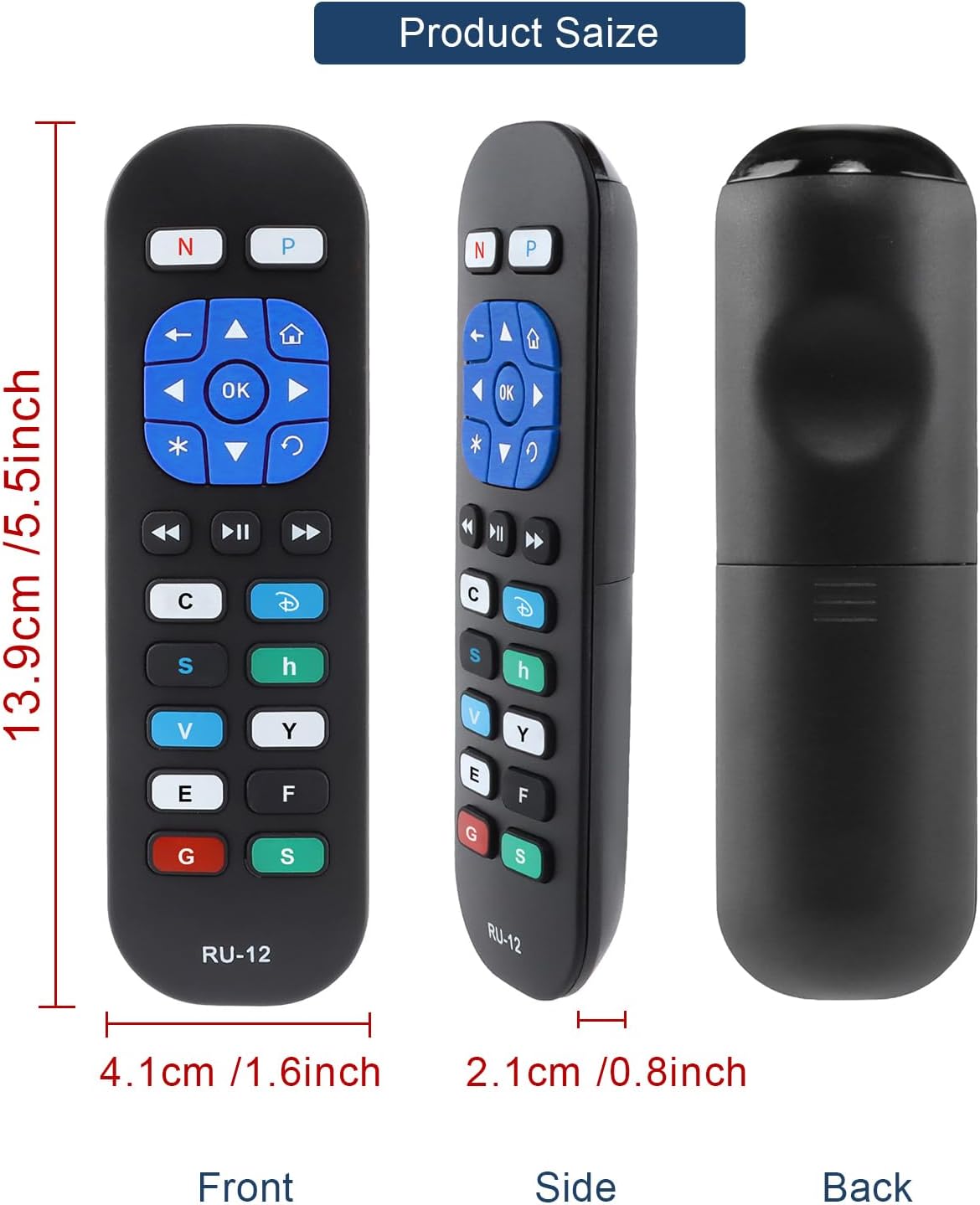
Image 5: Detailed dimensions of the remote control, indicating its length, width, and thickness.
8. Informacje o gwarancji
Specific warranty details for the YiBiChin RU-12 Universal Replacement Remote Control are not provided in the product information. Please refer to your purchase documentation or contact the seller for any warranty-related inquiries.
9. Wsparcie
For any questions regarding your YiBiChin RU-12 remote control, whether before purchase or during use, please do not hesitate to contact our customer support team. We aim to respond to all inquiries within 24 hours.
Informacje kontaktowe: Please refer to the seller's contact details on your purchase platform or documentation.