
1. Wprowadzenie
Thank you for choosing the Powerwerks PWR10 Powered Speaker Cabinet. This manual provides essential information for the safe and efficient operation of your new speaker. The PWR10 is a high-performance active speaker designed for various audio applications, featuring robust power output, versatile input options, and integrated digital signal processing (DSP).
Przed przystąpieniem do użytkowania urządzenia należy uważnie przeczytać niniejszą instrukcję i zachować ją do wykorzystania w przyszłości.
2. Informacje dotyczące bezpieczeństwa
Aby zmniejszyć ryzyko porażenia prądem, pożaru lub obrażeń ciała, zawsze należy przestrzegać poniższych podstawowych środków ostrożności:
- Źródło zasilania: Connect the unit only to a power supply of the type described in this manual or on the unit.
- Grunt: Aby zapobiec porażeniu prądem elektrycznym, należy upewnić się, że przewód zasilający jest prawidłowo uziemiony.
- Wentylacja: Nie zasłaniaj otworów wentylacyjnych. Zapewnij odpowiedni przepływ powietrza wokół urządzenia.
- Woda i wilgoć: Nie wystawiaj urządzenia na działanie deszczu ani wilgoci. Nie stawiaj na urządzeniu przedmiotów wypełnionych płynami.
- Ciepło: Trzymaj urządzenie z dala od źródeł ciepła, takich jak grzejniki, kratki wentylacyjne, piece i inne urządzenia wytwarzające ciepło.
- Serwisowanie: Nie próbuj samodzielnie naprawiać tego produktu. Wszelkie czynności serwisowe należy powierzyć wykwalifikowanemu personelowi serwisowemu.
- Czyszczenie: Przed czyszczeniem odłącz urządzenie od gniazdka elektrycznego. Do czyszczenia użyj suchej ściereczki.
3. Zawartość opakowania
The Powerwerks PWR10 package includes the following items:
- Powerwerks PWR10 Powered Speaker Cabinet
- Przewód zasilający
- Instrukcja obsługi (ten dokument)
4. Funkcje produktu
The Powerwerks PWR10 Powered Speaker Cabinet offers a range of features designed for optimal audio performance and versatility:
- Wysoka moc wyjściowa: 600 watts of Class D amplifikacja.
- System głośników dwudrożnych: Features one 10-inch low-frequency driver and one high-frequency compression driver.
- Wiele wejść audio: Two channels with XLR / Line combo inputs for microphones or line-level devices.
- Integrated DSP: Four selectable EQ presets: Main, Monitor, DJ, and Speech.
- Łączność Bluetooth: Bezproblemowe strumieniowanie dźwięku bezprzewodowego z kompatybilnych urządzeń.
- True Stereo Linking: Connect wirelessly to another Powerwerks PWR series speaker for stereo sound.
- Wyjście przelotowe XLR: Allows for system expansion by connecting to other powered speakers.
- Przenośna konstrukcja: Durable wooden cabinet with integrated handles for easy transport.
- Standardowe mocowanie na słupie: Compatible with standard speaker poles for elevated placement.

Obraz 1: Przód view of the Powerwerks PWR10 Powered Speaker Cabinet, showcasing its protective grille and Powerwerks logo.
5. Sterowanie i połączenia
Familiarize yourself with the control panel located on the rear of the PWR10 speaker. This section details each control and connection point.

Rysunek 2: Szczegółowy view of the rear control panel of the Powerwerks PWR10, showing inputs, outputs, and control knobs.
5.1. Input Section
- INPUT 1 (XLR / Line Combo): This input accepts both XLR (microphone level) and 1/4-inch TRS/TS (line level) connectors. Use for microphones, mixers, or other audio sources.
- INPUT 2 (XLR / Line Combo): Similar to Input 1, this input also accepts XLR and 1/4-inch TRS/TS connectors for additional audio sources.
- GAIN 1 & 2: Rotary controls to adjust the input sensitivity for Input 1 and Input 2 respectively. Adjust these to achieve an optimal signal level without distortion.
5.2. Bluetooth Section
- LINK Button: Used for wirelessly linking two PWR series speakers for True Stereo operation.
- Przycisk PARUJ: Initiates Bluetooth pairing mode to connect with a Bluetooth audio source (e.g., smartphone, tablet).
- Bluetooth Indicator LED: Illuminates when a Bluetooth device is connected.
5.3. Output and DSP Section
- DSP EQ PRESETS: A rotary selector to choose between four optimized sound modes:
- GŁÓWNY: General purpose setting for front-of-house sound.
- MONITOR: Zoptymalizowany dla stage aplikacje monitorujące.
- DJ: Wzmocnione basy i soprany podczas odtwarzania muzyki.
- PRZEMÓWIENIE: Optimized for vocal clarity in spoken word applications.
- GŁOŚNOŚĆ: Steruje ogólnym poziomem wyjściowym głośnika.
- OUTPUT (XLR Thru): An XLR output that sends a mix of the input signals to another powered speaker or audio device for system expansion.
- DIODA ZASILANIA: Wskazuje, że jednostka jest włączona.
- Dioda LIMITU: Illuminates when the internal limiter is active, indicating that the signal is approaching distortion. Reduce input gain or master volume if this LED frequently lights up.
5.4. Power Section
- WLOT AC: Tutaj podłącz dostarczony przewód zasilający.
- WŁĄCZNIK ZASILANIA: Włącza lub wyłącza głośnik.
6. Konfiguracja
Prawidłowa konfiguracja gwarantuje optymalną wydajność i bezpieczeństwo.
6.1. Umieszczenie
- Położenie piętra: Umieść głośnik na stabilnej, płaskiej powierzchni.
- Montaż na słupie: The PWR10 features a standard pole mount receptacle on the bottom. Insert the speaker onto a sturdy speaker pole stand. Ensure the stand is stable and capable of supporting the speaker's weight.
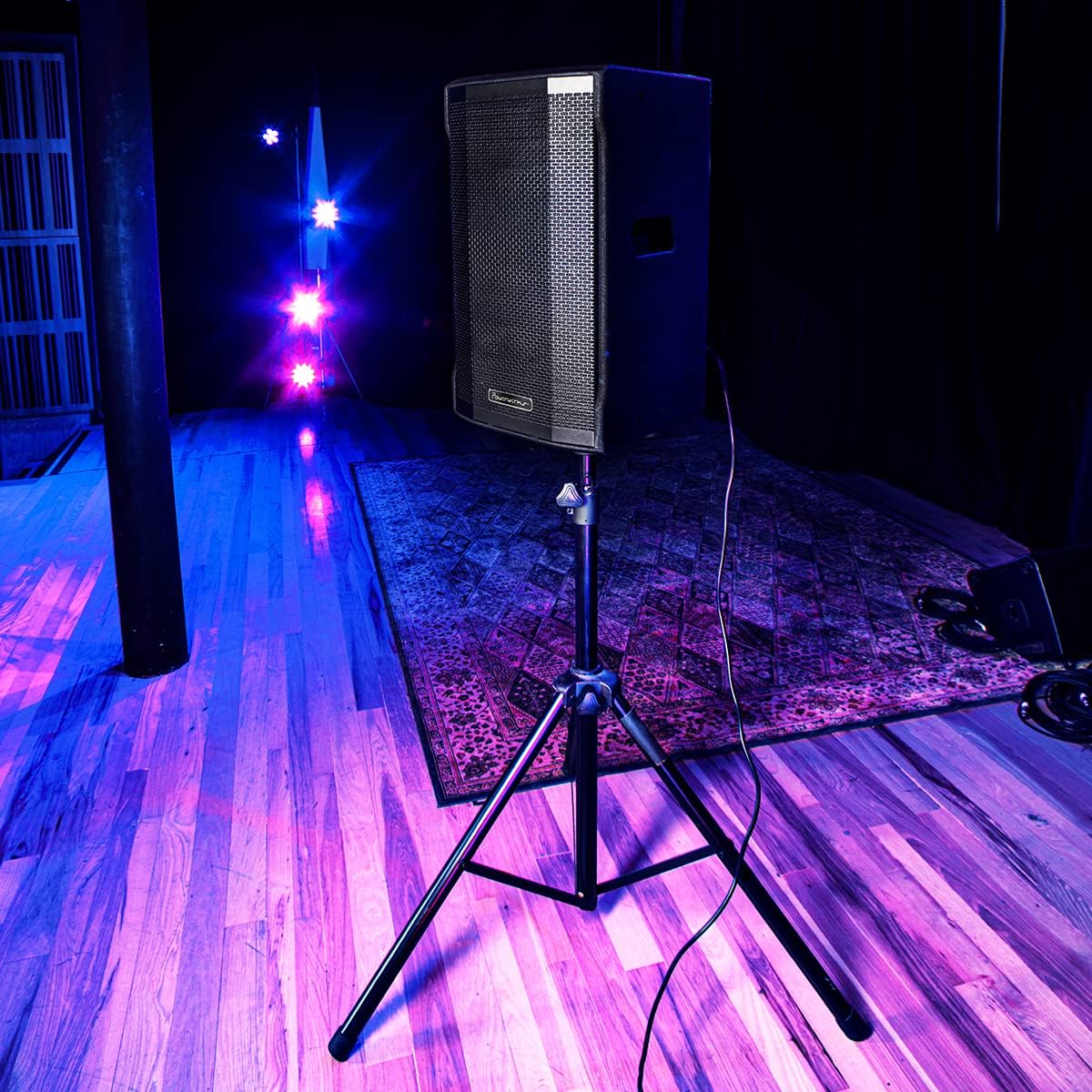
Image 3: The Powerwerks PWR10 speaker positioned on a stand, illustrating a typical setup for live sound applications.
6.2. Podłączenie zasilania
- Ensure the POWER switch on the rear panel is in the OFF position.
- Connect the supplied power cord to the AC INLET on the speaker.
- Podłącz drugi koniec przewodu zasilającego do uziemionego gniazdka elektrycznego.
6.3. Kontrole wstępne
- Before powering on, ensure all gain controls are set to their minimum (fully counter-clockwise) position.
- Sprawdź, czy wszystkie kable audio są solidnie podłączone.
7. Instrukcja obsługi
7.1. Włączanie/wyłączanie zasilania
- To power on, flip the POWER switch to the ON position. The POWER LED will illuminate.
- To power off, flip the POWER switch to the OFF position.
7.2. Podłączanie źródeł audio
- Connect your microphone or line-level device (e.g., mixer, instrument pre-amp) to INPUT 1 or INPUT 2 using an appropriate XLR or 1/4-inch cable.
- Slowly increase the corresponding GAIN control for the connected input until the desired volume is achieved without the LIMIT LED flashing excessively.
- Adjust the MASTER VOLUME to control the overall output level.
7.3. Parowanie Bluetooth
- Press the PAIR button on the rear panel. The Bluetooth indicator LED will flash, indicating it is in pairing mode.
- Na urządzeniu z włączoną funkcją Bluetooth (smartfon, tablet) wyszukaj dostępne urządzenia Bluetooth.
- Select "Powerwerks PWR10" from the list.
- Once connected, the Bluetooth indicator LED will glow solid. You can now stream audio wirelessly to the speaker.
7.4. Using DSP Presets
Rotate the DSP EQ PRESETS knob to select the desired sound profile:
- GŁÓWNY: Standard flat response for general use.
- MONITOR: Dopasowane do stage monitoring, often with reduced bass to prevent muddiness.
- DJ: Boosted bass and treble for impactful music playback.
- PRZEMÓWIENIE: Optimized for vocal clarity, often with a mid-range boost.
7.5. True Stereo Linking (with another PWR series speaker)
- Ensure both PWR series speakers are powered on and within Bluetooth range.
- On the first speaker (which will act as the master), pair your Bluetooth audio source as described in section 7.3.
- On the master speaker, press the LINK button. The Bluetooth indicator LED will flash.
- On the second speaker (slave), press its LINK button. The Bluetooth indicator LED will flash.
- Once linked, both speakers' Bluetooth indicator LEDs will glow solid, and audio will play in stereo.
8. Konserwacja
Regularna konserwacja pomaga przedłużyć żywotność głośnika.
- Czyszczenie: Disconnect the power cord before cleaning. Use a soft, dry cloth to wipe down the cabinet. Do not use abrasive cleaners, solvents, or waxes.
- Składowanie: Jeśli głośnik nie będzie używany przez dłuższy czas, należy go przechowywać w suchym i wolnym od kurzu miejscu.
- Kontrola: Periodically check the power cord and audio cables for any signs of damage.
9. Rozwiązywanie Problemów
If you encounter issues with your PWR10 speaker, refer to the following common problems and solutions:
- Brak zasilania:
- Upewnij się, że przewód zasilający jest prawidłowo podłączony do głośnika i do sprawnego gniazdka elektrycznego.
- Check the POWER switch is in the ON position.
- Sprawdź, czy gniazdko elektryczne działa prawidłowo, podłączając do niego inne urządzenie.
- Brak dźwięku:
- Check that the MASTER VOLUME is turned up.
- Ensure the GAIN controls for the active inputs are adjusted appropriately.
- Verify audio cables are securely connected and not damaged.
- If using Bluetooth, ensure the device is paired and streaming audio.
- Przetestuj przy użyciu innego źródła dźwięku lub kabla.
- Zniekształcony dźwięk:
- Reduce the GAIN controls for the inputs.
- Zmniejsz głośność MASTER VOLUME.
- If the LIMIT LED is frequently lit, reduce the input signal level.
- Sprawdź, czy źródło dźwięku nie jest zniekształcone.
- Brak połączenia Bluetooth:
- Ensure the speaker is in PAIRING mode (Bluetooth LED flashing).
- Upewnij się, że Bluetooth jest włączony w Twoim urządzeniu.
- Zbliż urządzenie do głośnika.
- Spróbuj rozparować i ponownie sparować urządzenie.
- Ensure no other devices are currently connected to the speaker via Bluetooth.
10. Specyfikacje
Detailed technical specifications for the Powerwerks PWR10 Powered Speaker Cabinet:

Image 4: Diagram illustrating the dimensions of the Powerwerks PWR10 speaker.
| Nazwa modelu | Powerwerks 600 Watt 1 x 10" Speaker |
| Typ głośnika | 2-Channel Active Speaker, Component |
| Średnica głośnika niskotonowego | 10 cali |
| Cotage | 600 W (szczyt) |
| Technologia łączności | Bluetooth, XLR, 1/4-inch Line |
| Tryb wyjścia audio | Stereo (via True Stereo Linking) |
| Ustawienia wstępne korektora DSP | Main, Monitor, DJ, Speech |
| Wymiary produktu (Gł. x Szer. x Wys.) | 28.3" x 15" x 15.6" |
| Waga przedmiotu | 42.9 funta (19.5 kilograma) |
| Źródło zasilania | Elektryczny przewodowy |
| Typ montażu | Stojący na podłodze, do montażu na słupie |
| Kolor | Czarny |
| UPC | 701963063117 |
11. Gwarancja i wsparcie
The Powerwerks PWR10 Powered Speaker Cabinet comes with a limited warranty. Please refer to the warranty card included with your product or contact Powerwerks customer support for specific details regarding coverage and duration.
For technical assistance, troubleshooting beyond this manual, or warranty claims, please contact Powerwerks customer support through their official webstronę lub dane kontaktowe podane w dokumentacji zakupu.


