
Ysametp M10
Instrukcja obsługi miniprojektora Ysametp M10
1080P Full HD Supported Portable Video Projector
Wstęp
Dziękujemy za zakupasing the Ysametp Mini Projector M10. This portable video projector is designed to provide a high-quality home theater experience with its 1080P Full HD support and 10000 Lux LED light source. It features dual built-in stereo speakers with an SRS sound system for immersive audio. Its compact size and multi-connection capabilities make it ideal for various entertainment and presentation needs. Please read this manual thoroughly before operating the projector to ensure proper use and maintenance.
Informacje dotyczące bezpieczeństwa
To ensure safe operation and prolong the lifespan of your projector, please observe the following safety precautions:
- Nie blokuj otworów wentylacyjnych. Zapewnij odpowiedni przepływ powietrza wokół projektora, aby zapobiec przegrzaniu.
- Nie wystawiaj projektora na działanie deszczu i wilgoci, aby uniknąć porażenia prądem elektrycznym lub pożaru.
- Nie otwierać projektora casing. Wszelkie prace serwisowe należy zlecać wykwalifikowanemu personelowi.
- Używaj wyłącznie zasilacza dołączonego do projektora.
- Place the projector on a stable, flat surface to prevent it from falling.
- Unikaj bezpośredniego kontaktu oczu z obiektywem projektora podczasamp jest włączony.
- Odłączaj projektor od gniazdka elektrycznego podczas burzy z piorunami lub jeśli nie będziesz go używać przez dłuższy czas.
Zawartość opakowania
Proszę sprawdzić zawartość opakowania po rozpakowaniu:
- 1 x Ysametp Mini Projector M10
- 1 x kabel HDMI
- 1 x 3-in-1 AV Line
- 1 x Przewód zasilający
- 1 x Statyw
- 1 x Drawstring Backpack
- 1 x Pilot zdalnego sterowania (baterie nie są dołączone)
- 1 x Instrukcja obsługi

Produkt ponadview
Zapoznaj się z podzespołami projektora i portami połączeniowymi.

Porty wejścia/wyjścia:
- Port HDMI: Podłącz się do urządzeń takich jak tunery TV, laptopy i konsole do gier.
- Port USB: Podłącz dyski USB w celu odtwarzania multimediów.
- Gniazdo karty TF: Włóż kartę TF, aby odtwarzać multimedia.
- Port VGA: Connect to computers or laptops.
- Port AV: Connect to older devices like DVD players using the 3-in-1 AV cable.
- Gniazdo audio 3.5 mm: Podłącz zewnętrzne słuchawki lub głośniki.
Organizować coś
1. Umiejscowienie i rozmiar ekranu
Position the projector on a flat, stable surface. The projection size can range from 32 inches to 200 inches, with an optimal projection distance between 3.6 feet and 16.4 feet.

2. Podłączenie zasilania
Connect the supplied power cord to the projector's power input and then plug it into a power outlet.
3. Regulacja ostrości i zniekształcenia trapezowego
After powering on, adjust the focus and keystone knobs located on top of the projector to achieve a clear and rectangular image. The focus ring adjusts image sharpness, while the keystone correction corrects trapezoidal distortion if the projector is not perfectly perpendicular to the screen.
Instrukcja obsługi
1. Włączanie/wyłączanie
- Włączyć: Naciśnij przycisk zasilania na projektorze lub pilocie.
- Wyłączyć: Press the power button again. The projector will go through a shutdown sequence.
2. Wybór źródła wejściowego
Use the "Source" button on the remote control or the projector's control panel to select the desired input source (HDMI, USB, TF, VGA, AV).
3. Podłączanie urządzeń
- HDMI: Connect an HDMI cable from your device (e.g., TV Stick, laptop, game console) to the projector's HDMI port.
- Karta USB/TF: Insert a USB drive or TF card into the respective port. The projector will automatically detect the media or prompt you to select it.
- VGA: Connect a VGA cable from your PC/laptop to the projector's VGA port.
- AV: Use the provided 3-in-1 AV cable to connect to devices with AV output.
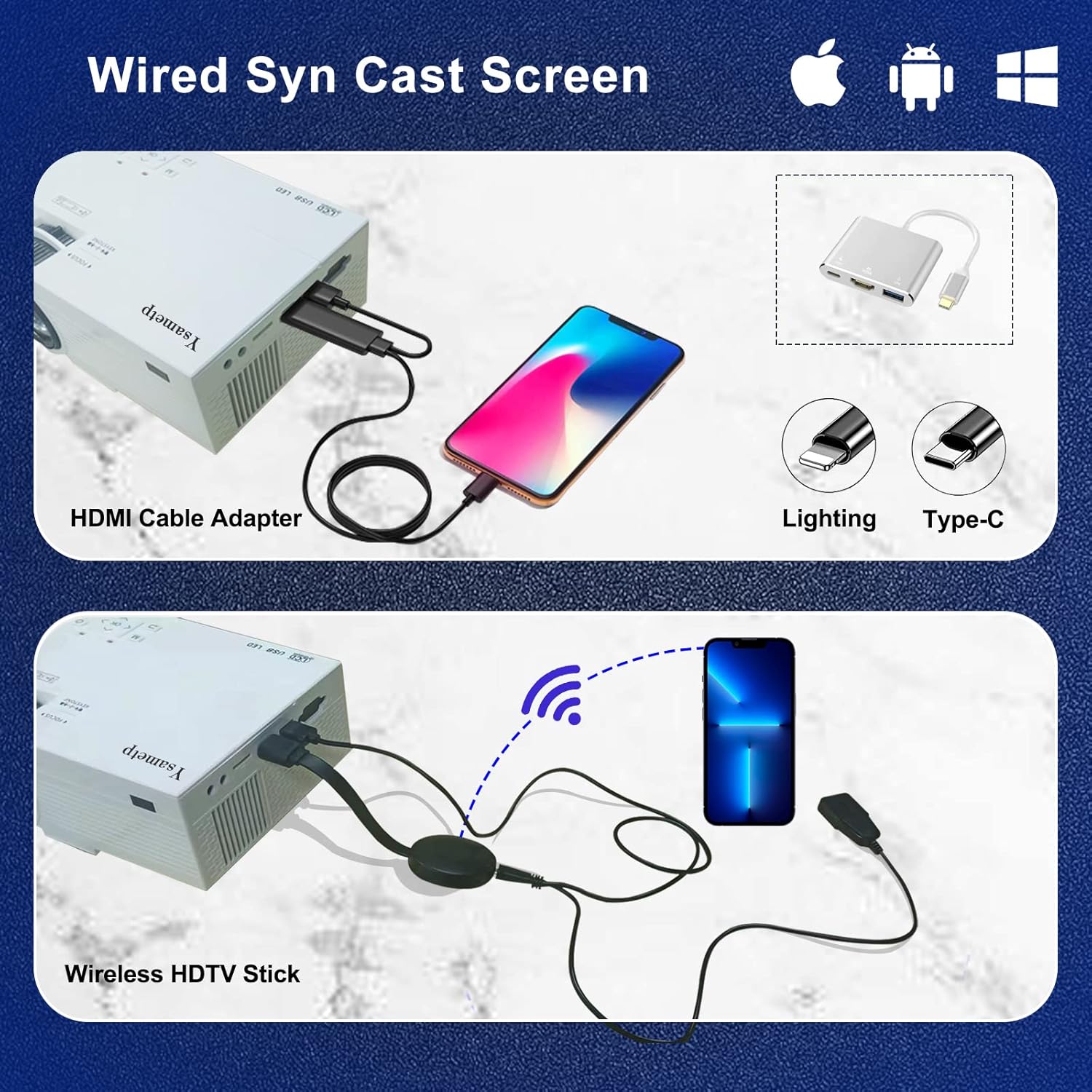
4. Wired Screen Mirroring (for Smartphones)
To mirror your smartphone screen, you will need an HDMI adapter (e.g., Lightning to HDMI for iPhone, USB-C to HDMI for Android) or a Miracast dongle/TV stick (like Roku, Fire TV Stick).

5. Wyjście audio
The projector has dual built-in stereo speakers. For external audio, connect headphones or external speakers to the 3.5mm audio jack.

Konserwacja
1. Czyszczenie
- Obiektyw: Używaj miękkiej, niepozostawiającej włókien ściereczki przeznaczonej specjalnie do soczewek optycznych. Nie używaj środków ściernych.
- Casing: Wipe the projector's exterior with a soft, dry cloth. Do not use liquid or aerosol cleaners.
- Wentylacja: Regularly check and clean the ventilation openings to prevent dust buildup, which can affect cooling performance.
2. Przechowywanie
When not in use, store the projector in a cool, dry place, away from direct sunlight and extreme temperatures. Use the provided drawstring backpack for protection during storage or transport.
3. LED Lifespan
The built-in LED light source is designed to support up to 55,000 hours of use, providing long-lasting performance.
Rozwiązywanie problemów
| Problem | Możliwa przyczyna / rozwiązanie |
|---|---|
| Brak obrazu na ekranie. |
|
| Obraz jest rozmazany. |
|
| Obraz ma kształt trapezu. |
|
| Brak dźwięku. |
|
| Pilot nie działa. |
|
Specyfikacje
| Funkcja | Szczegół |
|---|---|
| Marka | Ysametp |
| Model | M10 |
| Technologia wyświetlania | LCD |
| Rozdzielczość natywna | 1920 x 1080 Pixels (Full HD Supported) |
| Jasność obrazu | 11000 luks |
| Współczynnik kontrastu obrazu | 10000:1 |
| Proporcje obrazu | 4:3 |
| Rozmiar projekcji | 32 - 200 cala |
| Odległość projekcji | 3.6 stopy - 16.4 stopy |
| Żywotność diody LED | 55,000 godziny |
| Poziom hałasu | 31dB |
| Cotage | 60 watów |
| Interfejs sprzętowy | VGA, USB, HDMI, 3.5mm Audio, TF Card |
| Wymiary (dł. x szer. x wys.) | Wymiary 23.88 x 15.49 x 8.13 cm |
| Waga | 975.22 g (ok. 2.15 funta) |
Gwarancja i wsparcie
Ysametp provides a 3-letnia gwarancja na produkt for the Mini Projector M10.
If you encounter any problems or have questions regarding your projector, please do not hesitate to contact our customer support. Refer to the contact information provided on the product packaging or the official Ysametp webaby uzyskać pomoc.