
Wstęp
The Browning Spec Ops Elite HP5 is a high-performance trail camera designed for capturing wildlife images and videos, as well as for security surveillance. It features advanced imaging capabilities, robust construction, and user-friendly controls to ensure reliable operation in various outdoor conditions. This manual provides detailed instructions for setting up, operating, maintaining, and troubleshooting your camera.

Obraz: Przód view of the Browning Spec Ops Elite HP5 Trail Camera, showcasinze względu na kamuflażowy design i soczewki.
Główne cechy
- Obrazowanie w wysokiej rozdzielczości: Captures 24MP still images for exceptional detail.
- Wideo w pełnej rozdzielczości HD: Records 1920 x 1080p HD+ videos with sound.
- Szybka prędkość spustu: Adjustable 0.1-0.7 second trigger speed to capture fast-moving subjects.
- Rozszerzona widoczność w nocy: Invisible infrared (IR) illumination reaches up to 100 feet, ideal for discreet night surveillance.
- Technologia Illuma-Smart: Automatically adjusts IR flash for optimal night photos.
- Long Detection Range: Features an 80ft detection range.
- Programmable Delay: Customizable picture delay from 1 second to 60 minutes.
- Multi-Shot & Rapid-Fire: Options for capturing multiple images per trigger or rapid-fire sequences.
- Kolor ViewEkran wejściowy: Built-in 2-inch color screen for easy setup and playback.
- SDXC Card Support: Obsługuje karty pamięci o pojemności do 512 GB.
- Trwała konstrukcja: Rugged and water-resistant construction (IP54 rated) for outdoor use.
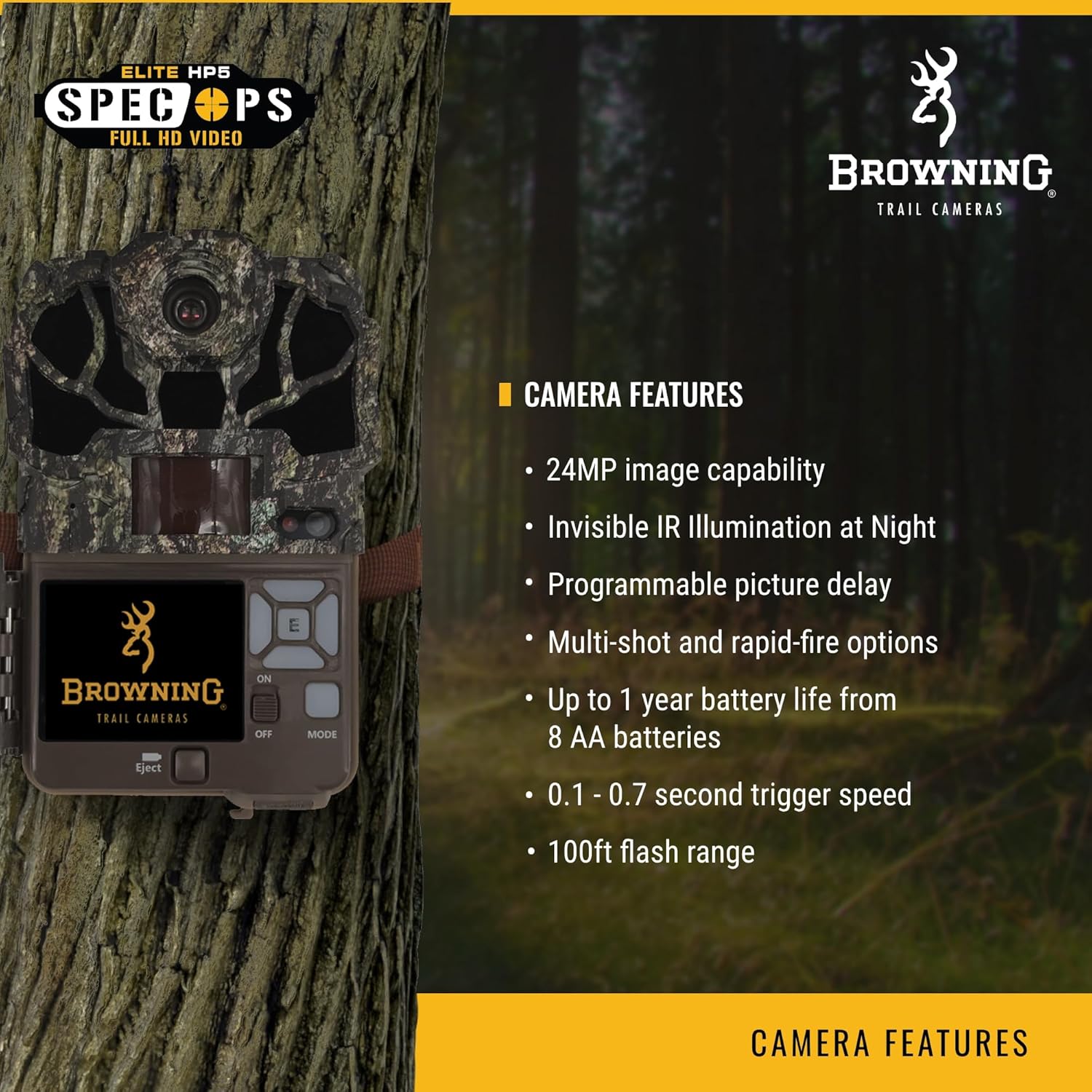
Image: A visual representation of the camera highlighting its key features like 24MP capability and invisible IR illumination.

Obraz: Inny view emphasizing advanced features such as 1080p Full HD videos and the 2-inch color view ekran.
Organizować coś
1. Instalacja baterii
- Open the camera housing by releasing the latches on the side.
- Locate the battery compartment. The Spec Ops Elite HP5 requires 8 AA batteries.
- Włóż baterie, zwracając uwagę na prawidłową biegunowość (+/-), zgodnie ze wskazaniami wewnątrz komory.
- Dokładnie zamknij komorę baterii.
2. Wkładanie karty SD
- Po otwarciu obudowy kamery znajdź gniazdo karty SD.
- Insert a compatible SDXC memory card (up to 512GB) into the slot until it clicks into place. Ensure the card is inserted with the label facing the correct direction.
- Aby wyjąć kartę SD, delikatnie wciśnij ją, aż usłyszysz kliknięcie, a następnie puść, a karta wysunie się.

Image: The camera with its side compartment open, showing the battery and SD card slots, and the internal display screen.
3. Montaż kamery
The camera can be mounted using the rear housing bracket or the bottom standard 1/4"-20 thread. Use the included strap or a compatible mounting accessory to secure the camera to a tree or post. Ensure the camera is stable and pointed towards the desired area of surveillance.

Image: Two individuals setting up the Browning Spec Ops Elite HP5 trail camera in an outdoor environment, demonstrating typical mounting.
Obsługa aparatu
1. Włączanie i ustawienia początkowe
- After installing batteries and SD card, slide the power switch to the 'ON' position.
- 2-calowy kolor viewing screen will activate.
- Navigate the menu using the directional buttons and 'OK' button to set the date, time, and other initial preferences.
2. Selecting Operation Mode
The camera offers various operation modes:
- Trail Cam (Photo Mode): Rejestruje nieruchome obrazy po wykryciu ruchu.
- Tryb wideo: Nagrywa klipy wideo po wykryciu ruchu.
- Time Lapse Plus: Captures images at set intervals over a period, in addition to motion-triggered images.
Access the 'Operation Mode' setting in the menu to select your desired mode. For optimal wildlife monitoring, 'Video Mode' is often preferred for capturing animal behavior with sound.
3. Dostosowywanie ustawień
Within the menu, you can customize various settings:
- Jakość zdjęcia: Select image resolution (e.g., 24MP).
- Rozdzielczość wideo: Choose video quality (e.g., 1080p).
- Prędkość wyzwalania: Adjust the speed at which the camera reacts to motion.
- Opóźnienie wykrywania: Set the time interval between consecutive captures.
- Tryb z błyskiem: Configure night vision settings.
- Identyfikator kamery: Assign a unique ID for easier organization if using multiple cameras.
4. Viewprzechwycone media
Use the 'Playback' option in the menu to review photos and videos directly on the camera's screen. You can also remove the SD card and view media on a computer or compatible device.

Image: A high-quality image of a deer captured by the Browning Spec Ops Elite HP5, demonstrating the camera's performance in the field.
Konserwacja
- Czyszczenie: Regularly wipe the camera lens and IR sensors with a soft, lint-free cloth to ensure clear images. Avoid abrasive materials or harsh chemicals.
- Wymiana baterii: Replace all 8 AA batteries when the low battery indicator appears or when performance degrades. Use high-quality alkaline or lithium batteries for best results.
- Zarządzanie kartami SD: Periodically format your SD card using the camera's menu option to maintain optimal performance and prevent data corruption. Back up important media before formatting.
- Składowanie: When not in use, store the camera in a cool, dry place away from direct sunlight and extreme temperatures. Remove batteries if storing for extended periods.
- Ochrona przed warunkami atmosferycznymi: Although water-resistant, avoid submerging the camera in water. Ensure all latches are securely closed during outdoor deployment to protect internal components from moisture.
Rozwiązywanie problemów
| Problem | Możliwa przyczyna / rozwiązanie |
|---|---|
| Kamera nie włącza się | Check battery polarity. Replace batteries with fresh ones. Ensure power switch is in 'ON' position. |
| Brak przechwyconych obrazów/filmów | Ensure SD card is inserted correctly and not full. Check 'Operation Mode' settings. Verify motion sensor is clear and active. Format SD card. |
| Słaba jakość obrazu/wideo w nocy | Clean lens and IR sensors. Ensure flash range is adequate for subject distance. Check battery level. |
| Krótki czas pracy baterii | Use high-quality alkaline or lithium batteries. Reduce frequency of captures or video length settings. Extreme cold weather can reduce battery performance. |
| Kamera nie wykrywa ruchu | Ensure camera is positioned correctly (not facing direct sunlight or heat sources). Clear any obstructions from the sensor. Adjust sensitivity settings. |
Specyfikacje
| Funkcja | Szczegół |
|---|---|
| Model | BTC-8E-HP5 |
| Rozdzielczość zdjęć | 24 MP |
| Rozdzielczość wideo | 1920 x 1080p HD+ with Sound |
| Szybkość wyzwalania | Regulowany 0.1 - 0.7 sekund |
| Czas regeneracji | 0.5 sekund |
| Zakres noktowizora | 100 feet (Invisible IR) |
| Zasięg wykrywania | 80 stóp |
| Źródło zasilania | 8 baterie AA |
| Obsługa kart pamięci | Up to 512GB SDXC |
| Wyświetlacz | 2-calowy kolor Viewekran |
| Wymiary (dł. x szer. x wys.) | 3.5 x 10.5 x 5.25 cala |
| Waga | 0.005 uncji (w przybliżeniu) |
| Tworzywo | Plastikowy |
| Odporność na warunki atmosferyczne | IP54 |

Image: A detailed specification chart for the Spec Ops Elite HP5, outlining technical data.
Gwarancja i wsparcie
The Browning Spec Ops Elite HP5 Trail Camera comes with a 1-roczna ograniczona gwarancja. This warranty covers defects in workmanship and materials under normal conditions of use. Browning will repair or replace the unit with a new or refurbished unit as needed.
For technical support, warranty claims, or additional product information, please visit the official Browning webodwiedź stronę internetową lub skontaktuj się z działem obsługi klienta. Możesz również odwiedzić Browning Store on Amazon Więcej produktów i zasobów.