
1. Wprowadzenie
This manual provides detailed instructions for the operation and maintenance of your WONNIE remote control, designed for use with WONNIE Portable Blue Ray DVD Player models W-BR141, W-BR146, and W-BR156. Please read this manual thoroughly before using the remote control to ensure proper functionality and to maximize your viewzdobywania doświadczenia.
2. Koniec produktuview
The WONNIE remote control is an ergonomic device designed for intuitive control of your portable Blue Ray DVD player. It features a comprehensive set of buttons for navigation, playback, volume, and various player functions.
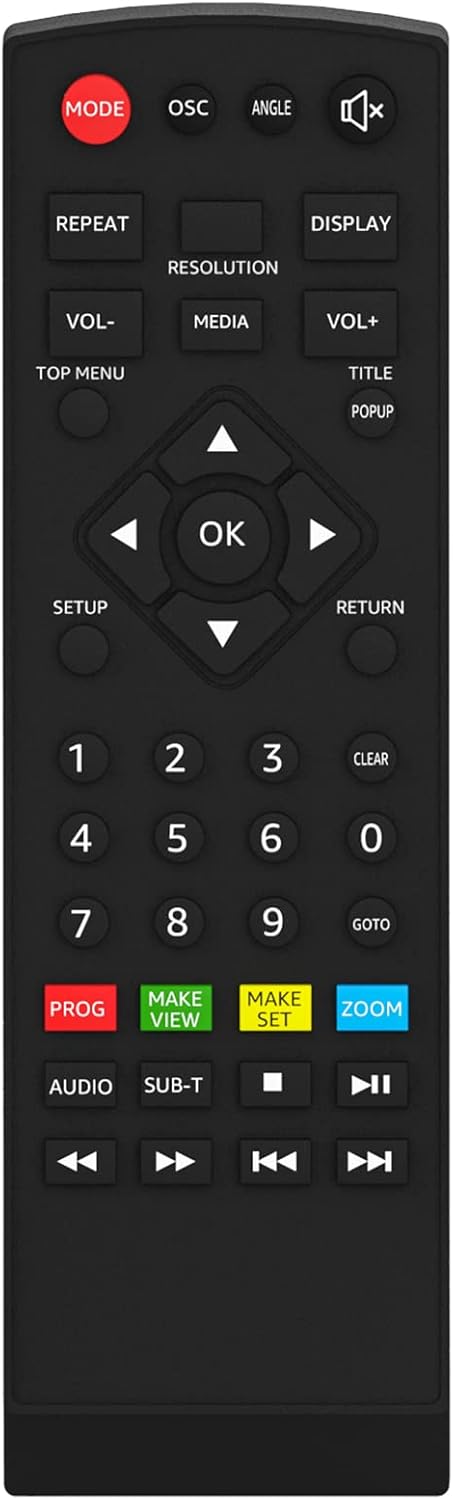
Image 1: WONNIE Remote Control. This image displays the front view of the black remote control, showing all its buttons clearly labeled for various functions such as mode, volume, navigation, playback, and numerical input.
Funkcje przycisków:
- Sposób użycia: Przełącza między różnymi trybami pracy.
- OSC: On-Screen Character display.
- KĄT: Zmienia viewing angle (if supported by the disc).
- NIEMY: Wycisza lub wyłącza wyciszenie dźwięku.
- POWTARZAĆ: Repeats the current track, chapter, or entire disc.
- REZOLUCJA: Adjusts video output resolution.
- POKAZ: Wyświetla informacje na ekranie.
- GŁOŚNOŚĆ- / GŁOŚNOŚĆ+: Zmniejsza lub zwiększa głośność.
- GŁOSKA BEZDŹWIĘCZNA: Selects media source.
- GÓRNE MENU: Accesses the disc's top menu.
- TYTUŁ: Accesses the disc's title menu.
- WYskakujące okienko: Wyświetla menu podręczne dysku.
- Przyciski nawigacyjne (w górę, w dół, w lewo, w prawo): Umożliwia nawigację po menu.
- OK: Potwierdza wybór.
- USTAWIAĆ: Enters the player's setup menu.
- POWRÓT: Umożliwia powrót do poprzedniego menu lub ekranu.
- Przyciski numeryczne (0-9): Direct input for track/chapter selection.
- JASNE: Clears input or selection.
- PRZEJDŹ DO: Jumps to a specific time or chapter.
- WAŁÓWKA: Kolejność odtwarzania programów.
- ROBIĆ VIEW: Zwyczaj view Ustawienia.
- MAKE SET: Custom set settings.
- POWIĘKSZENIE: Zooms in or out of the video.
- AUDIO: Zmienia ścieżki audio lub języki.
- PODT: Selects subtitle tracks.
- Playback Controls (Previous, Play/Pause, Next, Stop, Fast Rewind, Fast Forward): Standardowe funkcje odtwarzania multimediów.
3. Konfiguracja
3.1 Instalacja baterii
- Znajdź komorę baterii z tyłu pilota.
- Aby otworzyć pokrywę baterii, przesuń ją w dół lub w kierunku wskazanym strzałką.
- Włóż dwie baterie AAA (nie ma ich w zestawie), upewniając się, że bieguny dodatni (+) i ujemny (-) są prawidłowo ustawione względem oznaczeń wewnątrz komory.
- Załóż pokrywę baterii, wsuwając ją z powrotem na miejsce, aż do zatrzaśnięcia.
3.2 Pierwsze użycie
The WONNIE remote control operates using infrared (IR) technology. No pairing is required. Simply point the remote control directly at the IR receiver on your WONNIE Portable Blue Ray DVD Player to send commands.
4. Instrukcja obsługi
To operate your WONNIE Portable Blue Ray DVD Player using this remote control:
- Ensure the DVD player is powered on and the remote has fresh batteries.
- Point the remote control directly towards the front panel of your DVD player.
- Press the desired button for the function you wish to perform (e.g., PLAY, VOLUME+, MENU).
- For navigation within menus, use the directional arrow buttons and the OK button to confirm selections.
5. Konserwacja
- Czyszczenie: Do czyszczenia pilota używaj miękkiej, suchej ściereczki. Nie używaj płynnych środków czyszczących ani materiałów ściernych.
- Wymiana baterii: Replace batteries when the remote's range decreases or it becomes unresponsive. Always replace both batteries at the same time with new ones.
- Składowanie: Store the remote control in a cool, dry place away from direct sunlight and extreme temperatures. If not used for extended periods, remove the batteries to prevent leakage.
6. Rozwiązywanie Problemów
| Problem | Możliwa przyczyna | Rozwiązanie |
|---|---|---|
| Pilot zdalnego sterowania nie działa. |
|
|
| Przyciski nie reagują lub są lepkie. |
|
|
7. Specyfikacje
- Model: W-BR141 (Compatible with W-BR146, W-BR156)
- Wymiary produktu: 4.2 x 1.8 x 0.7 cala
- Waga przedmiotu: 0.81 uncji
- Źródło zasilania: Baterie 2 x AAA (brak w zestawie)
- Technologia łączności: Podczerwieni (IR)
- Marka: WONNIE
8. Gwarancja i wsparcie
WONNIE is committed to providing high-quality products and customer satisfaction. For any questions, technical assistance, or support regarding your remote control, please contact WONNIE customer service. Our professional online and office teams are available to help resolve any issues within 24 hours.
Please refer to your product's original packaging or the WONNIE official webSzczegóły dotyczące gwarancji i dane kontaktowe można znaleźć na stronie.