
DXPICR SMWACTH42
Instrukcja obsługi inteligentnego zegarka DXPICR
Model: SMWACTH42
Wstęp
This manual provides comprehensive instructions for the operation, maintenance, and troubleshooting of your DXPICR Smart Watch. Please read this manual carefully before using the device to ensure proper functionality and to maximize your user experience.

Image: The DXPICR Smart Watch, featuring a light pink band and a vibrant display showing various app icons.
Konfiguracja i początkowe parowanie
Before using your DXPICR Smart Watch, ensure it is adequately charged. The watch comes with a Lithium Polymer battery (included). Follow these steps to set up and pair your watch with your smartphone:
- Pobierz aplikację: Download the official DXPICR companion application from your mobile app store (compatible with Android and iOS).
- Włącz Bluetooth: Włącz Bluetooth w swoim smartfonie.
- Sparuj zegarek: Open the DXPICR app on your phone. Navigate to the "Add a device" section and search for "Y20 GT" to connect.
- Enable Call Function (for calling features): On your watch, swipe down the screen to access quick settings and turn on the 'call' function switch.
- Połącz Bluetooth, aby wykonywać połączenia: Open your phone's Bluetooth settings page. Find and connect to "Y20 GT_Phone" to enable call answering and dialing directly from your watch.
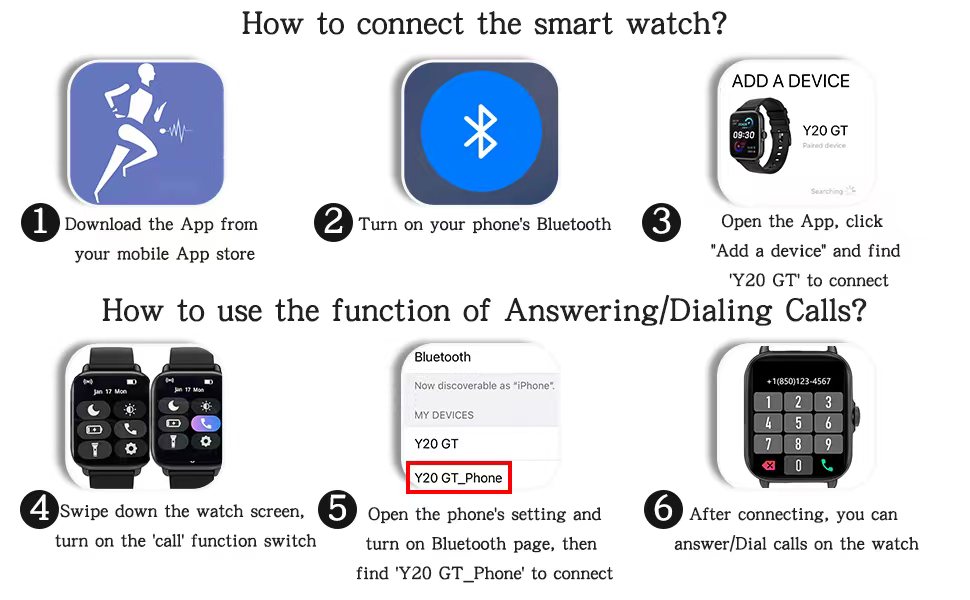
Image: A visual guide illustrating the six steps for connecting the smart watch and enabling its call answering/dialing functions via the mobile app and Bluetooth settings.

Image: A woman using her DXPICR Smart Watch to answer or dial calls directly from her wrist, demonstrating the Bluetooth call function.
Obsługa inteligentnego zegarka
Your DXPICR Smart Watch features a 1.7-inch TFT color full touch screen (240x280 pixels) for intuitive navigation. Use the touchscreen and the physical dial/button for interaction.
Główne cechy i funkcje:
- Call Receive/Dial: Once paired, you can make and receive calls directly from your watch using the dial pad, call records, or contacts.
- Inteligentne powiadomienia: Otrzymuj powiadomienia o połączeniach, wiadomościach i aplikacjach mediów społecznościowych bezpośrednio na nadgarstku.

Image: A user interacting with their laptop while their DXPICR Smart Watch displays various notifications, including calls, messages, and social media alerts.
- Monitorowanie zdrowia:
- Monitor pracy serca: Built-in optical heart rate sensor provides real-time heart rate data.

Image: A woman meditating, with her DXPICR Smart Watch displaying her heart rate, illustrating the heart rate monitoring feature.
- Monitor snu: Tracks awake time, light sleep, and deep sleep patterns to help you understand your sleep quality.

Image: A person sleeping, with the DXPICR Smart Watch displaying detailed sleep monitoring data, including awake time, light sleep, and deep sleep.
- Monitor tlenu we krwi (SpO2): Mierzy poziom nasycenia krwi tlenem.
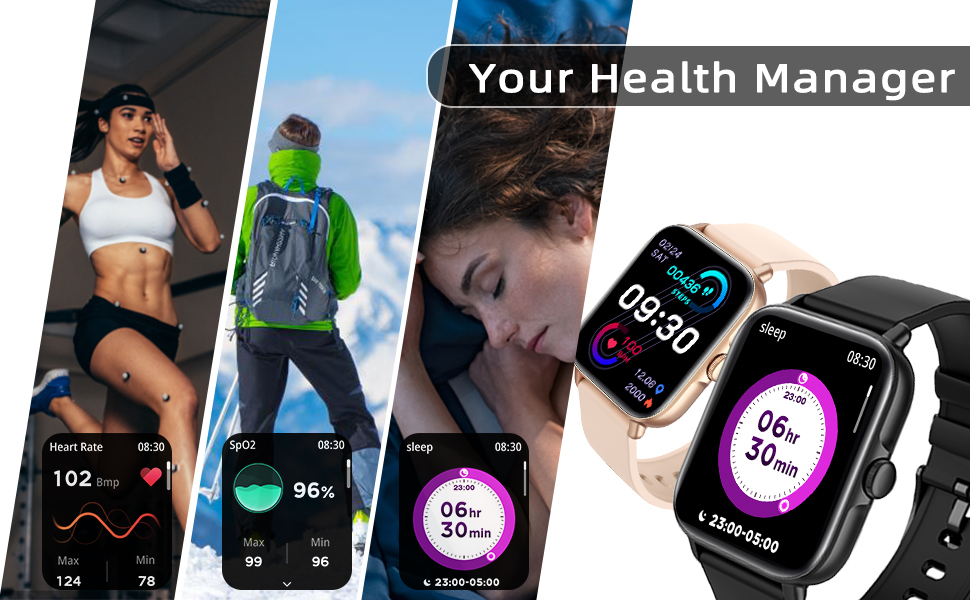
Obraz: Pokaz kolażuasing the health management features of the DXPICR Smart Watch, including heart rate, SpO2, and sleep tracking.
- Monitor pracy serca: Built-in optical heart rate sensor provides real-time heart rate data.
- Activity Tracking & Sports Modes: Built-in activity tracker records steps, calories burned, distance, and active hours. It supports 28 sports modes with GPS connectivity (via phone).

Image: A woman celebrating after a workout, with her DXPICR Smart Watch displaying activity data such as steps, calories, distance, and active minutes, highlighting the 28 sports modes.

Image: A dynamic image illustrating various sports modes available on the DXPICR Smart Watch, including walking, cycling, and swimming, with corresponding activity data.
- Praktyczne narzędzia: Your watch includes various useful tools:
- Asystent głosowy: Access AI voice commands.
- Trening oddechowy: Ćwiczenia oddechowe wspomagające relaksację.
- Sterowanie muzyką: Kontroluj odtwarzanie muzyki na sparowanym smartfonie.
- Sterowanie kamerą: Używaj zegarka jako zdalnego wyzwalacza migawki aparatu w telefonie.
- Przypomnienia o siedzącym trybie życia: Alerty mające na celu zachęcenie do ruchu po okresach braku aktywności.
- Budzik: Ustawiaj alarmy bezpośrednio na zegarku.
- Wyświetlacz pogody: Otrzymuj aktualne informacje o pogodzie w czasie rzeczywistym.
- Flesz: A basic flashlight function.

Image: A compilation of icons representing the DXPICR Smart Watch's practical functions, including weather display, blood oxygen monitoring, music control, call features, and alarm clock.
- Personalized Watch Face: Customize your watch face with your favorite pictures or photos through the app.
Konserwacja i pielęgnacja
Proper care will extend the life and performance of your DXPICR Smart Watch.
- Czyszczenie: Regularly wipe the watch screen and band with a soft, damp płótno. Unikaj stosowania ostrych chemikaliów lub materiałów ściernych.
- Wodoodporność: The watch is designed to be waterproof. However, avoid prolonged submersion in water, hot water, or steam. It is suitable for daily use and light water exposure like hand washing or rain.
- Ładowanie: Użyj dołączonego kabla ładującego. Przed ładowaniem upewnij się, że styki ładowania w zegarku i kablu są czyste i suche.
- Składowanie: Jeśli zegarek nie będzie używany przez dłuższy czas, należy go przechowywać w chłodnym i suchym miejscu.
Rozwiązywanie problemów
If you encounter issues with your DXPICR Smart Watch, refer to the following common solutions:
| Problem | Możliwe rozwiązanie |
|---|---|
| Zegarek się nie włącza/nie ładuje. | Ensure the charging cable is properly connected to both the watch and a power source. Check if the charging contacts are clean. Allow the watch to charge for at least 30 minutes before attempting to turn it on. |
| Rozłączenie Bluetootha. | Ensure the watch and phone are within Bluetooth range. Restart both the watch and your phone. Unpair and re-pair the devices through the app and phone's Bluetooth settings. Check if the app is running in the background and has necessary permissions. |
| Powiadomienia się nie pojawiają. | Verify that notification permissions are enabled for the DXPICR app in your phone's settings. Ensure notifications are enabled within the DXPICR app itself. Check if "Do Not Disturb" mode is active on either the watch or phone. |
| Odczyty tętna/SpO2 są niedokładne. | Ensure the watch is worn snugly on your wrist, not too tight or too loose. Keep the sensor clean and free from debris. Remain still during measurements. |
| Aplikacja ulega awarii lub zawiesza się. | Update the DXPICR app to the latest version. Clear the app's cache and data (this may require re-pairing). Reinstall the app if the issue persists. Ensure your phone's operating system is up to date. |
Specyfikacja produktu
| Funkcja | Szczegół |
|---|---|
| Marka | DXPICR |
| Nazwa modelu | DXPICR Smart Watch |
| Numer modelu przedmiotu | SMWACTH42 |
| Wymiary produktu | 3.7 x 3.4 x 1.7 cala |
| Waga przedmiotu | 3.84 uncji |
| Kolor | Jasnoróżowy |
| Technologia wyświetlania | TFT |
| Rozmiar ekranu | 1.7 cali |
| Rezolucja | 240 x 280 pikseli |
| System operacyjny | Kompatybilny z Androidem i iOS |
| Technologia łączności | Bluetooth |
| Typ baterii | 1 bateria litowo-polimerowa (w zestawie) |
| Cechy specjalne | Phone Call, Heart Rate Monitor, Sleep Monitor, Blood Oxymeter (SpO2), Music Player, Camera, Sedentary Reminder, Alarm Clock, Calorie Tracker, Time Display, Voice Call, Waterproof, Multisport Tracker, Notifications, Activity Tracker, Breath Monitor |
| Wejście interfejsu ludzkiego | Tarcza, ekran dotykowy |
Gwarancja i wsparcie
For warranty information or technical support, please refer to the contact details provided with your product packaging or visit the official DXPICR website. Our customer service team is available to assist you with any questions or concerns regarding your smart watch.
Ask a question about this manual
Ask about setup, troubleshooting, compatibility, parts, safety, or missing instructions. Manuals+ will review the question and use this page’s manual context to help answer it.