
1. Koniec produktuview
The farexon Electric Standing Desk is designed to provide a versatile and ergonomic workspace, allowing users to easily switch between sitting and standing positions. This model features a 55 x 24 inch desktop in Oak Grey, equipped with an electric lifting system, memory presets, and anti-collision technology for safe and convenient operation. It is suitable for various environments including home offices, study rooms, and commercial settings.

Figure 1.1: The farexon Electric Standing Desk in an office setup, showcasing its spacious desktop and integrated features like the mouse pad and headphone hook.
2. Informacje dotyczące bezpieczeństwa
Please read all safety instructions carefully before assembly and operation to prevent injury or damage to the product. Keep this manual for future reference.
- Ensure anti-collision technology is enabled during operation to prevent injuries or damage. The desk will move approximately 2cm in the opposite direction if an obstacle is detected during height adjustment.
- Verify that the desk meets U.S. federal and state safe air standards for reduced formaldehyde and VOC emissions.
- Do not place excessive weight on the desk. The maximum recommended weight is 178 pounds.
- Podczas pracy urządzenia należy trzymać dzieci i zwierzęta z dala od biurka.
- Ensure all cables are properly managed to avoid entanglement or damage during height adjustments.
- Należy używać wyłącznie dostarczonego zasilacza i podzespołów.
3. Zawartość opakowania
Before beginning assembly, please ensure all components listed below are present and undamaged. If any parts are missing or damaged, contact customer support immediately.
- Desktop (Oak Grey, 55 x 24 inches)
- Electric Lifting Columns (2 pcs)
- Desk Feet/Bases (2 pcs)
- Panel sterowania z wyświetlaczem LED
- Zasilacz i kabel
- Large Mouse Pad (36 x 16 inches)
- Rolling Wheels (4 pcs, lockable)
- Foot Pads (4 pcs, non-slip)
- Haczyki na słuchawki (2 szt.)
- Wire Collecting Hole Cover
- Sprzęt montażowy (śruby, nakrętki itp.)
- Narzędzia montażowe (klucz imbusowy itp.)
- Instrukcja obsługi (ten dokument)

Figure 3.1: Key components and features of the desk, such as the wire collecting hole, rolling wheels, protective edge, and metal headphone hooks.
4. Instrukcja montażu
Assembly typically requires two people. Follow the steps below. A detailed installation video is also available for visual guidance.
- Przygotuj miejsce pracy: Clear a spacious area for assembly. Lay down a soft cloth or cardboard to protect the desktop from scratches.
- Zamontuj kolumny podnoszące na biurku: Carefully place the desktop upside down. Align the electric lifting columns with the pre-drilled holes on the underside of the desktop and secure them using the provided screws.
- Install Desk Feet/Bases: Attach the desk feet to the bottom of the lifting columns. Decide whether to install the rolling wheels or the non-slip foot pads. The wheels offer mobility, while the foot pads provide stationary stability. Secure your chosen option with the appropriate hardware.
- Connect Control Panel and Motor: Mount the control panel to the underside of the desktop in the designated area. Connect the motor cables from the lifting columns to the control panel, ensuring a secure fit. Connect the power adapter to the control panel.
- Zainstaluj akcesoria: Attach the headphone hooks to the desired location on the underside of the desk. Insert the wire collecting hole cover into the desktop opening.
- Odwróć biurko: Korzystając z pomocy drugiej osoby, ostrożnie odwróć zmontowane biurko do pozycji pionowej.
- Pierwsze uruchomienie i kalibracja: Plug the power cable into a wall outlet. The desk may perform an initial calibration cycle. Follow any on-screen prompts on the LED display.

Figure 4.1: A fully assembled farexon Electric Standing Desk, ready for use in a home office environment.
5. Instrukcja obsługi
The farexon Electric Standing Desk features an intuitive control panel for easy height adjustment and memory functions.
5.1. Funkcje panelu sterowania

Figure 5.1: The smart LED controller with its various buttons and display.
- Wyświetlacz LED: Pokazuje aktualną wysokość biurka w calach.
- Strzałki w górę/w dół (^ / v): Press to adjust the desk height incrementally. Hold to continuously move the desk up or down.
- Przyciski pamięci (1, 2, 3, 4): These buttons allow you to save and recall up to four preferred height settings.
5.2. Ustawianie ustawień pamięci
- Dostosuj wysokość biurka do swoich potrzeb, korzystając ze strzałek w górę/w dół.
- Press and hold one of the Memory Buttons (1, 2, 3, or 4) until the LED display flashes or beeps, indicating the height has been saved.
- To recall a saved height, simply press the corresponding Memory Button (1, 2, 3, or 4). The desk will automatically move to the saved position.
5.3. Anti-Collision Technology
The desk is equipped with an anti-collision system to prevent damage or injury. If the desk encounters an obstacle during height adjustment, it will automatically stop and reverse approximately 2cm. This feature is designed to protect both the desk and its surroundings.

Figure 5.2: The desk's quiet operation and anti-collision feature ensure smooth and safe height adjustments.
6. Konserwacja
Regular maintenance will help prolong the life and performance of your farexon Electric Standing Desk.
- Czyszczenie: Przetrzyj blat i ramę miękką szmatką.amp cloth. Avoid abrasive cleaners or harsh chemicals that could damage the finish. Ensure the desk is unplugged before cleaning electrical components.
- Zarządzanie kablami: Periodically check and organize cables to prevent tangling or interference with the lifting mechanism.
- Kontrola silnika: While the motor is designed for durability (tested for 50,000 cycles), avoid overloading the desk. Listen for unusual noises during operation, which may indicate an issue.
- Wheel/Foot Pad Check: If using wheels, ensure they are clean and roll smoothly. If using foot pads, ensure they are securely attached and provide stable support.
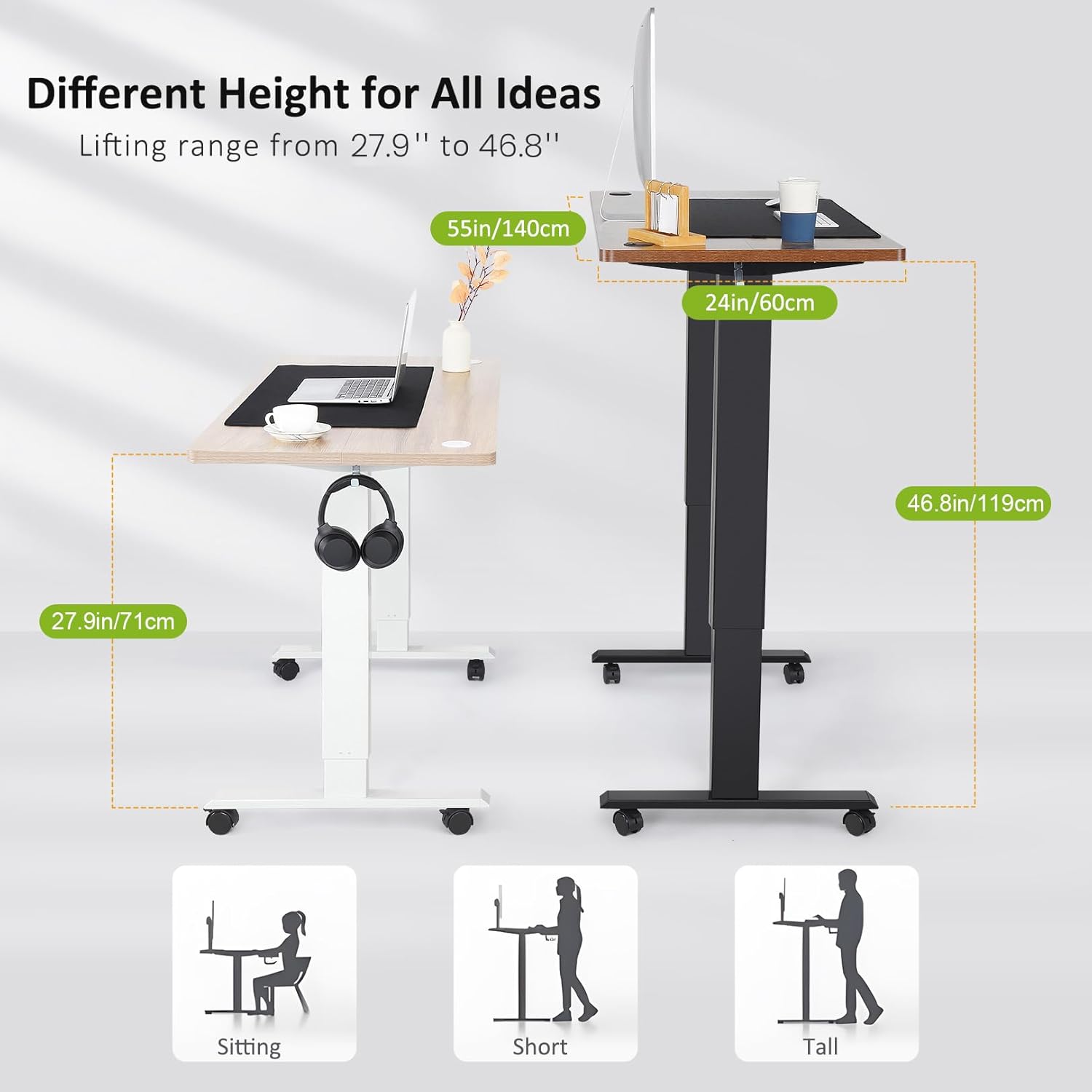
Figure 6.1: The robust motor designed for long-term reliability and safety features.
7. Rozwiązywanie Problemów
If you encounter any issues with your farexon Electric Standing Desk, refer to the following common problems and solutions. If the problem persists, contact customer support.
| Problem | Możliwa przyczyna | Rozwiązanie |
|---|---|---|
| Biurko się nie porusza. | Power cable unplugged; motor connection loose; overload. | Check power connection. Ensure all motor cables are securely connected. Reduce weight on the desk. |
| Biurko porusza się nieregularnie lub zatrzymuje się. | Obstacle detected by anti-collision; uneven weight distribution. | Remove any obstacles. Redistribute weight evenly on the desktop. |
| Ustawienia pamięci nie działają. | Presets not properly saved. | Re-save the desired height by holding the memory button until it confirms. |
| Hałas podczas pracy. | Normal operation sound; loose components. | A slight hum is normal. Check if all screws are tightened. Ensure nothing is obstructing the lifting columns. |
8. Specyfikacje produktu
| Funkcja | Szczegół |
|---|---|
| Marka | farexon |
| Nazwa modelu | biurko stojące |
| Numer modelu | 1 |
| Wymiary biurka (szer. x gł.) | 55" x 24" |
| Zakres regulacji wysokości | 27" - 46" |
| Maksymalna nośność | 178 funtów |
| Materiał na biurko | Wood (Oak Grey finish) |
| Materiał ramy | Metal (Steel finish) |
| Cechy specjalne | Adjustable Height, Electric, Ergonomic, Anti-Collision Technology, Memory Presets, Rolling Wheels/Foot Pads, Headphone Hook, Cable Management Hole |
| Wymagany montaż | Tak (narzędzia w zestawie) |

Figure 8.1: The adjustable height range of the desk accommodates various user preferences and postures.
9. Gwarancja i wsparcie
farexon is committed to providing high-quality products and excellent customer service.
- Gwarancja: This product comes with a Limited Warranty. Please refer to the warranty card included in your package for specific terms and conditions.
- Zwroty: The product is eligible for 30-day easy returns from the date of purchase.
- Obsługa klienta: For any questions, assistance with assembly, troubleshooting, or warranty claims, please contact the farexon customer service team. Contact information can typically be found on the product packaging or the official farexon webstrona.

Figure 9.1: farexon's dedicated customer support team is available to assist you.