
Wstęp
Thank you for choosing the Oversteel Bulat 1080P Full HD Webkamera. Niniejsza instrukcja zawiera szczegółowe instrukcje dotyczące konfiguracji, obsługi i konserwacji kamery. webcam to ensure optimal performance. The Bulat webcam is designed for high-quality video communication, recording, and streaming, featuring a 1080p resolution at 60 frames per second, an integrated microphone, and an adjustable ring light.
Produkt ponadview
Główne cechy
- Wideo w jakości Full HD 1080P: Equipped with a 2MP CMOS HD sensor, delivering sharp and clear video at resolutions up to 1920 x 1080 at 60fps. The 6G 2M glass lens ensures a crisp image.
- Zintegrowany mikrofon: Features a built-in microphone for clear audio capture, effective up to 10 meters, suitable for video conferences, meetings, and live broadcasts.
- Adjustable Ring Light: An integrated ring light provides uniform and flattering illumination. It offers adjustable brightness and color temperature (warm/cold light) to suit various lighting conditions.
- Plug & Play Connectivity: Simple USB connection (compatible with USB 2.0/3.0) with a 150 cm cable. No additional drivers or software are required for operation.
- Kompaktowa i trwała konstrukcja: Measuring 10 x 35 x 25 cm and weighing 135 grams, the webcam is portable and made from ABS material for durability.
Co jest w pudełku
- Oversteel Bulat Webkrzywka
Składniki produktu
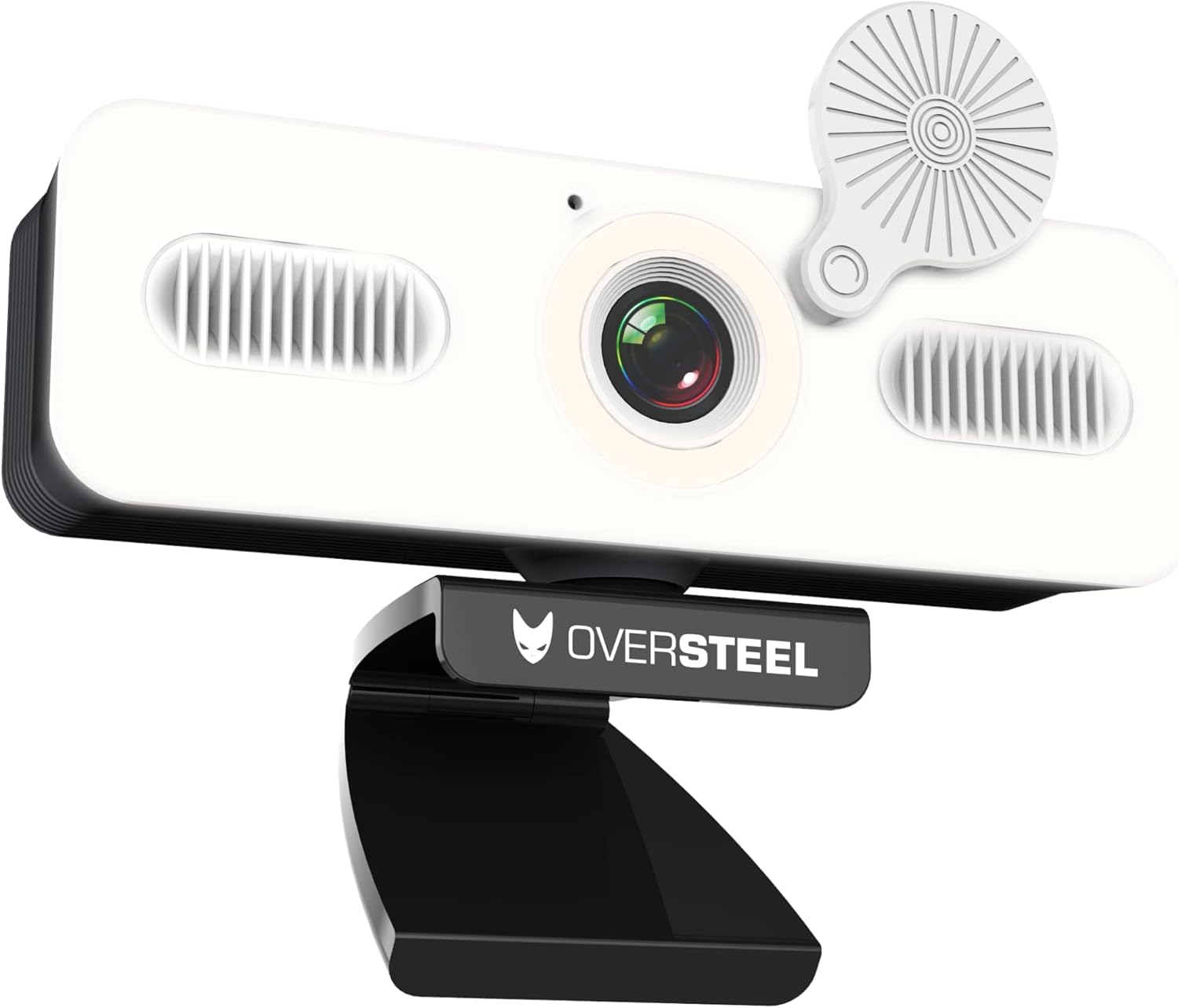
Obraz 1: Przód view of the Oversteel Bulat Webcam, showing the camera lens, integrated ring light, and microphone grilles. The webcam is mounted on its adjustable stand.

Obraz 2: Oversteel Bulat Webcam with its privacy cover closed, highlighting the design and the integrated light.
Instrukcje konfiguracji
- Rozpakuj Webkrzywka: Carefully remove the Oversteel Bulat Webcam z opakowania.
- Pozycja Webkrzywka:
- Umieść webcam on top of your monitor or laptop screen using its integrated clip. Ensure it is stable and securely positioned.
- Alternatywnie, webcam can be mounted on a tripod using the standard tripod thread located at the bottom of the stand (tripod not included).
- Połącz się ze swoim urządzeniem: Podłącz kabel USB do webcam into an available USB 2.0 or USB 3.0 port on your computer (PC, Mac, Laptop, Tablet, Chromebook).
- Instalacja automatyczna: Ten webcam is Plug & Play. Your operating system will automatically detect and install the necessary drivers. This process may take a few moments. No manual driver installation is typically required.
- Sprawdź instalację:
- Okna: Go to Device Manager and check under "Cameras" or "Imaging devices" for "Oversteel Bulat Webkrzywka".
- MacOS: Open System Preferences > Sound > Input and check for the webcam's microphone. For video, open an application like Photo Booth or FaceTime.

Obraz 3: The Oversteel Bulat Webkamera bezpiecznie zamocowana na monitorze komputerowym, pokazująca jej regulowany klips.
Instrukcja obsługi
Korzystanie z Webcam for Video Calls and Recording
- Open Your Application: Launch your preferred video conferencing or recording software (e.g., Zoom, Microsoft Teams, Skype, Google Meet, OBS Studio, Photo Booth).
- Wybierz Webkrzywka: In the application's settings, navigate to the video and audio input options.
- For video input, select "Oversteel Bulat Webcam" or a similar name.
- For audio input, select "Oversteel Bulat Microphone" or a similar name.
- Dostosuj ustawienia (opcjonalnie): Some applications allow you to adjust video resolution, frame rate, brightness, contrast, and other settings. Refer to your application's documentation for specific adjustments. The webcam supports 1080p resolution at 60fps.
- Start Your Session: Begin your video call, recording, or live stream.
Działanie światła pierścieniowego
The Oversteel Bulat Webcam features an integrated ring light to enhance your illumination.
- Włączanie/wyłączanie: The ring light is controlled by a touch-sensitive button located on the webcam body, typically near the lens. Tap the button to turn the light on or off.
- Dostosuj jasność: Press and hold the touch button to cycle through different brightness levels. Release the button when the desired brightness is achieved.
- Zmień temperaturę barwową: The light offers warm and cold light options. Tap the button repeatedly to switch between warm light, cold light, and mixed light modes.

Obraz 4: Comparison of the Oversteel Bulat Webcam's integrated ring light in warm and standard (cold) light modes, illustrating the adjustable color temperature feature.
Konserwacja
- Czyszczenie obiektywu: Do delikatnego czyszczenia obiektywów aparatów fotograficznych należy używać miękkiej, niepozostawiającej włókien ściereczki przeznaczonej specjalnie do czyszczenia obiektywów aparatów. websoczewka krzywkowa. Unikaj stosowania silnych środków chemicznych i materiałów ściernych.
- Czyszczenie ciała: Wytrzyj webcam body with a dry or slightly damp soft cloth. Do not immerse the webnie zanurzać w wodzie ani nie stosować nadmiernej wilgoci.
- Składowanie: Gdy nie jest używany, przechowuj webcam in a clean, dry place away from direct sunlight and extreme temperatures. Use the privacy cover to protect the lens from dust and scratches.
- Pielęgnacja kabli: Aby zapobiec uszkodzeniom, nie należy nadmiernie zginać ani skręcać kabla USB.
Rozwiązywanie problemów
| Problem | Możliwa przyczyna | Rozwiązanie |
|---|---|---|
| No image or video |
|
|
| Brak dźwięku lub słaba jakość dźwięku |
|
|
| Pierścień świetlny nie działa |
|
|
| Video appears choppy or laggy |
|
|
Specyfikacje
| Funkcja | Szczegół |
|---|---|
| Numer modelu | NAT-OV-BULAT-60 |
| Wymiary (gł. x szer. x wys.) | Wymiary 10 x 35 x 25 cm |
| Waga | 190 gramów |
| Technologia czujników | CMOS |
| Rozdzielczość przechwytywania wideo | 1080p Full HD (1920 x 1080 pikseli) |
| Video Capture Speed | 60 klatek na sekundę |
| Effective Still Image Resolution | 2.07 MP |
| Technologia łączności | USB2.0/3.0 |
| Funkcja specjalna | Built-in Ring Light (Warm/Cold) |
| Mikrofon | Zintegrowany |
| Kompatybilne urządzenia | PC, Laptop, Tablet, Chromebook |
| System operacyjny | Proprietary (firmware or embedded OS) |
| Format wideo | MP4 |
| Format audio | MP3 |
| Typ fokusu | Stały fokus |
| Balans bieli | Automatyczny |
| Proporcje obrazu | 16:9 |
| Poziom wodoodporności | Nie jest wodoodporny |
Gwarancja i wsparcie
Informacje o gwarancji
The Oversteel Bulat Webkamera jest wyposażona w dwuletnia gwarancja producenta from the date of purchase. This warranty covers defects in materials and workmanship under normal use. It does not cover damage caused by misuse, accident, unauthorized modification, or external causes. Please retain your proof of purchase for warranty claims.
Obsługa klienta
For technical assistance, troubleshooting, or warranty inquiries, please contact Oversteel customer support. Refer to the official Oversteel webstrona zawierająca najbardziej aktualne dane kontaktowe.
Zasoby internetowe: Odwiedź Oversteel Brand Store on Amazon Aby uzyskać dodatkowe informacje o produkcie i pomoc.