
Ważne informacje dotyczące bezpieczeństwa
Please read this manual carefully before assembly and use to ensure safe operation and to prevent damage to the product or injury to yourself.
- Nie przekraczać maksymalnego udźwigu 100 kilogramówPrzeciążenie może powodować niestabilność i uszkodzenia.
- Ensure all cables are properly managed and secured to prevent tripping hazards or damage during height adjustments.
- Podczas pracy urządzenia należy trzymać dzieci i zwierzęta z dala od biurka.
- Do not place hands or other body parts near moving parts of the desk frame during height adjustment.
- Only use the desk for its intended purpose as a workstation.
- Regularly check all screws and bolts to ensure they are tightened.
Produkt ponadview
The FLEXISPOT E1B Electric Standing Desk is designed to provide a versatile and ergonomic workspace. It features a robust dual-motor system for smooth height adjustments and a durable tabletop.
Główne cechy:
- System podwójnego silnika: Ensures stable and efficient height adjustment at 25 mm/s.
- Zakres wysokości: Adjustable from 70 cm to 119 cm to suit various user heights and work preferences.
- Nośność: Supports up to 100 kg, accommodating multiple monitors and office equipment.
- Ustawienia pamięci: Control panel with memory functions for saving preferred height settings.
- High-Quality Tabletop: 160x80cm black tabletop, made in the EU from FSC-certified MDF with scratch-resistant high-pressure laminate.
Zawartość opakowania
Przed rozpoczęciem montażu należy sprawdzić, czy wszystkie wymienione poniżej elementy są obecne i nieuszkodzone. W przypadku braku lub uszkodzenia jakiejkolwiek części prosimy o kontakt z obsługą klienta.
- Desk Frame (E1B) components (legs, feet, crossbar, motor, control box)
- Tabletop (DT1608-BLACK-EU18)
- Control Panel with Memory Functions
- Zasilacz i kabel
- Sprzęt montażowy (śruby, śruby, klucze imbusowe)
- Akcesoria do zarządzania kablami
- Instrukcja obsługi
Instrukcja montażu i instalacji
Assembly is designed to be straightforward. It is recommended to assemble the desk on a soft, clean surface to prevent scratches. Two people are recommended for easier assembly.
Krok 1: Rozpakuj komponenty
Ostrożnie wyjmij wszystkie części z opakowania i rozłóż je. Sprawdź zawartość opakowania.
Krok 2: Złóż ramę biurka
- Attach the lifting columns to the crossbar using the provided screws.
- Secure the desk feet to the bottom of the lifting columns.
- Mount the control box to the designated area on the frame.
- Connect the motor cables from the lifting columns to the control box.
- Connect the control panel cable to the control box.

Image: The FLEXISPOT E1B desk frame in black and white, illustrating the height adjustment range from 70cm to 119cm, highlighting the dual motor system, 25mm/s adjustment speed, and low noise operation (less than 50dB).
Krok 3: Zamontuj blat stołu
Carefully place the tabletop upside down on a soft surface. Position the assembled desk frame onto the tabletop, aligning the pre-drilled holes. Secure the tabletop to the frame using the provided screws.

Image: A FLEXISPOT desk with a black tabletop, featuring a laptop, books, and a pen holder, demonstrating a functional and organized workspace.
Step 4: Connect Power and Cable Management
Connect the power adapter to the control box and then to a power outlet. Use the included cable management accessories to organize and secure all cables, preventing them from interfering with the desk's movement.
Instrukcja obsługi
Panel sterowania nadview:
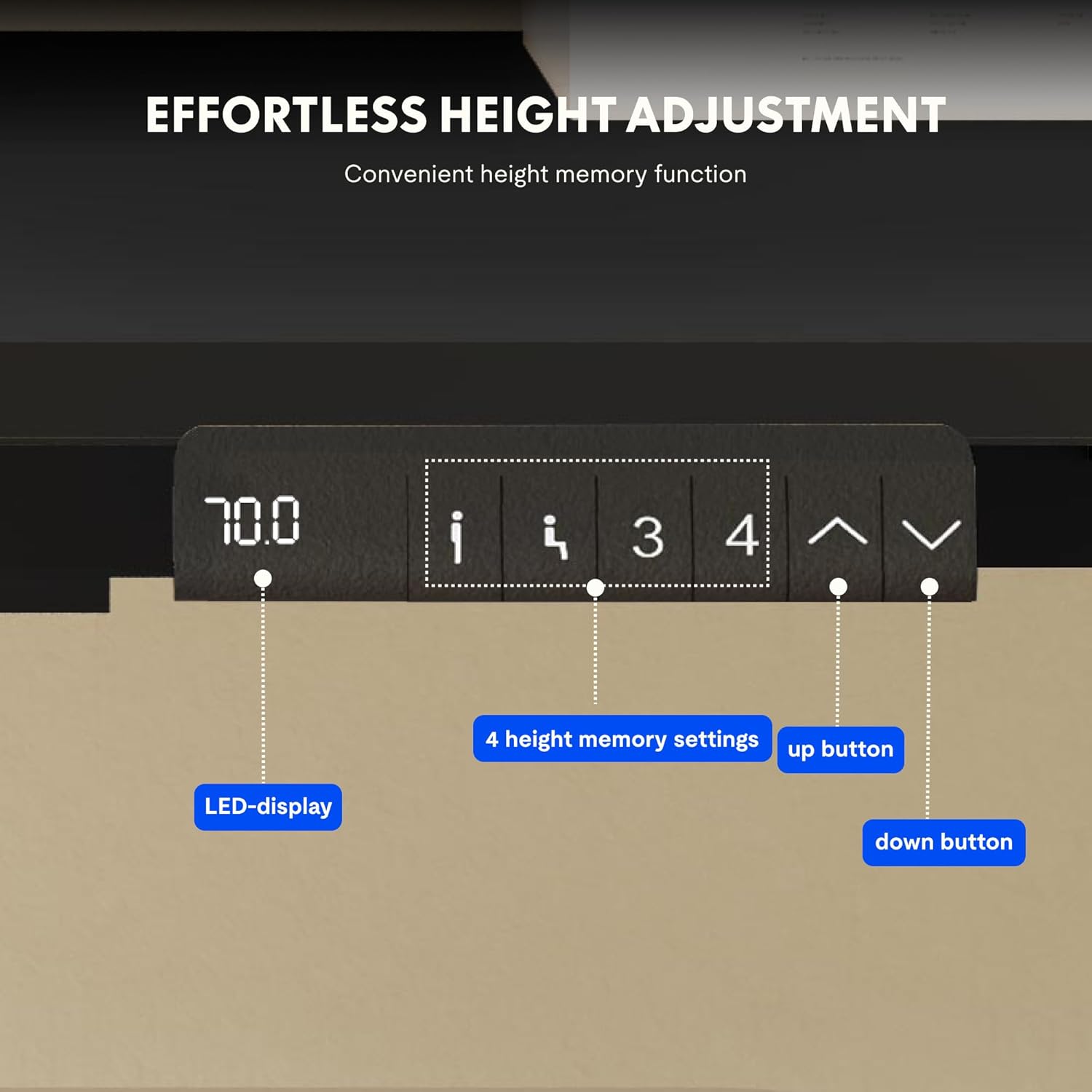
Image: Close-up of the FLEXISPOT desk control panel, showing the LED display for current height, up and down arrow buttons for manual adjustment, and four numbered buttons for saving and recalling height memory presets.
Manual Height Adjustment:
- Naciśnij i przytrzymaj Strzałka w górę (^) przycisk do podnoszenia biurka.
- Naciśnij i przytrzymaj Strzałka w dół (v) przycisk do obniżania biurka.
- Release the button at your desired height. The LED display will show the current height.
Ustawianie ustawień pamięci:
- Dostosuj wysokość biurka do swoich potrzeb, korzystając ze strzałek w górę/w dół.
- Naciśnij "M" or "USTAWIĆ" przycisk (jeśli dostępny, w przeciwnym razie przejdź do kroku 3).
- Naciśnij jeden z ponumerowanych przycisków pamięci (1, 2, 3 lub 4) within 3 seconds. The display will show "S-" followed by the number, indicating the height is saved.
Przywoływanie ustawień pamięci:
Simply press the desired numbered memory button (1, 2, 3 lub 4). Biurko automatycznie przesunie się na zapisaną wysokość.
Funkcja resetowania:
If the desk encounters an error or does not move smoothly, a reset may be required. Press and hold the "W dół" button until the desk reaches its lowest position, then release and press it again for 5-10 seconds until the display shows "RST" or "E-1" and then returns to the lowest height. The desk will then reset to its factory lowest position.
Konserwacja
- Czyszczenie: Przetrzyj powierzchnię biurka i ramę miękką szmatką.amp ściereczką. Unikaj środków czyszczących o działaniu ściernym i silnych środków chemicznych.
- Kontrola: Okresowo sprawdzaj wszystkie śruby i połączenia, aby upewnić się, że są dobrze dokręcone. W razie potrzeby dokręć.
- Zarządzanie kablami: Ensure cables remain tidy and do not obstruct the desk's movement.
- Rozkład masy: Distribute weight evenly on the tabletop to prevent strain on the motors and frame.
Rozwiązywanie problemów
| Problem | Możliwa przyczyna | Rozwiązanie |
|---|---|---|
| Biurko się nie porusza. | Power cable disconnected; control box error; overloaded desk. | Check power connections. Perform a reset (see Operating Instructions). Reduce weight on the desk. |
| Biurko porusza się nierównomiernie lub wydaje nietypowe dźwięki. | Loose connections; obstruction; uneven weight distribution. | Check all screws and connections. Remove any obstructions. Redistribute weight evenly. Perform a reset. |
| Na wyświetlaczu pojawia się kod błędu (np. E01, E02). | Wewnętrzny błąd systemu. | Perform a reset. If the error persists, contact customer support. |
| Ustawienia pamięci nie działają. | Ustawienia predefiniowane nie zostały zapisane prawidłowo. | Re-save the memory presets following the instructions. |
Specyfikacje
| Funkcja | Szczegół |
|---|---|
| Marka | ELASTYCZNI |
| Numer modelu | E1B+DT1608-BLACK-EU18 |
| Wymiary blatu stołu (dł. x szer.) | Wymiary: 160cm x 80cm |
| Zakres regulacji wysokości | 70 cm - 119 cm |
| Nośność | 100 kilogramów |
| Prędkość regulacji | 25 mm/s |
| Typ silnika | Podwójne silniki |
| Materiał blatu stołu | FSC-certified MDF with high-pressure laminate |
| Materiał ramy | Stal stopowa |
| Kolor | Black Tabletop + Black Frame |
Gwarancja i wsparcie
FLEXISPOT products are manufactured to high-quality standards. For warranty information and customer support, please refer to the official FLEXISPOT webstronie internetowej lub skontaktuj się ze sprzedawcą.
- Gwarancja: Specific warranty terms may vary by region and product. Please check your purchase documentation or the manufacturer's webstronie o szczegóły.
- Obsługa klienta: For technical assistance, missing parts, or operational questions, please visit the FLEXISPOT Brand Store or contact their official support channels.