
LFF DAB Plus Digital FM Radio
LFF DAB Plus Digital FM Radio User Manual
Model: DAB Plus Digital FM Radio
Marka: LFF
1. Wprowadzenie
This manual provides detailed instructions for the LFF DAB Plus Digital FM Radio. It covers setup, operation, maintenance, and troubleshooting to ensure optimal performance and user experience. Please read this manual thoroughly before using the device.

Przód view of the LFF DAB Plus Digital FM Radio, showing the speaker grille, color display, and extended antenna.
2. Zawartość opakowania
Proszę sprawdzić, czy w paczce znajdują się następujące elementy:
- 1 x LFF DAB Plus Digital FM Radio
- 1 x zasilacz sieciowy
- 1 x Skrócona instrukcja obsługi
3. Koniec produktuview
Zapoznaj się z podzespołami i elementami sterowania radia.
3.1 Główne cechy

This diagram illustrates the radio's key functions: DAB+ radio, 60 station presets, FM radio, sleep timer, headphone jack, Bluetooth connectivity, full-color screen, and dual alarm capability.
3.2 Elementy sterujące i porty

Góra i bok view of the radio, showing control buttons and knobs on the top panel, and the 3.5mm headphone jack located on the side.
Refer to the diagram above for the location of the following:
- Przycisk zasilania: Włącza/wyłącza radio.
- Przycisk trybu: Przełącza między trybami DAB+, FM i Bluetooth.
- Pokrętło strojenia/wyboru: Rotates to tune stations or navigate menus, press to select.
- Pokrętło głośności: Dostosowuje głośność dźwięku.
- Zaprogramowane przyciski: For saving and recalling favorite stations.
- Alarm/Sleep Timer Button: Dostęp do ustawień alarmu i timera snu.
- Wyświetlacz kolorowy: Wyświetla informacje o stacji, czas i opcje menu.
- Gniazdo słuchawkowe (3.5 mm): Do prywatnego słuchania.
- Port DC IN: Do podłączenia zasilacza sieciowego.
- Antena teleskopowa: Dla lepszego odbioru radia.
4. Konfiguracja
4.1 Włączanie
The radio can be powered by the included AC adapter or by batteries.
- Zasilanie prądem zmiennym: Connect the AC power adapter to the DC IN port on the back of the radio and plug it into a wall outlet.
- Moc baterii: Open the battery compartment on the back of the radio and insert 4 x 1.5V AA (LR6) batteries, ensuring correct polarity.
Z powrotem view of the radio, detailing the battery compartment for 4x AA batteries, the AC adapter input (5V/1000mA), and the 360° rotatable antenna. Product dimensions are also indicated.
4.2 Regulacja anteny
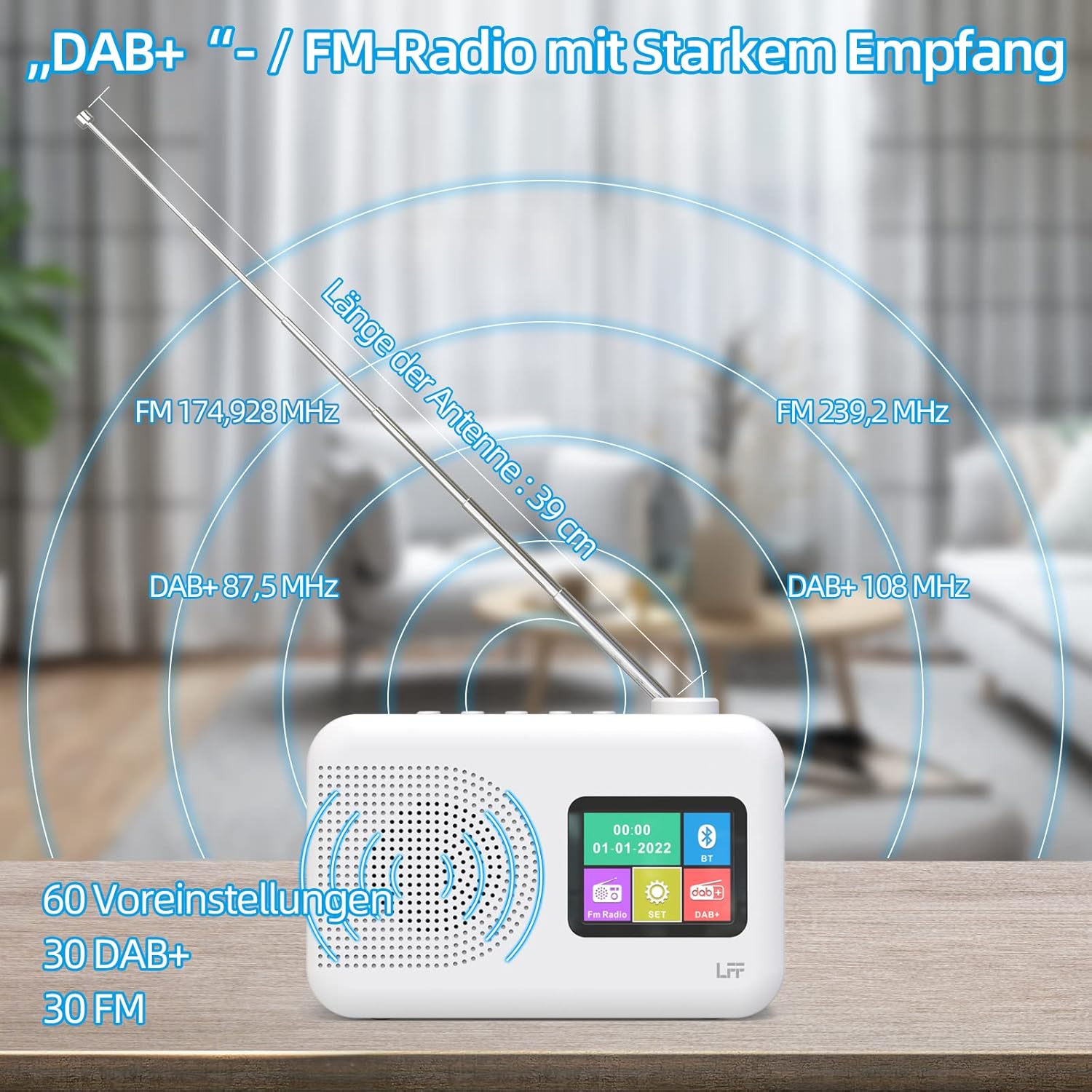
Extend the telescopic antenna fully (approximately 39 cm) and adjust its angle for optimal reception, especially for DAB+ and FM stations.

This diagram illustrates the radio's strong DAB+ and FM reception capabilities with the fully extended 39cm antenna, showing frequency ranges and the capacity for 60 total presets (30 DAB+, 30 FM).
4.3 Skanowanie początkowe (DAB+)
- Włącz radio.
- Ensure the mode is set to DAB+. If not, press the Tryb przycisk, aby przełączyć.
- The radio will automatically perform a full scan for available DAB+ stations. This may take a few minutes.
- Once the scan is complete, the radio will display a list of found stations.
5. Instrukcja obsługi
5.1 Tryb radia DAB+
- Naciśnij Tryb przycisk, aby wybrać tryb DAB+.
- Obróć Dostrój/Wybierz knob to browse through the available stations.
- Naciśnij Dostrój/Wybierz pokrętło do wyboru stacji.
- Zapisywanie ustawień wstępnych: Aby zapisać stację, naciśnij i przytrzymaj Ustawienie wstępne button until the display confirms. To recall, briefly press the corresponding Ustawienie wstępne button. Up to 30 DAB+ stations can be saved.
Tryb radia FM 5.2
- Naciśnij Tryb aby wybrać tryb FM.
- Obróć Dostrój/Wybierz pokrętło do ręcznego dostrojenia częstotliwości.
- Naciśnij i przytrzymaj Dostrój/Wybierz knob for a few seconds to auto-scan for the next available station.
- Zapisywanie ustawień wstępnych: Similar to DAB+ mode, press and hold a Ustawienie wstępne button to save, and briefly press to recall. Up to 30 FM stations can be saved.
5.3 Tryb Bluetooth

This diagram illustrates the three primary playback options for the radio: through its internal speaker, via Bluetooth connection to an external device, or using headphones connected to the headphone jack.
- Naciśnij Tryb button to select Bluetooth mode. The display will show "Bluetooth Pairing" or similar.
- On your external device (e.g., smartphone), enable Bluetooth and search for available devices.
- Select "LFF Radio" (or similar name) from the list to pair.
- Po sparowaniu możesz odtwarzać dźwięk ze swojego urządzenia przez głośnik radia.
- Notatka: This radio acts as a Bluetooth receiver. It does not support connecting to Bluetooth headphones or other Bluetooth speakers.
5.4 Wyłącznik czasowy
Timer uśpienia umożliwia automatyczne wyłączenie radia po upływie ustawionego czasu.

This image depicts the sleep timer function, offering selectable durations of 15, 30, 45, 60, 90, and 120 minutes before the radio automatically powers off.
- Naciśnij Alarm/Sleep Timer button repeatedly to cycle through sleep timer options (15 min, 30 min, 45 min, 60 min, 90 min, 120 min, OFF).
- Select your desired duration. The radio will turn off automatically after this time.
5.5 Budzik
The radio features a dual alarm function.
- Naciśnij i przytrzymaj Alarm/Sleep Timer przycisk, aby wejść w ustawienia alarmu.
- Użyj Dostrój/Wybierz knob to set the alarm time, alarm source (DAB+, FM, or buzzer), and volume.
- Naciśnij Dostrój/Wybierz pokrętło do potwierdzania każdego ustawienia.
- W razie potrzeby powtórz tę procedurę dla drugiego alarmu.
5.6 Korzystanie ze słuchawek
Plug 3.5mm headphones into the headphone jack on the side of the radio for private listening. The internal speaker will automatically mute.
6. Konserwacja
6.1 Czyszczenie
- Wytrzyj powierzchnię radia miękką, suchą ściereczką.
- Nie należy używać środków czyszczących o działaniu ściernym, wosków ani rozpuszczalników, gdyż mogą one uszkodzić powłokę.
6.2 Wymiana baterii
When using battery power, replace all four AA batteries when the low battery indicator appears on the display or when performance degrades.
- Ensure the radio is turned off and disconnected from AC power.
- Otwórz pokrywę komory baterii z tyłu.
- Wyjmij stare baterie i zutylizuj je w odpowiedni sposób.
- Insert new 4 x 1.5V AA (LR6) batteries, observing correct polarity (+/-).
- Dokładnie zamknij pokrywę komory baterii.
6.3 Folia ochronna na ekran
The radio's display comes with a transparent protective film. For optimal clarity, gently peel off this film before first use.
7. Rozwiązywanie Problemów
Jeśli napotkasz problemy, zapoznaj się z poniższymi typowymi problemami i rozwiązaniami:
| Problem | Możliwa przyczyna | Rozwiązanie |
|---|---|---|
| Brak zasilania | AC adapter not connected, batteries depleted or incorrectly inserted. | Check AC adapter connection. Replace batteries or ensure correct polarity. |
| Słaby odbiór radia | Antena nie jest wysunięta, sygnał jest słaby, zakłócenia. | Fully extend and adjust the telescopic antenna. Move the radio to a different location. Avoid sources of interference. |
| Bluetooth nie łączy się | Radio not in Bluetooth mode, device too far, already paired with another device. | Ensure radio is in Bluetooth mode. Keep devices within range. Disconnect from other devices. |
| Brak dźwięku | Głośność jest za niska, słuchawki są podłączone, wyciszenie jest włączone. | Zwiększ głośność. Odłącz słuchawki. Sprawdź, czy wyciszenie jest aktywne. |
8. Specyfikacje
- Marka: LFF
- Model: DAB Plus Digital FM Radio
- Kolor: Biały
- Technologia łączności: Bluetooth
- Wymiary (dł. x szer. x wys.): Wymiary: 16.1 cm x 5.9 cm x 10.9 cm
- Technologia strojenia: ZIMNICA
- Źródło zasilania: AC Adapter (5V/1000mA) or 4 x 1.5V AA (LR6) Batteries
- Obsługiwane pasma radiowe: DAB+, FM
- Zakres częstotliwości DAB+: 174.928 - 239.2 MHz
- Zakres częstotliwości FM: 87.5 - 108 MHz
- Ustawienia wstępne: 30 DAB+, 30 FM
- Długość anteny: 39 cm (extendable)
- Cechy szczególne: DAB Plus Radio, Sleep Timer, Dual Alarm, Headphone Jack, Color Display
- Zawartość zestawu: DAB Digital Radio, AC Power Adapter, Quick Start Guide
9. Gwarancja i wsparcie
For any quality-related issues or technical support, please contact the seller directly. We are committed to resolving any problems you may encounter with your LFF DAB Plus Digital FM Radio.
Ask a question about this manual
Ask about setup, troubleshooting, compatibility, parts, safety, or missing instructions. Manuals+ will review the question and use this page’s manual context to help answer it.