
1. Wprowadzenie
This manual provides detailed instructions for the installation, operation, and maintenance of your SriHome 3MP FHD Security Camera (Model SH039B/SP039). Please read this manual thoroughly before using the product to ensure proper functionality and safety. This camera offers 3MP Full HD resolution, color night vision, sound and light alarms, IP66 waterproofing, two-way audio, and local TF card storage.
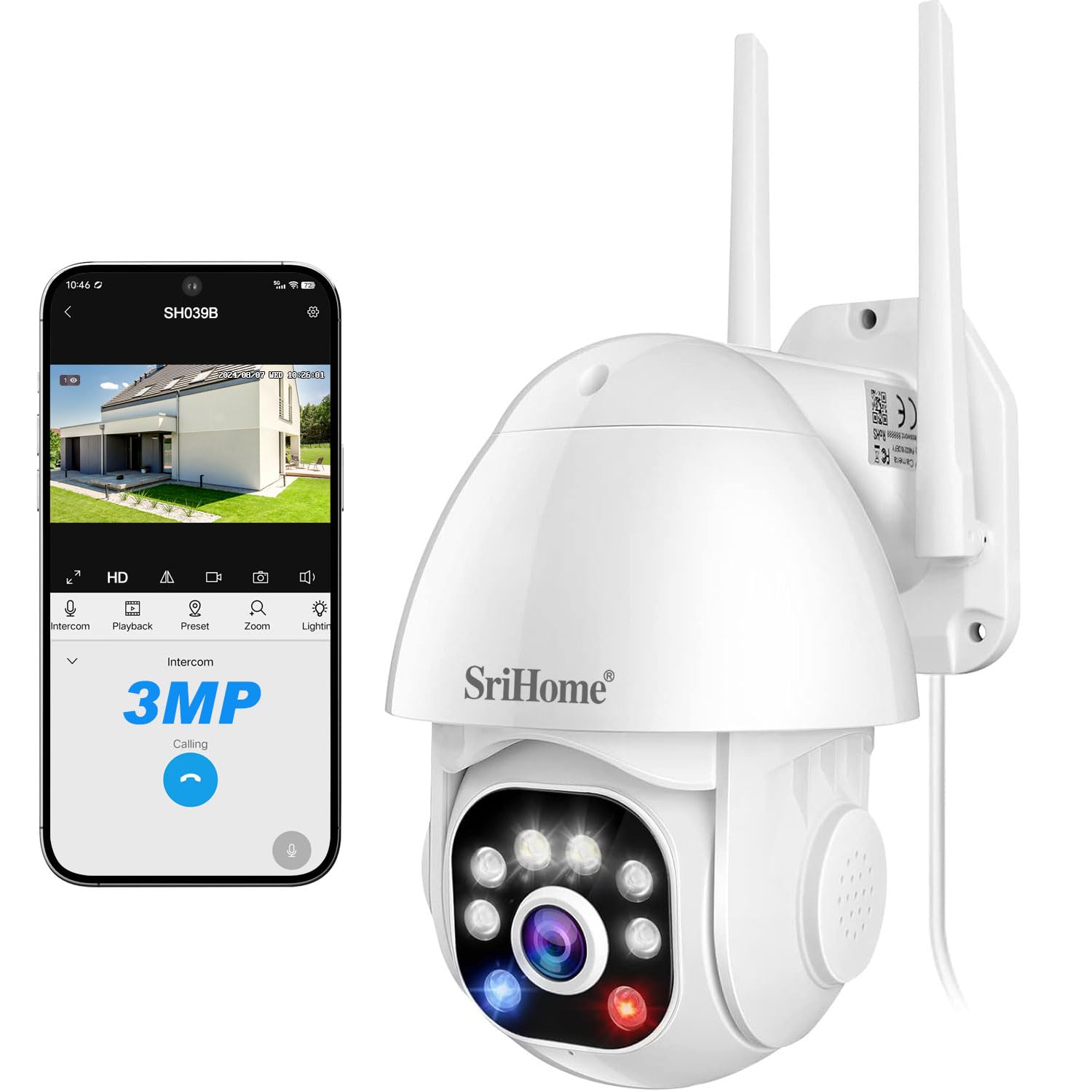
Image 1: SriHome 3MP IP Camera highlighting key features like 3MP resolution, starlight lens, two-way audio, waterproof design, human detection, motion detection, ONVIF support, color night vision, MicroSD card slot, and H.265 compression.
2. Zawartość opakowania
Sprawdź, czy w przesyłce znajdują się wszystkie elementy wymienione poniżej:
- SriHome IP Camera (x1)
- Zasilacz (x1)
- Instrukcja obsługi (x1)
- Mounting Screws (x1 set)
- Waterproof Plug (x1)

Rysunek 2: Wizualna reprezentacja elementów zawartych w opakowaniu produktu.
3. Schemat produktu
Familiarize yourself with the components of your SriHome security camera:
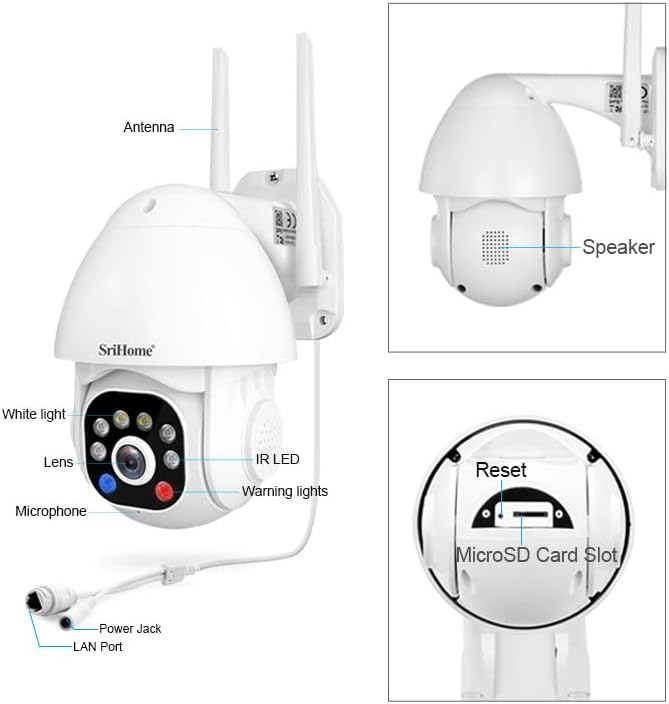
Image 3: Detailed diagram illustrating the various parts and ports of the SriHome IP Camera.
- Antena: Do łączności Wi-Fi.
- Głośnik: For two-way audio communication and audible alarms.
- Białe światło: Provides illumination for color night vision and acts as a warning light.
- Obiektyw: The primary camera sensor.
- Mikrofon: Do dwukierunkowej komunikacji audio.
- Gniazdo zasilania: Łączy się z zasilaczem.
- Port LAN: Do przewodowego połączenia sieciowego.
- Dioda podczerwieni: Diody LED podczerwieni zapewniające czarno-białe widzenie nocne.
- Światła ostrzegawcze: Red and blue lights for active deterrence.
- Przycisk resetowania: Służy do przywracania ustawień fabrycznych aparatu.
- Gniazdo kart microSD: Do lokalnego przechowywania plików wideo.
4. Konfiguracja
4.1 Pobieranie aplikacji
Download the SriHome app to your smartphone for camera control and monitoring.
- Dla Androida: Zeskanuj kod QR lub odwiedź Sklep Google Play.
- Dla systemu iOS: Zeskanuj kod QR lub odwiedź Sklep z aplikacjami Apple.
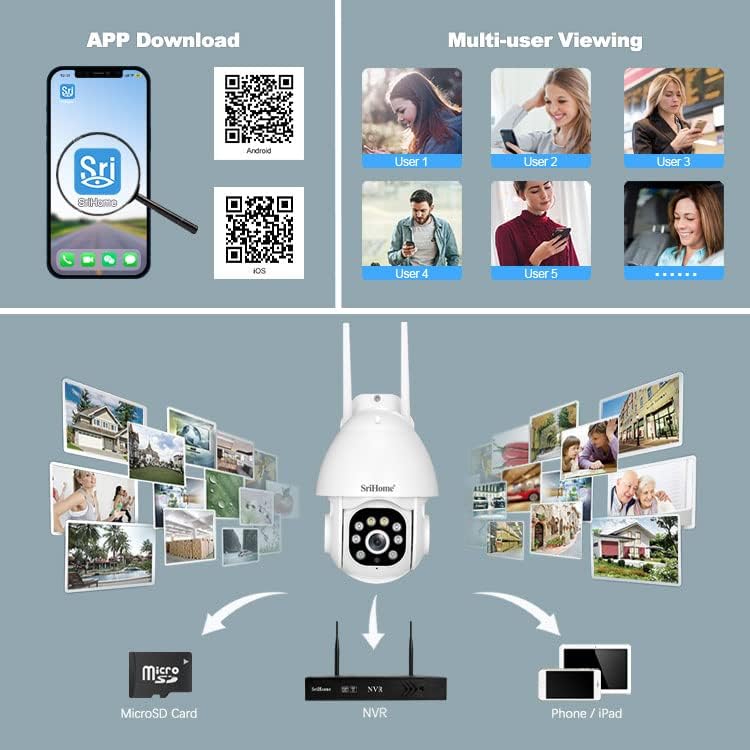
Image 4: Instructions for downloading the SriHome app and an overview of multi-user viewopcje przechowywania i przechowywania.
4.2 Połączenie sieciowe
The camera supports both wireless (Wi-Fi) and wired connections.
- QR Code Network: Follow the in-app instructions to connect the camera to your Wi-Fi network by scanning a QR code generated by the app.
- Sieć punktów dostępowych: The camera can connect directly to your phone via its built-in AP hotspot without a router for initial setup or direct monitoring.
- Sieci przewodowej: Connect an Ethernet cable to the LAN port for a stable wired connection.
4.3 Instalacja karty MicroSD
To enable local storage, install a MicroSD card (up to 128GB, not included) into the designated slot. Ensure the camera is powered off before inserting or removing the card.
4.4 Montaż
The camera is designed for wall mounting. Use the provided screws and waterproof plug to secure the camera in your desired outdoor location. Ensure the mounting surface is stable and can support the camera's weight.
5. Instrukcja obsługi
5.1 Obrót Pan & Tilt
Kontroluj kamerę viewing angle remotely through the SriHome app. The camera offers 355° horizontal pan and 90° vertical tilt for comprehensive coverage.

Image 5: Remote control of camera pan and tilt functions via the SriHome app.
5.2 Tryby widzenia nocnego
Kamera posiada trzy tryby widzenia nocnego:
- Alarm Mode (Default): Provides black and white night vision. When a human figure is detected, the white light automatically turns on, switching to full-color night vision.
- Tryb światła białego: The white light remains on, providing continuous full-color night vision. Brightness is adjustable.
- Tryb podczerwieni: White light is off, and the camera uses IR LEDs for standard black and white night vision.
5.3 Wykrywanie i śledzenie ludzi
Equipped with AI, the camera can distinguish human motion from other movements (e.g., pets, wind, leaves) to reduce false alarms. Upon human detection, the camera sends immediate notifications to your smartphone and can track the detected person.
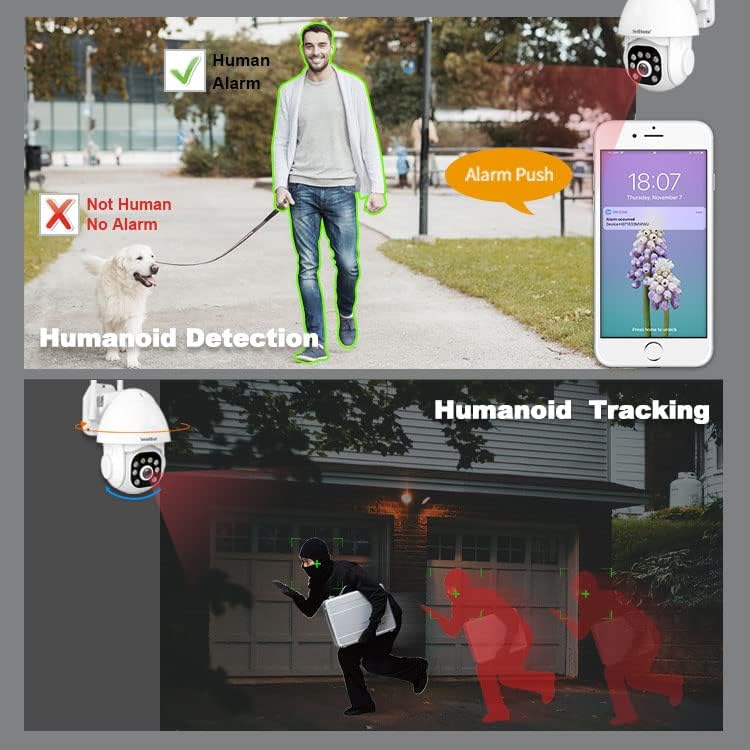
Image 6: Demonstration of the camera's ability to detect and track human figures.
5.4 Dźwięk dwukierunkowy
The integrated microphone and high-fidelity speaker allow for real-time two-way communication through the mobile app. You can listen to the camera's surroundings and speak through the camera.

Image 7: The camera's IP66 waterproof design and two-way audio communication capability.
5.5 Audible Alarm & Active Defense
When motion or a human is detected, the camera can actively deter intruders by emitting loud sound alarms and flashing red and blue warning lights.

Image 8: The camera activating its audible alarm and flashing lights to deter a person.
5.6 Wielu użytkowników Viewwchodzenie
The camera supports up to 5 simultaneous viewers. The first user to set up the camera becomes the administrator. Other users require administrator authorization to access the camera feed.
5.7 Opcje przechowywania
Nagrania można przechowywać na dwa sposoby:
- Karta MicroSD: Local storage on a MicroSD card (up to 128GB).
- Rejestrator NVR: Connect the camera to a Network Video Recorder (NVR) for continuous recording and extended storage (NVR not included).
6. Konserwacja
The SriHome camera is designed for outdoor use with an IP66 waterproof rating, making it resistant to dust, heat, and cold. Regular cleaning of the lens with a soft, dry cloth is recommended to ensure clear image quality. Avoid using harsh chemicals.
7. Rozwiązywanie Problemów
- Kamera nie łączy się z siecią Wi-Fi: Ensure the camera is within range of your Wi-Fi router. Check Wi-Fi password accuracy. Try resetting the camera using the reset button.
- No image or black screen: Verify the power adapter is correctly connected and the camera is powered on. Check network connection.
- Fałszywe alarmy: Adjust the motion detection sensitivity settings in the app. Utilize the human detection feature to minimize alerts from non-human movements.
- MicroSD card not recording: Upewnij się, że karta MicroSD jest prawidłowo włożona i sformatowana w aplikacji. Sprawdź, czy karta nie jest pełna lub uszkodzona.
- Problemy z dwukierunkową transmisją dźwięku: Check microphone and speaker permissions for the SriHome app on your smartphone. Ensure network connection is stable.
8. Specyfikacje
| Funkcja | Specyfikacja |
|---|---|
| Numer modelu | SH039B/SP039 |
| Rezolucja | 3 megapikseli (2304x1296) |
| Łączność | Wired (LAN) / Wireless (Wi-Fi) |
| Pan / Tilt Angle | Panoramowanie: 355°, Pochylenie: 90° |
| Wizja nocna | Color Night Vision, Infrared Night Vision (up to 15 meters) |
| Audio | Dwukierunkowa transmisja dźwięku (wbudowany mikrofon i głośnik) |
| Składowanie | Karta MicroSD (do 128 GB), NVR |
| Odporność na warunki atmosferyczne | Wodoodporność IP66 |
| Cechy specjalne | Human Detection, Motion Tracking, Audible Alarm, Red/Blue Warning Lights |
| Źródło zasilania | Zasilacz 12V DC |
| Wymiary | Wymiary 16 x 16 x 11 cm |
| Waga | 420 gram |
9. Gwarancja i wsparcie
For warranty information and technical support, please refer to the contact details provided in the product packaging or visit the official SriHome webstrona. Zachowaj dowód zakupu na potrzeby roszczeń gwarancyjnych.