Wstęp
Thank you for choosing the Baseus True Wireless Earphones Bowie E3. These earphones are designed to provide a high-quality audio experience with advanced features such as low latency, fast charging, and IP64 dust and water resistance. This manual will guide you through the setup, operation, maintenance, and troubleshooting of your new earphones.
Produkt ponadview

The Baseus Bowie E3 True Wireless Earphones, shown here in their open charging case, highlighting their compact and sleek white design.

Illustration demonstrating the Baseus Dual Channel Connection and Low Latency feature, indicating a delayed time of less than 0.06 seconds for fast response.

Visual representation of the Baseus Flash Charge capability, showing that 10 minutes of charging provides 2 hours of music playback.

Z bliska view of the 13mm Titanium Vibrating Diaphragms, designed for well-balanced triple frequency and clear sound quality.
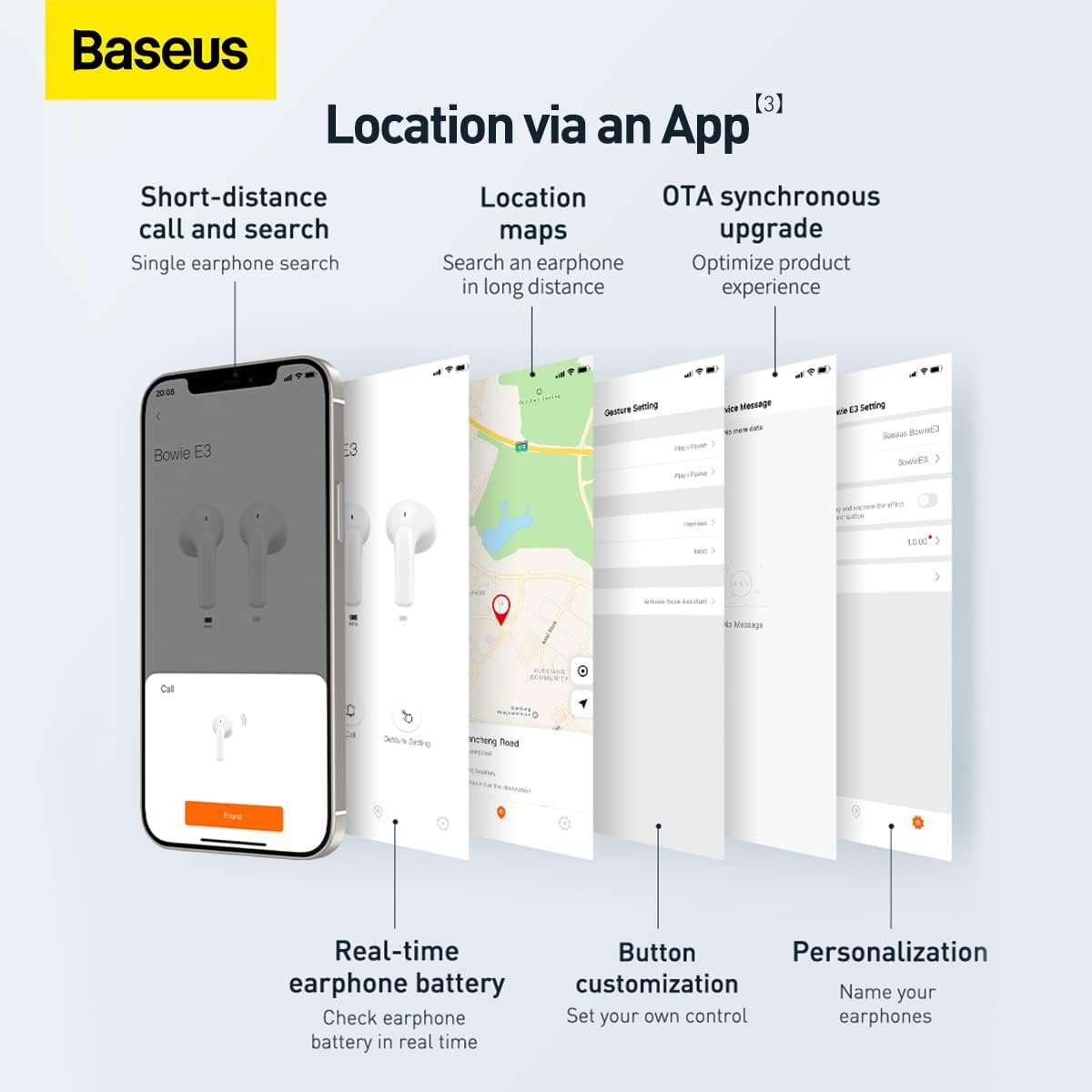
Screenshots illustrating the Baseus app features, including short-distance call and search, location maps, OTA synchronous upgrade, real-time earphone battery check, button customization, and personalization options.

Diagram showing the internal chip for Wireless 5.2 Stable Connection, indicating improved transmission rate and stability.

Summary of key features for Pure Music and Fast Response, including flash charge, 13mm PU+Titanium Moving Coils, 0.06 second delay, and location tracking via the app.

The retail packaging for the Baseus Bowie E3 True Wireless Earphones, displaying the product name and brand logo.
Organizować coś
1. Ładowanie słuchawek i etui
Before first use, fully charge the earphones and the charging case. Connect the charging case to a USB power source using a compatible USB-C cable. The indicator light on the case will show charging status.
- Ładowanie błyskawiczne: 10-minutowe ładowanie wystarcza na około 2 godziny odtwarzania muzyki.
- Ensure the earphones are properly seated in the charging case for them to charge.
2. Parowanie z urządzeniem
- Otwórz etui ładujące. Słuchawki automatycznie przejdą w tryb parowania.
- Włącz Bluetooth na swoim urządzeniu (smartfonie, tablecie itp.).
- Szukaj „Baseus Bowie E3” na liście dostępnych urządzeń Bluetooth.
- Select "Baseus Bowie E3" to connect. Once connected, a voice prompt will confirm successful pairing.
- Przy kolejnym użytkowaniu słuchawki będą automatycznie łączyć się z ostatnio sparowanym urządzeniem po wyjęciu z etui.
Instrukcja obsługi
Sterowanie dotykowe
The Baseus Bowie E3 earphones feature touch-sensitive controls on each earbud. The following actions are typically supported:
- Odtwórz/Pauza: Kliknij dwukrotnie dowolną słuchawkę.
- Następny utwór: Kliknij trzykrotnie prawą słuchawkę douszną.
- Poprzedni utwór: Kliknij trzykrotnie lewą słuchawkę.
- Odbieranie/kończenie połączeń: Kliknij dwukrotnie dowolną słuchawkę.
- Odrzuć połączenie: Naciśnij i przytrzymaj dowolną słuchawkę przez 2 sekund.
- Aktywuj asystenta głosowego: Naciśnij i przytrzymaj dowolną słuchawkę przez 3 sekund.
Note: Specific touch controls may be customizable via the Baseus app.
Korzystanie z aplikacji Baseus
Download the official Baseus app from your device's app store to unlock additional features and customization options:
- Lokalizacja słuchawek: Use the app to locate your earphones if misplaced.
- Status baterii: Check the real-time battery level of each earbud.
- Dostosowanie przycisku: Personalize touch controls to your preference.
- Aktualizacja synchroniczna OTA: Otrzymuj aktualizacje oprogramowania sprzętowego w celu optymalizacji działania produktu.
- Personalizacja: Nadaj nazwę swoim słuchawkom w aplikacji.
Konserwacja
- Czyszczenie: Regularnie czyść słuchawki i etui ładujące miękką, suchą i niepozostawiającą włókien ściereczką. Nie używaj środków czyszczących o właściwościach ściernych ani rozpuszczalników.
- Wodoodporność: The earphones are IP64 dustproof and waterproof. This means they are protected from dust ingress and splashing water from any direction. Do not submerge them in water or expose them to strong jets of water.
- Składowanie: Gdy nie używasz słuchawek, przechowuj je w etui ładującym, aby je chronić i utrzymać naładowanie. Przechowuj w chłodnym, suchym miejscu, z dala od bezpośredniego światła słonecznego i ekstremalnych temperatur.
- Pielęgnacja baterii: Aby przedłużyć żywotność baterii, unikaj częstego całkowitego rozładowywania słuchawek. Ładuj je regularnie, nawet jeśli nie są używane regularnie.
Rozwiązywanie problemów
| Problem | Możliwa przyczyna | Rozwiązanie |
|---|---|---|
| Słuchawki nie łączą się | Bluetooth is off; earphones not in pairing mode; interference. | Ensure Bluetooth is on. Place earphones back in case, close, then reopen. Try pairing again. Move away from other wireless devices. |
| Brak dźwięku z jednej słuchawki | Low battery; earbud not connected; dirty contacts. | Charge both earphones. Re-pair the earphones. Clean the charging contacts on the earbud and in the case. |
| Niska głośność | Device volume too low; earbud placement; dirty earbud mesh. | Increase volume on your device. Adjust earbud position. Gently clean the earbud mesh. |
| Problemy z ładowaniem | Cable or adapter fault; dirty charging port/contacts. | Try a different USB-C cable and power adapter. Clean the charging port and earbud contacts. |
| App not connecting to earphones | Earphones not paired to phone; app permissions. | Ensure earphones are connected via Bluetooth. Check app permissions in phone settings. Restart app. |
Specyfikacje
- Model: NGTW080002
- Marka: Baza
- Łączność: Bluetooth 5.2
- Umieszczenie ucha: W uchu
- Współczynnik kształtu: W uchu
- Impedancja: 32 omy
- Kontrola hałasu: Izolacja akustyczna
- Kierowcy: 13mm Titanium Vibrating Diaphragms
- Utajenie: 0.06 seconds (low latency)
- Ładowanie: Flash charge (10 min charge for 2h playback)
- Wodoodporność: IP64 pyłoszczelna i wodoodporna
- Bateria: 1 Lithium Ion battery required (per earbud, case has its own)
- Wymiary produktu: 3.8 x 9.2 x 9.2 cm (packaging/case); 100 g
- Producent: Baza
- Kraj pochodzenia: Chiny
- Pierwsza dostępna: 1 Marzec 2022
Gwarancja i wsparcie
Informacje o gwarancji
This product comes with a standard manufacturer's warranty. For specific warranty terms and conditions, please refer to the warranty card included in the product packaging or visit the official Baseus website. Extended warranty plans may also be available for purchase, such as 1-Year or 2-Year Extended Warranty Plans.
Obsługa klienta
For technical assistance, troubleshooting beyond this manual, or warranty claims, please contact Baseus customer support through their official website or the contact information provided in your product documentation. Please have your product model number (NGTW080002) and purchase details ready when contacting support.
Zasoby internetowe:
- Oficjalny Baseus Webstrona: www.baseus.pl (Sprawdź regionalne websites for specific support)
- Baseus App: Available on iOS App Store and Android Google Play Store.