
1. Wprowadzenie
Thank you for choosing the conecto Digital Timer. This device is designed to automate the switching of electrical appliances, offering convenience and energy savings for both indoor and outdoor applications. It features 10 programmable ON/OFF settings, a 1.5-inch LCD display, and a backup battery to retain settings during power outages. Please read this manual carefully before use to ensure proper operation and safety.
2. Ważne informacje dotyczące bezpieczeństwa
- Ostrzeżenie dotyczące zgodności: This timer is equipped with a Type F (Schuko) 2-pin plug. Ensure compatibility with your local electrical outlets. It may not be compatible with standard French outlets that require a grounding pin.
- Do not immerse the timer in water or expose it to extreme temperatures.
- Ensure the total load of connected appliances does not exceed 3600 Watts (16A).
- The device has an IP44 rating, making it suitable for outdoor use, but it should be protected from direct heavy rain or prolonged submersion.
- Keep out of reach of children. This device includes child safety features.
- Nie próbuj samodzielnie otwierać ani naprawiać urządzenia. Wszelkie prace serwisowe zleć wykwalifikowanemu personelowi.
3. Zawartość opakowania
Proszę sprawdzić, czy w paczce znajdują się następujące elementy:
- 1 x conecto Digital Timer (Model SA-CC50203-V2)
- 1 x Instrukcja obsługi (w języku niemieckim i angielskim)
4. Koniec produktuview
Familiarize yourself with the components of your digital timer:

Obraz 4.1: Przód view of the conecto Digital Timer with the protective cover open, revealing the Type F socket and the control panel with LCD display and buttons.
- Wyświetlacz LCD: Shows current time, day, program status, and settings.
- Pokrowiec ochronny: Transparent cover for the display and buttons, and a hinged cover for the socket, providing IP44 protection.
- Socket (Type F): Do podłączenia urządzenia.
- Plug (Type F): Do podłączenia timera do gniazdka ściennego.
- Przyciski sterujące:
- MASTER CLEAR: Resets all settings.
- TYDZIEŃ: Ustawia dzień tygodnia.
- GODZINA: Ustawia godzinę.
- CHWILA: Ustawia minuty.
- RST/RCL: Resetuje lub przywołuje ustawienia programu.
- ZEGAR: Enters clock setting mode or exits program setting mode.
- REGULATOR CZASOWY: Wchodzi w tryb ustawień programu.
- WŁ./AUTO/WYŁ.: Wybiera tryb pracy (Zawsze WŁ., Automatyczny, Zawsze WYŁ.).
- LOSOWY: Włącza/wyłącza funkcję losową.
5. Konfiguracja
5.1 Początkowa konfiguracja i ładowanie
- Plug the timer into a standard wall outlet for at least 30 minutes to charge the internal backup battery. This battery retains your settings during power outagt.j.
- Po naładowaniu naciśnij MISTRZ WYCZYŚĆ button with a pointed object (e.g., a pen tip) to reset all settings and clear any residual charge. The display will show '0:00'.
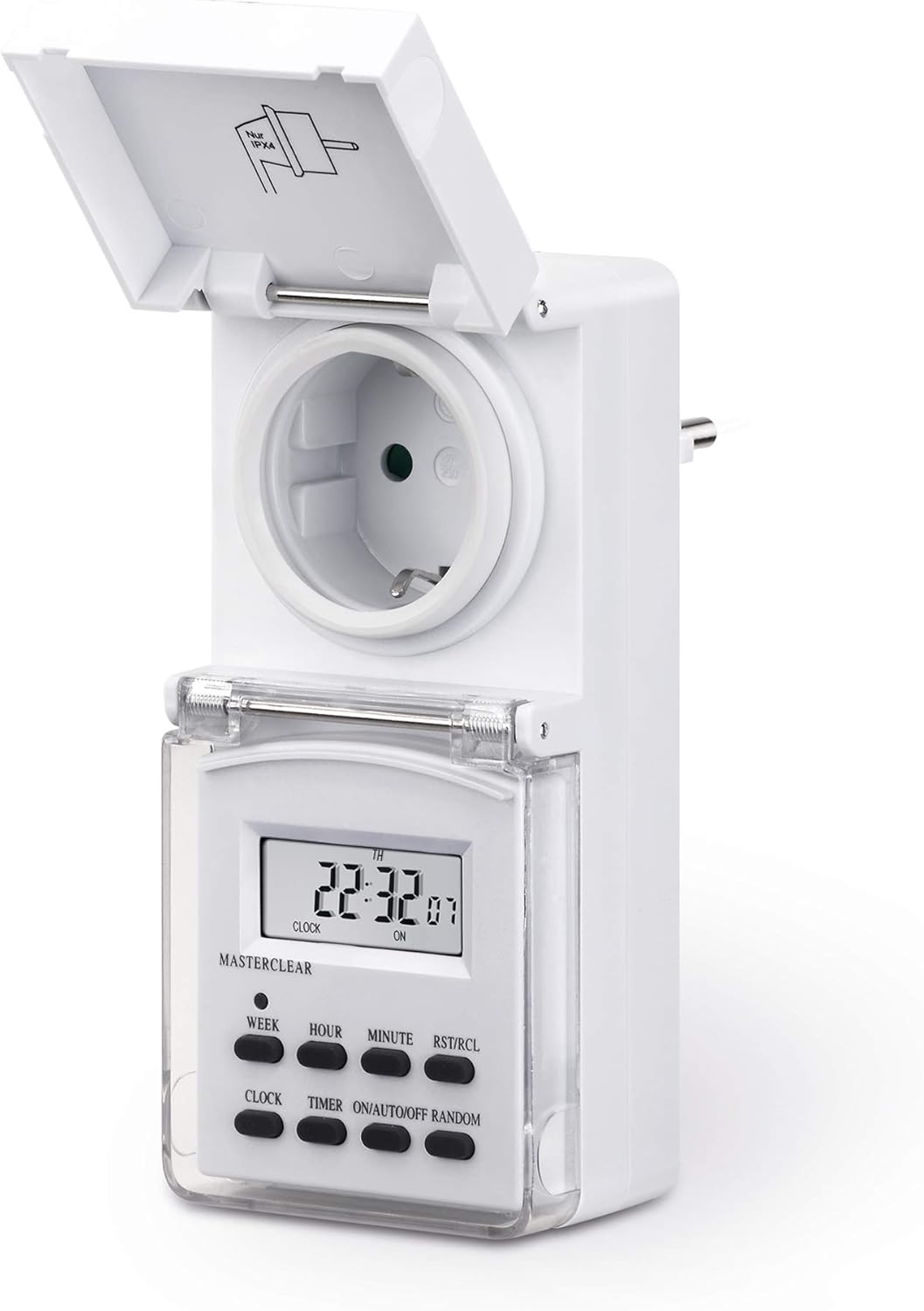
Image 5.1: The conecto Digital Timer plugged into a wall outlet, ready for initial setup and charging.
5.2 Ustawianie aktualnego czasu i dnia
- Naciśnij ZEGAR button. The display will show the current time.
- Podczas trzymania ZEGAR przycisk, naciśnij TYDZIEŃ button repeatedly to set the current day of the week (MO, TU, WE, TH, FR, SA, SU).
- Podczas trzymania ZEGAR przycisk, naciśnij GODZINA button repeatedly to set the current hour (12/24-hour format can be toggled by pressing HOUR while CLOCK is held).
- Podczas trzymania ZEGAR przycisk, naciśnij CHWILA Naciskaj przycisk wielokrotnie, aby ustawić aktualną minutę.
- Uwolnij ZEGAR przycisk. Czas i dzień są teraz ustawione.
- Aby przełączać się między formatem 12-godzinnym i 24-godzinnym, naciśnij przycisk ZEGAR I GODZINA jednocześnie.
- To activate/deactivate Daylight Saving Time (DST), press the ZEGAR I WŁ./AUTO/WYŁ buttons simultaneously. An 'S' will appear/disappear on the display.
6. Instrukcja obsługi
6.1 Programowanie czasów WŁ./WYŁ.
Timer umożliwia zaprogramowanie do 10 programów WŁ./WYŁ. Każdy program składa się z czasu WŁ. i czasu WYŁ.
- Naciśnij REGULATOR CZASOWY button once. The display will show '1 ON'. This is the first ON program.
- Naciskać TYDZIEŃ to select the desired day(s) for this program. You can choose from 16 different day combinations (e.g., Mon-Fri, Sat-Sun, Mon-Sun, individual days).
- Naciskać GODZINA aby ustawić żądaną godzinę włączenia.
- Naciskać CHWILA aby ustawić żądaną minutę dla czasu WŁ.
- Naciśnij REGULATOR CZASOWY button again. The display will show '1 OFF'. This is the first OFF program.
- Repeat steps 2-4 to set the day(s), hour, and minute for the OFF time of the first program.
- Kontynuuj naciskanie REGULATOR CZASOWY to cycle through programs 2 ON, 2 OFF, ..., up to 10 ON, 10 OFF, setting each as needed.
- Po ustawieniu wszystkich żądanych programów naciśnij przycisk ZEGAR przycisk, aby wyjść z trybu programowania i powrócić do wyświetlania bieżącego czasu.
6.2 Sterowanie ręczne (WŁ./AUTO/WYŁ.)
Naciśnij WŁ./AUTO/WYŁ Naciskaj przycisk wielokrotnie, aby przełączać się między trybami pracy:
- NA: The connected appliance will remain continuously ON, ignoring all programs.
- AUTOMATYCZNY: The connected appliance will operate according to the programmed ON/OFF times.
- OFF: The connected appliance will remain continuously OFF, ignoring all programs.
For programmed operation, ensure the timer is set to AUTOMATYCZNY tryb.
6.3 Funkcja losowa
The random function is useful for security purposes, making it appear as if someone is home. When activated, the timer will randomly turn ON and OFF the connected appliance within a specific time window (e.g., 6 PM to 6 AM).
- Upewnij się, że timer jest włączony AUTOMATYCZNY tryb.
- Naciśnij LOSOWY button. 'R' will appear on the display, indicating the random function is active.
- Aby dezaktywować, naciśnij LOSOWY button again. 'R' will disappear.
7. Konserwacja
- Clean the timer with a soft, dry cloth. Do not use abrasive cleaners or solvents.
- Ensure the protective covers for the display and socket are closed when not actively programming or connecting/disconnecting appliances, especially in outdoor environments, to maintain the IP44 rating.
- If the timer is not used for an extended period, plug it into an outlet for a few hours every few months to keep the internal battery charged.
8. Rozwiązywanie Problemów
| Problem | Możliwa przyczyna | Rozwiązanie |
|---|---|---|
| Wyświetlacz jest pusty lub pokazuje zniekształcone znaki. | Niski poziom naładowania baterii wewnętrznej lub błąd systemu. | Plug the timer into an outlet for at least 30 minutes to charge. Press MISTRZ WYCZYŚĆ zresetować. |
| Urządzenie nie włącza się i nie wyłącza o zaprogramowanych porach. | Timer nie jest w trybie AUTO. Nieprawidłowe ustawienia programu. | Upewnij się, że timer jest ustawiony na AUTOMATYCZNY tryb za pomocą WŁ./AUTO/WYŁ przycisk. Odnośnieview and correct your program settings. |
| Random function is not working. | Random function not activated or timer not in AUTO mode. | Naciśnij LOSOWY button to activate (check for 'R' on display). Ensure the timer is in AUTOMATYCZNY tryb. |
| Timer is not compatible with my wall outlet. | Incorrect plug type for your region (Type F). | This timer uses a Type F (Schuko) plug. Ensure your outlets are compatible. Do not force the plug into an incompatible socket. |
9. Specyfikacje
- Numer modelu: SA-CC50203-V2
- Marka: połączyć
- Wymiary (dł. x szer. x wys.): 14 x 6.5 x 8.7 cm (5.5 x 2.5 x 3.4 cala)
- Waga: 240 gramów (0.53 funta)
- Tworzywo: Akrylonitryl-butadien-styren (ABS)
- Kolor: Biały
- Rozmiar wyświetlacza: 1.5-calowy wyświetlacz LCD
- Liczba programów: 10 programów włączania/wyłączania
- Maksymalne obciążenie: 3600 watów / 16 Amps
- Stopień ochrony: IP44 (odporny na zachlapanie, nadaje się do użytku na zewnątrz)
- Cechy: Backup battery, Child safety, Random function, 12/24-hour mode, Daylight Saving Time (DST) adjustment.

Obraz 9.1: Bok view of the conecto Digital Timer, highlighting the Type F plug for connection to a wall outlet.
10. Informacje o gwarancji
Specific warranty details are not provided in the product information. Please refer to your purchase documentation or contact the retailer for warranty terms and conditions.
11. Obsługa klienta
For technical assistance or inquiries, please contact conecto customer support through their official website or the retailer where the product was purchased. Please have your model number (SA-CC50203-V2) ready when contacting support.