
1. Wprowadzenie
Dziękujemy za wybór FIFINE AmpliGame A6T USB Gaming Microphone. This high-quality condenser microphone is designed for gaming, streaming, recording, and video conferencing, offering clear audio capture and user-friendly features. This manual provides detailed instructions for setting up, operating, and maintaining your microphone to ensure optimal performance.

Obraz: FIFINE AmpliGame A6T USB Gaming Microphone, featuring its sleek design and included boom arm, recognized with an IF Design Award.
2. Zawartość opakowania
Sprawdź, czy w przesyłce znajdują się wszystkie poniższe elementy:
- FIFINA AmpliGame A6T USB Gaming Microphone
- Regulowany stojak na wysięgnik
- Filtr pop
- USB-C to USB-A Cable (approximately 2 meters)
Obraz: Wszystkie komponenty zawarte w FIFINE AmpliGame A6T package, neatly arranged.
3. Instrukcje konfiguracji
- Złóż ramię wysięgnika: Securely attach the boom arm to your desk using the clamp. Adjust the arm to your desired position. The arm offers a wide range of adjustment to optimize microphone placement and save desk space.
- Podłącz mikrofon: Mount the FIFINE A6T microphone onto the boom arm. Ensure it is securely fastened.
- Zainstaluj filtr Pop: Attach the included pop filter to the microphone. This helps to reduce plosive sounds (P, B, T, K) for clearer audio.
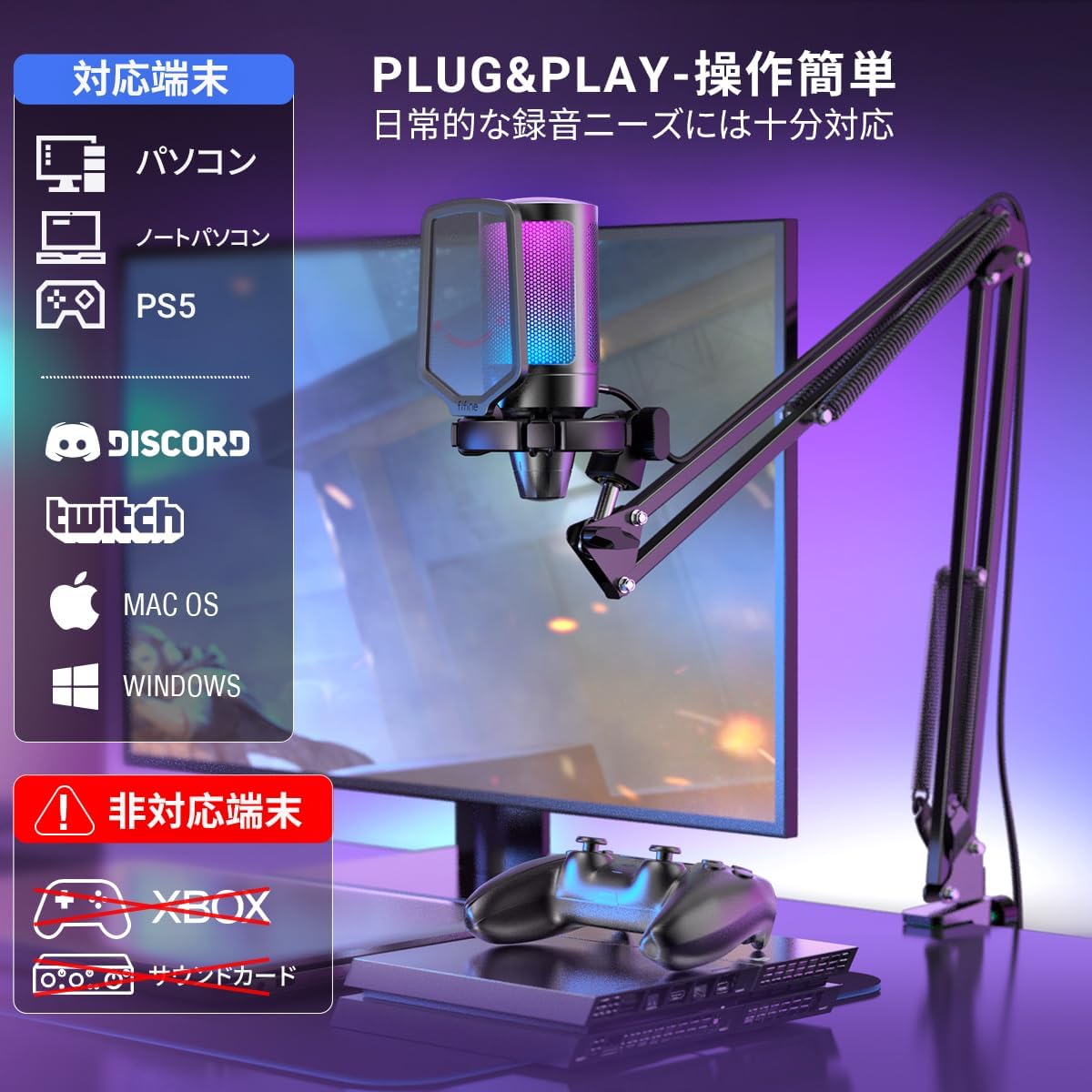
- Połącz z urządzeniem: Connect the USB-C end of the provided cable to the microphone and the USB-A end to an available USB port on your computer (PC/Mac), PlayStation (PS4/PS5), or other compatible device.
- Rozpoznawanie systemu: Your operating system should automatically recognize the microphone. No additional drivers are typically required.
- Wybierz jako urządzenie wejściowe: In your device's sound settings or your application's audio settings, select "FIFINE AmpliGame A6T" as your primary audio input device.

Image: The adjustable boom arm, illustrating its range of motion and how it can be positioned for optimal use.

Image: The microphone connected to a setup, highlighting its plug-and-play compatibility with various platforms.
4. Instrukcja obsługi
4.1. Funkcja wyciszania
The microphone features a touch-sensitive mute button located on the top. Tap it to instantly mute or unmute the microphone. The RGB lighting indicates the microphone's status:
- RGB Lighting ON: Microphone is active and recording.
- RGB Lighting OFF: Mikrofon jest wyciszony.

Image: The touch-sensitive mute button, demonstrating the visual feedback provided by the RGB lighting.
4.2. Przejmij kontrolę
A gain control knob is located at the bottom of the microphone. Rotate the knob to adjust the microphone's input sensitivity (gain). Turn clockwise to increase gain and counter-clockwise to decrease it. Adjust the gain to an appropriate level to avoid distortion or excessively low volume.

Image: The gain control knob, allowing for easy adjustment of microphone sensitivity directly on the device.
4.3. Oświetlenie RGB
The microphone features dynamic RGB lighting with a 7-color gradient effect, enhancing your gaming or streaming setup. The lighting is active when the microphone is unmuted and turns off when muted.
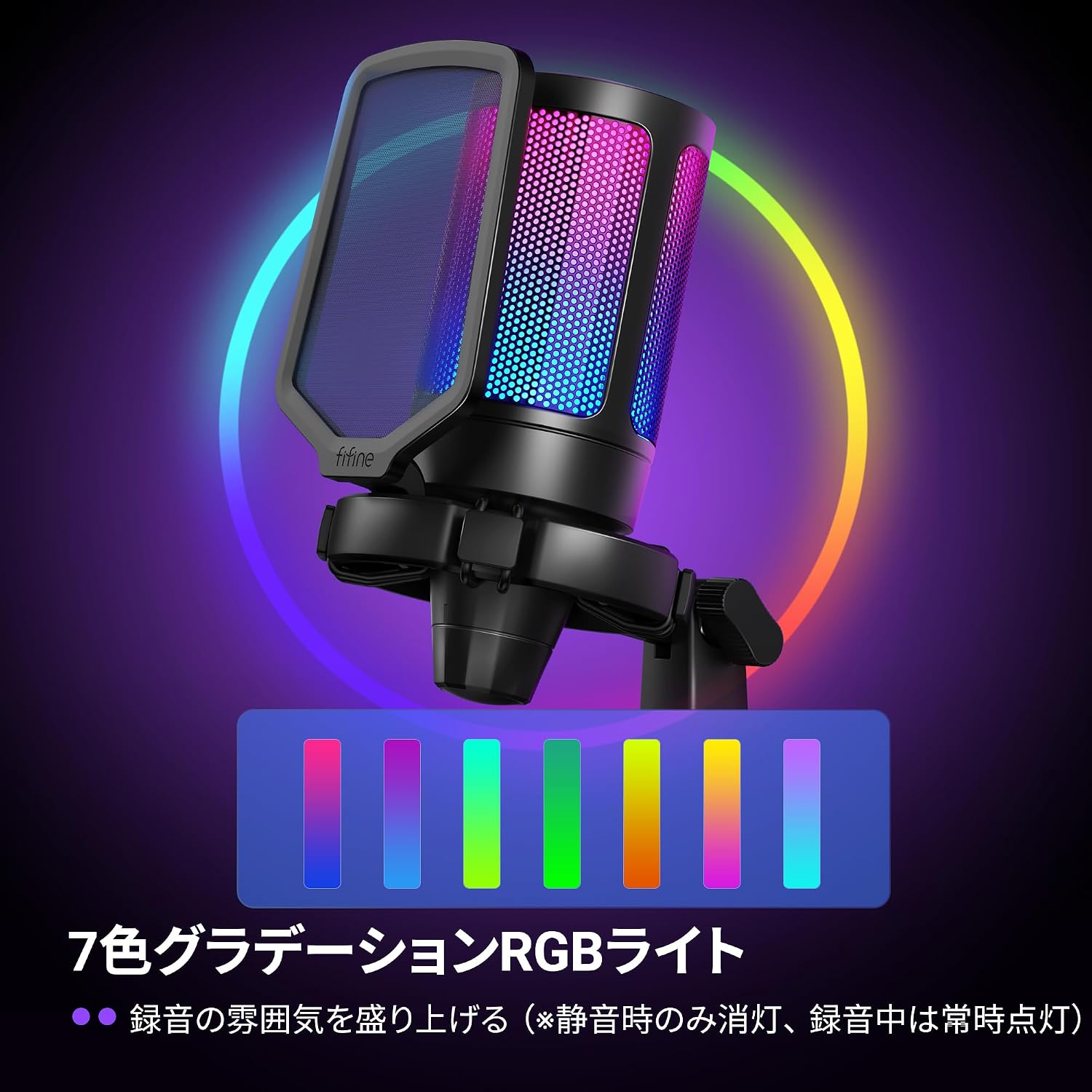
Image: The microphone illuminated with its vibrant 7-color RGB lighting.
4.4. Charakterystyka kardioidalna
The A6T microphone utilizes a cardioid polar pattern, which primarily picks up sound from the front of the microphone while minimizing sound from the sides and rear. This design is ideal for capturing your voice clearly and reducing unwanted background noise.

Image: A visual representation of the cardioid pickup pattern, demonstrating how the microphone focuses on sound directly in front of it.
5. Konserwacja
- Czyszczenie: Use a soft, dry cloth to clean the microphone body and stand. Avoid using harsh chemicals or abrasive materials.
- Składowanie: Gdy mikrofon nie jest używany, należy go przechowywać w czystym i suchym miejscu, z dala od ekstremalnych temperatur i wilgoci.
- Pielęgnacja kabli: Aby zapobiec uszkodzeniom, nie należy nadmiernie zginać ani skręcać kabla USB.
6. Rozwiązywanie Problemów
- Brak dźwięku:
- Ensure the microphone is properly connected to your device's USB port.
- Check if the microphone is muted (RGB lighting off). Tap the mute button to unmute.
- Verify that "FIFINE AmpliGame A6T" is selected as the input device in your operating system's sound settings and your application's audio settings.
- Adjust the gain control knob on the microphone.
- Try connecting the microphone to a different USB port or another device to rule out port or device issues.
- Poor Audio Quality / Distortion:
- Adjust the gain control knob. If the audio is distorted, decrease the gain. If it's too quiet, increase the gain.
- Upewnij się, że filtr pop jest prawidłowo umieszczony, aby ograniczyć ilość spółgłosek wybuchowych.
- Speak directly into the front of the microphone, utilizing its cardioid pickup pattern.
- Zminimalizuj hałas tła w swoim otoczeniu.
- Oświetlenie RGB nie działa:
- Ensure the microphone is unmuted. The RGB lighting is designed to turn off when muted.
- Sprawdź połączenie USB.
7. Specyfikacje
| Funkcja | Szczegół |
|---|---|
| Marka | FIFINA |
| Nazwa modelu | AmpliGame A6T |
| Technologia łączności | USB (USB-A to Type-C) |
| Zalecane zastosowania | Gaming, Streaming, Video Conferencing |
| Cechy specjalne | 192KHz Sampling Rate, RGB Light, Arm-type Stand, Mute Function |
| Kompatybilne urządzenia | Game Consoles (PS4, PS5), Laptops, PCs |
| Kolor | Black (Arm Type) |
| Wzór biegunowy | Jednokierunkowy (kardioidalny) |
| Stosunek sygnału do szumu (S/N) | 70dB |
| Odpowiedź częstotliwościowa | 60Hz-18kHz |
| Źródło zasilania | Przewodowy elektryczny (zasilany przez USB) |
| Tworzywo | Akrylonitryl-butadien-styren, metal |

Image: Key performance specifications of the microphone, including sensitivity, signal-to-noise ratio, and sampstawka lingwistyczna.
8. Informacje o gwarancji
FIFINE AmpliGame A6T USB Gaming Microphone comes with a 1-letnia gwarancja producenta od daty zakupu. Niniejsza gwarancja obejmuje wady materiałowe i wykonawcze wynikające z normalnego użytkowania. Prosimy zachować dowód zakupu na wypadek roszczeń gwarancyjnych.
Gwarancja nie obejmuje:
- Uszkodzeń spowodowanych wypadkiem, nadużyciem, niewłaściwym użytkowaniem, powodzią, pożarem, trzęsieniem ziemi lub innymi przyczynami zewnętrznymi.
- Damage caused by operating the product outside the permitted or intended uses described by FIFINE.
- Damage caused by service (including upgrades and expansions) performed by anyone who is not a representative of FIFINE.
- Products or parts that have been modified to alter functionality or capability without the written permission of FIFINE.
9. Obsługa klienta
For technical assistance, warranty claims, or any questions regarding your FIFINE AmpliGame A6T USB Gaming Microphone, please contact FIFINE customer support.
Informacje kontaktowe:
- Wsparcie online: Visit the official FIFINE webwitryna z odpowiedziami na często zadawane pytania, sterownikami i zasobami pomocy technicznej.
- Wsparcie e-mailowe: Zapoznaj się z opakowaniem produktu lub oficjalnym webodwiedź naszą witrynę, aby uzyskać odpowiedni adres e-mail pomocy technicznej.
- Operating Hours (FIFINE Japan): Monday - Friday (excluding holidays), 10:00 - 19:00 JST.
When contacting support, please have your product model (A6T) and proof of purchase ready.

Image: Guide on how to contact FIFINE customer support, including steps to find seller information on Amazon.


