
1. Wprowadzenie
Thank you for choosing the DIHOOM 2K PTZ Solar Wi-Fi Security Camera. This manual provides essential information for setting up, operating, and maintaining your camera to ensure optimal performance and security. This camera features 2K high-definition video, Pan-Tilt-Zoom (PTZ) functionality, solar power for continuous operation, and advanced human detection capabilities, making it ideal for outdoor surveillance.

Image 1: DIHOOM 2K PTZ Solar Wi-Fi Security Camera with solar panel.
2. Koniec produktuview
The DIHOOM security camera is designed for comprehensive outdoor monitoring. It integrates a high-resolution camera with PTZ capabilities, a solar panel for self-sustaining power, and smart detection features.
Główne cechy:
- 2K High-Definition Video: Rejestruje wyraźne i szczegółowe dźwiękitage.
- Funkcjonalność PTZ: Zakres obrotu w poziomie 355° i pochylenie w pionie 90° zapewniają pokrycie dużego obszaru.
- 10-krotny zoom cyfrowy: Pozwala na dokładniejsze przyjrzenie się szczegółom.
- Zasilane energią słoneczną: Equipped with a 7.5W solar panel and 16000mAh battery for continuous operation.
- Detekcja człowieka PIR: Reduces false alarms by detecting human heat and shape.
- Kolorowe widzenie nocne: Zapewnia wyraźne, kolorowe wideo nawet przy słabym oświetleniu.
- Dwukierunkowy dźwięk: Wbudowany mikrofon i głośnik umożliwiające komunikację.
- Odporność na warunki atmosferyczne IP65: Zaprojektowane tak, aby wytrzymać różne warunki atmosferyczne.
- Kontrola aplikacji: Remote monitoring and control via a dedicated smartphone application.
Składniki:
The package includes the camera unit with integrated solar panel, mounting bracket, screws, and a USB charging cable.

Image 2: Product dimensions and included components.
3. Konfiguracja
3.1 Wstępne przygotowanie
- Naładuj aparat: Before first use, fully charge the camera for approximately 8 hours using the provided USB cable.
- Zresetuj kamerę: Press and hold the reset button on the camera for more than 10 seconds. This ensures the camera is ready for pairing with the app.
- Pobierz aplikację: Download the dedicated smartphone application from your device's app store.
3.2 Połączenie sieciowe
- Kamera obsługuje Tylko Wi-Fi 2.4 GHz. Ensure your smartphone is connected to a 2.4GHz Wi-Fi network during setup. If you have a 5GHz/2.4GHz dual-band router, select the 2.4GHz option.
- During setup, place the camera close to your Wi-Fi router (ideally 30-100 cm) to ensure a stable connection.
- If other 2.4GHz wireless devices are nearby, try to keep the camera's antennas at least 1 meter away from them to avoid interference.
- Follow the in-app instructions to add the camera. When scanning the QR code displayed on your phone, hold the camera lens 15-25 cm away from the phone screen. A voice prompt will confirm successful connection.
3.3 Instalacja
- The recommended installation height is 2.1 meters, with a camera tilt angle of approximately 15 degrees for optimal PIR detection. The PIR detection range is approximately 7 meters forward from the camera.
- The solar panel can be detached from the main unit and installed in a separate, sunnier location to maximize charging efficiency.

Image 3: Easy installation with screws, showing the IP65 waterproof design.
4. Instrukcja obsługi
4.1 Kontrola aplikacji
Manage all camera functions through the dedicated smartphone app. This includes live viewing, playback, PTZ control, settings adjustments, and receiving notifications.

Image 4: Smartphone app interface for real-time monitoring, manual siren, light operation, and sensitivity settings.
4.2 PTZ and Zoom Functionality
Kamera oferuje zakres obrotu w poziomie 355° i pochylenie w pionie 90°, co pozwala na zdalną regulację viewing angle via the app. With 10x digital zoom, you can magnify specific areas for more detail.

Image 5: Illustrates 360-degree wide-angle coverage and 10x magnification capabilities.
4.3 PIR Human Detection and Alarms
The camera uses PIR (Passive Infrared) human detection technology to accurately identify human movement, minimizing false alarms from pets or swaying trees. Upon detection, you will receive instant push notifications on your smartphone. You can also manually activate the built-in white LED lights and a 100dB siren via the app to deter intruders.
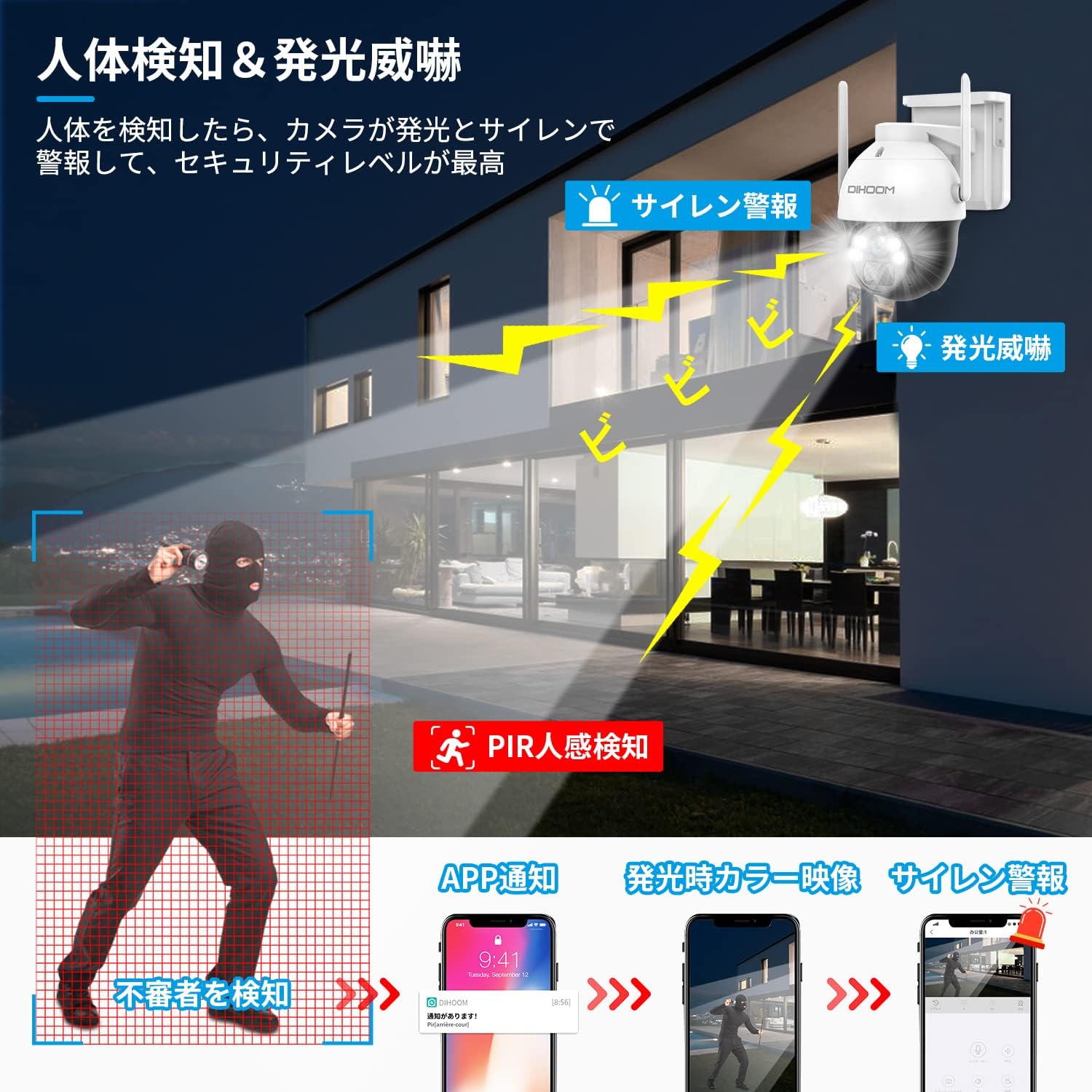
Image 6: Demonstrates PIR human detection triggering light and sound alarms, with smartphone notifications.
4.4 Dźwięk dwukierunkowy
With the integrated microphone and speaker, you can engage in two-way conversations through the camera. This allows you to communicate with visitors or deter unwanted individuals remotely.

Image 7: Shows two-way audio communication and manual alarm activation via the app.
4.5 Widzenie nocne
The camera features 2K color CMOS sensors and white LED lights, enabling clear color video recording even in minimal illumination (1 LUX). This ensures that details are visible day and night.

Image 8: Comparison of 2K color night vision and infrared night vision.
4.6 Przechowywanie wideo
Nagrane footage can be stored on a Micro SD card (up to 128GB, sold separately) or via a paid cloud service. The camera utilizes H.265+ video compression for efficient storage.

Image 9: Storage options including Micro SD card and cloud service.
4.7 Multi-Camera Management and Sharing
The app allows you to add and manage multiple DIHOOM cameras simultaneously. You can also share live or recorded video with family and friends by creating viewing IDs (up to 100 per camera) and setting specific permissions for each shared user.
5. Konserwacja
- Panel słoneczny: Ensure the solar panel is clean and free from obstructions (e.g., leaves, dirt) to maintain optimal charging efficiency.
- Monitorowanie baterii: Monitor the battery level via the app. You will receive a notification when the battery drops below 20%.
- Odporność na warunki atmosferyczne: The IP65 rating ensures the camera is protected against dust and water jets. However, avoid submerging the camera in water.
- Czyszczenie: Delikatnie przetrzyj obiektyw aparatu i panel słoneczny miękką ściereczką.amp W razie potrzeby przetrzyj ściereczką. Unikaj środków czyszczących o działaniu ściernym.

Image 10: The camera is designed to withstand various weather conditions, including rain and snow, with its IP65 rating.
6. Rozwiązywanie Problemów
- Problemy z połączeniem Wi-Fi:
- Upewnij się, że router nadaje sygnał Wi-Fi 2.4 GHz.
- Sprawdź, czy kamera znajduje się w zasięgu routera Wi-Fi.
- Zresetuj kamerę i spróbuj ponownie przeprowadzić proces konfiguracji.
- Częste fałszywe alarmy:
- Adjust the PIR detection sensitivity settings in the app (10 levels available).
- Ensure the camera is not pointed at areas with constant movement (e.g., busy roads, swaying branches).
- Szybkie rozładowywanie baterii:
- Ensure the solar panel is receiving adequate direct sunlight.
- Sprawdź, czy na panelu słonecznym nie ma żadnych przeszkód.
- Zmniejsz częstotliwość zdarzeń związanych z wykrywaniem ruchu lub transmisją na żywo viewing if possible.
- Słaba jakość wideo:
- Sprawdź siłę sygnału Wi-Fi w miejscu, w którym znajduje się kamera.
- Upewnij się, że obiektyw aparatu jest czysty.
7. Specyfikacje
| Funkcja | Specyfikacja |
|---|---|
| Pole View | 110 stopnia |
| Typ instalacji | Wkręcane |
| Zakres noktowizora | 20 metrów |
| Szybkość klatek | 30 klatek na sekundę |
| Tworzywo | Plastikowy |
| Źródło światła | Biała dioda LED |
| Cechy | PTZ Technology, Motion Sensor |
| Coating Features | Wodoodporny |
| Waga produktu | 1.79 kilograma |
| Zalecane zastosowanie | Plenerowy |
| Technologia łączności | Bezprzewodowy |
| Kompatybilne urządzenia | Smartfon |
| Źródło zasilania | Zasilany bateryjnie |
| Protokół połączenia | Wi-Fi |
| Rozdzielczość przechwytywania wideo | 1440p (2K) |
| Liczba elementów | 3 (Camera, Solar Panel, Mount) |
| Technologia komunikacji bezprzewodowej | Wi-Fi |
8. Gwarancja i wsparcie
The DIHOOM 2K PTZ Solar Wi-Fi Security Camera comes with a manufacturer's one-year warranty. If you encounter any issues, please do not hesitate to contact us.
- Adres e-mail kontaktowy: dihoomjp@hotmail.com
- Godziny otwarcia: Monday - Friday, 10:00 - 19:30 (Japan Standard Time)
- Technical issues will be addressed by our technical professionals.
This product is certified with the PSE Mark and Radio Law (Technical Conformity Mark), ensuring a safe and reliable user experience.
9. Filmy produktowe
Watch these official product videos for a visual guide to the camera's features and capabilities.
Video 1: Anker Eufy SoloCam S340 Overview. This video demonstrates the camera's 360-degree coverage, AI motion tracking, 3K high-quality zoom, solar charging, and IP65 weather resistance.
Video 2: Anker Eufy SoloCam S340 Features. This video highlights the camera's 360-degree coverage, no wiring or charging requirements, AI motion tracking, alarm and light functions, 3K high-quality video, 8x zoom, night vision, and IP65 durability.


