
TZT NanoVNA-F V3.1
Instrukcja obsługi analizatora sieci wektorowych NanoVNA-F V3.1
Model: NanoVNA-F V3.1 | Brand: TZT
1. Wprowadzenie
The TZT NanoVNA-F V3.1 is a compact and versatile Vector Network Analyzer (VNA) designed for measuring RF circuits and antenna performance. It operates within a wide frequency range of 10KHz to 1.5GHz, making it suitable for various applications including amateur radio, antenna tuning, and general RF circuit analysis. This manual provides essential information for the proper setup, operation, and maintenance of your NanoVNA-F V3.1.

Figure 1: The NanoVNA-F V3.1 Vector Network Analyzer with its 4.3-inch IPS display showing S-parameter measurements.
2. Główne cechy
- Szeroki zakres pomiarowy: Covers 10KHz to 1.5GHz, with excellent dynamic range: >70dB for 10K-300MHz, >60dB for 300M-900MHz, and >40dB for 900M-1.5GHz.
- Akumulator o dużej pojemności: Equipped with a 5000mAh battery for extended operation. Can also function as a mobile power source via its extended USB interface.
- Wyczyść wyświetlacz: Features a 4.3-inch IPS TFT LCD with a resistive touch screen for clear data and curve visualization.
- Potężne funkcje: Capable of measuring S-parameters, Voltage Standing Wave Ratio (SWR), phase map, group delay, Smith chart, DELAY, POLAR, and LINEAR. Supports firmware upgrades via virtual U disk.
- PC and Android Phone Connectivity: Compatible with PC software (e.g., NanoVNA Saver) for data display and Touchstone (.snp) file export. Supports Android mobile phones for control.
3. Zawartość opakowania
Po otwarciu opakowania należy sprawdzić, czy zawiera ono wszystkie poniższe elementy:
- NanoVNA-F V3.1 Vector Network Analyzer Unit
- Kabel USB typu C.
- 2 x SMA Male to Male RG316 RF Cables
- Calibration Kit (OPEN, SHORT, LOAD)
- SMA Male to Female Adapters (various types)
- Długopis typu Stylus
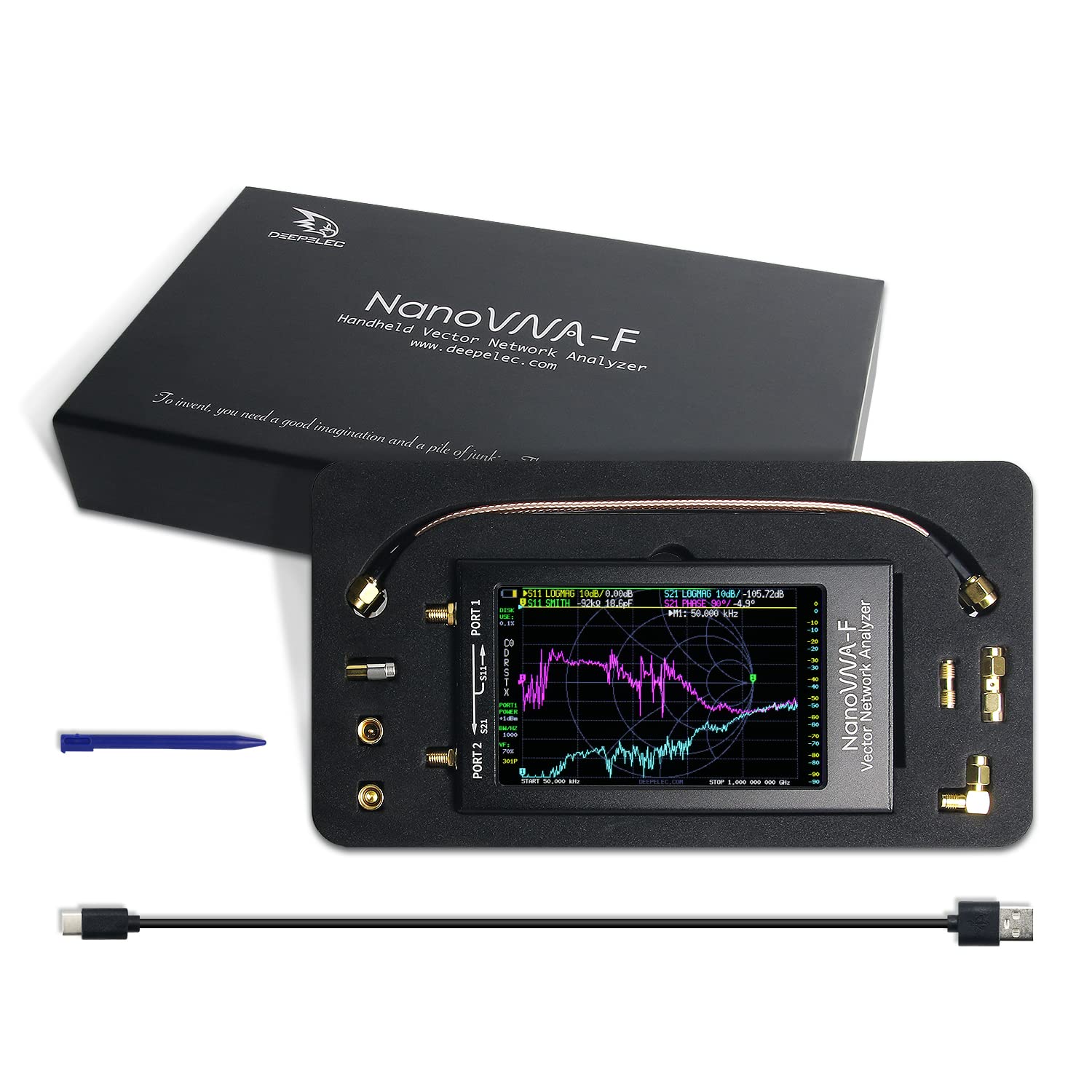
Figure 2: All components included in the NanoVNA-F V3.1 package.
4. Przewodnik konfiguracji
4.1 Pierwsze ładowanie
Before first use, fully charge the NanoVNA-F V3.1. Connect the provided USB Type-C cable to the device's USB-C port and the other end to a standard USB power adapter (5V, 1A recommended) or a computer's USB port. The charging indicator will show the charging status.
4.2 Włączanie/wyłączanie
Locate the power switch on the side of the device. Slide the switch to the "ON" position to power on the unit. To power off, slide the switch to the "OFF" position.
4.3 Connecting to a Device Under Test (DUT)
The NanoVNA-F V3.1 has two SMA ports: PORT 1 (S11) and PORT 2 (S21). Use the provided SMA cables and adapters to connect your DUT. For reflection measurements (S11), connect the DUT to PORT 1. For transmission measurements (S21), connect the input of the DUT to PORT 1 and the output to PORT 2.

Figure 3: Schematic representation of S-parameter measurement connections on the NanoVNA-F V3.1.
5. Działanie
5.1 Nawigacja w interfejsie użytkownika
The NanoVNA-F V3.1 features a resistive touch screen and a wheel button for navigation. Use the stylus or your finger to interact with the touch screen menus. The wheel button can be used for fine adjustments or menu selection in some modes.
5.2 Kalibracja
Calibration is crucial for accurate measurements. Perform a full two-port calibration (OPEN, SHORT, LOAD, THRU) for the desired frequency range before taking measurements. Access the calibration menu from the main screen.
- Connect the OPEN standard to PORT 1 and perform the OPEN calibration.
- Connect the SHORT standard to PORT 1 and perform the SHORT calibration.
- Connect the LOAD standard to PORT 1 and perform the LOAD calibration.
- Connect PORT 1 and PORT 2 directly using a THRU cable and perform the THRU calibration.
- Zapisz dane kalibracyjne.
5.3 Tryby pomiaru
The device supports various measurement modes, including:
- S11 (Reflection Coefficient): Measures the reflection characteristics of a device connected to PORT 1. Useful for SWR, Return Loss, and Smith Chart analysis.
- S21 (Transmission Coefficient): Measures the transmission characteristics between PORT 1 and PORT 2. Useful for gain/loss and phase measurements of filters, ampwężownice itp.
- SWR (Standing Wave Ratio): Indicates the impedance match of an antenna or transmission line.
- Smith Chart: Graphical representation of complex impedance.
- Faza: Displays the phase response of the DUT.
- Group Delay: Measures the time delay of signals through the DUT.
5.4 Łączność oprogramowania PC
For advanced analysis and data logging, connect the NanoVNA-F V3.1 to a PC using the USB Type-C cable. Download and install compatible software like NanoVNA Saver. This software allows for larger display, detailed analysis, and export of Touchstone (.snp) files for use in other RF simulation tools.
6. Konserwacja
6.1 Czyszczenie
Do czyszczenia urządzenia należy używać miękkiej, suchej ściereczki. W przypadku uporczywych zabrudzeń należy delikatnie przetrzeć urządzenie.amp Można użyć ściereczki. Unikaj stosowania silnych środków chemicznych lub materiałów ściernych, ponieważ mogą one uszkodzić ekran lubasing.
6.2 Przechowywanie
When not in use, store the NanoVNA-F V3.1 in a cool, dry place, away from direct sunlight and extreme temperatures. Keep it in its original packaging or a protective case to prevent physical damage.
6.3 Pielęgnacja baterii
Aby przedłużyć żywotność baterii, należy unikać częstego całkowitego rozładowywania. W przypadku dłuższego przechowywania, należy naładować baterię do około 50% i doładować ją ponownie co kilka miesięcy.
7. Rozwiązywanie Problemów
| Problem | Możliwa przyczyna | Rozwiązanie |
|---|---|---|
| Urządzenie nie włącza się. | Niski poziom naładowania baterii lub wyłącznik zasilania w pozycji WYŁĄCZONY. | Charge the device. Ensure the power switch is in the ON position. |
| Niedokładne pomiary. | Improper calibration or faulty cables/adapters. | Perform a full calibration for the current frequency range. Check cables and connectors for damage. |
| Ekran nie reaguje. | Błąd oprogramowania lub uszkodzenie fizyczne. | Uruchom ponownie urządzenie. Jeśli problem będzie się powtarzał, skontaktuj się z pomocą techniczną. |
| Nie można połączyć się z komputerem. | Incorrect USB cable, driver issues, or software settings. | Ensure you are using the correct USB Type-C cable. Install necessary drivers. Check PC software settings. |
8. Specyfikacje
| Funkcja | Szczegół |
|---|---|
| Zakres częstotliwości | 10KHz - 1.5GHz |
| Wyświetlacz | 4.3-inch IPS TFT LCD, Resistive Touch Screen |
| Zakres dynamiczny | >70dB (10K-300MHz), >60dB (300M-900MHz), >40dB (900M-1.5GHz) |
| Pojemność baterii | 5000mAh |
| Porty | 2 x SMA (PORT 1, PORT 2), 1 x USB Type-C |
| Wymiary | Około 127 mm x 74 mm x 21 mm (5 cala x 2.9 cala x 0.8 cala) |
| Waga | Około 1 funta |
| Producent | TERAZ |
| Kraj pochodzenia | Chiny |

Figure 4: Physical dimensions of the NanoVNA-F V3.1.
9. Gwarancja i wsparcie
Aby uzyskać informacje o gwarancji i pomocy technicznej, zapoznaj się z dokumentacją dołączoną do zakupu lub skontaktuj się bezpośrednio z producentem. Zachowaj dowód zakupu na wypadek roszczeń gwarancyjnych.
Nie znaleziono oficjalnych filmów produktu od sprzedawcy dla tego modelu.
Ask a question about this manual
Ask about setup, troubleshooting, compatibility, parts, safety, or missing instructions. Manuals+ will review the question and use this page’s manual context to help answer it.