
1. Wprowadzenie
Dziękujemy za zakupasing the zelotes T80 Wired Gaming Mouse. This manual provides essential information for setting up, operating, and maintaining your new gaming mouse. Please read it thoroughly to ensure optimal performance and longevity of your device.
2. Konfiguracja
2.1 Zawartość pudełka
- 1 x T80 Gaming Mouse
- 1 x Instrukcja obsługi
2.2 Podłączanie myszy
- Unpack the zelotes T80 Gaming Mouse and the instruction manual from the box.
- Locate an available USB port on your computer (Laptop, PC, Mac).
- Podłącz wtyczkę USB myszy do portu USB.
- The mouse is plug-and-play and should be automatically recognized by your operating system (Windows 11/10/8/7, Mac OS). No additional drivers are typically required for basic functionality.
For advanced customization of buttons and lighting, please refer to the manufacturer's webwitryna, w której znajdziesz oprogramowanie do pobrania.
3. Instrukcja obsługi
3.1 Funkcje przycisków
The zelotes T80 Gaming Mouse features 7 programmable buttons designed for enhanced gaming and productivity.
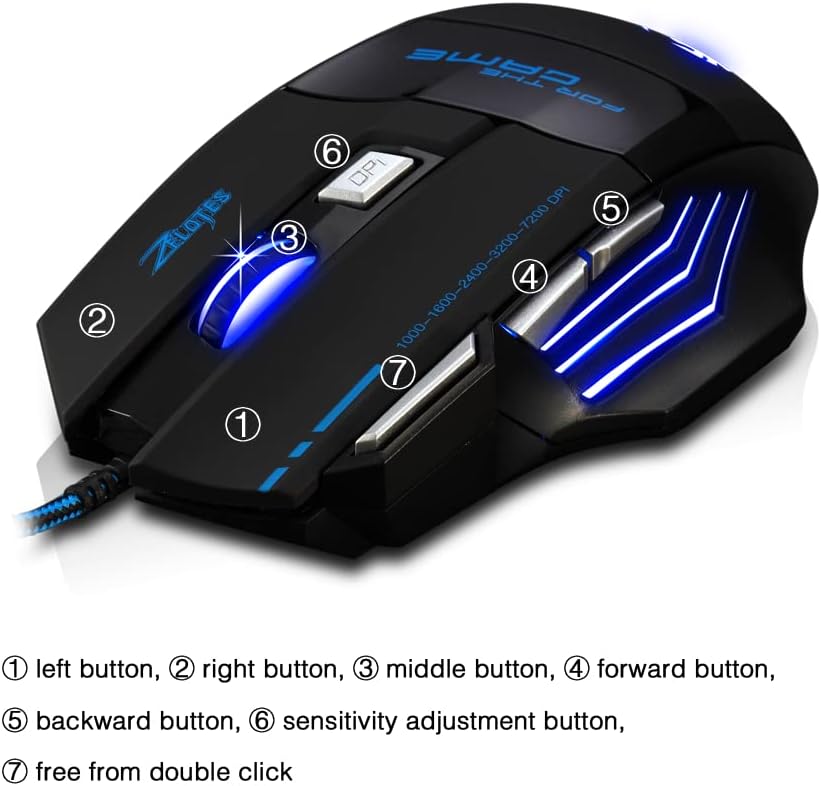
- Lewy przycisk (1): Standardowa funkcja lewego kliknięcia.
- Prawy przycisk (2): Standardowa funkcja prawego przycisku myszy.
- Middle Button / Scroll Wheel (3): Scrolls up/down and acts as a middle-click button.
- Przycisk „Do przodu” (4): Nawiguje do przodu w web przeglądarki lub file odkrywcy.
- Przycisk wstecz (5): Porusza się wstecz web przeglądarki lub file odkrywcy.
- Sensitivity Adjustment (DPI) Button (6): Przełącza między ustawieniami DPI.
- Quick Fire Button (7): Equipped for rapid firing, allowing continuous shooting with a single press (functions as a double-click by default).
3.2 Regulacja DPI
The mouse offers 5 adjustable DPI settings to match your preference for gaming or office work. Use the Sensitivity Adjustment (DPI) Button (6) to cycle through the following settings:
- 1000 DPI
- 1600 DPI
- 2400 DPI
- 3200 DPI
- 7200 DPI
3.3 LED Backlight Illumination
The zelotes T80 features multi-mode LED backlighting that enhances your visual experience and gaming atmosphere. The LED lights cycle through various colors, providing dynamic illumination.

3.4 Ergonomiczna konstrukcja
The mouse is designed with an ergonomic shape and skin-friendly material for a comfortable grip and soft touch. Its sweat-resistant and anti-slip features ensure comfort during prolonged use, reducing arm fatigue.

4. Konserwacja
- Utrzymuj mysz w czystości, wycierając ją miękką, suchą szmatką.
- Avoid exposing the mouse to extreme temperatures, direct sunlight, or liquids.
- Nie należy podejmować prób rozmontowania myszy, gdyż może to spowodować unieważnienie gwarancji.
5. Rozwiązywanie Problemów
- Mysz nie odpowiada: Ensure the USB cable is securely plugged into the computer. Try a different USB port or restart your computer.
- Ruch kursora jest nieregularny: Wyczyść czujnik optyczny na spodzie myszy. Upewnij się, że używasz myszy na odpowiedniej powierzchni (np. podkładce pod mysz).
- Światła LED nie działają: Check if the mouse is properly connected. Some operating systems or software might interfere with lighting controls.
6. Specyfikacje
| Funkcja | Opis |
|---|---|
| Wymiary produktu | 5.12 x 4.09 x 1.77 cala |
| Waga przedmiotu | 5.5 uncji |
| Numer modelu | T80 |
| Marka | zelotes |
| Kolor | Czarny |
| Technologia łączności | USB (przewodowy) |
| Technologia wykrywania ruchu | Optyczny |
| Ustawienia DPI | 1000/1600/2400/3200/7200 DPI (5 adjustable levels) |
| Pikolak | 7 (Programmable, including Quick Fire Button) |
| Funkcja specjalna | Ergonomic Design, LED Illumination, Sweat-resistant, Anti-slip |
| Zgodność | Windows 11/10/8/7, Mac OS |
7. Filmy produktowe
7.1 T80 7200DPI Gaming Mouse Overview
Ten film przedstawia krótki przeglądview of the zelotes T80 Gaming Mouse, highlighting its 7200 DPI capability and overall design. It demonstrates the mouse's appearance and some features in action.
8. Gwarancja i wsparcie
For warranty information or technical support, please refer to the contact details provided on the product packaging or visit the official zelotes webZachowaj paragon jako dowód zakupu na wypadek ewentualnych roszczeń gwarancyjnych.