
1. Wprowadzenie
This manual provides detailed instructions for the safe and effective operation of your Andoer 4K 48MP 60FPS WiFi Camcorder. Please read this manual thoroughly before using the device and retain it for future reference. This camcorder is designed for high-quality video recording and photography, featuring 4K Ultra HD resolution, 48-megapixel photos, a 3-inch IPS touchscreen, and infrared night vision capabilities. It is equipped with WiFi connectivity for easy file transfer and remote control, and comes with essential accessories such as an external microphone and a wide-angle macro lens.

Image 1.1: Andoer 4K Camcorder with included accessories.
2. Zawartość opakowania
Sprawdź, czy wszystkie wymienione poniżej elementy znajdują się w Twojej paczce. Jeśli brakuje któregokolwiek z nich lub jest on uszkodzony, skontaktuj się ze sprzedawcą.

Ilustracja 2.1: Wszystkie elementy zawarte w pakiecie.
- Kamera wideo
- Mikrofon
- Osłona przeciwwietrzna do mikrofonu
- Kabel audio TRS 3.5 mm do TRS
- Kabel USB
- Rękojeść
- Camera Lens (Wide-angle macro lens)
- Pierścień adaptera obiektywu
- 2 x Lithium-polymer Batteries (2000mAh)
- Zdalne sterowanie
- Camcorder Storage Bag
- Torba do przechowywania obiektywu
- Camcorder User Manual
- Instrukcja obsługi mikrofonu
3. Koniec produktuview
Zapoznaj się z różnymi częściami i elementami sterowania swojej kamery.
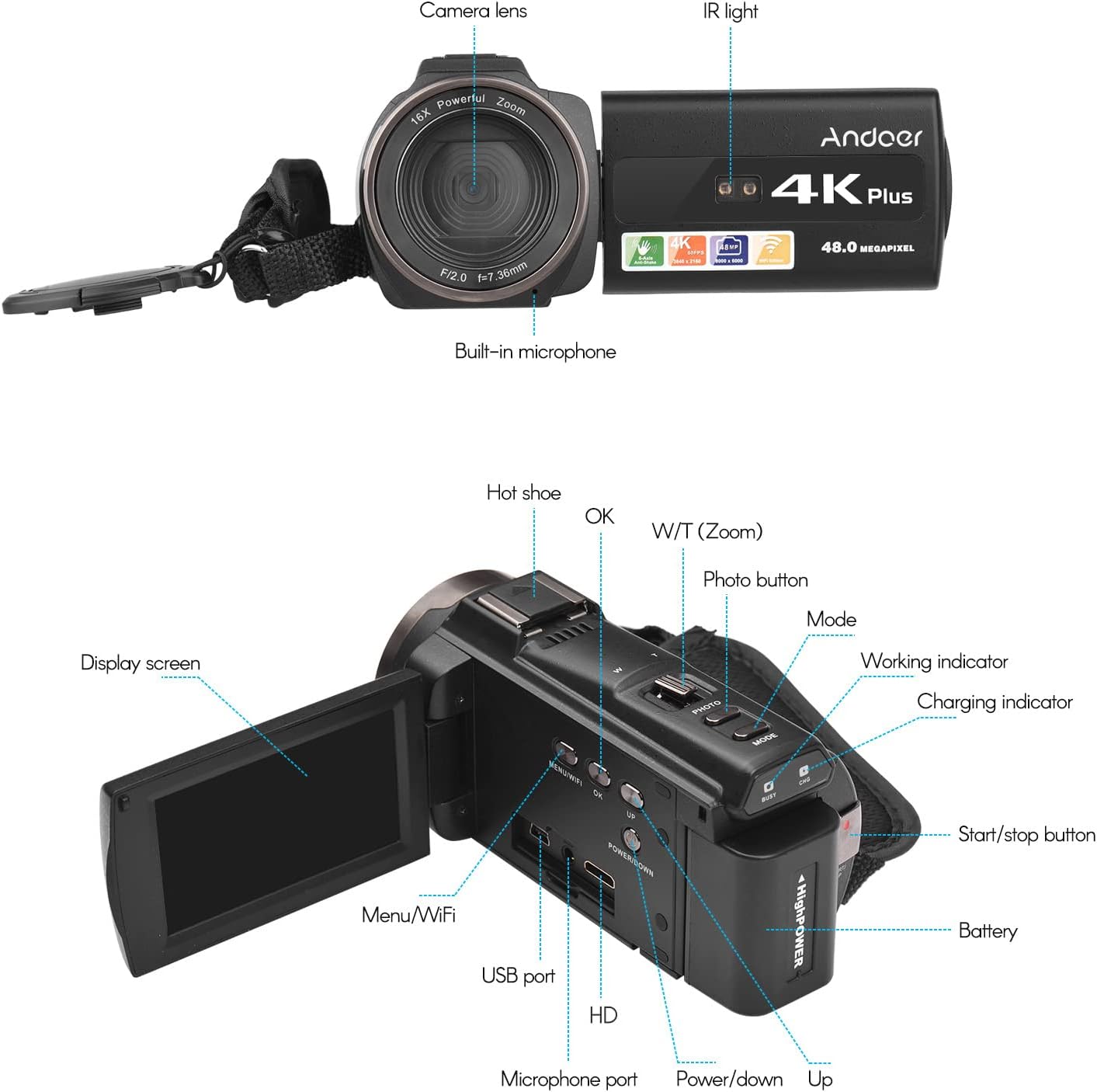
Obraz 3.1: Przód i tył View of the Camcorder with labeled components.
Kluczowe komponenty:
- Obiektyw aparatu: Główny element optyczny do robienia zdjęć i nagrywania filmów.
- Światło podczerwone: Emits infrared light for night vision recording.
- Wbudowany mikrofon: Captures audio. An external microphone can be connected for enhanced sound quality.
- Gorąca stopka: Mount for external accessories like the included microphone or an LED video light.
- Display Screen (3" IPS Touch Screen): Dla viewna żywotage, playback, and navigating menus.
- Przyciski sterujące: Including Power, Mode, Photo, Zoom (W/T), OK, Menu/WiFi, Up/Down.
- Porty: USB, HD (HDMI), Microphone port.
- Komora baterii: Mieści akumulator.
4. Konfiguracja
4.1 Ładowanie akumulatora
Before first use, fully charge the included lithium-polymer batteries. Insert one battery into the camcorder's battery compartment. Connect the camcorder to a power source using the provided USB cable. The charging indicator will illuminate during charging and turn off when fully charged. A full charge typically takes several hours.

Image 4.1: Battery installation and charging indication.
4.2 Wkładanie karty pamięci
The camcorder supports TF (MicroSD) cards up to 128GB. Ensure the card is formatted before first use in the camcorder's settings. Insert the memory card into the designated slot until it clicks into place.
- Use a Class 10 or higher speed rating for optimal performance, especially for 4K video recording.
- The camcorder supports V60 video speed class.
4.3 Podłączanie mikrofonu zewnętrznego
For improved audio quality, attach the external stereo microphone to the hot shoe mount on top of the camcorder. Connect the microphone's 3.5mm audio cable to the microphone input port on the camcorder.
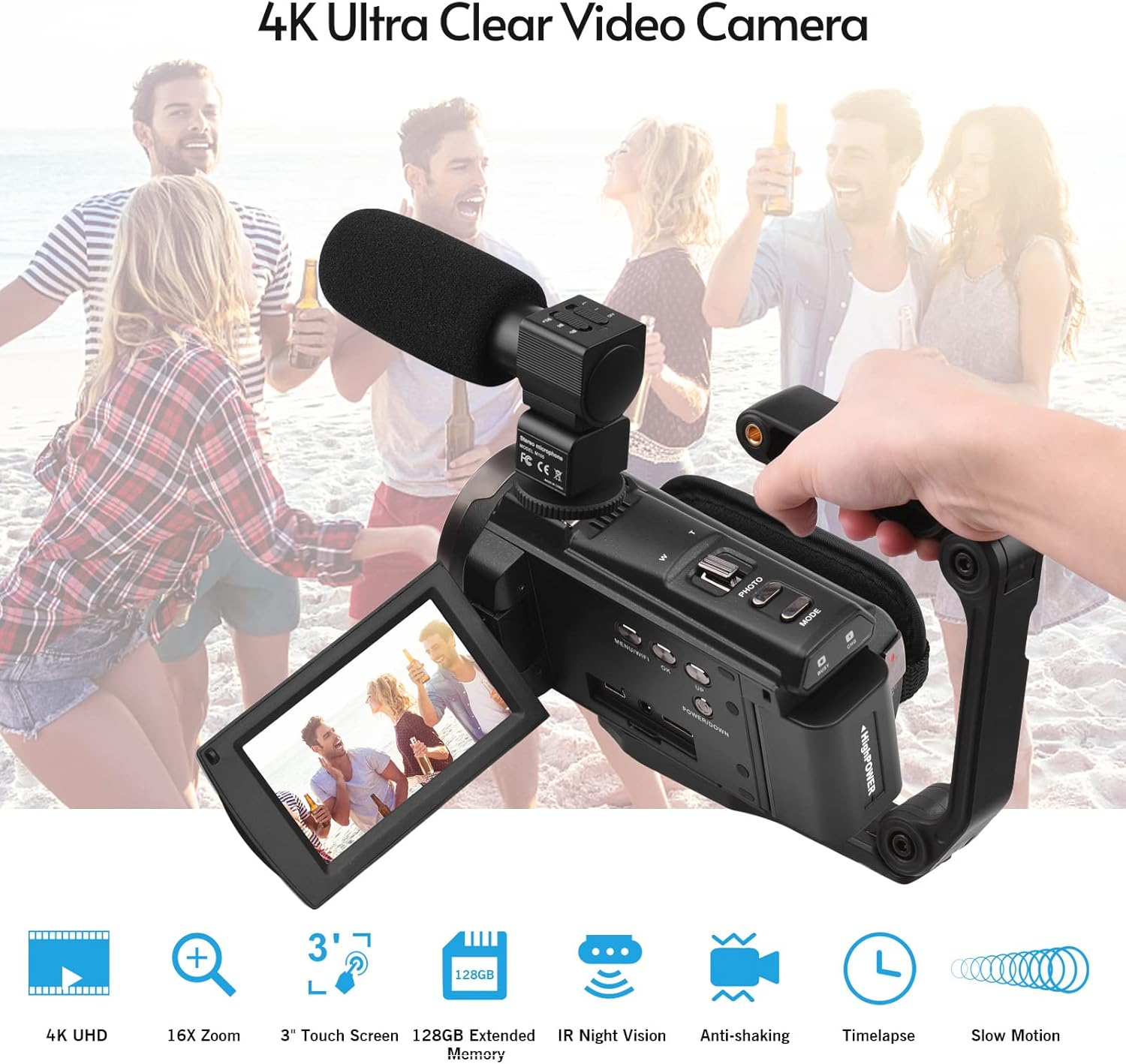
Image 4.2: External microphone attached to the camcorder.
4.4 Attaching the Wide-Angle Macro Lens
To use the wide-angle macro lens, first attach the lens adapter ring to the camcorder's main lens. Then, screw the wide-angle macro lens onto the adapter ring. This lens provides a broader perspective for your shots.

Image 4.3: Wide-angle macro lens for expanded field of view.
4.5 Attaching the Handgrip
The included handgrip can be attached to the bottom of the camcorder via the 1/4" screw hole for more stable handheld recording.
5. Instrukcja obsługi
5.1 Włączanie/wyłączanie
To power on the camcorder, open the display screen and press the Power button. To power off, press and hold the Power button, or close the display screen.
5.2 Nagrywanie wideo
- Włącz kamerę.
- Naciśnij Tryb button to select video recording mode.
- Naciśnij Uruchom/Zatrzymaj button to begin recording. The recording indicator will flash.
- Naciśnij Uruchom/Zatrzymaj ponownie, aby zatrzymać nagrywanie.
The camcorder supports 4K/60FPS video resolution for clear and smooth footage.
5.3 Robienie zdjęć
- Włącz kamerę.
- Naciśnij Tryb button to select photo mode.
- Frame your shot using the display screen.
- Naciśnij Zdjęcie button to capture a 48-megapixel image.
5.4 Using the 3" IPS Touch Screen
The capacitive touchscreen allows for intuitive navigation of menus and settings. Tap to select options, swipe to scroll, and pinch to zoom (if supported in specific modes).
5.5 Funkcja WiFi
The built-in WiFi allows for wireless transmission of files to a compatible smartphone or tablet via a dedicated app. It also enables remote control of the camcorder from your mobile device.
- Activate WiFi on the camcorder via the menu.
- Download and install the specified app on your mobile device.
- Connect your mobile device to the camcorder's WiFi network.
- Use the app to control recording, view żyćtagi przeniesienie files.
5.6 Widzenie nocne IR
For recording in low-light or dark conditions, activate the IR Night Vision feature. This utilizes infrared light to capture clear black and white footage.

Image 5.1: IR Night Vision in operation.
5.7 Zoom cyfrowy
Use the W/T (Wide/Telephoto) button to adjust the 16x digital zoom. Note that digital zoom can reduce image quality compared to optical zoom.
5.8 Stabilizacja obrazu
The camcorder features 6-axis image stabilization to reduce blur and shakiness in your recordings, especially during handheld use.
5.9 Funkcje specjalne
- Detekcja ruchu: The camcorder can be set to automatically start recording when motion is detected.
- Face Detection/Recognition: Optimizes focus and exposure for faces in the frame.
- Zdalne sterowanie: Use the included remote control to operate the camcorder from a distance, useful for self-recording or group shots.
- Samowyzwalacz: Set a delay before capturing a photo or starting a video recording.

Image 5.2: Tripod mounting for self-timer and stable shots.
5.10 Podłączanie do urządzeń zewnętrznych
- USB: Podłącz do komputera file przenosić.
- HD (HDMI): Connect to a TV or monitor to view Twoje nagrania na większym ekranie.
6. Konserwacja
- Czyszczenie: Use a soft, dry cloth to clean the camcorder body. For the lens, use a specialized lens cleaning cloth and solution. Avoid harsh chemicals.
- Składowanie: Przechowuj kamerę w chłodnym, suchym miejscu, z dala od bezpośredniego światła słonecznego i ekstremalnych temperatur. Wyjmij baterię, jeśli przechowujesz ją przez dłuższy czas.
- Pielęgnacja baterii: Do not expose batteries to high temperatures. Recharge regularly even if not in use to maintain battery health.
- Aktualizacje oprogramowania układowego: Sprawdź producenta webokresowo odwiedzaj tę witrynę w celu sprawdzenia dostępności aktualizacji oprogramowania sprzętowego, aby zapewnić optymalną wydajność i nowe funkcje.
7. Rozwiązywanie Problemów
| Problem | Możliwa przyczyna | Rozwiązanie |
|---|---|---|
| Kamera nie włącza się. | Bateria jest rozładowana lub nieprawidłowo włożona. | Ensure battery is fully charged and correctly inserted. Try the second battery. |
| Nie można nagrywać filmów/robić zdjęć. | Karta pamięci jest pełna, nie została włożona lub jest uszkodzona. Wybrano nieprawidłowy tryb. | Check memory card status, ensure it's inserted and has free space. Format if necessary (backup data first). Select the correct mode. |
| Słaba jakość obrazu/wideo. | Lens is dirty. Low light conditions without IR. Digital zoom used excessively. | Clean the lens. Activate IR Night Vision in dark environments. Avoid excessive digital zoom. Ensure sufficient lighting. |
| Problemy z połączeniem WiFi. | Incorrect WiFi settings. App not installed or updated. | Ensure WiFi is enabled on camcorder and mobile device. Re-establish connection. Update or reinstall the mobile app. |
| Mikrofon nie nagrywa dźwięku. | Microphone not connected properly or settings incorrect. | Check microphone cable connection. Verify audio input settings in the camcorder menu. |
8. Specyfikacje
| Funkcja | Szczegół |
|---|---|
| Numer modelu | ZOH0150584179474NZ |
| Rozdzielczość wideo | 4K (3840x2160) at 60FPS |
| Rozdzielczość zdjęcia | 48 megapikseli (8000x6000) |
| Stabilizacja obrazu | 6-osiowy |
| Ekran wyświetlacza | 3-calowy pojemnościowy ekran dotykowy IPS |
| Zoom cyfrowy | 16x |
| Łączność | USB, Wi-Fi, HDMI |
| Obsługa kart pamięci | TF (MicroSD) up to 128GB (Class 10, V60 recommended) |
| Cechy specjalne | IR Night Vision, Motion Detection, Face Detection, Remote Control |
| Bateria | 2 x 2000mAh Lithium-polymer |
| Przysłona obiektywu | f/2.0 |
| Minimalna ogniskowa | 39mm |
| Kompatybilne urządzenia | Tripod, Microphone, TV, Computer, Smartphone |
| Zgodność z systemem operacyjnym | Okna |
| Wymiary (pakiet) | Wymiary 18 x 15 x 11 cm |
| Waga (opakowanie) | 1.01 kilogramów |
9. Gwarancja i wsparcie
Andoer products are designed for reliability and performance. For any technical assistance, troubleshooting beyond this manual, or warranty inquiries, please contact Andoer customer support through their official webna stronie internetowej lub u sprzedawcy.
Proszę zachować dowód zakupu na potrzeby roszczeń gwarancyjnych.