
1. Wprowadzenie
This manual provides essential information for the safe and efficient use of your Getac V110 Rugged Convertible Laptop/Tablet PC. Please read this manual thoroughly before operating the device and retain it for future reference. The Getac V110 is designed for durability and performance in challenging environments, offering versatility as both a laptop and a tablet.
2. Informacje dotyczące bezpieczeństwa
Aby zapobiec uszkodzeniu urządzenia lub obrażeniom ciała, należy przestrzegać następujących środków ostrożności:
- Nie wystawiaj urządzenia na działanie ekstremalnych temperatur, bezpośredniego światła słonecznego ani nadmiernej wilgoci.
- Use only Getac-approved power adapters and accessories.
- Unikaj upuszczania urządzenia i narażania go na silne uderzenia, pomimo jego solidnej konstrukcji.
- Nie próbuj samodzielnie demontować ani naprawiać urządzenia. Skontaktuj się z wykwalifikowanym personelem serwisowym.
- Otwory wentylacyjne należy utrzymywać w czystości, aby zapobiec przegrzaniu.
3. Przekroczenie fizyczneview
The Getac V110 is a versatile device designed for rugged use. It features a convertible design, allowing it to function as both a traditional laptop and a tablet. Key components include a durable chassis, an 11.6-inch touchscreen display, a full-sized keyboard, and various ports for connectivity.

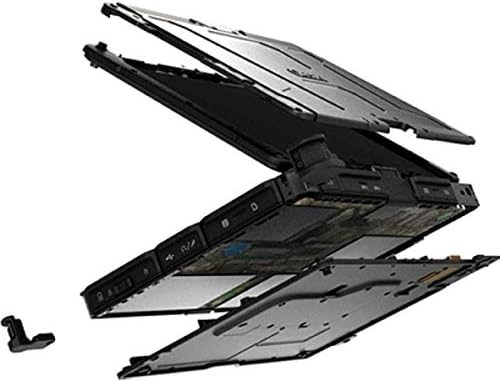
Rysunek 3.1: Eksplodowany view illustrating the internal structure and ruggedized layers of the Getac V110.
3.1. Klawiatura i touchpad
The device includes a backlit keyboard for typing in various lighting conditions and a precision touchpad for navigation.
Rysunek 3.2: Widok z góry na dół view of the Getac V110 keyboard and integrated touchpad.
3.2. Convertible Design
The V110 can be easily converted between laptop and tablet modes by rotating the screen. This flexibility allows for optimal use in different scenarios.

Figure 3.3: The Getac V110 configured in laptop mode, displaying the screen and keyboard.

Figure 3.4: The Getac V110 in tablet mode, showcasing the touchscreen interface.
4. Konfiguracja
4.1. Pierwsze włączenie zasilania
- Podłącz zasilacz do urządzenia i gniazdka elektrycznego.
- Press the power button located on the side or front of the device.
- Postępuj zgodnie z instrukcjami wyświetlanymi na ekranie, aby dokończyć początkową konfigurację systemu Windows 8.1, obejmującą wybór języka, regionu i utworzenie konta użytkownika.
4.2. Łączność sieciowa
The Getac V110 supports both Wi-Fi and Ethernet for internet access.
- Wi-Fi: Access the network settings in Windows 8.1, select your desired Wi-Fi network, and enter the password if required.
- Ethernet: Connect an Ethernet cable from your network router or switch to the Ethernet port on the device.
4.3. Parowanie Bluetooth
Aby podłączyć urządzenia Bluetooth:
- Upewnij się, że urządzenie Bluetooth jest w trybie parowania.
- On the Getac V110, navigate to PC Settings > PC and devices > Bluetooth.
- Turn Bluetooth on and select the device from the list to pair.
5. Obsługa urządzenia
5.1. Przełączanie między trybami laptopa i tabletu
To convert the device:
- Gently rotate the screen 180 degrees clockwise or counter-clockwise.
- Fold the screen back over the keyboard to enter tablet mode.
- Unfold the screen and rotate it back to the original position for laptop mode.
5.2. Korzystanie z ekranu dotykowego
The 11.6-inch LED touchscreen supports multi-touch gestures. Use your fingers or a compatible stylus for navigation, selection, and input.
5.3. Zarządzanie energią
To conserve battery life, adjust power settings in Windows 8.1. You can configure sleep mode, display brightness, and other power-saving options.
- Tryb uśpienia: Aby przełączyć urządzenie w tryb uśpienia, naciśnij krótko przycisk zasilania.
- Zamknięcie: Go to the Charms bar (swipe from right edge or move mouse to top-right corner), select Settings > Power > Shut down.
- Uruchom ponownie: Go to the Charms bar, select Settings > Power > Restart.
6. Konserwacja
6.1. Czyszczenie urządzenia
Regular cleaning helps maintain performance and appearance.
- Użyj miękkiej, niestrzępiącej się ściereczki, lekko wyczyśćampened with water or a mild, non-abrasive cleaner for the screen and exterior.
- Unikaj bezpośredniego rozpylania płynów na urządzenie.
- Nie należy używać silnych środków chemicznych, rozpuszczalników ani materiałów ściernych.
6.2. Pielęgnacja baterii
Aby zmaksymalizować żywotność baterii:
- Unikaj częstego całkowitego rozładowywania akumulatora.
- Jeśli urządzenie nie będzie używane przez dłuższy czas, należy je przechowywać w chłodnym i suchym miejscu.
- If the device has removable batteries, ensure they are properly seated.
6.3. Aktualizacje oprogramowania
Regularly check for and install operating system and driver updates to ensure optimal performance and security. Access Windows Update through PC Settings.
7. Rozwiązywanie Problemów
This section addresses common issues you might encounter with your Getac V110.
7.1. Urządzenie się nie włącza
- Sprawdź, czy zasilacz jest prawidłowo podłączony, a gniazdko działa prawidłowo.
- Check if the battery is charged. If not, allow it to charge for at least 30 minutes before attempting to power on again.
- If the battery is removable, ensure it is correctly installed.
7.2. Problemy z łącznością Wi-Fi
- Sprawdź, czy w ustawieniach systemu Windows włączona jest funkcja Wi-Fi.
- Restart your router and the Getac V110.
- Ensure you are within range of the Wi-Fi network and have the correct password.
- Sprawdź dostępność zaktualizowanych sterowników Wi-Fi.
7.3. Ekran dotykowy nie reaguje
- Uruchom ponownie urządzenie.
- Upewnij się, że ekran jest czysty i wolny od zanieczyszczeń.
- Check for any recent software updates or driver issues.
7.4. Niska wydajność
- Zamknij niepotrzebne aplikacje działające w tle.
- Sprawdź dostępną przestrzeń dyskową.
- Uruchom skanowanie antywirusowe.
- Upewnij się, że system Windows i sterowniki są aktualne.
8. Specyfikacje
| Funkcja | Szczegół |
|---|---|
| Marka | Getac |
| Numer modelu | V110 |
| Edytor | Intel Core i5-6300U (2.6 GHz) |
| Pamięć RAM | 8 GB pamięci DDR4 SDRAM |
| Pojemność magazynowa | 128 GB |
| Rozmiar ekranu | 11.6 cali |
| Rozdzielczość wyświetlacza | 1366 x 768 pikseli |
| Typ wyświetlacza | PROWADZONY |
| Wprowadzanie danych przez interfejs użytkownika | Ekran dotykowy |
| System operacyjny | Windows 8.1 |
| Koprocesor graficzny | Karta graficzna Intel HD 520 |
| Technologia łączności | Bluetooth, Ethernet, HDMI, USB, Wi-Fi |
| Waga przedmiotu | 4.4 funtów |
| Item Dimensions (L x W x Th) | 11.99" x 18.9" x 3.9" |
| Typ ogniwa baterii | Lithium Ion (23 Watt Hours) |
9. Informacje o gwarancji
The Getac V110 Rugged Convertible Laptop/Tablet PC comes with a 90-dniowa ograniczona gwarancja. This warranty covers manufacturing defects and malfunctions under normal use. It does not cover damage caused by misuse, accidents, unauthorized repairs, or modifications. Please retain your proof of purchase for warranty claims.
For detailed terms and conditions, refer to the warranty documentation provided with your device or contact Getac customer support.
10. Wsparcie
If you require further assistance or encounter issues not covered in this manual, please contact Getac customer support. You can typically find support contact information on the manufacturer's official website or within the device's pre-installed documentation.
When contacting support, please have your device's model number (V110) and serial number ready.