
Fnatic BOLT
Fnatic BOLT Wireless Gaming Mouse User Manual
Wstęp
This manual provides detailed instructions for the setup, operation, maintenance, and troubleshooting of your Fnatic BOLT Wireless Gaming Mouse. Please read this manual thoroughly before using the product to ensure optimal performance and longevity.
Produkt ponadview
The Fnatic BOLT is a lightweight wireless gaming mouse designed for high performance. It features a durable construction and versatile connectivity options.
Komponenty
- Przyciski lewego i prawego kliknięcia
- Kółko przewijania
- DPI Cycle Button (typically located on the bottom or top)
- Przyciski boczne (przód/tył)
- Port ładowania USB-C
- Wireless Receiver (dongle)

Rysunek 1: Góra view of the Fnatic BOLT Wireless Gaming Mouse, showing the main click buttons and scroll wheel.

Rysunek 2: Kątowy view of the Fnatic BOLT Wireless Gaming Mouse, highlighting the two programmable side buttons.

Rycina 3: Przód view of the Fnatic BOLT Wireless Gaming Mouse, displaying the USB-C charging port.
Organizować coś
1. Ładowanie początkowe
Before first use, it is recommended to fully charge the Fnatic BOLT mouse.
- Connect the provided USB-C cable to the charging port on the front of the mouse.
- Podłącz drugi koniec kabla USB-C do zasilanego portu USB w komputerze lub do zasilacza ściennego USB.
- The mouse's indicator light will show charging status (refer to product documentation for specific light patterns). A full charge typically takes a few hours.
2. Podłączanie do komputera
The Fnatic BOLT supports two wireless connection modes: 2.4 GHz wireless (via USB dongle) and Bluetooth.
2.1. Połączenie bezprzewodowe 2.4 GHz
- Locate the USB wireless receiver (dongle) that came with your mouse.
- Podłącz odbiornik USB do dostępnego portu USB w komputerze.
- Włącz mysz za pomocą włącznika zasilania znajdującego się na spodzie myszy.
- The mouse should automatically connect to the receiver. The indicator light will confirm a successful connection.
2.2. Połączenie Bluetooth
- Sprawdź, czy Bluetooth w Twoim komputerze jest włączony.
- Włącz mysz i przełącz ją na tryb Bluetooth (w celu wyboru trybu skorzystaj z dolnego przełącznika lub przycisku myszy).
- Na komputerze przejdź do ustawień Bluetooth i wyszukaj nowe urządzenia.
- Select "Fnatic BOLT" from the list of available devices to pair.
- The mouse's indicator light will confirm successful pairing.
Instrukcja obsługi
Regulacja DPI
The Fnatic BOLT mouse allows you to adjust its Dots Per Inch (DPI) sensitivity. This mouse features 4 preset DPI levels.
- Locate the DPI cycle button, typically on the bottom of the mouse.
- Press the DPI button to cycle through the available sensitivity settings.
- An indicator light (often on the scroll wheel or top of the mouse) may change color or flash to indicate the current DPI level.
Funkcje przycisków
- Lewy przycisk myszy: Podstawowa akcja: selekcja.
- Kliknij prawym przyciskiem myszy: Menu kontekstowe, akcja drugorzędna.
- Kliknięcie kółka przewijania: Middle click, often used for opening links in new tabs or specific in-game functions.
- Przewiń w górę/w dół: Navigating documents or web stron.
- Przyciski boczne: Default to Forward/Back in web browsers. These can often be customized via software (if available).
Zarządzanie energią
- To conserve battery life, turn off the mouse using the power switch when not in use for extended periods.
- The mouse may enter a sleep mode after a period of inactivity. Move the mouse or click a button to wake it up.
- Monitor the battery indicator (if available) to know when to recharge.
Konserwacja
Czyszczenie
- Regularnie czyść powierzchnię myszy miękką, suchą i niepozostawiającą włókien ściereczką.
- W przypadku uporczywych zabrudzeń, delikatnieampPrzetrzyj ściereczkę wodą lub delikatnym środkiem czyszczącym. Unikaj silnych środków chemicznych.
- Clean the optical sensor on the bottom of the mouse with a cotton swab to ensure accurate tracking.
- Nie dopuść do przedostania się płynów do wewnętrznych podzespołów myszy.
Pielęgnacja baterii
- Unikaj częstego całkowitego rozładowywania akumulatora.
- Jeśli mysz nie będzie używana przez dłuższy czas, należy ją przechowywać w chłodnym i suchym miejscu.
- Nie wystawiaj myszy na działanie ekstremalnych temperatur.
Rozwiązywanie problemów
Mysz nie odpowiada
- Sprawdź baterię: Ensure the mouse is charged. Connect it to the USB-C cable and allow it to charge for a period.
- Przycisk zasilania: Sprawdź, czy przełącznik zasilania myszy jest w pozycji „ON”.
- Wireless Connection (2.4 GHz):
- Upewnij się, że odbiornik USB jest prawidłowo podłączony do działającego portu USB. Spróbuj użyć innego portu USB.
- Ensure the mouse is within range of the receiver.
- Unikaj źródeł zakłóceń (np. innych urządzeń bezprzewodowych, dużych obiektów metalowych).
- Połączenie Bluetooth:
- Sprawdź, czy Bluetooth w Twoim komputerze jest włączony.
- Check if the mouse is in Bluetooth pairing mode or already paired. Re-pair if necessary.
- Remove and re-add the device in your computer's Bluetooth settings.
- Uruchom ponownie: Uruchom ponownie komputer.
Niedokładne śledzenie
- Wyczyść czujnik: Wyczyść czujnik optyczny znajdujący się na spodzie myszy.
- Powierzchnia: Ensure you are using the mouse on a suitable surface. Highly reflective or uneven surfaces can affect tracking. A mouse pad is recommended.
- Ustawienie DPI: Adjust the DPI setting to a level that suits your preference and task.
Krótki czas pracy baterii
- Ładowanie: Sprawdź, czy mysz jest w pełni naładowana.
- Wyłączone: Remember to turn off the mouse when not in use.
- Stosowanie: High-intensity usage or certain settings might consume more power.
Specyfikacje
| Funkcja | Szczegół |
|---|---|
| Marka | Fnatic |
| Nazwa modelu | FnaticGear BOLT |
| Numer modelu przedmiotu | ŚRUBA |
| Kolor | biały |
| Technologia łączności | Bluetooth, Wi-Fi (2.4 GHz Wireless) |
| Technologia wykrywania ruchu | Optyczny |
| Liczba przycisków | 6 |
| Orientacja dłoni | Prawidłowy |
| Cechy specjalne | Lekki |
| Typ źródła zasilania | Wireless (Rechargeable Battery) |
| Baterie w zestawie | Yes (1 Lithium Metal battery) |
| Zawartość energii baterii litowej | 470 mlnamp Godziny (mAh) |
| Wymiary produktu | 12.5 x 6.5 x 0.1 cm; 69 g |
| Kompatybilne urządzenia | Laptop, komputer osobisty |
| Systemy operacyjne | Linux, Windows 7, Windows XP (and newer) |
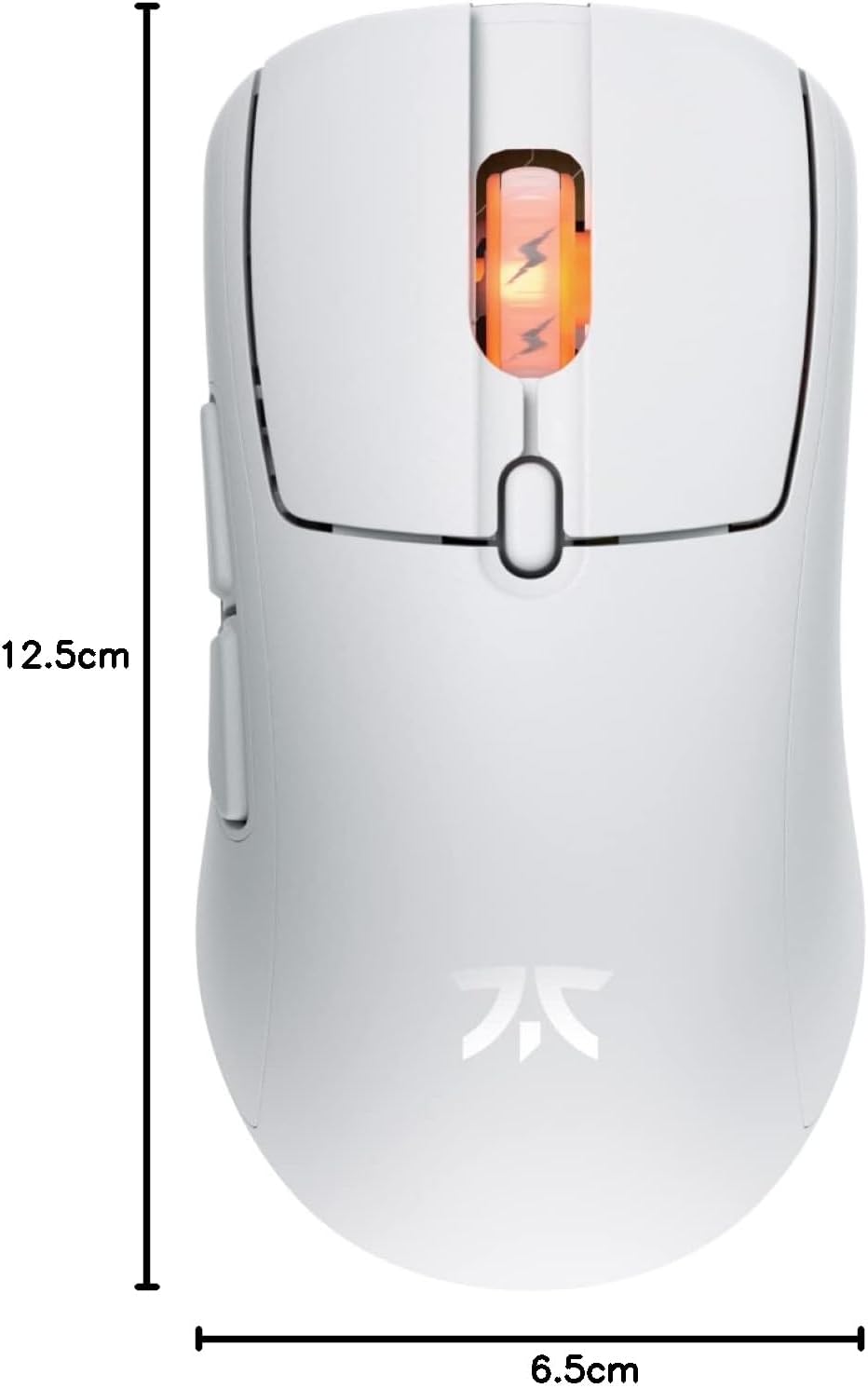
Figure 4: Diagram showing the dimensions of the Fnatic BOLT Wireless Gaming Mouse.
Gwarancja i wsparcie
For information regarding warranty coverage and technical support, please refer to the official Fnatic webstronie internetowej lub karcie gwarancyjnej dołączonej do produktu.
You can typically find support resources, FAQs, and contact information on the manufacturer's official support pages.
Ask a question about this manual
Ask about setup, troubleshooting, compatibility, parts, safety, or missing instructions. Manuals+ will review the question and use this page’s manual context to help answer it.