
Xtorm XP300U
Xtorm XP300U Portable Power Station 300W - User Manual
Model: XP300U
Wstęp
Thank you for choosing the Xtorm XP300U Portable Power Station. This device is designed to provide reliable and portable power for various applications, from home use to outdoor camping. With a 300W output and multiple charging options, it ensures your devices stay powered wherever you are. This manual provides essential information on the safe operation, setup, maintenance, and troubleshooting of your power station.
Informacje dotyczące bezpieczeństwa
Przed użyciem produktu należy przeczytać wszystkie ostrzeżenia i instrukcje dotyczące bezpieczeństwa, aby zapewnić bezpieczną obsługę i zapobiec uszkodzeniom. Zachowaj tę instrukcję do wykorzystania w przyszłości.
- Nie rozmontowuj, nie naprawiaj ani nie modyfikuj urządzenia. Nieprawidłowy montaż może spowodować pożar lub obrażenia.
- Do not expose the unit to fire or high temperatures (above 60°C/140°F).
- Nie należy używać ani przechowywać urządzenia w bezpośrednim świetle słonecznym lub w gorącym otoczeniu.
- Nie należy używać ani przechowywać urządzenia w łazience ani w miejscach narażonych na działanie wody lub wilgoci.
- Nie upuszczaj, nie uderzaj ani nie narażaj urządzenia na silne uderzenia.
- Przechowywać w miejscu niedostępnym dla dzieci.
- Należy używać wyłącznie oryginalnych lub certyfikowanych kabli ładujących i adapterów.
- Ensure proper ventilation during use and charging. Do not cover the unit.
- In case of leakage from the battery, do not allow the liquid to come into contact with skin or eyes. If contact occurs, wash with plenty of water and seek medical advice.

Image: Safety features of the Xtorm XP300U, highlighting Pure Sine Wave, Short Circuit Protection, Temperature Control, Overcharge Protection, APM Chip, A-Class Batteries, and High Efficiency.
Zawartość opakowania
Proszę sprawdzić zawartość opakowania po otwarciu. Jeśli brakuje któregokolwiek elementu lub jest on uszkodzony, prosimy o kontakt ze sprzedawcą.
- Xtorm XP300U Portable Power Station
- Ładowarka ścienna AC
- Kabel do ładowarki samochodowej
- MC4 to DC Cable (for solar panel connection, solar panel not included)
- Instrukcja obsługi

Image: The Xtorm XP300U Portable Power Station displayed with its included accessories: AC wall charger, car charger cable, and MC4 to DC cable.
Produkt ponadview
Familiarize yourself with the different parts of your Xtorm XP300U Power Station.
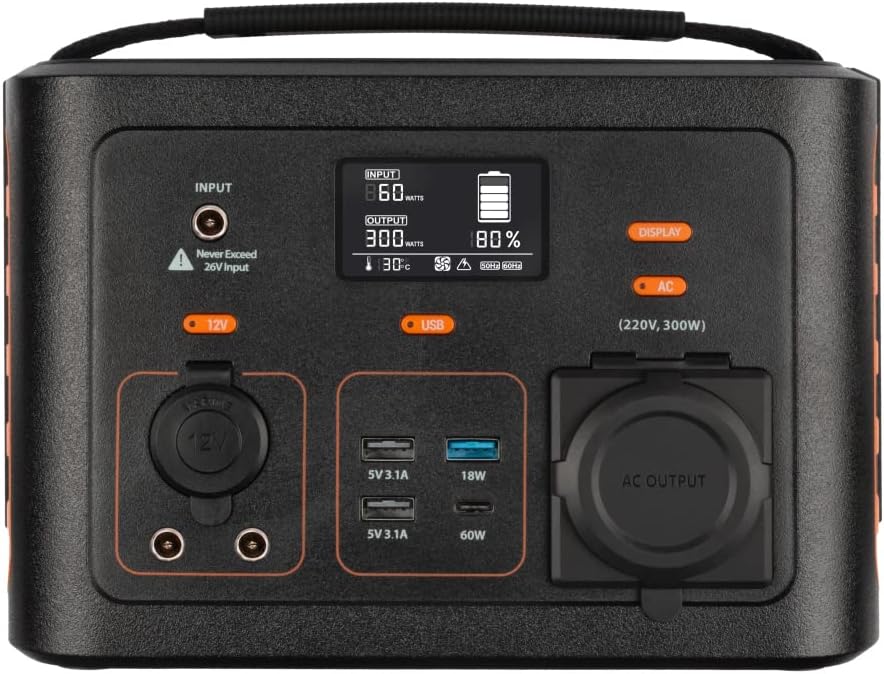
Obraz: Zbliżenie view of the Xtorm XP300U's front panel, showing the digital display, input port, 12V DC output, USB-A and USB-C ports, and AC output socket.
Funkcje panelu przedniego:
- Wyświetlacz LCD: Pokazuje poziom naładowania baterii, moc wejściową/wyjściową i wskaźniki stanu.
- Port wejściowy: Do ładowania elektrowni za pomocą zasilacza sieciowego, ładowarki samochodowej lub panelu słonecznego.
- Wyjście 12 V prądu stałego: Do zasilania urządzeń 12V.
- Porty USB-A: Multiple USB-A outputs for charging various devices (e.g., 5V 3.1A, 18W Quick Charge).
- Port USB-C PD: High-speed USB-C Power Delivery output (up to 60W).
- Gniazdo wyjściowe AC: Standard AC outlet for powering household appliances (220V, 300W).
- Przyciski sterujące: Buttons for turning on/off specific outputs (e.g., AC, DC, USB).

Obraz: Góra view of the Xtorm XP300U, highlighting its integrated carrying handle for portability.

Obraz: Tył view of the Xtorm XP300U, featuring the Xtorm brand logo and "Portable Power Station 300" text.
Organizować coś
Before first use, it is recommended to fully charge your Xtorm XP300U Power Station.
- Rozpakować: Ostrożnie wyjmij stację zasilającą i wszystkie akcesoria z opakowania.
- Initial Charge (AC Wall Charger):
- Connect the AC wall charger to the input port on the power station.
- Plug the AC wall charger into a standard wall outlet.
- The LCD display will show the charging status. Charge until the battery indicator shows 100%.
- Umieszczenie: Place the power station on a stable, flat surface in a well-ventilated area, away from direct sunlight or heat sources.
Instrukcja obsługi
The Xtorm XP300U offers multiple ways to charge and power your devices.
Ładowanie elektrowni:
The XP300U can be recharged using four different methods:
Image: Visual representation of the four charging methods for the Xtorm XP300U: via wall socket, USB-C PD, solar panel (not included), and 12V car charger.
- Via Wall Socket (AC Charger): Connect the included AC wall charger to the input port and a wall outlet.
- Via USB-C PD: Use a compatible USB-C Power Delivery charger (not included) to charge the unit via its USB-C port.
- Za pośrednictwem panelu słonecznego: Connect a compatible solar panel (not included) to the input port using the provided MC4 to DC cable. Ensure the solar panel is placed in direct sunlight for optimal charging.
- Via 12V Car Charger: Connect the included car charger cable to the input port and your vehicle's 12V cigarette lighter socket.
Na wyświetlaczu LCD pojawi się wartość wejściowatage and battery charge status during charging. You can use the outputs even while the power station is charging (pass-through charging).
Using the Outputs:
The XP300U provides various output ports to power different types of devices.

Image: The Xtorm XP300U demonstrating its universal compatibility with icons representing various devices and output types: 1x AC 300W/220V, 1x USB-C PD 60W, 2x DC 5.5mm 60W, 2x USB QC3.0 18W, 1x USB 18W, and 1x 12V Car 120W.
- AC Output (220V, 300W):
- Press the "AC" button to activate the AC output. The AC indicator on the display will light up.
- Podłącz przewód zasilający urządzenia do gniazdka sieciowego.
- Ensure your device's power consumption does not exceed 300W.
- Press the "AC" button again to turn off the AC output when not in use.
- Wyjście prądu stałego (12 V):
- Press the "12V" button to activate the DC output. The DC indicator will light up.
- Connect your 12V device to the DC port.
- Press the "12V" button again to turn off the DC output.
- USB Outputs (USB-A, USB-C PD):
- The USB outputs are typically always active when the unit is on.
- Connect your USB-powered devices to the appropriate USB-A or USB-C PD ports.
- The display will show the output wattage for connected devices.
The power station can provide power for extended periods, depending on the connected devices' power consumption.

Obraz: Byłyamples of device runtimes with the Xtorm XP300U: 17.5 hours for a 10W LED light, 5.5 hours for a 30W small TV, 4 hours for a 40W small coolbox, and 6 hours for a 40W small coolbox (via 12V carplug output).
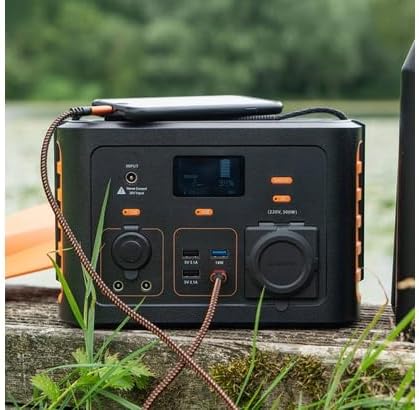
Image: The Xtorm XP300U Portable Power Station being used outdoors on a wooden surface, charging a smartphone, demonstrating its portability and utility in various environments.
Konserwacja
Właściwa konserwacja gwarantuje długowieczność i optymalną wydajność Twojej elektrowni.
- Czyszczenie: Do czyszczenia zewnętrznej części urządzenia należy używać miękkiej, suchej ściereczki. Nie należy używać środków czyszczących o właściwościach ściernych ani rozpuszczalników.
- Składowanie:
- Przechowuj elektrownię w chłodnym i suchym miejscu, z dala od bezpośredniego światła słonecznego i ekstremalnych temperatur.
- W przypadku długotrwałego przechowywania ładuj urządzenie do poziomu około 50–80% co 3–6 miesięcy, aby zachować sprawność akumulatora.
- Avoid storing in environments with high humidity.
- Pielęgnacja baterii: Do not fully discharge the battery frequently, as this can reduce its lifespan. Recharge promptly when the battery level is low.
Rozwiązywanie problemów
If you encounter issues with your Xtorm XP300U, refer to the following common problems and solutions.
| Problem | Możliwa przyczyna | Rozwiązanie |
|---|---|---|
| Urządzenie nie włącza się. | Akumulator jest całkowicie rozładowany. | Connect the power station to an AC wall outlet and charge it for at least 30 minutes. |
| Wyjście prądu zmiennego nie działa. | Wyjście prądu zmiennego nie jest aktywowane; moc urządzenia przekracza 300 W; przegrzewanie. | Naciśnij przycisk „AC”, aby aktywować. Sprawdź stan urządzenia.tage. Allow unit to cool down if overheated. |
| Porty USB nie ładują się. | Device not compatible; cable faulty. | Ensure device is compatible. Try a different USB cable. |
| Powolne ładowanie. | Using a low-power charger; environmental factors (e.g., cloudy for solar). | Use the original AC charger or a higher wattage USB-C PD charger. Optimize solar panel placement. |
If the problem persists, please contact Xtorm customer support.
Specyfikacje
Detailed technical specifications for the Xtorm XP300U Portable Power Station.
| Funkcja | Szczegół |
|---|---|
| Nazwa modelu | XP300U |
| Marka | Xtorm |
| Moc wyjściowa | 300 watów (prąd przemienny) |
| Wejście Voltage | 12 V (prąd stały) |
| Źródło zasilania | AC Wall, USB-C PD, Solar, Car Charger |
| Zalecane zastosowania | Home, Campwchodzenie |
| Waga | 3300 gramów (3.3 kg) |
| Kolor | Pomarańczowy |
| Zawarte komponenty | 1 package (Power Station, AC Charger, Car Charger, MC4 to DC Cable) |

Image: Dimensions of the Xtorm XP300U Portable Power Station (240mm x 154mm x 142mm) and its weight (3.3 kg), highlighting its convenient travel size.
Gwarancja i wsparcie
Xtorm products come with a standard warranty. Please refer to the warranty card included in your package or visit the official Xtorm webSzczegółowe warunki gwarancji można znaleźć na naszej stronie.
For technical support, troubleshooting assistance, or warranty claims, please contact Xtorm customer service:
- Webstrona: www.xtorm.pl (Sprawdź dane kontaktowe pomocy technicznej)
- E-mail: Refer to the Xtorm webstrona zawierająca konkretne adresy e-mail wsparcia.
- Telefon: Refer to the Xtorm webstrona z regionalnymi numerami telefonów pomocy technicznej.
When contacting support, please have your product model (XP300U) and purchase details ready.