
1. Wprowadzenie
Thank you for choosing the BLOW RA2 Portable Analog AM/FM Radio. This device combines classic analog radio functionality with modern features such as Bluetooth connectivity, USB and SD card playback, and an AUX input. It also includes a clock and alarm function for added convenience. This manual provides essential information for the safe and efficient operation of your radio.
2. Konfiguracja
2.1 Rozpakowanie
Carefully remove the radio from its packaging. Ensure all components are present: the BLOW RA2 radio and the power cable.
2.2 Połączenie zasilania
Connect the power cable to the AC 230V ~ 50Hz power input located at the rear of the radio. Plug the other end into a standard wall outlet. The radio is designed for AC power operation.
Rysunek 1: Tył view of the BLOW RA2 radio, illustrating the power input, main power switch, and the telescopic antenna.
2.3 Regulacja anteny
For optimal AM/FM radio reception, extend the telescopic antenna fully. Adjust its position for the clearest signal. For AM reception, rotating the unit itself may also improve signal quality.
3. Instrukcja obsługi
3.1 Włączanie/wyłączanie zasilania
Locate the main power switch, typically on the rear or side of the unit. Flip the switch to the 'ON' position to power on the radio. Flip to 'OFF' to power down.

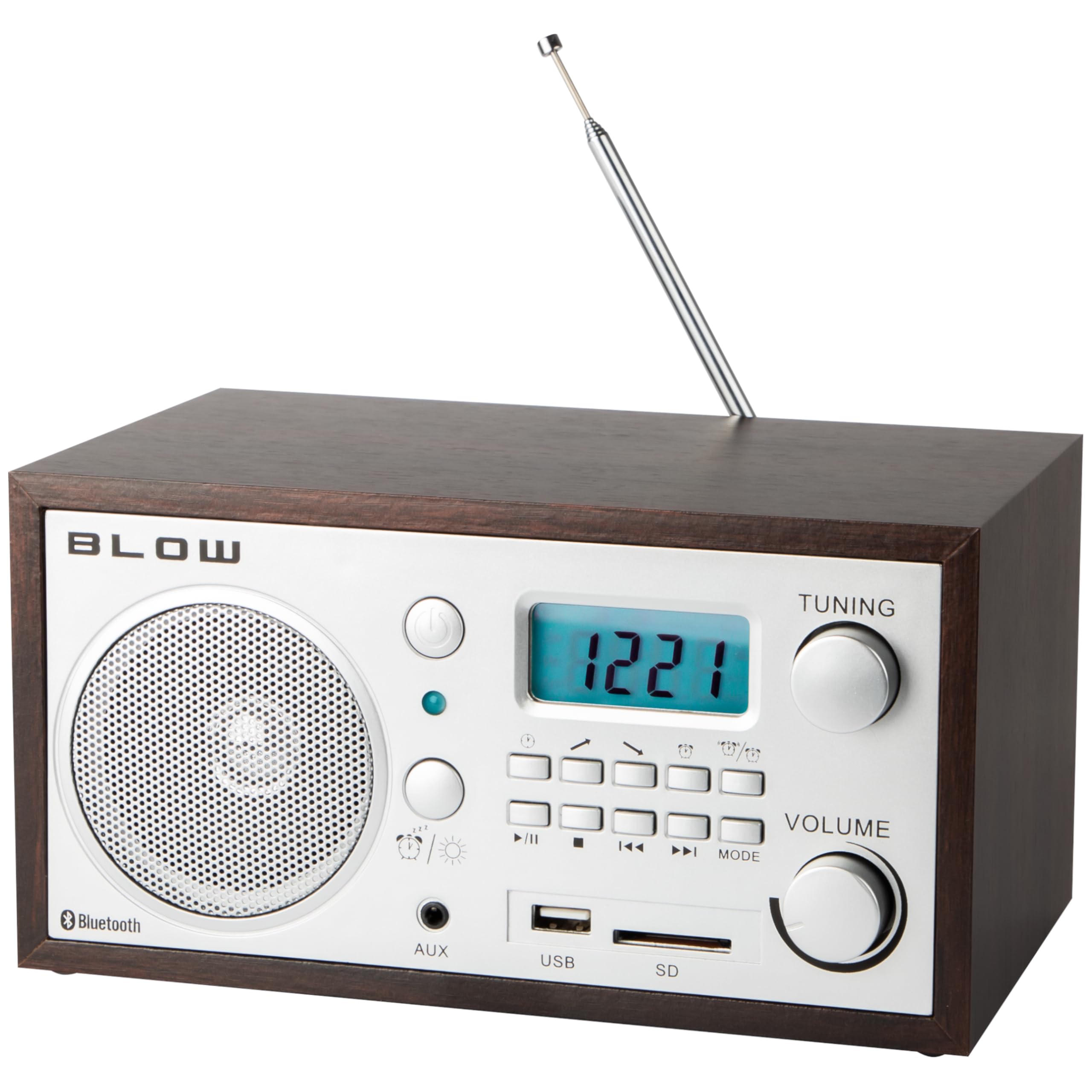
Rysunek 2: Front panel of the BLOW RA2 radio, showing the LCD display, control knobs, and input ports.
3.2 Strojenie radia (AM/FM)
- Press the 'MODE' button to select either AM or FM radio band. The selected band will be shown on the LCD display.
- Rotate the 'TUNING' knob to scan for radio stations. The frequency will be displayed on the LCD.
- Adjust the 'VOLUME' knob to your desired listening level.
3.3 Obsługa Bluetooth
- Press the 'MODE' button until 'Bluetooth' or 'BT' is displayed on the LCD. The radio will enter pairing mode.
- Na swoim urządzeniu mobilnym (smartfonie, tablecie itp.) włącz Bluetooth i wyszukaj dostępne urządzenia.
- Select 'BLOW RA2' from the list of devices to pair. A confirmation sound may indicate successful pairing.
- Play audio from your device, and it will stream through the radio's speaker.
3.4 Odtwarzanie z USB i karty SD
- Włóż dysk flash USB do portu USB lub kartę SD do gniazda karty SD.
- Press the 'MODE' button until 'USB' or 'SD' is displayed. The radio will automatically begin playing compatible audio files.
- Use the playback control buttons (Play/Pause, Next, Previous) to manage your audio.
3.5 Wejście AUX
- Connect an external audio device (e.g., MP3 player, laptop) to the 'AUX' input jack using a 3.5mm audio cable (not included).
- Naciskaj przycisk „MODE”, aż na wyświetlaczu pojawi się „AUX”.
- Odtwórz dźwięk z urządzenia zewnętrznego. Dźwięk będzie odtwarzany przez głośnik radia.
3.6 Funkcja zegara i alarmu
The BLOW RA2 features an integrated clock and alarm. Refer to the specific instructions in the included owner's manual for detailed steps on setting the time and configuring the alarm, as these functions typically involve specific button combinations not detailed here.
4. Konserwacja
4.1 Czyszczenie
To clean the radio, use a soft, dry cloth. Do not use abrasive cleaners, waxes, or solvents, as these can damage the finish and internal components. Ensure the unit is unplugged before cleaning.
4.2 Pielęgnacja anteny
Handle the telescopic antenna with care to prevent bending or breaking. When not in use, retract the antenna to protect it.
4.3 Przechowywanie
If the radio will not be used for an extended period, unplug it from the power outlet and store it in a cool, dry place away from direct sunlight and extreme temperatures.
5. Rozwiązywanie Problemów
| Problem | Możliwa przyczyna | Rozwiązanie |
|---|---|---|
| Brak zasilania | Power cable not connected; Main switch off | Ensure power cable is securely plugged in; Turn main power switch to 'ON' |
| Słaby odbiór radia | Antena nie jest prawidłowo rozłożona/ustawiona; obszar o słabym sygnale | Extend and adjust telescopic antenna; Try relocating the radio for better signal |
| Bluetooth nie łączy się | Radio not in Bluetooth mode; Device not in pairing mode; Already paired to another device | Ensure radio is in Bluetooth mode; Put your device in pairing mode; Disconnect from other devices |
| Karta USB/SD nie jest odtwarzana | Wybrano nieprawidłowy tryb; niezgodny file format; Corrupted media | Select 'USB' or 'SD' mode; Ensure files are compatible (e.g., MP3); Try another USB/SD card |
| Brak dźwięku | Głośność zbyt niska; Wyciszenie włączone; Wybrano nieprawidłowe źródło | Increase volume; Check for mute function; Ensure correct input mode is selected |
6. Specyfikacje
- Model: 77-531
- Technologia tunera: Analogowe AM/FM
- Zakres częstotliwości AM: 522-1620 kHz
- Zakres częstotliwości FM: 88-108MHz
- Głośnik: 2.5 cala
- Antena: Teleskopowy
- Łączność: Bluetooth, USB, SD Card Reader, AUX Input
- Wyświetlacz: LCD
- Cechy szczególne: Built-in Clock, Alarm Clock, Portable
- Zasilanie: AC 230V ~ 50Hz (Corded Electric)
- Wymiary: 21 x 11 x 14 cm (dł. x szer. x wys.)
- Waga: 1.39 kilogramów
- Tworzywo: Plastikowy
7. Gwarancja i wsparcie
For warranty information and technical support, please refer to the documentation included with your purchase or contact your retailer. The owner's manual is included as a component with the product.