
Wstęp
Thank you for choosing the Edifier Hecate GT4 Gaming Earbuds. These true wireless earbuds are designed to provide a low-latency audio experience for gaming across multiple platforms, including PS5, PS4, Nintendo Switch, mobile phones, and PCs. Featuring Bluetooth 5.2 connectivity, an IP55 rating for dust and splash resistance, and customizable RGB lighting, the GT4 earbuds offer both performance and convenience. Please read this manual thoroughly to ensure proper use and optimal performance of your new earbuds.
Zawartość opakowania
Sprawdź, czy w przesyłce znajdują się wszystkie wymienione poniżej elementy:
- Edifier Hecate GT4 Gaming Earbuds (Left and Right)
- Etui ładujące
- Kabel ładujący USB-C
- Multiple Sizes of Eartips (Small, Medium, Large)
- Instrukcja obsługi

Image: The Edifier Hecate GT4 earbuds, charging case, USB-C cable, and extra eartips are shown, representing the package contents.
Organizować coś
1. Ładowanie słuchawek i etui
Before first use, fully charge the earbuds and charging case. Place the earbuds into the charging case. Connect the USB-C charging cable to the charging port on the case and the other end to a USB power adapter (not included) or a computer's USB port. The indicator lights on the case will show charging status.
- Czas ładowania: Pełne ładowanie trwa około 1.5 godzin.
- Czas pracy baterii: Up to 7 hours of playback on a single charge, with an additional 21 hours provided by the charging case.
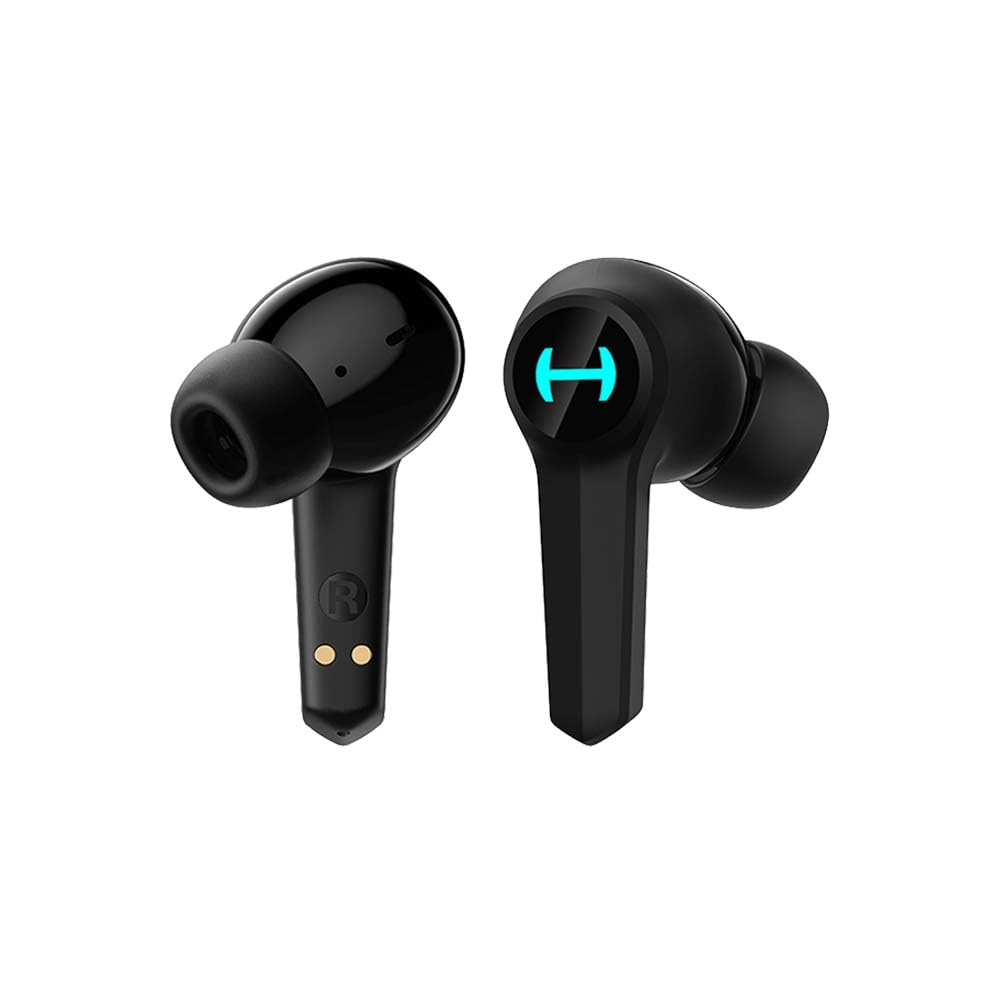
Image: The Edifier Hecate GT4 earbuds are shown inside their open charging case, with the case's RGB lights illuminated.
2. Parowanie Bluetooth
- Upewnij się, że słuchawki douszne są naładowane.
- Otwórz etui ładujące. Słuchawki automatycznie przejdą w tryb parowania, co zostanie zasygnalizowane migającymi diodami.
- On your device (phone, PC, console), enable Bluetooth and search for new devices.
- Select "EDIFIER HECATE GT4" from the list of available devices to connect.
- Once connected, the earbud lights will stop flashing or show a steady light.
The earbuds support Bluetooth 5.2 for a stable and efficient connection.
Instrukcja obsługi
1. Włączanie/wyłączanie zasilania
- Włączanie: Otwórz etui ładujące lub wyjmij słuchawki z etui. Włączą się automatycznie.
- Wyłączone: Włóż słuchawki douszne z powrotem do etui ładującego i zamknij pokrywę. Wyłączą się automatycznie.
2. Sterowanie dotykowe
The Edifier Hecate GT4 earbuds feature touch-sensitive controls on each earbud. Refer to the diagram below for touch panel location.

Image: A finger is shown touching the outer surface of an earbud, indicating the smart touch control area.
| Działanie | Lewa słuchawka (L) | Słuchawka prawa (R) |
|---|---|---|
| Odtwórz/Pauza | Podwójne dotknięcie | Podwójne dotknięcie |
| Następny utwór | Potrójne dotknięcie | Potrójne dotknięcie |
| Odbierz/Zakończ połączenie | Podwójne dotknięcie | Podwójne dotknięcie |
| Odrzuć połączenie | Długie naciśnięcie (2 s) | Długie naciśnięcie (2 s) |
| Aktywuj tryb gry | Długie naciśnięcie (2 s) | Długie naciśnięcie (2 s) |
| Deactivate Game Mode | Długie naciśnięcie (2 s) | Długie naciśnięcie (2 s) |
Note: Volume control may need to be adjusted directly on your connected device.
3. Game Mode (45ms Low-Latency)
The Edifier Hecate GT4 features a dedicated Game Mode to reduce audio latency to as low as 45ms, providing a synchronized audio-visual experience crucial for gaming. To activate or deactivate Game Mode, long press either earbud for 2 seconds. You will hear an audio prompt indicating the mode change.

Image: An illustration depicting the low latency feature of the earbuds, highlighting the 45ms response time.
Wideo: Oficjalny film prezentujący produktasing the features of the EDIFIER HECATE GT4 Gaming Earbuds, including low latency and ergonomic design.
4. Oświetlenie RGB
The charging case and earbuds feature RGB lighting. The lighting indicates various statuses such as charging, pairing, and game mode activation. The specific patterns and colors are pre-set and provide visual feedback on the earbuds' operational status.

Image: The Edifier Hecate GT4 charging case is shown with its red RGB lighting illuminated, indicating its gaming aesthetic.
Konserwacja
- Czyszczenie: Use a soft, dry cloth to clean the earbuds and charging case. Do not use liquid cleaners or abrasive materials.
- Wodoodporność: The earbuds have an IP55 rating, meaning they are protected against dust and low-pressure water jets. Avoid submerging them in water or exposing them to heavy rain. Dry them thoroughly if they get wet.
- Składowanie: Gdy nie używasz słuchawek, przechowuj je w etui ładującym, aby je chronić i utrzymać naładowanie. Przechowuj w chłodnym, suchym miejscu, z dala od ekstremalnych temperatur.

Image: An Edifier Hecate GT4 earbud is shown with water splashing around it, illustrating its water-resistant feature.
Rozwiązywanie problemów
| Problem | Możliwa przyczyna | Rozwiązanie |
|---|---|---|
| Słuchawki nie włączają się. | Niski poziom naładowania baterii. | Naładuj całkowicie słuchawki douszne i etui ładujące. |
| Nie można sparować z urządzeniem. | Bluetooth not enabled, earbuds not in pairing mode, or device too far. | Ensure Bluetooth is enabled on your device. Place earbuds in case, close, then open to re-enter pairing mode. Keep devices within 10 meters. |
| Brak dźwięku lub dźwięk przerywany. | Earbuds not properly connected, low battery, or interference. | Check Bluetooth connection. Recharge earbuds. Move away from sources of interference (e.g., Wi-Fi routers). |
| Jedna słuchawka nie wydaje dźwięku. | Individual earbud connection issue. | Place both earbuds back into the charging case, close the lid, then open it again to reset the connection. Re-pair if necessary. |
| Low latency mode not working. | Game Mode not activated. | Long press either earbud for 2 seconds to activate Game Mode. Listen for the audio prompt. |
| Cannot connect to PS4/PS5/Switch. | Console limitations or specific pairing requirements. | Some consoles may require a separate Bluetooth adapter for full compatibility or specific pairing steps. Refer to your console's manual for Bluetooth audio device connection instructions. |
Specyfikacje
| Funkcja | Szczegół |
|---|---|
| Numer modelu | GT4-BK |
| Marka | Edytor |
| Technologia łączności | Bezprzewodowy (Bluetooth) |
| Wersja Bluetooth | 5.2 |
| Umieszczenie ucha | W uchu |
| Typ sterownika audio | Dynamic Driver (10mm Composite Diaphragm Unit) |
| Zakres częstotliwości | 20Hz-20kHz |
| Niskie opóźnienie | 45 ms (tryb gry) |
| Czas pracy baterii (słuchawki douszne) | Do 7 godzin |
| Całkowity czas pracy baterii (z etui) | Do 28 godzin (7 + 21 godzin) |
| Czas ładowania akumulatora | Około 1.5 godzin |
| Metoda kontroli | Dotykać |
| Poziom wodoodporności | IP55 (odporność na kurz i zachlapanie) |
| Kompatybilne urządzenia | PS5, PS4, Nintendo Switch, Phone (Android, iOS), PC |
| Tworzywo | Plastikowy |
| Waga przedmiotu | 0.12 kilograma |
Gwarancja i wsparcie
Produkty Edifier są projektowane i produkowane zgodnie z najwyższymi standardami jakości. Informacje dotyczące gwarancji można znaleźć w karcie gwarancyjnej dołączonej do opakowania produktu lub na oficjalnej stronie Edifier. website. If you encounter any issues or have questions about your Edifier Hecate GT4 Gaming Earbuds, please contact Edifier customer support through their official channels for assistance.
Oficjalny Edifier Webstrona: www.edifier.com


