
Wstęp
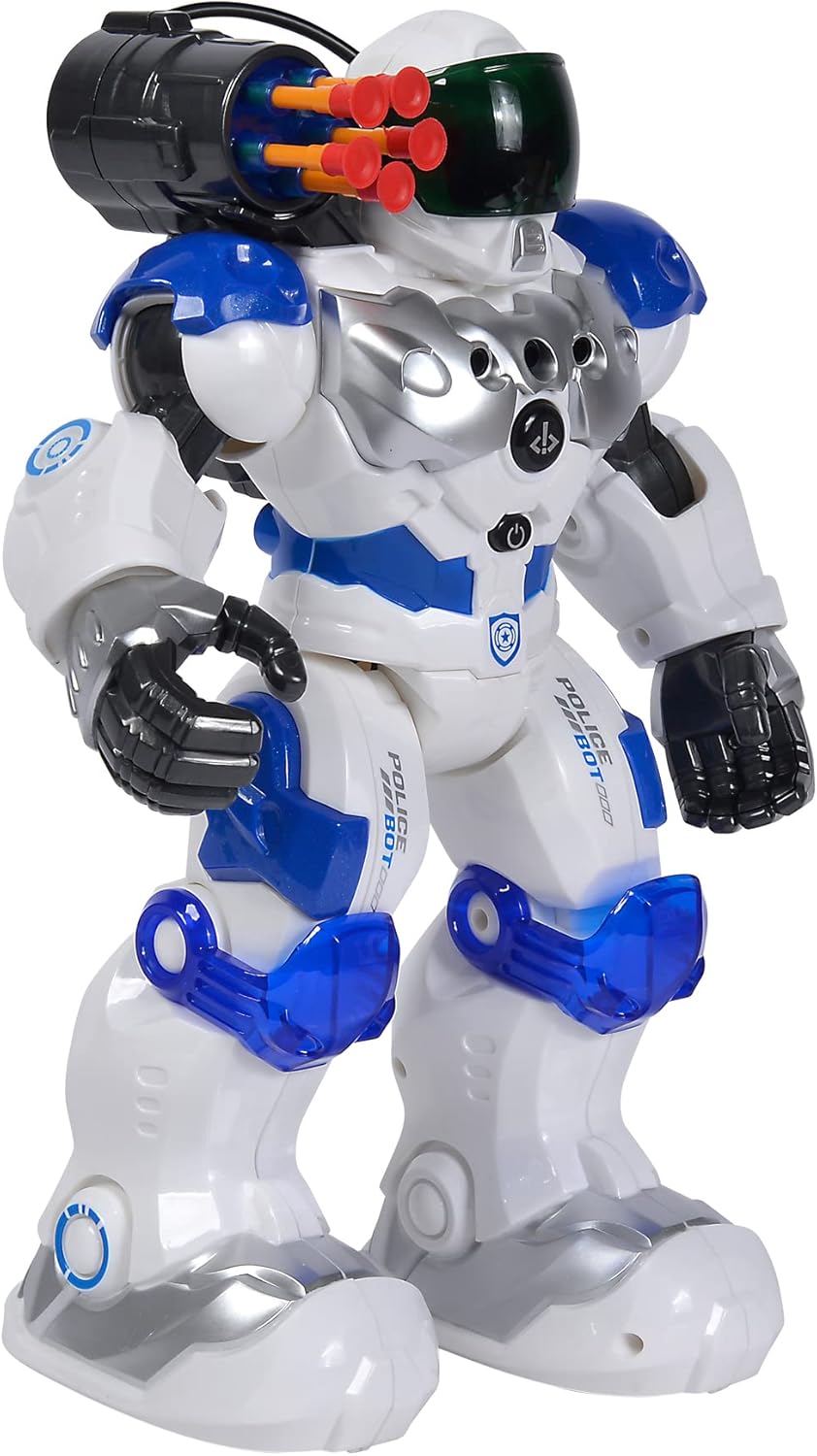
This manual provides comprehensive instructions for the safe and effective operation of your Simba Planet Fighter Robot, Model 108042509. Please read this manual thoroughly before use and retain it for future reference. This robot features infrared remote control, gesture control, light and sound effects, and a shooting function.
Ważne informacje dotyczące bezpieczeństwa
OSTRZEŻENIE: Produkt nieodpowiedni dla dzieci poniżej 3 lat ze względu na małe elementy. Niebezpieczeństwo zadławienia.
- Zawsze nadzoruj dzieci podczas zabawy.
- Do not aim the shooting mechanism at eyes or face.
- Chronić przed wodą i wilgocią.
- Nie należy podejmować prób rozmontowania lub modyfikacji robota ani pilota.
- Upewnij się, że baterie zostały włożone z zachowaniem prawidłowej polaryzacji.
- Jeśli produkt nie będzie używany przez dłuższy czas, należy wyjąć baterie.
Zawartość opakowania
Sprawdź, czy w przesyłce znajdują się wszystkie wymienione poniżej elementy:
- Simba Planet Fighter Robot (Model 108042509)
- Pilot na podczerwień
- USB Cable (for potential charging or data, specific function not detailed in specifications)
- Soft Darts/Arrows (for shooting function)
- Instrukcja obsługi (ten dokument)

Organizować coś
1. Montaż baterii (robot)
The robot requires 3 AAA batteries (not included).
- Locate the battery compartment on the back or bottom of the robot.
- W razie potrzeby otwórz pokrywę komory baterii za pomocą śrubokręta.
- Insert 3 AAA batteries according to the polarity markings (+/-).
- Dokładnie zamknij pokrywę komory baterii.

2. Montaż baterii (pilot zdalnego sterowania)
The remote control typically requires 2 AA batteries (not included). Please check the remote control's battery compartment for specific requirements.
- Znajdź komorę baterii z tyłu pilota.
- Otwórz pokrywę komory baterii.
- Insert the required batteries according to the polarity markings (+/-).
- Dokładnie zamknij pokrywę komory baterii.
3. Włączanie
After installing batteries, turn on the robot using the power switch, usually located on its back or chest. Turn on the remote control using its power switch.
Instrukcja obsługi
Funkcje pilota zdalnego sterowania
The infrared remote control allows you to command the robot's movements and actions. Ensure the remote is pointed towards the robot for optimal signal transmission.
- Sterowanie ruchem: Use the directional buttons (Forward, Backward, Turn Left, Turn Right) to navigate the robot.
- Slide Movement: Specific buttons may allow the robot to slide forward or backward.
- Run/Dance: Activate pre-programmed running or dancing sequences.
- Funkcja fotografowania: Press the "SHOOT" button to fire the soft darts from the robot's shoulder-mounted launcher. Ensure darts are loaded correctly.
- Światło i dźwięk: Buttons for activating or deactivating the robot's visor light and various sound effects.
- Funkcja programu: Some models allow programming a sequence of movements. Refer to the remote's specific button layout for programming instructions.
- Regulacja głośności: Dostosuj głośność dźwięku robota.
Sterowanie gestami
The robot can respond to hand gestures. Specific sensors on the robot detect hand movements to initiate actions such as moving forward or turning. Experiment with different hand motions in front of the robot's sensors to discover its gesture-controlled responses.
Główne cechy
- Pilot na podczerwień: Full control over movement and actions.
- Sterowanie gestami: Responds to hand movements for interactive play.
- Funkcja fotografowania: Fires soft darts from a shoulder-mounted launcher.
- Efekty świetlne i dźwiękowe: Features a light-up visor and various robotic sounds.
- Multiple Movement Modes: Capable of driving, running, and dancing.
- Trwała konstrukcja: Made from plastic, designed for active play.

Konserwacja
- Czyszczenie: Przetrzyj robota i pilota miękką, suchą ściereczką. Nie używaj silnych środków chemicznych ani ściernych środków czyszczących.
- Pielęgnacja baterii: Jeśli robot i pilot nie będą używane przez dłuższy czas, wyjmij baterie, aby zapobiec ich wyciekowi.
- Składowanie: Przechowuj robota i jego akcesoria w chłodnym i suchym miejscu, z dala od bezpośredniego światła słonecznego i ekstremalnych temperatur.
Rozwiązywanie problemów
| Problem | Możliwa przyczyna | Rozwiązanie |
|---|---|---|
| Robot nie włącza się. | Baterie są rozładowane lub nieprawidłowo zainstalowane. | Sprawdź biegunowość baterii i wymień je na nowe. |
| Pilot nie odpowiada. | Remote batteries are dead or robot is out of range/line of sight. | Replace remote batteries. Ensure remote is pointed at the robot within effective range. |
| Shooting function not working. | Darts not loaded correctly or mechanism jammed. | Ensure darts are fully inserted. Check for any obstructions in the launcher. |
| Robot porusza się chaotycznie lub niezgodnie z oczekiwaniami. | Niski poziom baterii lub zakłócenia. | Replace batteries. Move away from other infrared or radio-controlled devices. |
Specyfikacje
| Funkcja | Szczegół |
|---|---|
| Numer modelu | 108042509 |
| Marka | Simba |
| Wymiary (dł. x szer. x wys.) | Wymiary 11 x 21 x 31.5 cm |
| Waga | 1.34 kilogramów |
| Zalecany wiek | 5 lata i więcej |
| Typ baterii robota | 3 baterie AAA (brak w zestawie) |
| Typ baterii pilota zdalnego sterowania | 2 x AA batteries (not included, typical for similar remotes) |
| Materiał główny | Plastikowy |
| Metoda kontroli | Infrared Remote Control, Gesture Control |
| Cechy | Light, Sound, Shooting Function, Various Movement Functions |
Gwarancja i wsparcie
For warranty information and customer support, please refer to the documentation provided at the time of purchase or contact your retailer. Simba products are designed for quality and durability, and support is available for manufacturing defects.
For further assistance, please visit the official Simba webstronie lub skontaktuj się z działem obsługi klienta.


