
Wstęp
Thank you for choosing Vont Smart RGBIC LED Strip Lights. This manual provides essential information for the proper installation, operation, and maintenance of your new lighting system. Please read these instructions carefully before use and retain them for future reference.
Zawartość opakowania
- Vont Smart RGBIC LED Strip Light (16.4 ft)
- Zasilacz
- Control Box/Remote
- Klipsy montażowe i śruby
- Waciki nasączone alkoholem
- Instrukcja obsługi
Organizować coś
1. Przygotowanie
- Ensure the installation surface is clean, dry, and smooth. Use the provided alcohol prep pads to clean the area thoroughly.
- Unroll the LED strip light completely before powering it on to prevent overheating.
2. Instalacja
- Connect the LED strip to the control box, ensuring the connection is secure.
- Podłącz skrzynkę kontrolną do zasilacza.
- Ostrożnie odklej warstwę klejącą od paska LED.
- Press the strip firmly onto the desired surface. For corners or added security, use the provided mounting clips and screws. Avoid bending the LED beads directly.
- Podłącz zasilacz do standardowego gniazdka elektrycznego.
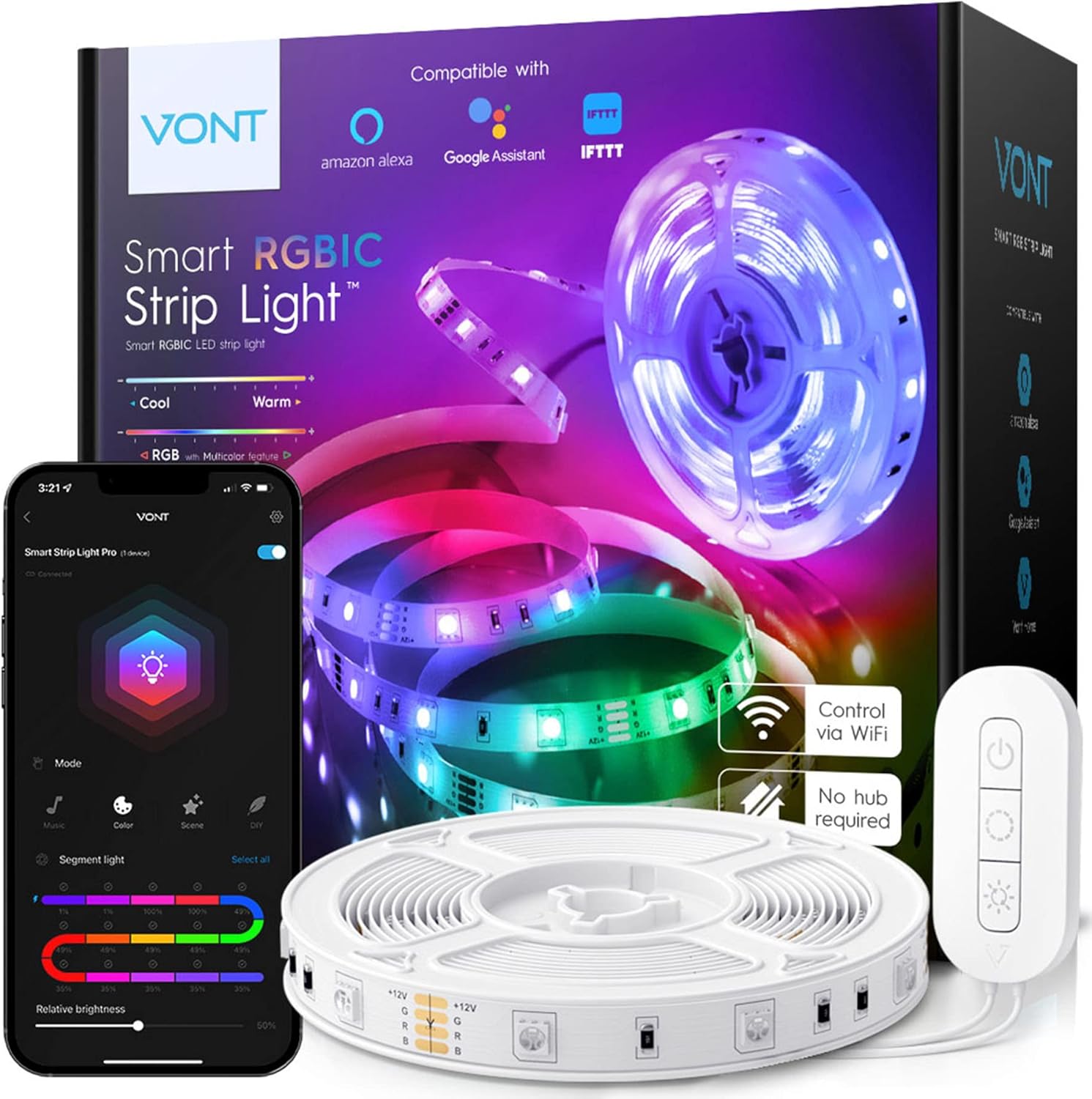
Image: Vont Smart RGBIC LED Strip Lights packaging and included components, including the strip, remote, and power adapter.

Image: Illustration demonstrating the simple plug-and-play setup of the Vont Smart RGBIC LED Strip Lights, highlighting that no additional hub is required.
3. Pobieranie i parowanie aplikacji
- Download the 'Vont Home' app from the App Store (iOS) or Google Play Store (Android).
- Otwórz aplikację i postępuj zgodnie z instrukcjami wyświetlanymi na ekranie, aby utworzyć konto i dodać urządzenie.
- Ensure your smartphone's Bluetooth and Wi-Fi (2.4GHz network) are enabled for successful pairing.

Image: Screenshot of the Vont Home app interface, displaying options for segmented lighting control and brightness adjustment.
Instrukcja obsługi
1. Using the Vont Home App
- Kontrola koloru: Choose from 16 million colors in RGB mode or create unique gradients with the segmented lighting feature. Control up to 15 segments individually.
- Regulacja jasności: Dostosuj intensywność światła do swoich preferencji.
- Tryb synchronizacji muzyki: The built-in microphone allows the lights to synchronize and dance to the rhythm of your music.
- Predefiniowane sceny: Select from over 30 pre-programmed scenes for various moods and occasions.
- Tryb DIY: Create and save your own custom lighting effects and color combinations.
- Harmonogram: Ustaw timery, aby światła włączały się i wyłączały automatycznie.

Image: Visual comparison illustrating the difference between RGBIC (multiple colors simultaneously) and standard RGB (one color at a time) LED strip lighting.

Image: A person dancing in a room illuminated by Vont Smart RGBIC LED Strip Lights, demonstrating the music synchronization feature.
2. Sterowanie głosowe
- The Vont Smart RGBIC LED Strip Lights are compatible with Amazon Alexa and Google Assistant.
- Link your Vont Home account to your preferred voice assistant app.
- Use voice commands to change colors, adjust brightness, or activate scenes (e.g., "Alexa, turn the strip lights red," or "Hey Google, set the strip lights to party scene").

Image: A couple watching TV with Vont Smart RGBIC LED Strip Lights providing ambient lighting, illustrating hands-free voice control compatibility with Amazon Alexa and Google Assistant.
3. Pilot zdalnego sterowania
- The included remote control allows for basic functions: power on/off, color cycling, and brightness adjustment.

Image: A close-up of the Vont Smart RGBIC LED Strip Lights remote control, showing buttons for power on/off, color change, and music mode/brightness adjustment.
Konserwacja
To ensure the longevity and optimal performance of your Vont Smart RGBIC LED Strip Lights, follow these maintenance guidelines:
- Czyszczenie: Gently wipe the LED strip with a dry, soft cloth. Avoid using harsh chemicals or abrasive cleaners.
- Składowanie: If storing the lights, ensure they are clean and dry. Roll them loosely to prevent damage to the strip or LEDs.
- Środowisko: These lights are designed for indoor use only. Avoid exposure to water, high humidity, or extreme temperatures.
Rozwiązywanie problemów
If you encounter issues with your Vont Smart RGBIC LED Strip Lights, refer to the following common solutions:
- Światła się nie włączają: Ensure all connections are secure and the power adapter is properly plugged into a working outlet. Check if the power button on the remote or app is activated.
- Connectivity issues (App/Voice Assistant): Verify your Wi-Fi network is 2.4GHz. Ensure Bluetooth is enabled on your device during pairing. Try restarting the app, your router, and the LED strip by unplugging and replugging it.
- Lights not responding to commands: Check battery in the remote (if applicable). Ensure the app is connected to the correct device. For voice control, confirm the device is linked correctly in Alexa/Google Home apps.
- Klej nie przykleja się: Ensure the surface was clean and dry before application. For persistent issues, use the provided mounting clips or additional adhesive.
Specyfikacje
| Funkcja | Szczegół |
|---|---|
| Marka | Zapomnieć |
| Numer modelu | SSL03 - RIC16V1-X1 |
| Długość produktu | 16.4 stóp (196.8 cali) |
| Kolor | Wielokolorowy (RGBIC) |
| Typ źródła światła | PROWADZONY |
| Liczba źródeł światła | 150 |
| Tomtage | 12 wolty |
| Cotage | 24 watów |
| Metoda kontroli | App, Voice (Alexa, Google Assistant), Remote |
| Cechy specjalne | Color Changing, Multicolor, Vont App, Bluetooth, Wi-Fi, Voice Control, Dimmable, Segmented Lighting, Music Sync, DIY Mode, 30+ Scenes |
| Zastosowanie wewnątrz/na zewnątrz | Tylko do użytku wewnątrz pomieszczeń |
| Tworzywo | AL + PC |
| Waga przedmiotu | 9.2 uncji |
Gwarancja i wsparcie
Your Vont Smart RGBIC LED Strip Lights are covered by a lifetime warranty against loss, theft, and defects in materials and workmanship for as long as you own the product. Vont Customer Satisfaction Wizards are available 24/7 to assist you.
For support, please visit the official Vont website or contact customer service through the Vont Home app.