Wstęp
This manual provides essential information for the safe and efficient operation, maintenance, and troubleshooting of your MT8500W Petrol Generator. Please read it thoroughly before use and keep it for future reference. Proper understanding and adherence to these instructions will ensure optimal performance and extend the lifespan of your generator.
Ważne instrukcje bezpieczeństwa
Always follow these safety guidelines to prevent injury, property damage, or damage to the generator. Failure to comply with these instructions may result in serious injury or death.
- Zagrożenie tlenkiem węgla: Never operate the generator indoors or in enclosed spaces, including garages, sheds, or basements. Exhaust fumes contain carbon monoxide, a colorless, odorless, and deadly gas that can cause illness or death. Always operate outdoors in a well-ventilated area, far from windows, doors, and vents.
- Zagrożenie pożarem: Fuel is highly flammable and its vapors are explosive. Refuel in a well-ventilated area with the engine off and cool. Do not smoke or allow open flames near the generator. Store fuel in approved containers away from heat sources.
- Ryzyko porażenia prądem elektrycznym: Do not operate the generator in wet conditions, rain, or snow. Ensure all electrical connections are secure and properly grounded. Never touch electrical components with wet hands. Use only approved extension cords that are rated for outdoor use and the power requirements.
- Keep children and pets away from the generator during operation. The generator produces heat and can cause burns.
- Wear appropriate personal protective equipment (PPE), such as gloves and eye protection, when handling fuel or performing maintenance.
- Do not modify the generator in any way. Unauthorized modifications can be dangerous and will void the warranty.
- Always turn off the generator and allow it to cool before performing any maintenance or moving it.
Produkt ponadview
The MT8500W is a robust petrol generator designed for reliable power supply in various applications. Familiarize yourself with its components for safe and effective operation.

Rycina 1: Przód view of the MT8500W petrol generator, highlighting the control panel with 230V and 380V outlets, voltmeter, circuit breaker, and engine start/stop switch.
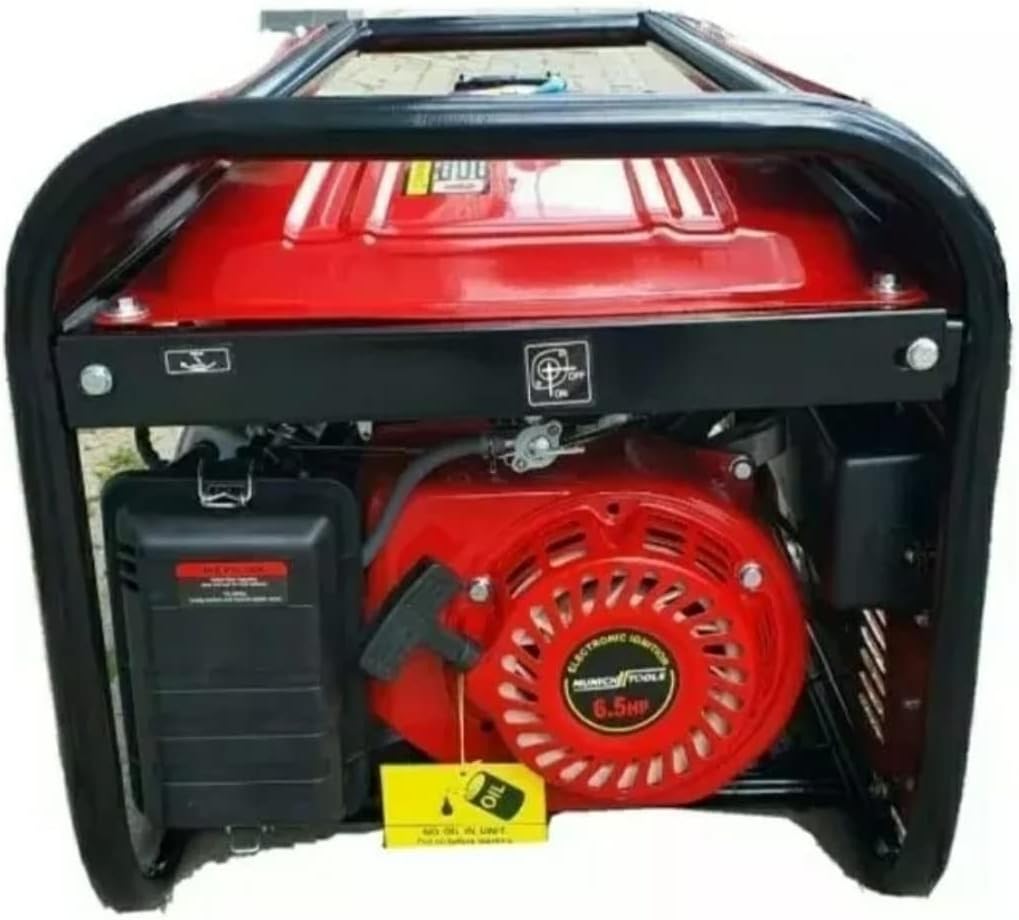
Rysunek 2: Strona view of the MT8500W petrol generator, illustrating the air-cooled 4-stroke engine, air filter housing, and oil fill location.
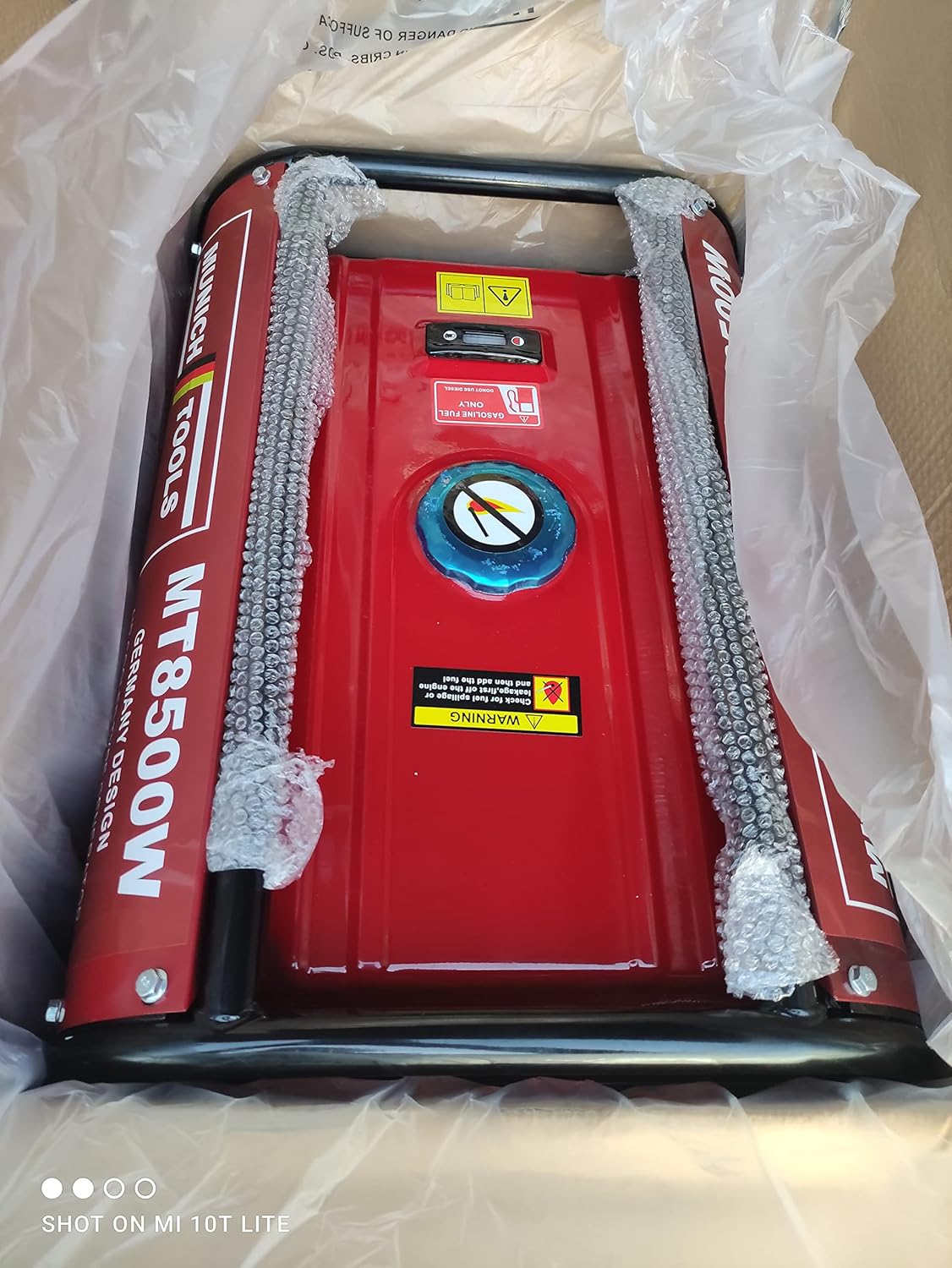
Rysunek 3: Góra view of the MT8500W petrol generator, displaying the fuel tank, fuel cap, and integrated fuel level indicator.
Konfiguracja i wstępne przygotowanie
Before operating your generator for the first time, follow these steps carefully:
- Rozpakowywanie: Carefully remove the generator from its packaging. Inspect for any shipping damage. Retain packaging materials for future storage or transport.
- Umieszczenie: Place the generator on a firm, level surface outdoors, in a well-ventilated area. Ensure it is at least 1 meter (3 feet) away from buildings, other equipment, and combustible materials.
- Dodaj olej silnikowy: The generator is shipped without engine oil. Before first use, fill the engine with the recommended type and amount of engine oil (refer to the engine oil specifications in the 'Technical Specifications' section). Use the oil dipstick to ensure the correct oil level. Do not overfill.
- Dodaj paliwo: Fill the fuel tank with unleaded gasoline (95 or 98 octane). Do not use E85 or other ethanol blends not approved for small engines. Fill slowly to avoid spills and do not overfill. Ensure the fuel cap is securely tightened after filling.
- Grunt: For safety, connect a proper ground wire from the generator's grounding terminal to an appropriate earth ground. Consult local electrical codes for proper grounding procedures.
Instrukcja obsługi
Uruchamianie generatora
- Ensure all electrical loads are disconnected from the generator's outlets.
- Przekręć zawór paliwa do pozycji „ON”.
- Move the choke lever to the "CHOKE" position (if the engine is cold). For a warm engine, the choke may not be necessary.
- Turn the engine switch to the "ON" or "START" position.
- For manual start models, pull the recoil starter handle firmly and smoothly until the engine starts. For electric start models, turn the key to "START" and hold until the engine starts.
- Po uruchomieniu silnika stopniowo przesuwaj dźwignię ssania do pozycji „RUN”, w miarę nagrzewania się silnika.
- Przed podłączeniem jakichkolwiek odbiorników elektrycznych należy odczekać kilka minut, aż generator się nagrzeje.
Podłączanie obciążeń elektrycznych
The MT8500W features 3x 230V sockets and 1x 380V socket. Always ensure the generator is running stably before connecting appliances.
- Ensure the generator is running at a stable speed.
- Plug in your appliances one by one, starting with the largest load first.
- Do not exceed the generator's rated continuous output capacity (2800W). Overloading can damage the generator and connected appliances.
- Monitor the voltmeter to ensure stable voltage wyjście.
Zatrzymywanie generatora
- Disconnect all electrical loads from the generator's outlets.
- Pozostaw generator na kilka minut włączony bez obciążenia, aby ostygł.
- Przekręć wyłącznik silnika do pozycji „WYŁ”.
- Aby zapobiec wyciekowi paliwa i zapewnić bezpieczne przechowywanie, należy ustawić zawór paliwa w pozycji „OFF”.
Konserwacja
Regular maintenance ensures optimal performance, reliability, and extends the life of your generator. Always turn off the generator and allow it to cool before performing any maintenance.
Harmonogram konserwacji
| Przedmiot | Częstotliwość | Działanie |
|---|---|---|
| Olej silnikowy | Every 25 hours of operation or annually | Sprawdź poziom, wymień olej |
| Filtr powietrza | Every 50 hours of operation or annually | Oczyścić, w razie potrzeby wymienić |
| Świeca zapłonowa | Every 100 hours of operation or annually | Sprawdź, wyczyść lub wymień |
| Filtr paliwa | Rocznie | Sprawdź i w razie potrzeby wymień |
| Inspekcja ogólna | Przed każdym użyciem | Check for loose fasteners, fuel leaks, and general condition |
Składowanie
For long-term storage (over 30 days), follow these steps to prevent fuel degradation and engine damage:
- Opróżnij zbiornik paliwa i gaźnik. Uruchom silnik, aż zgaśnie z powodu braku paliwa.
- Wymień olej silnikowy.
- Remove the spark plug and pour a small amount (approx. 5-10ml) of clean engine oil into the cylinder. Pull the recoil starter a few times to distribute the oil, then reinstall the spark plug.
- Wyczyść zewnętrzną część generatora.
- Store the generator in a clean, dry, well-ventilated area, away from direct sunlight and extreme temperatures.
Rozwiązywanie problemów
This section addresses common issues you might encounter with your MT8500W generator. For problems not listed here, or if solutions do not work, contact customer support.
Silnik nie uruchamia się
- Brak paliwa: Check the fuel level in the tank. Refill if necessary.
- Old/Stale Fuel: Drain old fuel and refill with fresh, unleaded gasoline.
- Wyłącznik silnika WYŁĄCZONY: Ensure the engine switch is in the "ON" or "START" position.
- Pozycja dławiąca: Adjust the choke lever to the "CHOKE" position for a cold engine. Move to "RUN" once started.
- Problem ze świecą zapłonową: Inspect the spark plug. Clean if fouled, adjust gap, or replace if damaged.
- Niski poziom oleju: The generator may have a low oil shutdown feature. Check the engine oil level and add oil if it's below the recommended mark.
Brak mocy wyjściowej
- Zadziałał wyłącznik automatyczny: Check the circuit breaker on the control panel. Reset it if it has tripped.
- Przeciążać: The generator may be overloaded. Disconnect some appliances and reset the circuit breaker. Do not exceed the maximum output capacity.
- Luźne połączenia: Ensure all electrical connections, including extension cords, are secure.
Dane techniczne
Detailed specifications for the MT8500W Petrol Generator:
- Model: MT8500W
- Tomtage: 400 V / 50 Hz (three-phase), 230 V (single-phase)
- Typ silnika: Chłodzony powietrzem 4-suwowy
- Moc silnika: 5.2 kW / 7 KM
- Continuous Generator Output: 2800 W
- Maximum Generator Output: 3.5 kW / 3.8 kVA
- Gniazda: 3x 230V, 1x 380V
- TomtagRegulator: AVR (automatyczna objętośćtage Rozporządzenie)
- Uruchomienie: Manual (Recoil) / Key Start
- Woltomierz: Tak
- Wskaźnik paliwa: Tak
- 12-Volt Output: Tak
- Pojemność zbiornika paliwa: 15L
- Typ paliwa: Unleaded Gasoline 95 or 98 Octane
- Przybory: Stainless steel, aluminum, plastic
- Waga: Około 38 kg
- Wymiary opakowania: Wymiary 62 x 45 x 45 cm
Gwarancja i obsługa klienta
For detailed warranty information and terms, please refer to the documentation provided at the time of purchase. Warranty coverage typically varies by region and retailer.
For technical support, spare parts, or any inquiries not covered in this manual, please contact the seller or manufacturer directly. Have your model number (MT8500W) and purchase details ready when contacting support.
Dodatkowe zasoby
For more information about the MT8500W Petrol Generator or to explore related products and accessories, please visit the official product page: