
Produkt ponadview
The Muzen Cyber Cube Bluetooth Speaker is a portable audio device designed for both indoor and outdoor use. It features Bluetooth 5.0 connectivity, a unique cyberpunk-themed RGB LED light, and a rugged, waterproof, and dustproof design. Its compact size makes it ideal for travel and on-the-go listening.
Główne cechy obejmują:
- Światło LED RGB: Dynamic color-changing themes that pulse to the beat of your music, enhancing the atmosphere.
- Lekki i przenośny: Weighing only 245g with a palm-sized design for easy one-handed use and portability.
- Wytrzymały i trwały: IPX-5 waterproof and dustproof rating, featuring a built-in flashlight and robust metal housing for outdoor adventures.
- Bluetooth 5.0: Ensures fast and easy wireless connection to all Bluetooth-enabled devices with a range of up to 32 feet (approximately 10 meters).
- Długi czas odtwarzania: Equipped with a 1000mAh high-capacity battery for extended music playback on a single charge.
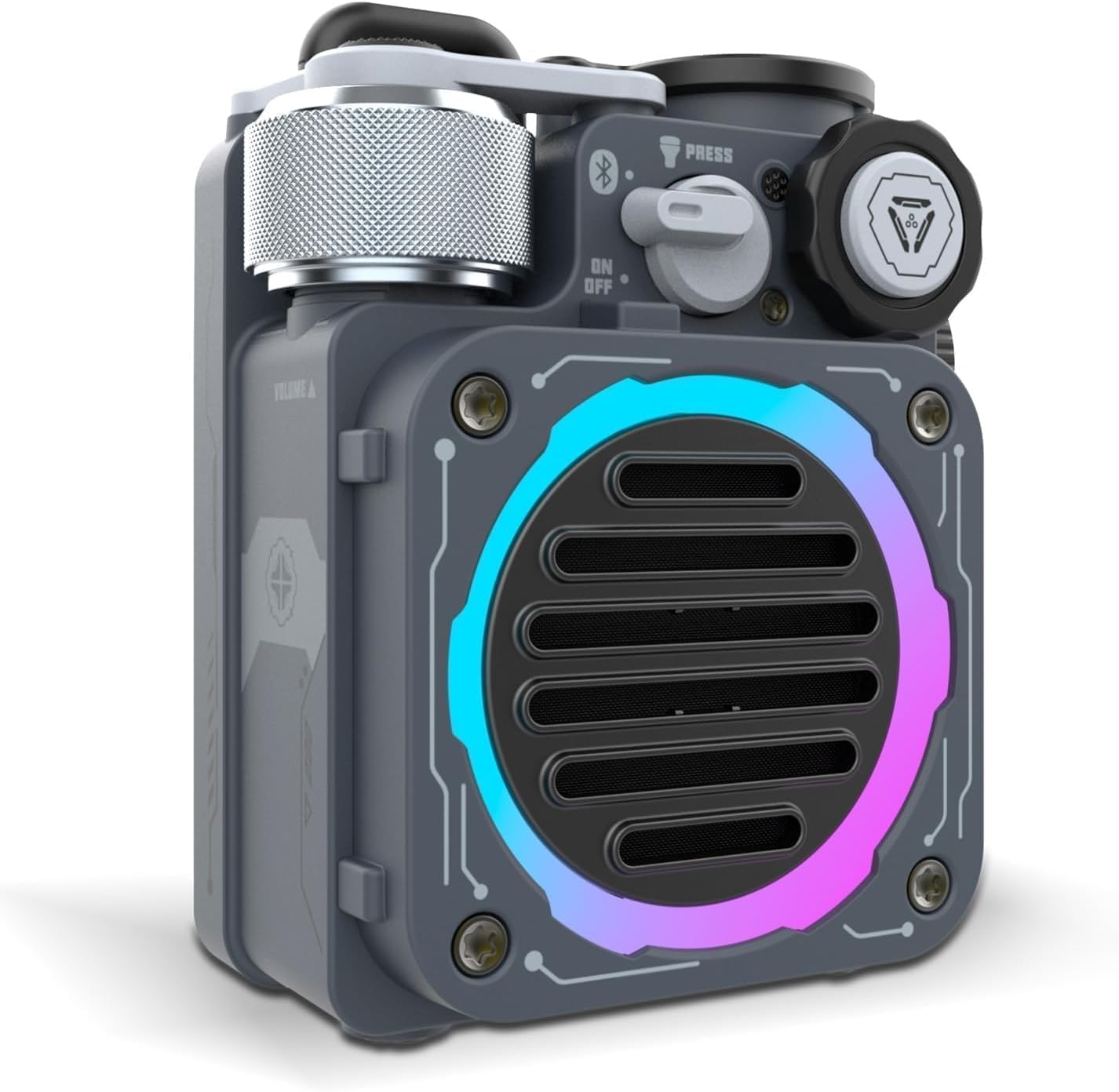
Image: The Muzen Cyber Cube Bluetooth Speaker, showcasing its compact design and vibrant RGB LED lighting.
Składniki produktu i elementy sterujące
Familiarize yourself with the various parts and controls of your Cyber Cube speaker.

Image: Labeled diagram of the Muzen Cyber Cube, highlighting its key controls and features.
- Pokrętło głośności: Obróć, aby dostosować głośność dźwięku.
- Sterowanie efektami świetlnymi: Button or switch to cycle through RGB LED light modes.
- Power Switch/Reset Bluetooth: Toggle switch for power, press to reset Bluetooth connection.
- Przełącznik toru: Control for skipping tracks (forward/backward) and pausing playback.
- Port ładowania typu C: Located under a protective cover, used for charging the device.
- Fidget Spinner: Integrated into the speaker's design for tactile interaction.
Organizować coś
Ładowanie głośnika
Before first use, fully charge your Muzen Cyber Cube speaker. Use the provided Type-C cable to connect the speaker to a USB power source (e.g., wall adapter, computer USB port). The charging indicator light will glow red while charging and turn green when fully charged.
Wstępne parowanie Bluetooth
Aby podłączyć głośnik do urządzenia obsługującego technologię Bluetooth:
- Upewnij się, że głośnik jest naładowany.
- Toggle the Power Switch to the "ON" position. You will hear a series of beeps indicating the speaker is powered on and ready for pairing.
- Na swoim urządzeniu (smartfonie, tablecie, komputerze) przejdź do ustawień Bluetooth.
- Szukaj available devices. The speaker will appear as "Muzen Cyber Cube" or similar.
- Select the speaker from the list to pair. Once successfully paired, you will hear another set of beeps, confirming the connection.
Po włączeniu głośnik automatycznie spróbuje nawiązać połączenie z ostatnio sparowanym urządzeniem.

Image: Demonstrating the Bluetooth 5.0 connectivity of the Muzen Cyber Cube speaker.
Instrukcja obsługi
Włączanie/wyłączanie zasilania
- To power on, toggle the Power Switch to "ON".
- To power off, toggle the Power Switch to "OFF".
Kontrola odtwarzania dźwięku
- Regulacja głośności: Rotate the Volume Knob clockwise to increase volume, counter-clockwise to decrease.
- Odtwórz/Pauza: Press the Track Switch knob once to play or pause music.
- Następny utwór: Push the Track Switch knob forward to skip to the next song.
- Poprzedni utwór: Push the Track Switch knob backward to go to the previous song.
RGB LED Light Control
Use the Light Effects Control to cycle through different RGB LED light modes. The lights will pulse and change color in sync with your music, creating a dynamic visual experience.
Obsługa latarki
The Cyber Cube includes a built-in flashlight. To activate, press the Power Switch/Reset Bluetooth button. Press again to cycle through different brightness settings or turn off the flashlight.
Konserwacja
Czyszczenie
To clean your speaker, use a soft, dry cloth. For stubborn dirt, a slightly damp cloth can be used. Do not use harsh chemicals, solvents, or abrasive cleaners as they may damage the surface.
Odporność na wodę i kurz
The Muzen Cyber Cube is IPX-5 waterproof and dustproof. This means it can withstand splashes of water and dust ingress. However, it is not designed for submersion in water. Ensure the Type-C charging port cover is securely closed when exposed to water or dust.
Pielęgnacja baterii
To prolong battery life, avoid fully discharging the battery frequently. Charge the speaker regularly, even if not in use for extended periods. Store the speaker in a cool, dry place when not in use.
Rozwiązywanie problemów
| Problem | Możliwa przyczyna | Rozwiązanie |
|---|---|---|
| Głośnik nie włącza się. | Niski poziom naładowania baterii. | Naładuj głośnik przy użyciu dołączonego kabla typu C. |
| Nie można sparować z urządzeniem Bluetooth. | Bluetooth is off on your device; speaker is too far; speaker is already paired to another device; pairing mode not active. | Ensure Bluetooth is enabled on your device. Move speaker closer to your device (within 32 feet). Disconnect from other devices. Press the Power Switch/Reset Bluetooth button to force pairing mode. |
| Brak dźwięku lub niski poziom głośności. | Volume too low on speaker or device; speaker not connected; audio source issue. | Increase volume on both the speaker and your connected device. Ensure the speaker is properly paired. Check the audio source on your device. |
| RGB LED lights not working. | Light effects are off or in a static mode. | Press the Light Effects Control button to cycle through different light modes. |
| Latarka nie działa. | Flashlight is off. | Press the Power Switch/Reset Bluetooth button to activate the flashlight. |
Specyfikacje

Image: Dimensions of the Muzen Cyber Cube speaker.
| Funkcja | Szczegół |
|---|---|
| Nazwa modelu | Cyber kostka |
| Numer modelu | MW-PVXLI |
| Technologia łączności | Bluetooth 5.0 |
| Zasięg Bluetooth | Do 32 stóp (10 metrów) |
| Typ głośnika | Przenośny głośnik zewnętrzny |
| Maksymalna moc wyjściowa głośnika | 5 watów |
| Pojemność baterii | 1000 mAh |
| Żywotność baterii | Do 8 godzin |
| Poziom wodoodporności | Wodoodporność IPX-5 |
| Waga przedmiotu | 230 gramów (8.1 uncji) |
| Wymiary produktu (dł. x szer. x wys.) | 3.03" gł. x 1.65" szer. x 2.40" wys. |
| Zawarte komponenty | Rechargeable battery, Bluetooth module, flashlight, Type-C Cable |
Gwarancja i wsparcie
Informacje o gwarancji
Specific warranty terms and conditions for your Muzen Cyber Cube speaker are typically provided with your purchase documentation or can be found on the official Muzen webStrona. Zachowaj dowód zakupu na wypadek roszczeń gwarancyjnych.
Obsługa klienta
For technical assistance, troubleshooting beyond this manual, or general inquiries, please visit the official Muzen website or contact their customer support directly. Contact information can usually be found on the product packaging or the brand's official online presence.
You can visit the Muzen Store on Amazon for more information: Muzen Store