
AOLION WGXB004005
Instrukcja obsługi adaptera słuchawkowego stereo AOLION
Model: WGXB004005
Wstęp
The AOLION Stereo Headset Adapter is designed to enhance your gaming experience on Xbox One controllers. This adapter allows you to connect most wired stereo gaming headsets with a 3.5mm audio jack (CTIA plug standard) directly to your Xbox controller, providing convenient control over game sound and voice chat.
Zawartość opakowania
- 1 × AOLION Stereo Headset Adapter
- 1 × Instrukcja obsługi
Produkt ponadview
The adapter features intuitive controls for managing your audio experience during gameplay.

Rycina 1: Przód view of the headset adapter showing control buttons.
- Game Balance Button: Adjusts the balance towards game audio.
- Chat Balance Button: Adjusts the balance towards voice chat audio.
- Przycisk wyciszenia mikrofonu: Włącza/wyłącza mikrofon.
- Przycisk zwiększania głośności: Increases overall volume.
- Przycisk zmniejszania głośności: Decreases overall volume.
- Gniazdo audio 3.5 mm: For connecting your stereo gaming headset.
- Złącze USB: For connecting to the Xbox controller.
Zgodność
This headset adapter is compatible with a wide range of Xbox One controllers and stereo gaming headsets:
- Kontrolery Xbox: Xbox One, Xbox One S, Xbox One X, Xbox Elite Wireless Controller Series 1, Xbox Elite Wireless Controller Series 2, Xbox Series S, and Xbox Series X Controllers.
- Zestawy słuchawkowe: Most wired stereo gaming headsets featuring a 3.5mm audio jack (using the CTIA plug standard).

Figure 2: The adapter is compatible with multiple Xbox controller models.

Figure 3: The adapter supports standard 3.5mm CTIA headsets.
Organizować coś
Setting up your AOLION Stereo Headset Adapter is a simple plug-and-play process.
- Connect the Adapter to the Controller: Align the USB connector of the headset adapter with the expansion port at the bottom of your Xbox controller. Gently push until it clicks securely into place.
- Podłącz zestaw słuchawkowy: Plug your wired stereo gaming headset's 3.5mm audio jack into the corresponding port on the bottom of the headset adapter.
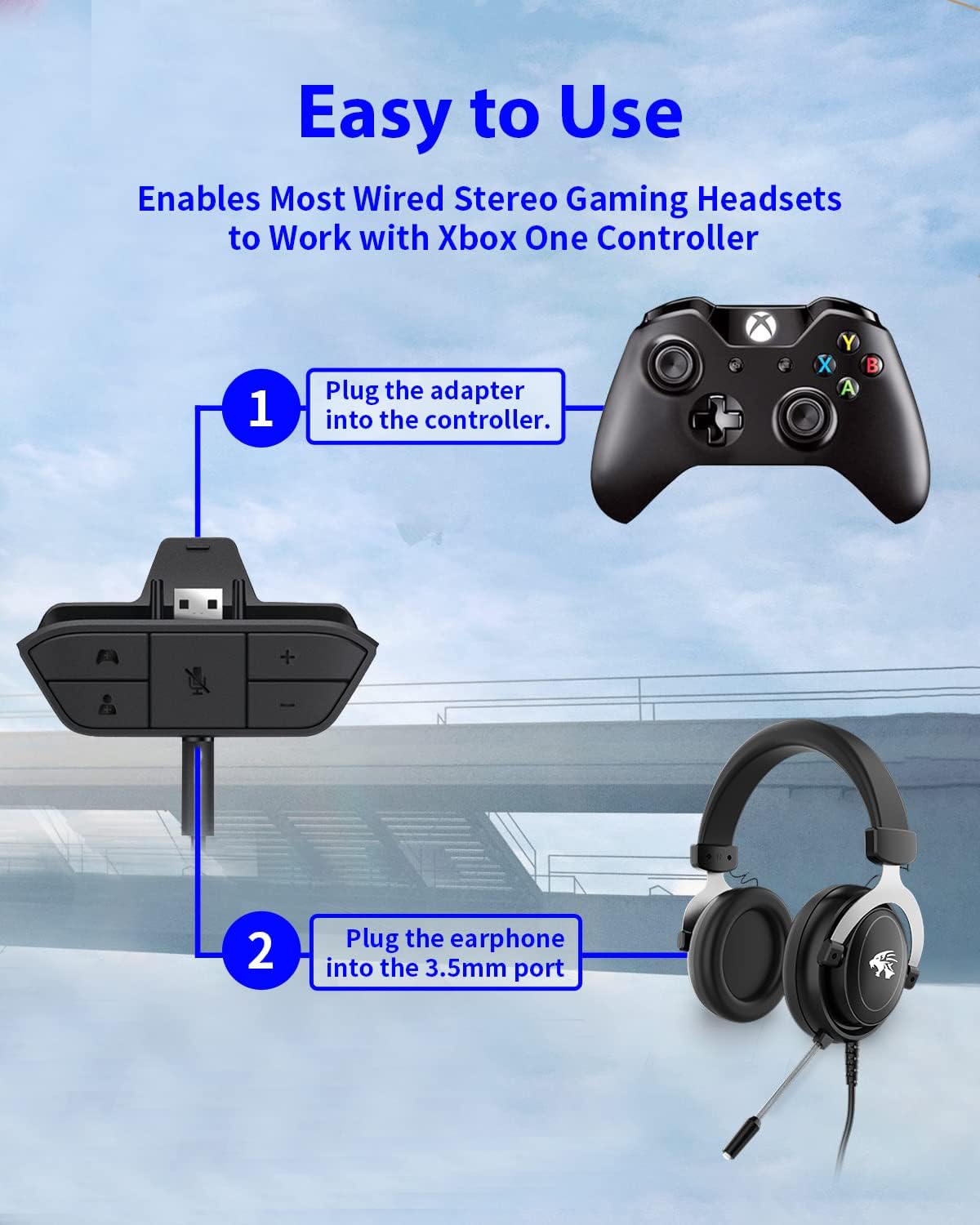
Figure 4: Step-by-step connection guide for the headset adapter.
Video 1: Demonstration of connecting the headset adapter to an Xbox controller.
Ważna uwaga: For optimal performance and to resolve potential audio issues, it is recommended to update your Xbox controller's firmware after connecting the adapter. This can typically be done through your Xbox console's settings (Settings > Devices & connections > Accessories > Select your controller > ... > Controller settings > Update firmware).
Instrukcja obsługi
Once connected, use the buttons on the adapter to control your audio:
- Zwiększanie/zmniejszanie głośności (+/-): Press the '+' button to increase the overall volume of both game and chat audio. Press the '-' button to decrease it.
- Microphone Mute (Microphone Icon): Press this button to mute or unmute your microphone. An indicator light (if present) or on-screen notification may confirm the mute status.
- Game/Chat Balance (Controller Icon / Person Icon):
- Naciśnij Ikona kontrolera button to increase game audio volume and decrease chat audio volume.
- Naciśnij Ikona osoby button to increase chat audio volume and decrease game audio volume.
Rysunek 5: Szczegółowy view of the adapter's control buttons.
Konserwacja
To ensure the longevity and optimal performance of your headset adapter, follow these simple maintenance guidelines:
- Utrzymuj adapter w czystości, bez kurzu i zanieczyszczeń. Do czyszczenia używaj miękkiej, suchej ściereczki.
- Unikaj wystawiania adaptera na działanie ekstremalnych temperatur, wilgoci lub bezpośredniego światła słonecznego.
- Nie należy podejmować prób samodzielnego demontażu lub naprawy adaptera, gdyż spowoduje to utratę gwarancji.
- Gdy nie używasz adaptera, przechowuj go w bezpiecznym miejscu, aby zapobiec jego uszkodzeniu fizycznemu.
Rozwiązywanie problemów
If you encounter issues with your AOLION Stereo Headset Adapter, please refer to the following common solutions:
| Problem | Możliwa przyczyna / rozwiązanie |
|---|---|
| No audio or poor audio quality (buzzing, peaking) |
|
| Mikrofon nie działa |
|
| Game/Chat balance not working |
|
Jeśli po wypróbowaniu tych kroków problem nadal występuje, skontaktuj się z obsługą klienta.
Specyfikacje
| Funkcja | Szczegół |
|---|---|
| Numer modelu | WGXB004005 |
| Marka | AOLION |
| Wymiary produktu (dł. x szer. x wys.) | 3.15 x 1.57 x 0.79 cala (8 x 4 x 2 cm) |
| Kolor | Czarny |
| Typ złącza | Auxiliary (3.5mm CTIA standard) |
| Kompatybilne urządzenia | Xbox One, One S, One X, Elite 1, Elite 2, Series S, Series X Controllers; 3.5mm CTIA Stereo Headsets |
Gwarancja i wsparcie
AOLION stands behind the quality of its products. This Stereo Headset Adapter comes with:
- 60-dniowa gwarancja zwrotu pieniędzy: If you are not entirely satisfied with your purchase within 60 days, you may be eligible for a full refund.
- 24-miesięczna gwarancja: We provide a 24-month warranty against manufacturing defects from the date of purchase.
For any questions, concerns, or warranty claims, please contact us through Amazon. We are committed to responding to your inquiries within 12 hours to ensure your complete satisfaction.