
1. Koniec produktuview
The WORKPRO 6.5AMP 850W Corded Electric Jig Saw is a versatile power tool designed for precise cutting of various materials, including wood, metal, and plastic. It features a powerful motor, variable speed control, orbital settings, and a tool-free blade change system for enhanced efficiency and user convenience.

Figure 1: WORKPRO 6.5AMP 850W Corded Electric Jig Saw and included accessories.
2. Informacje dotyczące bezpieczeństwa
Always prioritize safety when operating power tools. Read and understand all safety warnings, instructions, illustrations, and specifications provided with this power tool. Failure to follow all instructions listed below may result in electric shock, fire, and/or serious injury.
- Bezpieczeństwo w miejscu pracy: Utrzymuj miejsce pracy w czystości i dobrze oświetlone. Zaśmiecone lub ciemne obszary zachęcają do wypadków.
- Bezpieczeństwo elektryczne: Wtyczki elektronarzędzi muszą pasować do gniazdka. Nigdy nie modyfikuj wtyczki w żaden sposób. Unikaj kontaktu ciała z powierzchniami uziemionymi.
- Bezpieczeństwo osobiste: Always wear eye protection, dust mask, non-skid safety shoes, hard hat, or hearing protection as appropriate for the conditions.
- Używanie i konserwacja narzędzia: Nie używaj elektronarzędzia na siłę. Używaj elektronarzędzia odpowiedniego do danego zastosowania. Odłącz wtyczkę od źródła zasilania przed dokonywaniem jakichkolwiek regulacji, wymianą akcesoriów lub przechowywaniem elektronarzędzia.
- Konserwacja: Konserwuj elektronarzędzia i akcesoria. Sprawdź, czy ruchome części nie są źle ustawione lub nie są zablokowane, czy nie ma pęknięć części i czy nie występują inne warunki, które mogą mieć wpływ na działanie elektronarzędzia.
For detailed safety guidelines, refer to the complete user manual provided in the product packaging.
3. Zawartość opakowania
Upon opening the package, ensure all items are present and in good condition. The WORKPRO 6.5AMP 850W Corded Electric Jig Saw kit includes:
- 1 × WORKPRO Jigsaw
- 7 × Replaceable T-shank blades (1 for metal, 6 for wood)
- 1 × Scale Ruler
- 1 × Dust Exhaust Pipe
- 1 × Instrukcja obsługi
- 1 × Allen Wrench
Film 1: Rozpakowywanie i koniecview of the WORKPRO 6.5AMP 850W Corded Electric Jig Saw and its included components.
4. Funkcje produktu
4.1 High-Performance Motor
The jigsaw is equipped with a powerful 6.5 amp motor, delivering a top speed of 3000 Strokes Per Minute (SPM). This high power allows for faster cutting and helps prevent material burn. The 4/5-inch stroke length ensures efficient material removal with each cut. It can cut iron plate up to 10mm and wood board up to 100mm.
4.2 Bevel Cutting & Orbital Settings
The adjustable bottom plate allows for bevel cuts up to ±45 degrees, providing flexibility for various cutting angles. Four orbital settings enable adjustment of cut aggressiveness, suitable for different materials and cutting speeds. Higher orbital settings are ideal for softer materials and faster cuts, while lower settings are for harder materials and slower, more precise cuts.

Figure 2: The adjustable base plate allows for precise ±45° bevel cutting.

Figure 3: Four-position orbital action for varied cutting needs across different materials.
4.3 Tool-less Blade Change & LED Light
Blade changes are quick and easy with the tool-less system; simply press the replacement button. The integrated LED light illuminates the cutting area, ensuring improved visibility and precise cuts, especially in dimly lit environments.

Figure 4: Easy and quick saw blade installation without the need for additional tools.

Figure 5: Built-in LED light provides enhanced visibility for precise cutting.
4.4 User-Friendly Design
The jigsaw includes a dust blower function to keep the cut line clear of debris, improving visibility. The blower switch allows for both blowing and vacuuming functions. A lock-on button is also provided to reduce user fatigue during extended cutting tasks.

Figure 6: Labeled components of the WORKPRO Jig Saw for easy identification.
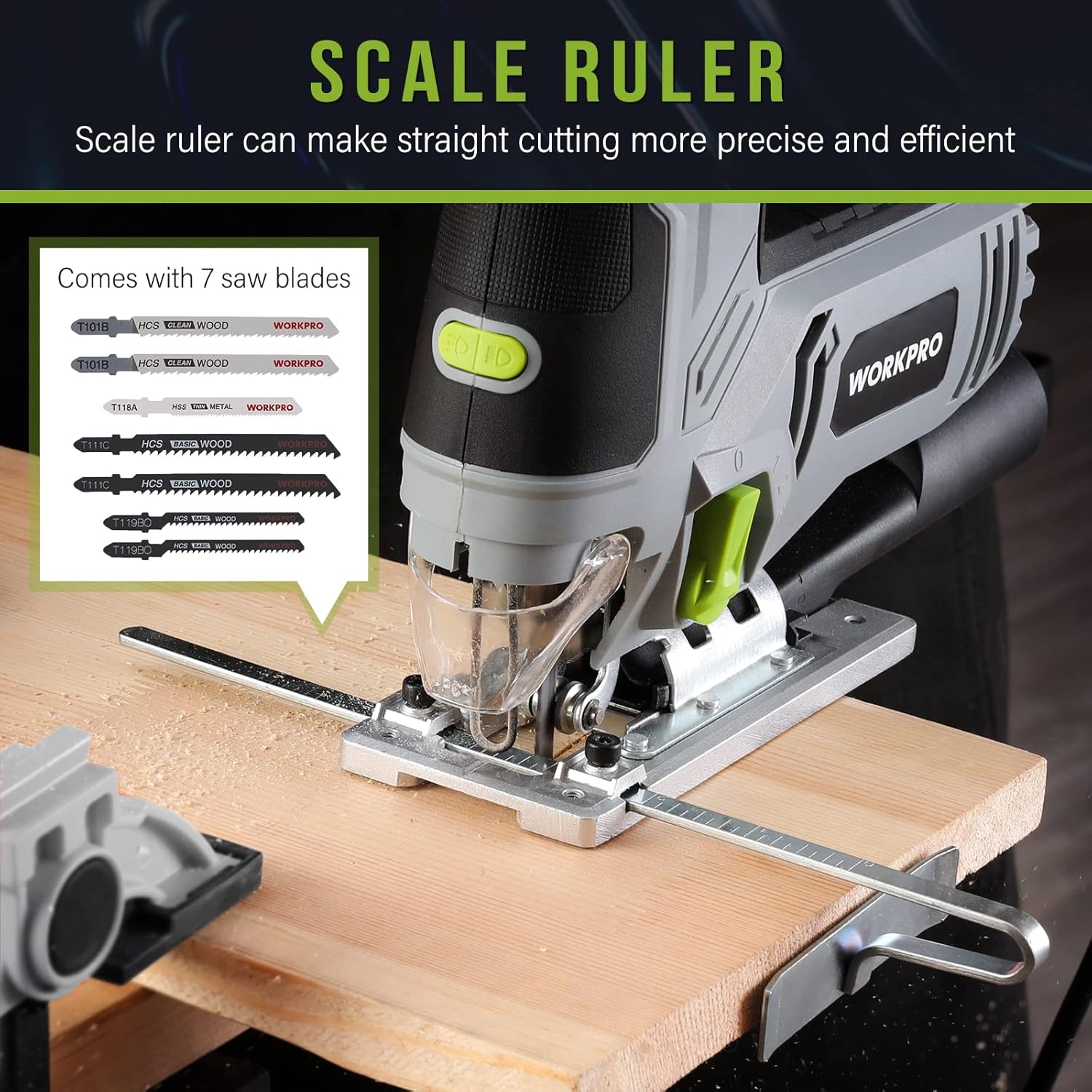
Figure 7: The included scale ruler assists in making straight and precise cuts.
5. Konfiguracja
5.1 Instalacja ostrza
- Upewnij się, że wyrzynarka jest odłączona od źródła zasilania.
- Locate the tool-less blade change lever on the front of the saw.
- Push the lever to release the blade clamp.
- Insert the T-shank blade into the blade holder until it clicks securely into place.
- Release the lever to lock the blade. Gently pull on the blade to ensure it is firmly seated.
5.2 Attaching Dust Exhaust Pipe
For dust collection, attach the dust exhaust pipe to the designated port at the rear of the saw. This allows connection to a vacuum system to keep your work area clean.
5.3 Adjusting Base for Bevel Cuts
- Using the included Allen wrench, loosen the screws on the base plate.
- Tilt the base plate to the desired angle (up to ±45 degrees). Use the angle markings on the base for accuracy.
- Tighten the screws firmly to secure the base plate in position.
5.4 Using the Scale Ruler (Edge Guide)
The scale ruler can be inserted into the slot on the base plate to guide straight cuts parallel to an edge. Adjust the ruler to the desired distance from the blade and tighten its locking mechanism.
6. Instrukcja obsługi
6.1 Włączanie/wyłączanie
To turn the jig saw on, press the trigger switch. To turn it off, release the trigger. For continuous operation, press the lock-on button while the trigger is depressed. To release the lock, press the trigger again.
6.2 Regulacja prędkości zmiennej
Adjust the variable speed dial located on top of the tool to select the appropriate speed for your material. Speeds range from 1 (lowest) to 6 (highest). Use lower speeds for harder materials or intricate cuts, and higher speeds for softer materials or faster cuts.
6.3 Orbital Action Selection
The orbital action lever allows you to choose from four settings (0-3). Setting 0 provides no orbital action for fine, splinter-free cuts. Higher settings increase the orbital action for faster, more aggressive cuts in softer materials.
6.4 Korzystanie ze światła LED
The LED light can be turned on or off using the dedicated switch near the front of the tool. This feature is useful for illuminating the cutting line in low-light conditions.
6.5 Zarządzanie pyłem
Utilize the dust blower switch to direct air away from the cutting line, keeping it clear of sawdust. For more comprehensive dust collection, attach the dust exhaust pipe to a vacuum cleaner.
6.6 General Cutting Tips
- Zawsze zabezpieczaj obrabiany przedmiot za pomocąampaby zapobiec ruchowi podczas cięcia.
- Allow the saw to reach full speed before engaging the material.
- Apply steady, even pressure. Do not force the saw, as this can damage the blade or motor.
- For plunge cuts, tilt the saw forward on its base plate, start the cut, and slowly lower the blade into the material.
7. Konserwacja
Regular maintenance ensures the longevity and optimal performance of your WORKPRO Jig Saw.
- Wymiana ostrza: Replace blades when they become dull or damaged to ensure clean and efficient cuts. Always use appropriate T-shank blades for the material being cut.
- Czyszczenie: After each use, unplug the tool and clean any sawdust or debris from the ventilation slots and the blade area. Use a soft brush or compressed air.
- Kontrola przewodu: Regularnie sprawdzaj przewód zasilający pod kątem uszkodzeń. W przypadku uszkodzenia zleć jego naprawę wykwalifikowanemu specjaliście.
- Składowanie: Store the jig saw in a dry, secure location out of reach of children.
8. Rozwiązywanie Problemów
Jeśli napotkasz problemy z wyrzynarką, zapoznaj się z poniższymi typowymi problemami i ich rozwiązaniami:
| Problem | Możliwa przyczyna | Rozwiązanie |
|---|---|---|
| Piła się nie uruchamia | Brak zasilania, uszkodzony przełącznik. | Check power outlet and cord. If issue persists, contact service. |
| Ostrze nie tnie prosto | Dull or bent blade; incorrect orbital setting; forcing the tool. | Replace blade. Adjust orbital setting. Apply less pressure. |
| Nadmierne wibracje | Luźne ostrze; uszkodzone ostrze; zużyte elementy wewnętrzne. | Ensure blade is securely installed. Replace blade. Contact service if vibration continues. |
| Przegrzanie silnika | Zablokowane otwory wentylacyjne; ciągłe, intensywne użytkowanie. | Wyczyść otwory wentylacyjne. Pozostaw narzędzie do ostygnięcia. Zmniejsz obciążenie. |
Jeśli po wypróbowaniu tych rozwiązań problem nadal występuje, skontaktuj się z obsługą klienta WORKPRO.
9. Specyfikacje
| Funkcja | Szczegół |
|---|---|
| Marka | WORKPRO |
| Numer modelu | W124748A |
| Źródło zasilania | Elektryczny przewodowy |
| Obecna ocena | 6.5 Amps |
| Cotage | 850 watów |
| Tomtage | 120 wolty |
| Prędkość | 3000 SPM (uderzeń na minutę) |
| Kąt cięcia ukosu | ±45 stopni |
| Ustawienia orbitalne | Pozycje 4 |
| Materiał ostrza | Metal |
| Zalecenia dotyczące powierzchni | Drewno |
| Waga przedmiotu | 5.44 funtów |
| Wymiary produktu | 8.86" dł. x 11.22" szer. x 3.15" wys. |
| Funkcja specjalna | Tool-less Blade Change, LED Light, Dust Blower |
| UPC | 820909772569 |
10. Gwarancja i wsparcie
The WORKPRO 6.5AMP 850W Corded Electric Jig Saw comes with a limited warranty. For specific warranty terms and conditions, please refer to the warranty card included in your product packaging or visit the official WORKPRO webstrona.
For technical support, replacement parts, or any inquiries regarding your product, please contact WORKPRO customer service. Contact information can typically be found in your user manual or on the WORKPRO brand webstrona.