
1. Wprowadzenie
This manual provides detailed instructions for the BoxWave SlimKeys Bluetooth Keyboard with Trackpad, designed for use with the Apple iPhone 13 mini. Please read this manual thoroughly before using the product to ensure proper operation and to maximize its lifespan.
The SlimKeys Bluetooth Keyboard integrates responsive chiclet-style keys and a full-functioning trackpad, transforming your iPhone 13 mini into a portable workstation. Its ultra-thin and lightweight design makes it an ideal travel companion.
2. Zawartość opakowania
- BoxWave SlimKeys Bluetooth Keyboard with Trackpad
- Kabel ładujący USB
- Instrukcja obsługi
3. Funkcje produktu
- Integrated Keyboard and Trackpad: Combines a full QWERTY keyboard with a responsive trackpad for enhanced navigation.
- Smukła i lekka konstrukcja: At approximately 3/16 inch thick, it is highly portable without compromising key size for comfortable typing.
- Wersja Bluetooth 3.0: Ensures fast pairing and seamless wireless communication with your device.
- Oszczędność baterii: Features an on/off switch to extend battery life when not in use.
- Przenośny: Designed for easy transport in bags or luggage.

Rysunek 3.1: Widok z góry na dół view of the SlimKeys Bluetooth Keyboard, showing the full keyboard layout and integrated trackpad.
4. Konfiguracja
4.1 Ładowanie klawiatury
- Znajdź port ładowania z boku klawiatury.
- Connect the small end of the provided USB charging cable to the keyboard's charging port.
- Podłącz większy koniec kabla USB do źródła zasilania USB (np. portu USB komputera, zasilacza ściennego USB).
- Zaświeci się kontrolka ładowania. Po pełnym naładowaniu kontrolka zazwyczaj zmieni kolor lub zgaśnie.
4.2 Włączanie/wyłączanie
- To power on the keyboard, slide the 'ON/OFF' switch, usually located on the side or back, to the 'ON' position. A power indicator light will briefly illuminate.
- To power off the keyboard, slide the 'ON/OFF' switch to the 'OFF' position. This conserves battery life when the keyboard is not in use.
4.3 parowanie Bluetooth
Follow these steps to pair your BoxWave SlimKeys Bluetooth Keyboard with your Apple iPhone 13 mini:
- Sprawdź, czy klawiatura jest całkowicie naładowana i włączona.
- On your iPhone 13 mini, go to Ustawienia > Bluetooth.
- Turn on Bluetooth. Your iPhone will begin searching for nearby Bluetooth devices.
- On the keyboard, press the Bluetooth pairing button (often labeled 'Connect' or with a Bluetooth symbol). The Bluetooth indicator light on the keyboard will start blinking, indicating it is in pairing mode.
- On your iPhone, locate 'BoxWave Keyboard' or a similar name in the list of 'Other Devices' and tap on it.
- If prompted, enter the pairing code displayed on your iPhone screen using the keyboard, then press Enter.
- Once paired, the Bluetooth indicator light on the keyboard will stop blinking and remain solid or turn off, and your iPhone will show the keyboard as 'Connected'.

Figure 4.1: Keyboard with highlighted power switch and Bluetooth pairing button locations.
5. Instrukcja obsługi
5.1 Korzystanie z klawiatury
Once paired, the keyboard functions like a standard computer keyboard. Simply open any application on your iPhone that requires text input (e.g., Messages, Notes, Safari) and begin typing. The on-screen keyboard will automatically disappear, allowing you to use the physical keyboard.
5.2 Korzystanie z gładzika
The integrated trackpad allows for precise cursor control and navigation on your iPhone 13 mini. Basic gestures include:
- Stuknięcie jednym palcem: Functions as a left-click to select items or activate buttons.
- Przewijanie dwoma palcami: Drag two fingers up or down on the trackpad to scroll through content.
- Ruch kursora: Move a single finger across the trackpad to move the cursor on your iPhone screen.
5.3 Specjalne klawisze funkcyjne
The keyboard may include function keys (F1-F12) or dedicated media control keys. These keys often require pressing the 'Fn' key simultaneously with the desired function key to activate their secondary functions (e.g., volume control, play/pause, screen lock).
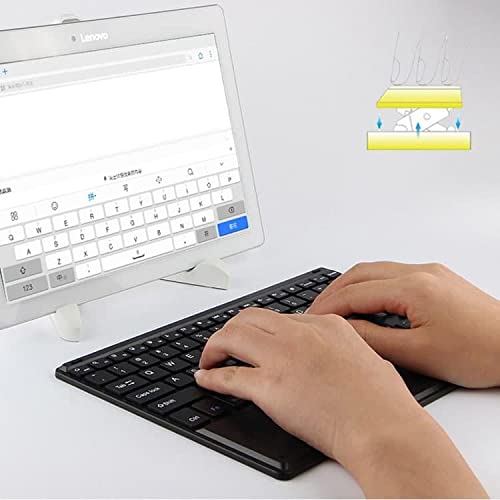
Figure 5.1: User demonstrating typing on the SlimKeys Bluetooth Keyboard.
6. Konserwacja
6.1 Czyszczenie
- Przed czyszczeniem upewnij się, że klawiatura jest wyłączona.
- Użyj miękkiej, niestrzępiącej się ściereczki, lekko wyczyśćampened with water or a mild electronics cleaner to wipe the surface.
- Unikaj stosowania silnych środków chemicznych, ściernych środków czyszczących i nadmiernej wilgoci, ponieważ mogą one uszkodzić klawiaturę.
- For dust or debris between keys, use compressed air.
6.2 Pielęgnacja baterii
- To prolong battery life, power off the keyboard when not in use.
- Unikaj częstego całkowitego rozładowywania akumulatora. Naładuj go, gdy pojawi się wskaźnik niskiego poziomu naładowania akumulatora.
- Jeśli klawiaturę nie używasz przez dłuższy czas, przechowuj ją w chłodnym i suchym miejscu.
7. Rozwiązywanie Problemów
If you encounter issues with your BoxWave SlimKeys Bluetooth Keyboard, refer to the following common solutions:
- Klawiatura się nie włącza: Upewnij się, że bateria jest naładowana. Podłącz kabel ładujący i ładuj przez co najmniej 30 minut przed ponownym włączeniem.
- Klawiatura nie łączy się:
- Ensure the keyboard is in pairing mode (Bluetooth indicator blinking).
- Make sure Bluetooth is enabled on your iPhone 13 mini.
- Move the keyboard closer to your iPhone.
- Forget the device from your iPhone's Bluetooth settings and attempt to pair again.
- Restart both the keyboard and your iPhone.
- Klawisze nie reagują:
- Check if the keyboard is still connected via Bluetooth.
- Sprawdź, czy poziom naładowania baterii nie jest krytycznie niski.
- Try reconnecting the keyboard by turning it off and on, or by re-pairing.
- Gładzik nie działa:
- Sprawdź, czy klawiatura jest podłączona.
- Check for any settings on your iPhone that might disable external trackpads.
- Wyczyść powierzchnię gładzika, aby usunąć wszelkie zanieczyszczenia.
8. Specyfikacje
| Funkcja | Specyfikacja |
|---|---|
| Marka | Fala pudełkowa |
| Numer modelu | bw-1977-29861-11782 |
| Interfejs sprzętowy | Bluetooth |
| Wersja Bluetooth | 3.0 |
| Kompatybilne urządzenia | Apple iPhone 13 mini, Smartphones, Laptops |
| Opis klawiatury | Bezprzewodowy |
| Cechy specjalne | Portable, Integrated Trackpad |
| Źródło zasilania | Zasilany bateryjnie |
| Wymiary (w przybliżeniu) | 257mm x 172mm x 5mm |

Figure 8.1: Dimensions and operating system compatibility of the SlimKeys Bluetooth Keyboard.
9. Gwarancja i wsparcie
9.1 Informacje o gwarancji
For specific warranty details, please refer to the warranty card included with your product or visit the official BoxWave webZachowaj dowód zakupu na wypadek roszczeń gwarancyjnych.
9.2 Obsługa klienta
If you require further assistance or have questions not covered in this manual, please contact BoxWave customer support through their official webstronę lub dane kontaktowe podane w dokumentacji zakupu.