
1. Wprowadzenie
This manual provides detailed instructions for the setup, operation, and maintenance of your ITECH Fusion 2 S Smartwatch and accompanying Wireless Headphones. The ITECH Fusion 2 S is designed to help you monitor your health and fitness goals, offering features such as heart rate tracking, step counting, sleep monitoring, and multi-sport modes. The included wireless headphones provide an integrated audio experience.
2. Zawartość opakowania
Sprawdź, czy w przesyłce znajdują się wszystkie elementy:
- ITECH Fusion 2 S Smartwatch
- Słuchawki bezprzewodowe
- USB Charging Cable (for smartwatch)
- USB Charging Cable (for headphones)
- Instrukcja obsługi (ten dokument)

Image: The ITECH Fusion 2 S Smartwatch and Wireless Headphones displayed within their retail packaging.
3. Urządzenie ponadview
3.1. ITECH Fusion 2 S Smartwatch

Image: The ITECH Fusion 2 S Smartwatch with a grey camouflage band shown alongside the matching wireless headphones.
The smartwatch features a touch screen display, a side button for navigation, and sensors on the rear for health monitoring. The display shows time, date, activity data, and notifications.

Image: A close-up of the ITECH Fusion 2 S Smartwatch display, highlighting features such as heart rate monitor, apps and notifications, multi-sports modes, water resistance, calorie tracker, music remote, pedometer, sleep monitor, hydration reminder, and extended 14-day battery life.
3.2. Wireless Headphones
The wireless headphones are over-ear style with cushioned earcups and an adjustable headband. Controls for audio playback and calls are located on the earcup.

Obraz: strona A view of the ITECH Wireless Headphones, illustrating features like powerful sound quality, convenient controls, comfort for hours, and a go-anywhere design.

Obraz: szczegółowy view of the ITECH Wireless Headphones, emphasizing noise isolating fit, built-in microphone, Bluetooth wireless technology, and up to 8 hours of playback.

Image: A diagram of the ITECH Wireless Headphones highlighting the flexible headband, comfortable ear cushion, foldable design, and convenient controls, along with key technical specifications.
4. Konfiguracja
4.1. Ładowanie urządzeń
Before first use, fully charge both your smartwatch and wireless headphones.
- Smartwatch: Connect the USB charging cable to the charging port on the back of the smartwatch and to a USB power source. The battery icon on the screen will indicate charging status.
- Słuchawki bezprzewodowe: Connect the USB charging cable to the charging port on the headphones and to a USB power source. An indicator light will show charging status and turn off when fully charged.
4.2. Włączanie/wyłączanie zasilania
- Smartwatch: To power on, press and hold the side button until the screen illuminates. To power off, navigate to the 'Settings' menu on the smartwatch, then select 'Power Off'.
- Słuchawki bezprzewodowe: Aby włączyć, naciśnij i przytrzymaj przycisk zasilania, aż kontrolka zacznie migać. Aby wyłączyć, naciśnij i przytrzymaj przycisk zasilania ponownie, aż kontrolka zgaśnie.
4.3. Pairing the Smartwatch with Your Smartphone
The ITECH Fusion 2 S Smartwatch is compatible with both iPhone and Android devices.
- Pobierz iTECH Wearables aplikację z Apple App Store lub Google Play Store.
- Upewnij się, że Bluetooth jest włączony w Twoim smartfonie.
- Open the iTECH Wearables app and follow the on-screen instructions to create an account and pair your smartwatch.
- The app will guide you through connecting the smartwatch via Bluetooth. Confirm the pairing request on both your phone and smartwatch.
4.4. Pairing the Wireless Headphones
- Upewnij się, że słuchawki są wyłączone.
- Naciśnij i przytrzymaj przycisk zasilania, aż kontrolka zacznie szybko migać, wskazując tryb parowania.
- Na smartfonie lub innym urządzeniu z włączoną funkcją Bluetooth przejdź do ustawień Bluetooth i wyszukaj dostępne urządzenia.
- Select "ITECH Headphones" (or similar name) from the list to connect. The indicator light will change to a steady blue when successfully paired.
5. Obsługa smartwatcha
5.1. Nawigacja
- Ekran dotykowy: Przesuwaj w lewo/prawo, w górę/w dół, aby poruszać się po menu i funkcjach. Dotknij, aby wybrać.
- Przycisk boczny: Naciśnij, aby powrócić do ekranu głównego lub wybudzić urządzenie.
5.2. Tarcze zegarka
Customize your smartwatch display by changing watch faces. On the home screen, press and hold the display, then swipe left or right to browse available watch faces. Tap to select your preferred design.
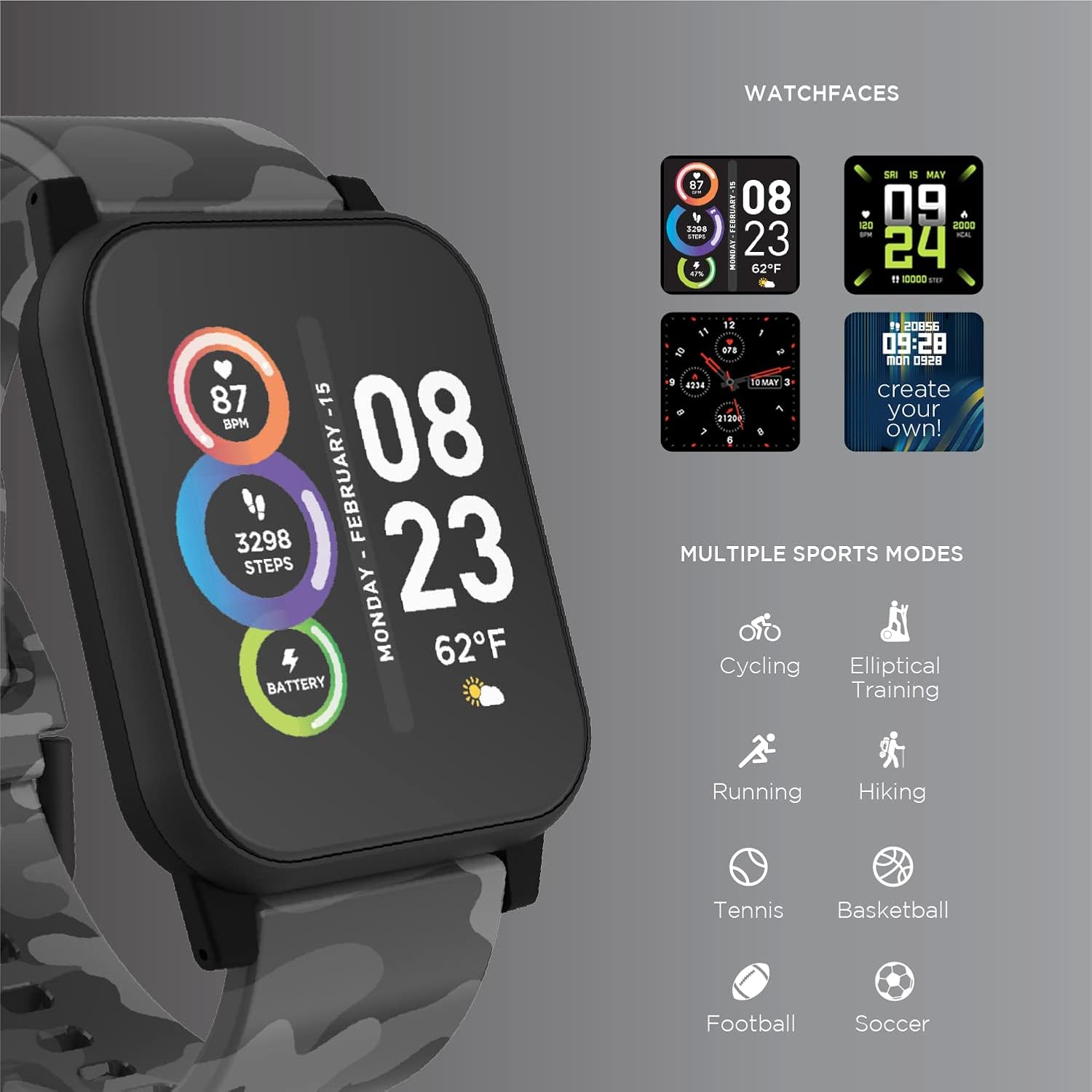
Image: The ITECH Fusion 2 S Smartwatch display showing various customizable watch faces and icons representing multiple sports modes including cycling, elliptical training, running, hiking, tennis, basketball, football, and soccer.
5.3. Podstawowe funkcje
- Monitor pracy serca: Access the heart rate feature on your smartwatch to measure your heart rate using the built-in optical sensor. Ensure the watch is snug on your wrist for accurate readings.
- Step Counter (Pedometer): The smartwatch automatically tracks your daily steps, distance, and calories burned. View your progress on the device or in the iTECH Wearables app.
- Monitor snu: Wear your smartwatch to bed to track your sleep patterns, including light and deep sleep stages. Data is synchronized with the app for detailed analysis.
- Tryby multisportowe: Select from various sports modes (e.g., running, cycling, hiking) to track specific workout data, including duration, distance, and calories.
- Powiadomienia o wiadomościach: Receive notifications for calls, texts, and app alerts directly on your smartwatch when connected to your smartphone.
- Śledzenie kalorii: Monitors calories burned throughout the day based on your activity level.
- Przypomnienie o nawodnieniu: Set reminders to drink water at regular intervals through the app.
- Pilot do muzyki: Steruj odtwarzaniem muzyki na swoim smartfonie bezpośrednio ze smartwatcha (odtwarzaj, pauzuj, pomijaj utwory).
5.4. Integracja aplikacji
Dla kompleksowego view of your health and fitness data, regularly sync your smartwatch with the iTECH Wearables app. The app allows you to set goals, view historical data, customize settings, and manage notifications.
6. Operating the Wireless Headphones
6.1. Sterowanie
Słuchawki wyposażone są w intuicyjne sterowanie odtwarzaniem multimediów i zarządzaniem połączeniami:
- Przycisk zasilania: Naciśnij i przytrzymaj, aby włączyć/wyłączyć. Naciśnij krótko, aby włączyć/wstrzymać.
- Przyciski głośności: Naciśnij „+”, aby zwiększyć głośność, lub „-”, aby ją zmniejszyć.
- Kontrola toru: Press and hold '+' for next track, '-' for previous track.
- Zarządzanie połączeniami: Short press power button to answer/end calls. Press and hold to reject calls.
6.2. Funkcje audio
- Wysoka jakość dźwięku: Designed to deliver clear and rich audio.
- Noise Isolating Fit: The over-ear design helps to reduce external noise for an immersive listening experience.
- Wbudowany mikrofon: Umożliwia wykonywanie połączeń bez użycia rąk.
6.3. Czas pracy baterii
The wireless headphones provide up to 8 hours of playback on a single charge, depending on usage and volume levels.

Image: A person wearing the ITECH Fusion 2 S Smartwatch on their wrist and the matching wireless headphones, demonstrating typical use.
7. Konserwacja
7.1. Czyszczenie
- Smartwatch: Przetrzyj ekran i pasek miękką ściereczką.amp, ściereczka niepozostawiająca włókien. Unikaj agresywnych środków chemicznych i materiałów ściernych.
- Słuchawki: Gently wipe earcups and headband with a soft, dry cloth. Do not immerse in water.
7.2. Water Resistance (Smartwatch)
The ITECH Fusion 2 S Smartwatch is IP67 water resistant. This means it is protected against dust and can withstand immersion in water up to 1 meter for up to 30 minutes. It is suitable for daily use and light splashes, but not recommended for swimming, showering, or prolonged water immersion.
7.3. Przechowywanie
Store your devices in a cool, dry place away from direct sunlight and extreme temperatures when not in use.
8. Rozwiązywanie Problemów
If you encounter issues with your ITECH Fusion 2 S devices, please refer to the following common solutions:
- Urządzenie się nie włącza: Ensure the device is fully charged. Try connecting it to a different USB power source.
- Smartwatch not pairing with phone: Ensure Bluetooth is enabled on your phone and the smartwatch is within range. Restart both devices and try pairing again through the iTECH Wearables app.
- Słuchawki nie łączą się: Ensure headphones are in pairing mode (rapidly flashing indicator light). Check your device's Bluetooth settings and try reconnecting.
- Inaccurate heart rate/step readings: Ensure the smartwatch is worn snugly on your wrist, not too tight or too loose. Clean the sensor on the back of the watch.
- Powiadomienia się nie wyświetlają: Check app permissions on your smartphone to ensure the iTECH Wearables app has access to notifications. Verify notification settings within the app.
- Audio issues with headphones: Ensure headphones are fully charged and properly paired. Check volume levels on both the headphones and the connected device.
If problems persist, consider performing a factory reset (refer to the smartwatch settings menu or contact customer support for headphones). For further assistance, please contact Itech customer support.
9. Specyfikacje
| Funkcja | Szczegół |
|---|---|
| Wymiary produktu | 22.86 x 5.08 x 22.86 cm; 621 g |
| Numer modelu przedmiotu | 900366B-40-G57 |
| System operacyjny | Android (Compatible with iPhone and Android) |
| Cechy specjalne | Heart Rate Monitor, Step Counter, Sleep Monitor, Message Notifications, Multi-Sport Modes |
| Technologia łączności | USB |
| Standard komunikacji bezprzewodowej | Bluetooth |
| Skład ogniw baterii | Litowo-jonowy |
| GPS | PRAWDA |
| Smartwatch Shape | Kwadrat |
| Smartwatch Screen Size | 1.3 cali |
| Marka | Itech |
| Nazwa modelu | Fusion 2 Bundle |
| Odporność na wodę | IP67 |
| Headphones Playback Time | Do 8 godzin |
| Headphones Driver Diameter | 40mm |
| Headphones Connection Type | Bluetooth ® 5.0 |
| Impedancja słuchawek | 32 omów ±15% |
| Pasmo przenoszenia słuchawek | 20Hz - 20KHz |
10. Gwarancja i wsparcie
Your ITECH Fusion 2 S Smartwatch and Wireless Headphones are covered by a manufacturer's warranty. Please refer to the warranty card included in your package or visit the official Itech webSzczegółowe warunki gwarancji można znaleźć na naszej stronie.
For technical support, troubleshooting assistance, or warranty claims, please contact Itech customer service through their official webwitrynę lub dane kontaktowe podane w dokumentacji produktu.