1. Wprowadzenie
The Generic MP20 Home Mini LED Portable Smart Pocket Cinema Video Projector is designed for versatile multimedia entertainment. Featuring a compact design and multiple input options, it allows you to project movies, photos, and text onto various surfaces. This manual provides essential information for setting up, operating, and maintaining your projector.
Główne cechy:
- Innowacyjny projekt: Crafted from environmental projection ABS plastic, ensuring a safe and pollution-free experience.
- Exquisite & Realistic Pictures: Optimized picture quality frame by frame according to digital projector color standard DCI-P3, restoring original filmstrip colors for vivid and smooth visuals.
- Diffuse Reflection Eye Protection: Utilizes diffuse reflection imaging technology for soft light that is gentle on the eyes, promoting a healthy viewzdobywania doświadczenia.
- Ładowanie przenośne: Supports charging via power bank for convenient use on the go.
- Zaawansowany system chłodzenia: Equipped with an advanced hydraulic axial fan for efficient heat dissipation and low noise operation, ideal for family entertainment.
- Obsługa Full HD 1080p: Supports up to 1920*1080 pixels resolution for input, with a native resolution of 320*240 pixels.
2. Zawartość opakowania
Upon unpacking, ensure all items listed below are present. If any items are missing or damaged, please contact customer support.
- Generic MP20 Mini LED Projector
- Power Adapter (with UK adapter included)
- Pilot zdalnego sterowania (wymaga 2 baterii AAA, brak w zestawie)
- Kabel AV
- Instrukcja użytkownika

Figure 2.1: Generic MP20 Mini LED Projector and its accessories, including the projector unit, power adapter, remote control, and AV cable.
Video 2.1: An unboxing demonstration of the Generic MP20 Mini LED Projector, showcasing the packaging, included accessories, and initial impressions of the device. (Content from 00:00 to 03:52)
3. Koniec produktuview
3.1. Układ urządzenia

Rysunek 3.1: Koniecview of the Generic MP20 Mini LED Projector's control buttons and various input/output interfaces.
3.2. Porty i elementy sterujące
- Przód: Projection Lens, Focus Adjustment Dial.
- Szczyt: Power Button, Navigation Buttons (Up, Down, Left, Right, OK), Menu Button, Back Button.
- Strona (prawa): DC IN (Power Input), HDMI Port, USB Port, 3.5mm Headphone Jack.
- Strona (lewa): Micro SD Card Slot, AV Input, Micro USB (5V-2A) Port.
- Tył: Ventilation Grille.
- Spód: Tripod Mount, Anti-slip Pads.

Figure 3.2: Close-up of the projector's side panel, showing the DC IN, HDMI, USB, and headphone jack ports.
3.3 Kompaktowa konstrukcja
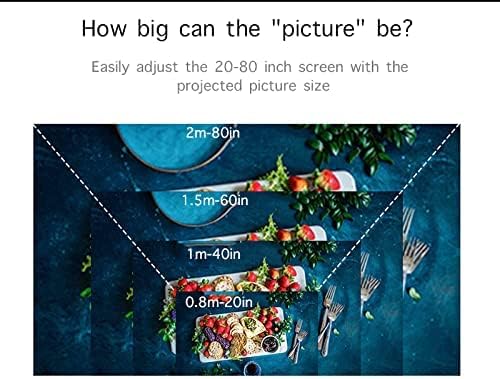
Figure 3.3: The compact size of the MP20 projector, designed for easy portability and handling.
4. Konfiguracja
4.1. Włączanie projektora
- Podłącz zasilacz do portu DC IN w projektorze.
- Podłącz zasilacz do gniazdka elektrycznego.
- Naciśnij przycisk zasilania na projektorze lub pilocie, aby włączyć urządzenie.
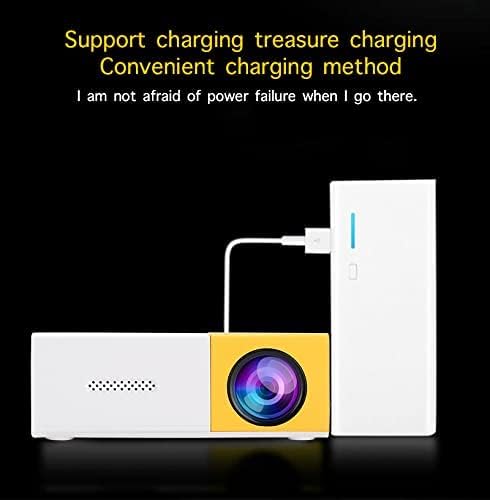
Figure 4.1: The projector can be powered via the included adapter or a portable power bank for flexible use.
4.2. Regulacja ostrości
Rotate the Focus Adjustment Dial located near the projection lens until the image on the screen appears clear and sharp.
4.3. Ustawianie projektora
Place the projector on a stable surface or mount it on a tripod using the bottom screw mount. The optimal projection distance is between 0.8 to 2 meters, yielding a screen size of 24 to 80 inches.

Figure 4.2: The projector offers flexible screen sizes from 24 to 80 inches, depending on the projection distance.
5. Instrukcja obsługi
5.1. Wybór źródła wejściowego
Use the navigation buttons on the projector or remote to select your desired input source from the main menu. Available inputs include HDMI, USB, Micro SD, and AV.
5.2. Nawigacja po menu
The main menu allows selection between Movie, Music, Photo, and Text modes. Further settings for picture, sound, and time can be accessed through the Options menu.
Video 5.1: A demonstration of the projector's operating menu, input selection, and projection quality for various media types including movies, photos, and text. (Content from 03:52 to 08:35)
5.3. Jakość obrazu
The projector delivers bright and colorful images. While the native resolution is 320x240 pixels, it supports input resolutions up to 1920x1080 pixels. For optimal viewing, especially with text or subtitles, ensure a dark environment and use a large font size.

Rysunek 5.1: Example of a vibrant image projected by the MP20, highlighting its color reproduction.
6. Specyfikacje
| Funkcja | Specyfikacja |
|---|---|
| Technologia obrazowania | Wyświetlacz TFT-LCD |
| Rozdzielczość natywna | 320*240 pikseli |
| Obsługiwana rozdzielczość | 1920*1080 pikseli |
| Jasność | Lumeny 400-600 |
| Źródło światła | PROWADZONY |
| Żywotność LED | Ponad 30000 XNUMX godzin |
| Kontrast | 800:1 |
| Tryb działania | Obsługa ręczna |
| Odległość projektora | 0.8-2 mln |
| Rozmiar ekranu | 24-80 cala |
| Proporcje obrazu | 4:3/16:9 |
| Reprodukcja kolorów | 16.7 tys. |
| Wejście | USB/SD/VGA/AV |
| Głośnik | 8Ω1W |
| Wsparcie językowe | Angielski, chiński, itd. |
| Rozmiar jednostki | 12.7*8.15*4.85 cm |
| Waga przedmiotu | 1.09 funta |
| Wymiary produktu | 5 x 3.21 x 1.91 cala |
7. Konserwacja
7.1. Czyszczenie soczewki
Use a soft, lint-free cloth specifically designed for optical lenses to gently wipe the projection lens. Avoid using abrasive materials or harsh chemicals.
7.2. Czyszczenie korpusu projektora
Przetrzyj zewnętrzną część projektora miękką, suchą ściereczką. Nie używaj płynnych środków czyszczących ani rozpuszczalników.
7.3. Wentylacja
Ensure that the ventilation grilles are not blocked to prevent overheating. Regular airflow is crucial for the longevity of the LED light source.

Figure 7.1: The advanced cooling system ensures efficient heat dissipation, crucial for maintaining projector performance.
8. Rozwiązywanie Problemów
- Brak obrazka: Check power connection, ensure the correct input source is selected, and verify the connected device is powered on and sending a signal.
- Rozmazany obraz: Adjust the focus dial on the projector. Ensure the projection surface is flat and the projector is within the recommended distance.
- Brak dźwięku: Check the volume settings on both the projector and the connected device. If using external speakers, ensure they are properly connected and powered.
- Pilot nie działa: Wymień baterie w pilocie. Upewnij się, że między pilotem a odbiornikiem podczerwieni projektora nie ma żadnych przeszkód.
9. Gwarancja i wsparcie
Aby uzyskać informacje o gwarancji i obsłudze klienta, zapoznaj się z dokumentacją dołączoną do zakupu lub skontaktuj się ze sprzedawcą. Zachowaj dowód zakupu na wypadek roszczeń gwarancyjnych.


